Automate company data enrichment with ZoomInfo, Serper & Oxylabs to Google Sheets

Workflow preview

Workflow preview
100%
Automate company data enrichment with ZoomInfo, Serper & Oxylabs to Google Sheets preview
Open on n8n.io

Important notice

This workflow is provided as-is. Please review and test before using in production.

1. Workflow Overview

This workflow automatically enriches company domain lists with comprehensive business information scraped from ZoomInfo, organizing the data in Google Sheets for sales teams and researchers. Who's ...

Best for

  • Lead Generation automation workflows
  • advanced n8n builders looking for reusable templates

Tools used

n8n-nodes-base.manualtrigger, n8n-nodes-base.googlesheets, n8n-nodes-base.splitinbatches, n8n-nodes-base.httprequest, n8n-nodes-base.if, n8n-nodes-base.code, n8n-nodes-base.html, n8n-nodes-base.wait

Source and attribution

This workflow is cataloged by N8N Workflows and links back to its original n8n.io source page by Naveen Choudhary.

Original n8n.io source

1.1 Workflow description

Title
Automate company data enrichment with ZoomInfo, Serper & Oxylabs to Google Sheets
Workflow name
Automate company data enrichment with ZoomInfo, Serper & Oxylabs to Google Sheets

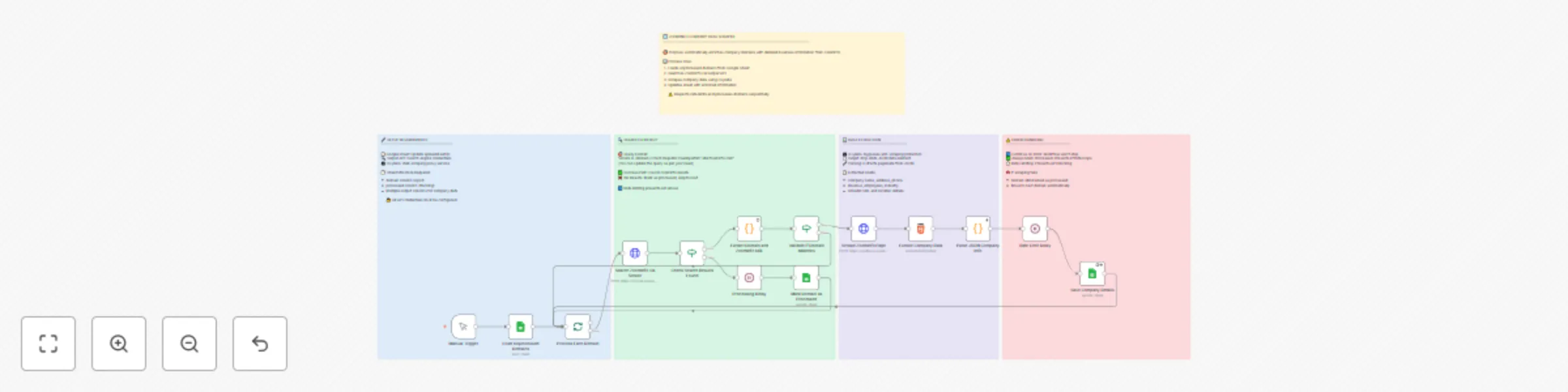
This workflow automatically enriches company domain lists with comprehensive business information scraped from ZoomInfo, organizing the data in Google Sheets for sales teams and researchers.

Who's it for

  • Sales teams building prospect databases with accurate company information
  • Marketing professionals researching target companies for outreach campaigns
  • Business development teams qualifying leads with revenue and employee data
  • Researchers collecting structured company data for market analysis
  • Lead generation specialists enriching domain lists with contact details

How it works

The workflow processes unprocessed domains from a Google Sheet, searches for their ZoomInfo profiles using Serper API, scrapes the company pages through Oxylabs proxy service, and extracts structured business data. Each domain is marked as processed to prevent duplicates, and the workflow includes proper rate limiting to respect API limits.

What it does

  1. Loads unprocessed domains from your Google Sheets database
  2. Searches ZoomInfo using targeted queries via Serper API for each domain
  3. Validates search results and extracts relevant ZoomInfo profile URLs
  4. Scrapes company pages using Oxylabs to bypass anti-scraping protection
  5. Extracts structured data including company details, address, revenue, and employee count
  6. Updates Google Sheets with enriched company information
  7. Tracks processing status to prevent reprocessing the same domains

Requirements

How to set up

  1. Make a copy of the Google Sheets template - Click here to copy the template to your Google Drive
  2. Configure API credentials in the respective HTTP Request nodes:
    • Add Serper API key in the search node
    • Set up Oxylabs username/password in the scraping node
  3. Set up Google Sheets authentication using OAuth2
  4. Update the Google Sheets document ID in all Google Sheets nodes to point to your copied template
  5. Add your domain list to the sheet with 'processed' column empty or false
  6. Run the workflow using the manual trigger

How to customize the workflow

  • Search query modification: Update the search query in the Serper node for different geographic focus (currently set for Czech Republic)
  • Data extraction fields: Modify the Google Sheets column mapping to include/exclude specific company data points
  • Rate limiting: Adjust wait times between requests to match your API rate limits
  • Batch processing: Configure the split batch size for processing domains in smaller groups
  • Error handling: Customize the continue-on-error settings based on your data quality requirements
  • Scheduling: Replace Manual Trigger with Schedule Trigger for automated daily/weekly runs

Output data includes

  • Complete company name and official address
  • Phone numbers and contact information
  • Revenue figures and employee headcount
  • Industry classifications and business categories
  • LinkedIn company profile URLs
  • Geographic location details (city, state, country, postal code)
  • Processing status tracking for workflow management

Note: This workflow includes comprehensive error handling to ensure domains are always marked as processed, preventing infinite loops while maintaining data integrity. Rate limiting is built-in to respect API quotas and avoid service interruptions.

1.2 Logical Blocks

This catalog entry is organized from the workflow JSON. The node-level section below shows the executable blocks available for review before importing the template.

2. Block-by-Block Analysis

Block 1 - Manual Trigger

Type / Role
n8n-nodes-base.manualTrigger - manualTrigger
Config choices
Version 1

Block 2 - Load Unprocessed Domains

Type / Role
n8n-nodes-base.googleSheets - googleSheets
Config choices
Version 4.6

Block 3 - Process Each Domain

Type / Role
n8n-nodes-base.splitInBatches - splitInBatches
Config choices
Version 3

Block 4 - Search ZoomInfo via Serper

Type / Role
n8n-nodes-base.httpRequest - httpRequest
Config choices
Version 4.2

Block 5 - Check Search Results Found

Type / Role
n8n-nodes-base.if - if
Config choices
Version 2.2

Block 6 - Extract Domain and ZoomInfo URL

Type / Role
n8n-nodes-base.code - code
Config choices
Version 2

Block 7 - Validate if Domain Matches

Type / Role
n8n-nodes-base.if - if
Config choices
Version 2.2

Block 8 - Scrape ZoomInfo Page

Type / Role
n8n-nodes-base.httpRequest - httpRequest
Config choices
Version 4.2

Block 9 - Extract Company Data

Type / Role
n8n-nodes-base.html - html
Config choices
Version 1.2

Block 10 - Parse JSON Company Info

Type / Role
n8n-nodes-base.code - code
Config choices
Version 2

Block 11 - Save Company Details

Type / Role
n8n-nodes-base.googleSheets - googleSheets
Config choices
Version 4.6

Block 12 - Mark Domain as Processed

Type / Role
n8n-nodes-base.googleSheets - googleSheets
Config choices
Version 4.6

Block 13 - Rate Limit Delay

Type / Role
n8n-nodes-base.wait - wait
Config choices
Version 1.1

Block 14 - Processing Delay

Type / Role
n8n-nodes-base.wait - wait
Config choices
Version 1.1

Block 15 - Sticky Note

Type / Role
n8n-nodes-base.stickyNote - stickyNote
Config choices
Version 1

Block 16 - Sticky Note1

Type / Role
n8n-nodes-base.stickyNote - stickyNote
Config choices
Version 1

Block 17 - Sticky Note2

Type / Role
n8n-nodes-base.stickyNote - stickyNote
Config choices
Version 1

Block 18 - Sticky Note3

Type / Role
n8n-nodes-base.stickyNote - stickyNote
Config choices
Version 1

Block 19 - Sticky Note4

Type / Role
n8n-nodes-base.stickyNote - stickyNote
Config choices
Version 1

3. Summary Table

Workflow Automate company data enrichment with ZoomInfo, Serper & Oxylabs to Google Sheets
Complexity advanced
Nodes 19
Categories Lead Generation
Author Naveen Choudhary
Published 06 Aug 2025

4. Reproducing the Workflow from Scratch

  1. 1. Download the workflow JSON

    Use the JSON export at /data/workflows/7030/7030.json as the source template for this automation.

  2. 2. Import the template into n8n

    Open n8n, import the downloaded JSON, and review each node before activating the workflow.

  3. 3. Configure credentials and variables

    Replace placeholder credentials, API keys, webhook URLs, account IDs, and environment-specific values with your own settings.

  4. 4. Test with sample data

    Run the workflow manually or in a staging workspace, inspect node output, and confirm downstream systems receive the expected data.

  5. 5. Activate and monitor

    Enable the workflow only after testing, then monitor executions, errors, and rate limits during the first production runs.

5. General Notes & Resources

Review imported nodes carefully before activation. This catalog entry is intended to help you inspect the workflow structure, understand required services, and find related templates faster.

Node names, credentials, schedules, webhook paths, and external service limits may need adjustment for your workspace.

Frequently asked questions

What does Automate company data enrichment with ZoomInfo, Serper & Oxylabs to Google Sheets do?

This workflow automatically enriches company domain lists with comprehensive business information scraped from ZoomInfo, organizing the data in Google Sheets for sales teams and researchers. Who's ...

What do I need before importing this workflow?

Review the workflow JSON, configure any required credentials in n8n, and test the automation in a safe workspace before using it in production.

Can I customize this workflow?

Yes. Use the block-by-block analysis and the downloadable JSON to inspect each node, then adjust credentials, prompts, schedules, filters, or destinations for your Lead Generation use case.