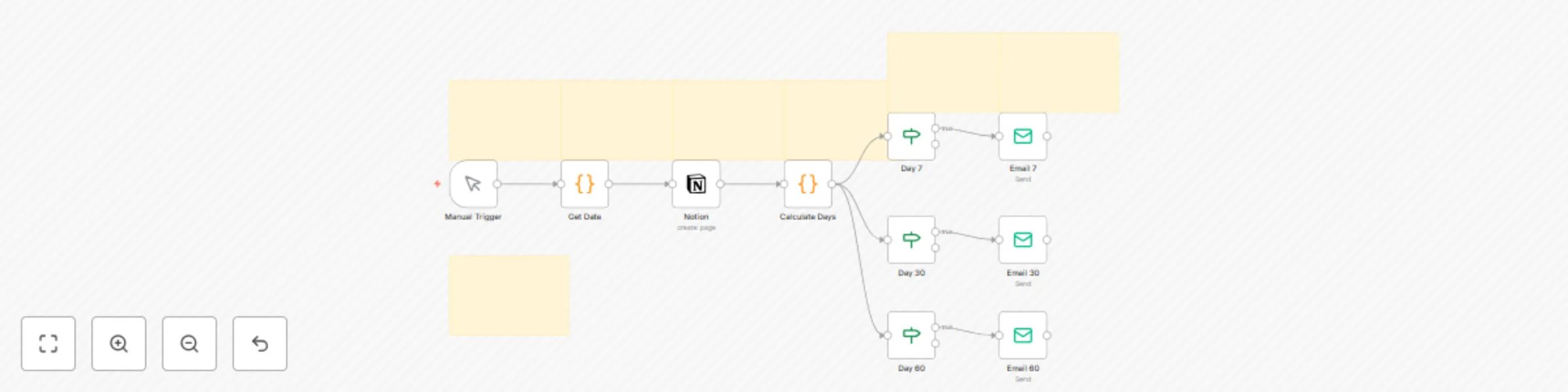
Automate client nurture & testimonial collection with Notion, Email, Tally & Telegram

Workflow preview

Workflow preview
100%
Automate client nurture & testimonial collection with Notion, Email, Tally & Telegram preview
Open on n8n.io

Important notice

This workflow is provided as-is. Please review and test before using in production.

1. Workflow Overview

Automate Client Nurture & Testimonial Collection with Notion and Email You’ve onboarded your client with elegance. Now, keep the relationship warm — and get glowing testimonials — without manual fo...

Best for

  • Social Media automation workflows
  • Lead Nurturing automation workflows
  • advanced n8n builders looking for reusable templates

Tools used

n8n-nodes-base.manualtrigger, n8n-nodes-base.code, n8n-nodes-base.notion, n8n-nodes-base.if, n8n-nodes-base.emailsend, n8n-nodes-base.stickynote

Source and attribution

This workflow is cataloged by N8N Workflows and links back to its original n8n.io source page by Shelly-Ann Davy.

Original n8n.io source

1.1 Workflow description

Title
Automate client nurture & testimonial collection with Notion, Email, Tally & Telegram
Workflow name
Automate client nurture & testimonial collection with Notion, Email, Tally & Telegram

Automate Client Nurture & Testimonial Collection with Notion and Email

You’ve onboarded your client with elegance. Now, keep the relationship warm — and get glowing testimonials — without manual follow-up.

This workflow listens to your Notion Clients database and automatically:

  • 💌 Sends a 3-part nurture sequence (7, 30, 60 days)
  • 🎉 Celebrates milestones with personalized messages
  • 📝 Requests a testimonial at the perfect moment
  • 💬 Notifies you on Telegram when feedback arrives
  • 📊 Logs everything in Notion for tracking

Perfect for:

  • Coaches who want consistent client care
  • Designers building social proof
  • Service providers scaling with grace

No spreadsheets. No forgotten follow-ups. Just gentle, timely nurturing — on autopilot.

Prerequisites

Service Purpose Free Tier?
n8n Orchestrate automation Yes
Notion Store client records Yes
SMTP Email Send nurture emails Yes (Gmail)
Telegram Owner notifications Yes
Tally or Fillout Testimonial form Yes

🔐 Store all API keys securely in n8n’s Credentials section.

Notion Database Requirements

Your Clients database must include these properties:

Property Type Example
Name Title Ava Laurent
Email Email [email protected]
Status Select Confirmed
Onboarded Date Date 2025-09-01
Package Select Growth, Pro
Testimonial Text “Best coach ever!”
Consent Checkbox True
Milestone Select Day 7, Day 30, Day 60

📌 Use the same database as your Onboarding Concierge.

Step-by-Step Setup Instructions

1. Import the Workflow

  1. In n8n, go to Workflows > Create from JSON
  2. Paste the provided JSON
  3. Click Import

2. Set Up Credentials

  • Notion: Connect to your Clients database
  • Email: Set up SMTP (e.g., Gmail app password)
  • Telegram (optional): Add bot token and chat ID

🔐 Never hardcode keys.

3. Configure Nurture Emails

In the Email: Send Nurture nodes:

  • Customize tone for your industry (coaching, design, e-commerce)
  • Add your logo and branding
  • Include a personal note

4. Build Your Testimonial Form

Use Tally or Fillout to create a simple form:

  • “How has this program helped you?”
  • “What would you tell someone considering it?”
  • Webhook sends response to n8n

5. Automate the Flow

The workflow uses Schedule Triggers and Delays to send emails at:

  • Day 7: “Getting Started” tips
  • Day 30: “Midpoint Check-In” + resource
  • Day 60: “How’s it going?” + testimonial ask

🔁 Runs automatically for every new client.

Customization Guidance

  • 🎨 Change email tone: Friendly, professional, or bold
  • 🎁 Add a bonus: Send a gift card for testimonials
  • 📲 Swap Telegram for WhatsApp: Use WhatsAble
  • 📊 Sync to Airtable: Mirror feedback for reporting
  • 🖥️ Build a testimonial gallery: Use Softr + Notion

This workflow grows with your business.

Nodes Used

  • n8n-nodes-base.notion – Monitor client status
  • n8n-nodes-base.email – Send nurture emails
  • n8n-nodes-base.tally – Collect testimonials
  • n8n-nodes-base.telegram – Owner alerts
  • n8n-nodes-base.scheduleTrigger – Time-based actions

1.2 Logical Blocks

This catalog entry is organized from the workflow JSON. The node-level section below shows the executable blocks available for review before importing the template.

2. Block-by-Block Analysis

Block 1 - Manual Trigger

Type / Role
n8n-nodes-base.manualTrigger - manualTrigger
Config choices
Version 1

Block 2 - Get Date

Type / Role
n8n-nodes-base.code - code
Config choices
Version 2

Block 3 - Notion

Type / Role
n8n-nodes-base.notion - notion
Config choices
Version 2.2

Block 4 - Calculate Days

Type / Role
n8n-nodes-base.code - code
Config choices
Version 2

Block 5 - Day 7

Type / Role
n8n-nodes-base.if - if
Config choices
Version 1

Block 6 - Day 30

Type / Role
n8n-nodes-base.if - if
Config choices
Version 1

Block 7 - Day 60

Type / Role
n8n-nodes-base.if - if
Config choices
Version 1

Block 8 - Email 7

Type / Role
n8n-nodes-base.emailSend - emailSend
Config choices
Version 2

Block 9 - Email 30

Type / Role
n8n-nodes-base.emailSend - emailSend
Config choices
Version 2

Block 10 - Email 60

Type / Role
n8n-nodes-base.emailSend - emailSend
Config choices
Version 2

Block 11 - Sticky Note

Type / Role
n8n-nodes-base.stickyNote - stickyNote
Config choices
Version 1

Block 12 - Sticky Note1

Type / Role
n8n-nodes-base.stickyNote - stickyNote
Config choices
Version 1

Block 13 - Sticky Note2

Type / Role
n8n-nodes-base.stickyNote - stickyNote
Config choices
Version 1

Block 14 - Sticky Note3

Type / Role
n8n-nodes-base.stickyNote - stickyNote
Config choices
Version 1

Block 15 - Sticky Note4

Type / Role
n8n-nodes-base.stickyNote - stickyNote
Config choices
Version 1

Block 16 - Sticky Note5

Type / Role
n8n-nodes-base.stickyNote - stickyNote
Config choices
Version 1

Block 17 - Sticky Note6

Type / Role
n8n-nodes-base.stickyNote - stickyNote
Config choices
Version 1

3. Summary Table

Workflow Automate client nurture & testimonial collection with Notion, Email, Tally & Telegram
Complexity advanced
Nodes 17
Categories Social Media, Lead Nurturing
Author Shelly-Ann Davy
Published 06 Sept 2025

4. Reproducing the Workflow from Scratch

  1. 1. Download the workflow JSON

    Use the JSON export at /data/workflows/8330/8330.json as the source template for this automation.

  2. 2. Import the template into n8n

    Open n8n, import the downloaded JSON, and review each node before activating the workflow.

  3. 3. Configure credentials and variables

    Replace placeholder credentials, API keys, webhook URLs, account IDs, and environment-specific values with your own settings.

  4. 4. Test with sample data

    Run the workflow manually or in a staging workspace, inspect node output, and confirm downstream systems receive the expected data.

  5. 5. Activate and monitor

    Enable the workflow only after testing, then monitor executions, errors, and rate limits during the first production runs.

5. General Notes & Resources

Review imported nodes carefully before activation. This catalog entry is intended to help you inspect the workflow structure, understand required services, and find related templates faster.

Node names, credentials, schedules, webhook paths, and external service limits may need adjustment for your workspace.

Frequently asked questions

What does Automate client nurture & testimonial collection with Notion, Email, Tally & Telegram do?

Automate Client Nurture & Testimonial Collection with Notion and Email You’ve onboarded your client with elegance. Now, keep the relationship warm — and get glowing testimonials — without manual fo...

What do I need before importing this workflow?

Review the workflow JSON, configure any required credentials in n8n, and test the automation in a safe workspace before using it in production.

Can I customize this workflow?

Yes. Use the block-by-block analysis and the downloadable JSON to inspect each node, then adjust credentials, prompts, schedules, filters, or destinations for your Social Media, Lead Nurturing use case.