Automate B2B lead generation using Google Places API & SendGrid with dashboard

Workflow preview

Workflow preview
100%
Automate B2B lead generation using Google Places API & SendGrid with dashboard preview
Open on n8n.io

Important notice

This workflow is provided as-is. Please review and test before using in production.

1. Workflow Overview

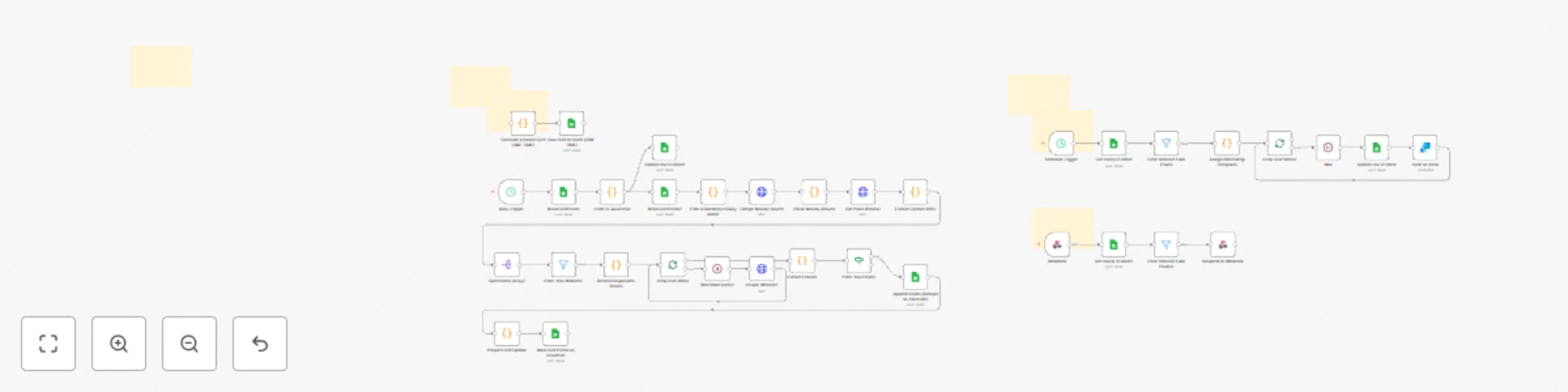
This n8n workflow automates the entire lead generation pipeline from discovery to outreach: 1. Location Grid Generation and Management Generates precise lat/lng grid points covering major US cities...

Best for

  • Lead Generation automation workflows
  • advanced n8n builders looking for reusable templates

Tools used

n8n-nodes-base.googlesheets, n8n-nodes-base.scheduletrigger, n8n-nodes-base.code, n8n-nodes-base.httprequest, n8n-nodes-base.splitout, n8n-nodes-base.filter, n8n-nodes-base.wait, n8n-nodes-base.if

Source and attribution

This workflow is cataloged by N8N Workflows and links back to its original n8n.io source page by Gilbert Onyebuchi.

Original n8n.io source

1.1 Workflow description

Title
Automate B2B lead generation using Google Places API & SendGrid with dashboard
Workflow name
Automate B2B lead generation using Google Places API & SendGrid with dashboard

This n8n workflow automates the entire lead generation pipeline from discovery to outreach:

1. Location Grid Generation and Management

  • Generates precise lat/lng grid points covering major US cities (New York, Texas, New Jersey, Atlanta, Miami)
  • Uses 1.5km radius searches for optimal coverage
  • Tracks searched locations to prevent duplicates
  • Processes 50 points per day (customizable based on API quota)

2. Automated Lead Discovery

  • Daily scheduled searches using Google Places Nearby API
  • Extracts business details: name, address, rating, status, place ID
  • Fetches additional data via Google Places Details API (phone, website, hours)
  • Smart filtering to focus only on businesses with websites

3. Contact Information Extraction

  • Scrapes business websites to find email addresses
  • Advanced email filtering removes fake/placeholder emails
  • Deduplicates by domain to ensure quality leads
  • Tracks all discovered emails per business

4. Intelligent Cold Email Outreach

  • Two alternating email templates for variety and testing
  • Personalized with business name, industry, and first name
  • Rate-limited sending (30-second delays) to avoid spam flags
  • Automated via SendGrid integration
  • Marks sent emails in the database

5. Real-Time Lead Dashboard

  • Webhook-powered reporting endpoint
  • Displays all discovered leads with full details
  • Filters out fake/invalid emails automatically
  • Clean, accessible data format for analysis

What You Get:

  1. Automated daily lead collection from Google Places
  2. Email extraction from business websites
  3. Personalized cold email campaigns with A/B testing
  4. Lead tracking database in Google Sheets
  5. Real-time reporting dashboard via webhook
  6. Complete deduplication to maintain data quality

Setup Requirements:

  • Google Cloud Platform account (for Places API key)
  • SendGrid account (for email sending)
  • Google Sheets (2 templates provided)
  • Basic n8n knowledge for configuration

Included Templates:

  • Location Grid Google Sheet - Tracks searched coordinates
  • Leads Database Google Sheet - Stores all discovered leads
  • Dashboard Webpage - Real-time lead reporting interface

Customizable Features:

  • Target locations (currently covers 5 major US cities)
  • Daily batch size (default: 50 searches/day)
  • Email templates and personalization
  • Search radius (default: 1.5km)
  • Industry filters and targeting

Perfect For:

  • Marketing agencies building client lead lists
  • B2B sales teams prospecting locally
  • Service providers finding new customers
  • Anyone needing automated local business outreach

Need help setting this up or want custom modifications? šŸ“§ Connect with me on LinkedIn: Gilbert Onyebuchi 🌐 View live dashboard demo: Click here

1.2 Logical Blocks

This catalog entry is organized from the workflow JSON. The node-level section below shows the executable blocks available for review before importing the template.

2. Block-by-Block Analysis

Block 1 - Save Grid to Sheet (ONE-TIME)

Type / Role
n8n-nodes-base.googleSheets - googleSheets
Config choices
Version 4.7

Block 2 - Daily Trigger

Type / Role
n8n-nodes-base.scheduleTrigger - scheduleTrigger
Config choices
Version 1.1

Block 3 - Read Grid Points

Type / Role
n8n-nodes-base.googleSheets - googleSheets
Config choices
Version 4.7

Block 4 - Filter & Randomize Daily Batch

Type / Role
n8n-nodes-base.code - code
Config choices
Version 2

Block 5 - Google Nearby Search

Type / Role
n8n-nodes-base.httpRequest - httpRequest
Config choices
Version 4.1

Block 6 - Parse Nearby Results

Type / Role
n8n-nodes-base.code - code
Config choices
Version 2

Block 7 - Prepare Grid Update

Type / Role
n8n-nodes-base.code - code
Config choices
Version 2

Block 8 - Mark Grid Points as Searched

Type / Role
n8n-nodes-base.googleSheets - googleSheets
Config choices
Version 4.7

Block 9 - Get Place Details2

Type / Role
n8n-nodes-base.httpRequest - httpRequest
Config choices
Version 4.1

Block 10 - Extract Contact Info2

Type / Role
n8n-nodes-base.code - code
Config choices
Version 2

Block 11 - Split Places Array2

Type / Role
n8n-nodes-base.splitOut - splitOut
Config choices
Version 1

Block 12 - Filter: Has Website2

Type / Role
n8n-nodes-base.filter - filter
Config choices
Version 1

Block 13 - Wait (Rate Limit)2

Type / Role
n8n-nodes-base.wait - wait
Config choices
Version 1

Block 14 - Scrape Website2

Type / Role
n8n-nodes-base.httpRequest - httpRequest
Config choices
Version 4.1

Block 15 - Extract Emails2

Type / Role
n8n-nodes-base.code - code
Config choices
Version 2

Block 16 - Filter: Has Email2

Type / Role
n8n-nodes-base.if - if
Config choices
Version 2

Block 17 - Remove Duplicates: Emails

Type / Role
n8n-nodes-base.code - code
Config choices
Version 2

Block 18 - Code in JavaScript

Type / Role
n8n-nodes-base.code - code
Config choices
Version 2

Block 19 - Read Grid Points1

Type / Role
n8n-nodes-base.googleSheets - googleSheets
Config choices
Version 4.7

Block 20 - Update row in sheet1

Type / Role
n8n-nodes-base.googleSheets - googleSheets
Config choices
Version 4.7

Block 21 - Sticky Note

Type / Role
n8n-nodes-base.stickyNote - stickyNote
Config choices
Version 1

Block 22 - Sticky Note1

Type / Role
n8n-nodes-base.stickyNote - stickyNote
Config choices
Version 1

Block 23 - Append Leads (Dedupe by Place ID)1

Type / Role
n8n-nodes-base.googleSheets - googleSheets
Config choices
Version 4.7

Block 24 - Loop Over Items

Type / Role
n8n-nodes-base.splitInBatches - splitInBatches
Config choices
Version 3

Showing the first 24 of 41 workflow blocks. Download the JSON for the full node graph.

3. Summary Table

Workflow Automate B2B lead generation using Google Places API & SendGrid with dashboard
Complexity advanced
Nodes 41
Categories Lead Generation
Author Gilbert Onyebuchi
Published 19 Dec 2025

4. Reproducing the Workflow from Scratch

  1. 1. Download the workflow JSON

    Use the JSON export at /data/workflows/11952/11952.json as the source template for this automation.

  2. 2. Import the template into n8n

    Open n8n, import the downloaded JSON, and review each node before activating the workflow.

  3. 3. Configure credentials and variables

    Replace placeholder credentials, API keys, webhook URLs, account IDs, and environment-specific values with your own settings.

  4. 4. Test with sample data

    Run the workflow manually or in a staging workspace, inspect node output, and confirm downstream systems receive the expected data.

  5. 5. Activate and monitor

    Enable the workflow only after testing, then monitor executions, errors, and rate limits during the first production runs.

5. General Notes & Resources

Review imported nodes carefully before activation. This catalog entry is intended to help you inspect the workflow structure, understand required services, and find related templates faster.

Node names, credentials, schedules, webhook paths, and external service limits may need adjustment for your workspace.

Frequently asked questions

What does Automate B2B lead generation using Google Places API & SendGrid with dashboard do?

This n8n workflow automates the entire lead generation pipeline from discovery to outreach: 1. Location Grid Generation and Management Generates precise lat/lng grid points covering major US cities...

What do I need before importing this workflow?

Review the workflow JSON, configure any required credentials in n8n, and test the automation in a safe workspace before using it in production.

Can I customize this workflow?

Yes. Use the block-by-block analysis and the downloadable JSON to inspect each node, then adjust credentials, prompts, schedules, filters, or destinations for your Lead Generation use case.