Block 1 - Add to Google Sheet
- Type / Role
- n8n-nodes-base.googleSheets - googleSheets
- Config choices
- Version 4.5


 Early Deal
This workflow is provided as-is. Please review and test before using in production.
This n8n template automates targeted lead discovery, AI driven data structuring, and personalized cold email sending at controlled intervals. It’s ideal for sales teams, founders, and agencies that...
n8n-nodes-base.googlesheets, n8n-nodes-base.formtrigger, @n8n/n8n-nodes-langchain.chainllm, n8n-nodes-base.httprequest, n8n-nodes-base.limit, @n8n/n8n-nodes-langchain.outputparserstructured, n8n-nodes-base.stickynote, n8n-nodes-base.if
This workflow is cataloged by N8N Workflows and links back to its original n8n.io source page by Mirai.
Original n8n.io sourceThis n8n template automates targeted lead discovery, AI-driven data structuring, and personalized cold-email sending at controlled intervals. It’s ideal for sales teams, founders, and agencies that want to scale outreach without losing personalization.
Good to know
Can run on an interval (e.g., every 10 minutes) to fetch and process new leads.
Requires API keys for OpenAI (content + parsing) and Apify (lead discovery).
Emails are sent one-by-one with delays (the Wait node) to reduce spam risk.
Lead data is written to Google Sheets—we recommend separate sheets for leads with and without emails.
Works with Gmail, Outlook, or your own SMTP—just plug in your credentials.
How it works
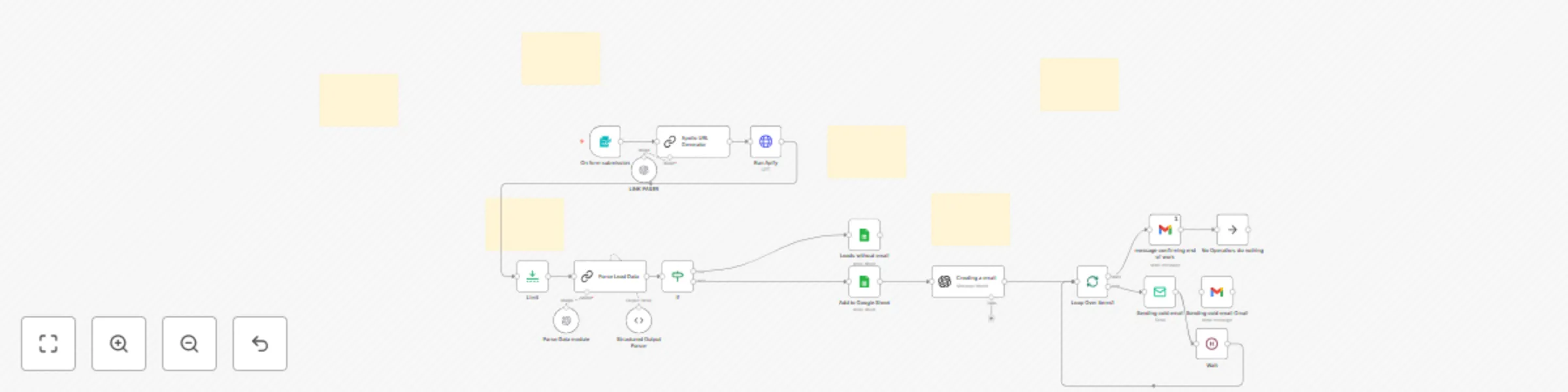
Form Trigger (START) A form collects: Job Title, Company Size, Keywords, Location.
Apollo URL Generator (GPT) The model turns the form fields into a precise Apollo search URL.
Run Apify (Actor) Apify fetches contacts/companies that match your preferences for downstream processing.
Limit Caps how many records are prepared per run (e.g., max 5).
Parse Lead Data (GPT)
Extracts key fields (full name, email, title, LinkedIn, company, company links).
Synthesizes a short 2–3 sentence sales-ready summary for each lead.
Sorting (If) Splits leads into with email vs. without email.
With email → main sheet + email pathway
Without email → a separate sheet for later enrichment
Email Magic (GPT) Uses the parsed data to personalize your fixed email template for each lead (keeps structure/intent, swaps in the right details).
Sending Emails (Loop + Wait + Sender)
Loop Over sends messages individually.
Wait inserts a pause between sends (fully configurable).
Delivery via Gmail or SMTP (custom domain / Outlook).
Confirmation After the loop finishes, a Gmail node sends a “campaign complete” confirmation.
How to use
Enable the workflow and open the start form.
Enter preferences: job title, company size, keywords, location.
Add credentials:
OpenAI (for parsing + email generation)
Apify (Bearer token in Run Apify)
Google (Sheets + optionally Gmail)
SMTP/Outlook (if not using Gmail)
Set limits (the Limit node) and send interval (the Wait node).
Choose sheets for leads with/without email.
Run—the workflow will fetch leads, prepare emails, and send them with spacing.
Requirements
OpenAI API key
Apify API token (access to the chosen Actor)
Google Sheets for storage
Gmail or SMTP/Outlook credentials for sending
An operational n8n instance
Customising this workflow
Email template: Edit the text in “Creating a email” while preserving placeholders.
Segmentation: Add more conditions (role, industry, country) and route to different templates/sheets.
Follow-ups: Add a second loop that reads statuses and sends timed reminders.
Data enrichment: Insert additional APIs before “Parse Lead Data.”
Anti-spam: Increase Wait duration, rotate senders, vary subject lines.
Reporting: Add a “send status” sheet and an error log.
Security & compliance tips
Store API keys in n8n Credentials, not plain-text nodes.
Respect GDPR/opt-out—track source and first-contact date in your sheet.
Start with a small batch, validate deliverability, then scale up.
In short
Automated lead capture → AI cleaning + summary → personalized emails → spaced sending → completion notice. Scalable, customizable, and ready to plug into your preferred sender and template.
This catalog entry is organized from the workflow JSON. The node-level section below shows the executable blocks available for review before importing the template.
| Workflow | Automate B2B lead generation & personalized cold emails with Apollo, Apify & GPT |
|---|---|
| Complexity | advanced |
| Nodes | 24 |
| Categories | Lead Generation, AI Chatbot |
| Author | Mirai |
| Published | 09 Oct 2025 |
Use the JSON export at /data/workflows/9393/9393.json as the source template for this automation.
Open n8n, import the downloaded JSON, and review each node before activating the workflow.
Replace placeholder credentials, API keys, webhook URLs, account IDs, and environment-specific values with your own settings.
Run the workflow manually or in a staging workspace, inspect node output, and confirm downstream systems receive the expected data.
Enable the workflow only after testing, then monitor executions, errors, and rate limits during the first production runs.
Review imported nodes carefully before activation. This catalog entry is intended to help you inspect the workflow structure, understand required services, and find related templates faster.
Node names, credentials, schedules, webhook paths, and external service limits may need adjustment for your workspace.
This n8n template automates targeted lead discovery, AI driven data structuring, and personalized cold email sending at controlled intervals. It’s ideal for sales teams, founders, and agencies that...
Review the workflow JSON, configure any required credentials in n8n, and test the automation in a safe workspace before using it in production.
Yes. Use the block-by-block analysis and the downloadable JSON to inspect each node, then adjust credentials, prompts, schedules, filters, or destinations for your Lead Generation, AI Chatbot use case.