M

Mirai

3
Workflows

Workflows by Mirai

Workflow preview: Generate platform-specific social media posts with ChatGPT, Tavily & G-Sheets
Free advanced

Generate platform-specific social media posts with ChatGPT, Tavily & G-Sheets

Automated Social Media Content Generator with ChatGPT & Tavily Research This n8n template turns a simple spreadsheet of ideas into ready-to-publish content for LinkedIn, X, and Instagram. It uses Tavily to find recent insights from the web and ChatGPT to craft optimized posts automatically — writing results back to your sheet. ⚙️ Good to know Triggers automatically when a new row is added to your Google Sheet. Uses Tavily for intelligent web research based on your topic. Generates three platform-specific posts (LinkedIn, X, IG) using ChatGPT. Saves all results back into the same sheet — no manual copying. Requires API keys for OpenAI, Tavily, and Google Sheets credentials. 🧭 How it works Step 1 — Watch the Sheet & Prepare Inputs A Google Sheets Trigger monitors your content sheet with six columns: Campaign Content topic Target audience LinkedIn X IG The Set Search Fields node structures this data for later steps. Step 2 — Research with Tavily The Search Internet node calls Tavily’s API (insert your key here) to fetch fresh news and articles about the topic. Split Out unfolds the search results; Aggregate compiles them into a single, clean dataset used by the LLMs. Step 3 — Generate Platform-Optimized Posts Each platform uses a dedicated ChatGPT agent: LinkedIn – long-form, insightful, paragraph breaks, 1–2 emojis, 3–5 hashtags, and a call to action. X – ≤ 280 characters, concise and catchy, 1–3 hashtags, 1–2 emojis. Instagram – scannable text with CTA, hashtags, and image suggestions for posts/carousels. Finally, Update Campaign writes the generated posts back into your sheet (LinkedIn, X, and IG columns) using the campaign name as the match key. 🧩 How to use Prepare your Google Sheet Columns: Campaign, Content topic, Target audience, LinkedIn, X, IG. Keep the last three empty — they’ll be filled automatically. Connect credentials Google Sheets → account owning the document. Tavily → enter your API key in the Search Internet node. OpenAI → connect your key in the three generation nodes (LinkedIn, X, IG). Run Add a new row to the sheet and watch the workflow automatically research, write, and update the row with finished posts. 🧾 Requirements n8n instance Google Sheets access OpenAI API key Tavily API key 🧱 Customizing this workflow Tone & Voice – Edit system prompts in each GPT node. Research Depth – Adjust max_results or search_depth in Tavily. Localization – Modify prompts for language or region. Formatting – Add post templates, hashtags, or links. Quality Control – Add moderation or length checks before saving results. A/B Testing – Duplicate platform nodes to create and compare multiple drafts. 💡 Tips Keep topics focused — one clear idea per row. Use Tavily’s news topic for the freshest insights. Test on a few rows to calibrate tone and hashtags before scaling. ✅ In short: Idea in Google Sheet → Tavily research → ChatGPT writes LinkedIn/X/IG posts → Auto-update in sheet. Plug in your keys, run once, and your content pipeline writes itself.

M
Mirai
Content Creation
22 Oct 2025
44
0

Workflow preview: Generate personalized cold email icebreakers from sites with GPT-4 & G-Sheets
Free advanced

Generate personalized cold email icebreakers from sites with GPT-4 & G-Sheets

Icebreaker Generator powered with ChatGPT This n8n template crawls a company website, distills the content with AI, and produces a short, personalized icebreaker you can drop straight into your cold emails or CRM. Perfect for SDRs, founders, and agencies who want “real research” at scale. Good to know Works from a Google Sheet of leads (domain + LinkedIn, etc.). Handles common scrape failures gracefully and marks the lead’s Status as Error. Uses ChatGPT to summarize pages and craft one concise, non-generic opener. Output is written back to the same Google Sheet (IceBreaker, Status). You’ll need Google credentials (for Sheets) and OpenAI credentials (for GPT). How it works Step 1 — Discover internal pages Reads a lead’s website from Google Sheets. Scrapes the home page and extracts all links. A Code node cleans the list (removes emails/anchors/social/external domains, normalizes paths, de-duplicates) and returns unique internal URLs. If the home page is unreachable or no links are found, the lead is marked Error and the workflow moves on. Step 2 — Convert pages to text Visits each collected URL and converts the response into HTML/Markdown text for analysis. You can cap depth/amount with the Limit node. Step 3 — Summarize & generate the icebreaker A GPT node produces a two-paragraph abstract for each page (JSON output). An Aggregate node merges all abstracts for the company. Another GPT node turns the merged summary into a personalized, multi-line icebreaker (spartan tone, non-obvious details). The result is written back to Google Sheets (IceBreaker = ..., Status = Done). The workflow loops to the next lead. How to use Prepare your sheet Include at least: organization_website_url, linkedin_url, and any other lead fields you track. Keep an empty IceBreaker and Status column for the workflow to fill. Connect credentials Google Sheets: use the Google account that owns the sheet and link it in the nodes. OpenAI: add your API key to the GPT nodes (“Summarize Website Page”, “Generate Multiline Icebreaker”). Run the workflow Start with the Manual Trigger (or replace with a schedule/webhook). Adjust Limit if you want fewer/more pages per company. Watch Status (Done/Error) and IceBreaker populate in your sheet. Requirements n8n instance Google Sheets account & access to the leads sheet OpenAI API key (for summarization + icebreaker generation) Customizing this workflow Tone & format: tweak the prompts (both GPT nodes) to match your brand voice and structure. Depth: change the Limit node to scan more/less pages; add simple rules to prioritize certain paths (e.g., /about, /blog/*). Fields: write additional outputs (e.g., Company Summary, Key Products, Recent News) back to new sheet columns. Lead selection: filter rows by Status = "" (or custom flags) to only process untouched leads. Error handling: expand the Error branch to retry with www./HTTP→HTTPS or to log diagnostics in a separate tab. Tips Keep icebreakers short, specific, and free of clichés—small, non-obvious details from the site convert best. Start with a small batch to validate quality, then scale up. Consider adding a rate limit if target sites throttle requests. In short: Sheet → crawl internal pages → AI abstracts → single tailored icebreaker → write back to the sheet, then repeat for the next lead. This automation can work great with our automation for automated cold emailing.

M
Mirai
Lead Generation
19 Oct 2025
183
0
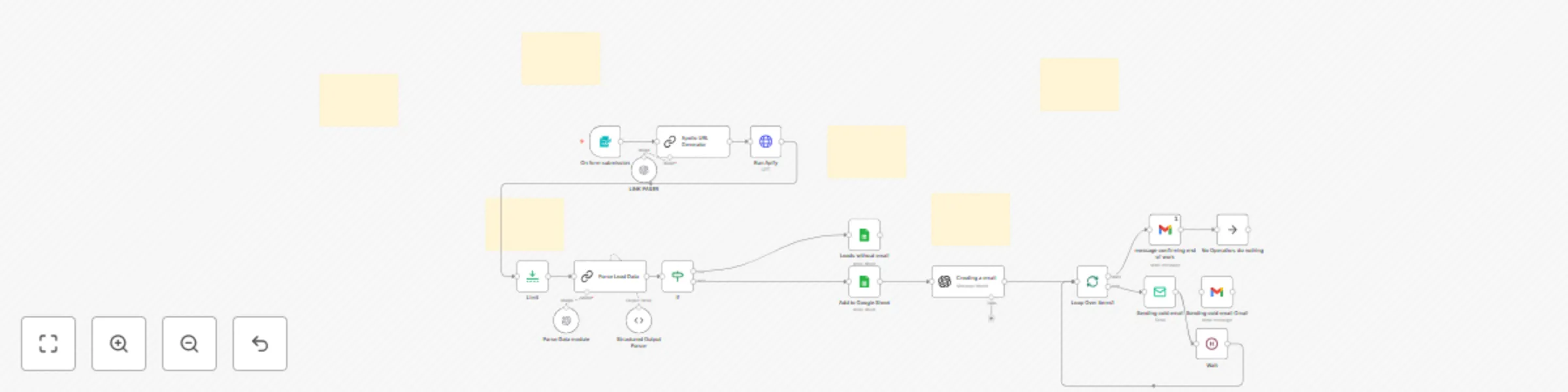
Workflow preview: Automate B2B lead generation & personalized cold emails with Apollo, Apify & GPT
Free advanced

Automate B2B lead generation & personalized cold emails with Apollo, Apify & GPT

This n8n template automates targeted lead discovery, AI-driven data structuring, and personalized cold-email sending at controlled intervals. It’s ideal for sales teams, founders, and agencies that want to scale outreach without losing personalization. Good to know Can run on an interval (e.g., every 10 minutes) to fetch and process new leads. Requires API keys for OpenAI (content + parsing) and Apify (lead discovery). Emails are sent one-by-one with delays (the Wait node) to reduce spam risk. Lead data is written to Google Sheets—we recommend separate sheets for leads with and without emails. Works with Gmail, Outlook, or your own SMTP—just plug in your credentials. How it works Form Trigger (START) A form collects: Job Title, Company Size, Keywords, Location. Apollo URL Generator (GPT) The model turns the form fields into a precise Apollo search URL. Run Apify (Actor) Apify fetches contacts/companies that match your preferences for downstream processing. Limit Caps how many records are prepared per run (e.g., max 5). Parse Lead Data (GPT) Extracts key fields (full name, email, title, LinkedIn, company, company links). Synthesizes a short 2–3 sentence sales-ready summary for each lead. Sorting (If) Splits leads into with email vs. without email. With email → main sheet + email pathway Without email → a separate sheet for later enrichment Email Magic (GPT) Uses the parsed data to personalize your fixed email template for each lead (keeps structure/intent, swaps in the right details). Sending Emails (Loop + Wait + Sender) Loop Over sends messages individually. Wait inserts a pause between sends (fully configurable). Delivery via Gmail or SMTP (custom domain / Outlook). Confirmation After the loop finishes, a Gmail node sends a “campaign complete” confirmation. How to use Enable the workflow and open the start form. Enter preferences: job title, company size, keywords, location. Add credentials: OpenAI (for parsing + email generation) Apify (Bearer token in Run Apify) Google (Sheets + optionally Gmail) SMTP/Outlook (if not using Gmail) Set limits (the Limit node) and send interval (the Wait node). Choose sheets for leads with/without email. Run—the workflow will fetch leads, prepare emails, and send them with spacing. Requirements OpenAI API key Apify API token (access to the chosen Actor) Google Sheets for storage Gmail or SMTP/Outlook credentials for sending An operational n8n instance Customising this workflow Email template: Edit the text in “Creating a email” while preserving placeholders. Segmentation: Add more conditions (role, industry, country) and route to different templates/sheets. Follow-ups: Add a second loop that reads statuses and sends timed reminders. Data enrichment: Insert additional APIs before “Parse Lead Data.” Anti-spam: Increase Wait duration, rotate senders, vary subject lines. Reporting: Add a “send status” sheet and an error log. Security & compliance tips Store API keys in n8n Credentials, not plain-text nodes. Respect GDPR/opt-out—track source and first-contact date in your sheet. Start with a small batch, validate deliverability, then scale up. In short Automated lead capture → AI cleaning + summary → personalized emails → spaced sending → completion notice. Scalable, customizable, and ready to plug into your preferred sender and template.

M
Mirai
Lead Generation
9 Oct 2025
268
0