Auto-respond to Gmail enquiries using GPT-4o, Dumpling AI & LangChain agent

Workflow preview

Workflow preview
100%
Auto-respond to Gmail enquiries using GPT-4o, Dumpling AI & LangChain agent preview
Open on n8n.io

Important notice

This workflow is provided as-is. Please review and test before using in production.

1. Workflow Overview

Who is this for? This workflow is perfect for customer support teams, sales departments, or solopreneurs who receive frequent email enquiries and want to automate the initial response process using...

Best for

  • Ticket Management automation workflows
  • AI RAG automation workflows
  • intermediate n8n builders looking for reusable templates

Tools used

n8n-nodes-base.gmailtrigger, @n8n/n8n-nodes-langchain.openai, n8n-nodes-base.filter, @n8n/n8n-nodes-langchain.lmchatopenai, @n8n/n8n-nodes-langchain.memorybufferwindow, @n8n/n8n-nodes-langchain.toolhttprequest, n8n-nodes-base.gmailtool, @n8n/n8n-nodes-langchain.agent

Source and attribution

This workflow is cataloged by N8N Workflows and links back to its original n8n.io source page by Yang.

Original n8n.io source

1.1 Workflow description

Title
Auto-respond to Gmail enquiries using GPT-4o, Dumpling AI & LangChain agent
Workflow name
Auto-respond to Gmail enquiries using GPT-4o, Dumpling AI & LangChain agent

Who is this for?

This workflow is perfect for customer support teams, sales departments, or solopreneurs who receive frequent email enquiries and want to automate the initial response process using AI. If you spend too much time answering similar questions, this system helps respond faster and more intelligently—without writing a single line of code.


What problem is this workflow solving?

Manually responding to repeated customer enquiries slows productivity and increases delay. This workflow classifies if an incoming email is a real enquiry, analyzes the content with a LangChain-powered agent, fetches helpful context using Dumpling AI, and sends a personalized reply using Gmail—all within minutes.


What this workflow does

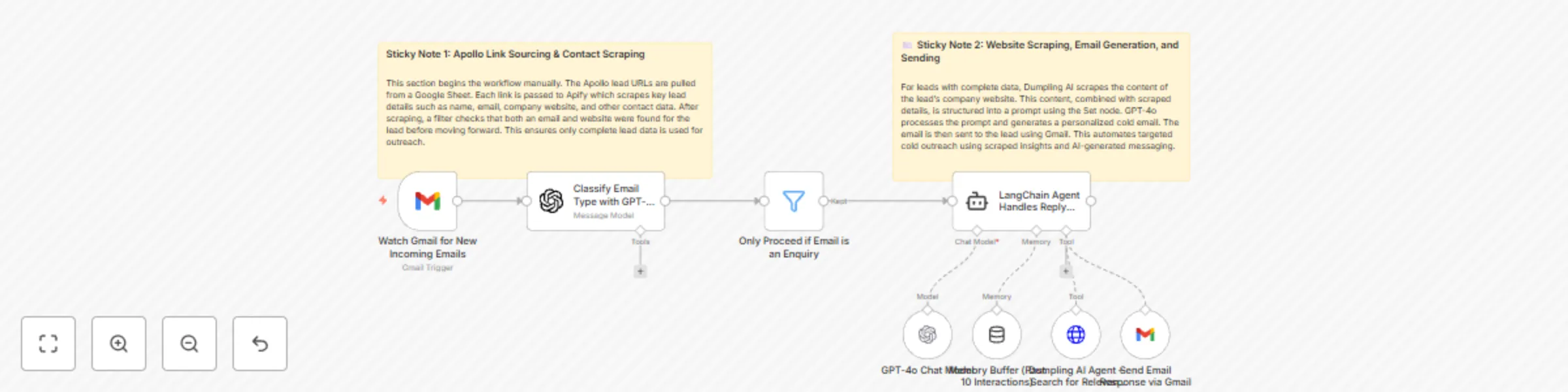
  1. Listens for new incoming Gmail messages using the Gmail Trigger node.
  2. Classifies whether the email is an enquiry using a GPT-4o classification prompt.
  3. Uses a Filter node to continue only if the email was classified as an enquiry.
  4. Passes the email content to a LangChain Agent, enhanced with memory, AI tools, and Dumpling AI to search for relevant information.
  5. The agent constructs a smart, relevant response, then sends it to the original sender via Gmail.

Setup

  1. Connect Gmail

    • Use the Gmail Trigger node to connect to the Gmail account that receives enquiries.
    • Make sure Gmail OAuth2 credentials are authenticated.
  2. Configure Dumpling AI Agent

    • Sign up at Dumpling AI.
    • Create an agent trained to search your help docs, site content, or FAQs.
    • Copy your Dumpling agent ID and API key.
    • Paste it in the Dumpling AI Agent – Search for Relevant Info HTTP Request node.
  3. Set Up LangChain Agent

    • No extra setup needed beyond connecting OpenAI credentials.
    • GPT-4o is used for classification and reply generation.
  4. Enable Gmail Reply Node

    • The final Send Email Response via Gmail node will send the AI-generated reply back to the same thread.

How to customize this workflow to your needs

  • Change the classification prompt to include other email types like “support”, “complaint”, or “sales”.
  • Add additional logic if you want to CC someone or forward certain types of enquiries.
  • Add a Notion or Google Sheets node to log the conversation for analytics.
  • Replace Gmail with Outlook or another email provider by switching the nodes.
  • Improve context by adding more AI tools like database queries or preloaded FAQs.

1.2 Logical Blocks

This catalog entry is organized from the workflow JSON. The node-level section below shows the executable blocks available for review before importing the template.

2. Block-by-Block Analysis

Block 1 - Watch Gmail for New Incoming Emails

Type / Role
n8n-nodes-base.gmailTrigger - gmailTrigger
Config choices
Version 1.2

Block 2 - Classify Email Type with GPT-4o

Type / Role
@n8n/n8n-nodes-langchain.openAi - openAi
Config choices
Version 1.8

Block 3 - Only Proceed if Email is an Enquiry

Type / Role
n8n-nodes-base.filter - filter
Config choices
Version 2.2

Block 4 - GPT-4o Chat Model

Type / Role
@n8n/n8n-nodes-langchain.lmChatOpenAi - lmChatOpenAi
Config choices
Version 1.2

Block 5 - Memory Buffer (Past 10 Interactions)

Type / Role
@n8n/n8n-nodes-langchain.memoryBufferWindow - memoryBufferWindow
Config choices
Version 1.3

Block 6 - Dumpling AI Agent – Search for Relevant Info

Type / Role
@n8n/n8n-nodes-langchain.toolHttpRequest - toolHttpRequest
Config choices
Version 1.1

Block 7 - Send Email Response via Gmail

Type / Role
n8n-nodes-base.gmailTool - gmailTool
Config choices
Version 2.1

Block 8 - LangChain Agent Handles Reply Logic

Type / Role
@n8n/n8n-nodes-langchain.agent - agent
Config choices
Version 1.8

Block 9 - Sticky Note

Type / Role
n8n-nodes-base.stickyNote - stickyNote
Config choices
Version 1

Block 10 - Sticky Note1

Type / Role
n8n-nodes-base.stickyNote - stickyNote
Config choices
Version 1

3. Summary Table

Workflow Auto-respond to Gmail enquiries using GPT-4o, Dumpling AI & LangChain agent
Complexity intermediate
Nodes 10
Categories Ticket Management, AI RAG
Author Yang
Published 14 May 2025

4. Reproducing the Workflow from Scratch

  1. 1. Download the workflow JSON

    Use the JSON export at /data/workflows/4057/4057.json as the source template for this automation.

  2. 2. Import the template into n8n

    Open n8n, import the downloaded JSON, and review each node before activating the workflow.

  3. 3. Configure credentials and variables

    Replace placeholder credentials, API keys, webhook URLs, account IDs, and environment-specific values with your own settings.

  4. 4. Test with sample data

    Run the workflow manually or in a staging workspace, inspect node output, and confirm downstream systems receive the expected data.

  5. 5. Activate and monitor

    Enable the workflow only after testing, then monitor executions, errors, and rate limits during the first production runs.

5. General Notes & Resources

Review imported nodes carefully before activation. This catalog entry is intended to help you inspect the workflow structure, understand required services, and find related templates faster.

Node names, credentials, schedules, webhook paths, and external service limits may need adjustment for your workspace.

Frequently asked questions

What does Auto-respond to Gmail enquiries using GPT-4o, Dumpling AI & LangChain agent do?

Who is this for? This workflow is perfect for customer support teams, sales departments, or solopreneurs who receive frequent email enquiries and want to automate the initial response process using...

What do I need before importing this workflow?

Review the workflow JSON, configure any required credentials in n8n, and test the automation in a safe workspace before using it in production.

Can I customize this workflow?

Yes. Use the block-by-block analysis and the downloadable JSON to inspect each node, then adjust credentials, prompts, schedules, filters, or destinations for your Ticket Management, AI RAG use case.