Block 1 - Sticky Note
- Type / Role
- n8n-nodes-base.stickyNote - stickyNote
- Config choices
- Version 1


 Early Deal
This workflow is provided as-is. Please review and test before using in production.
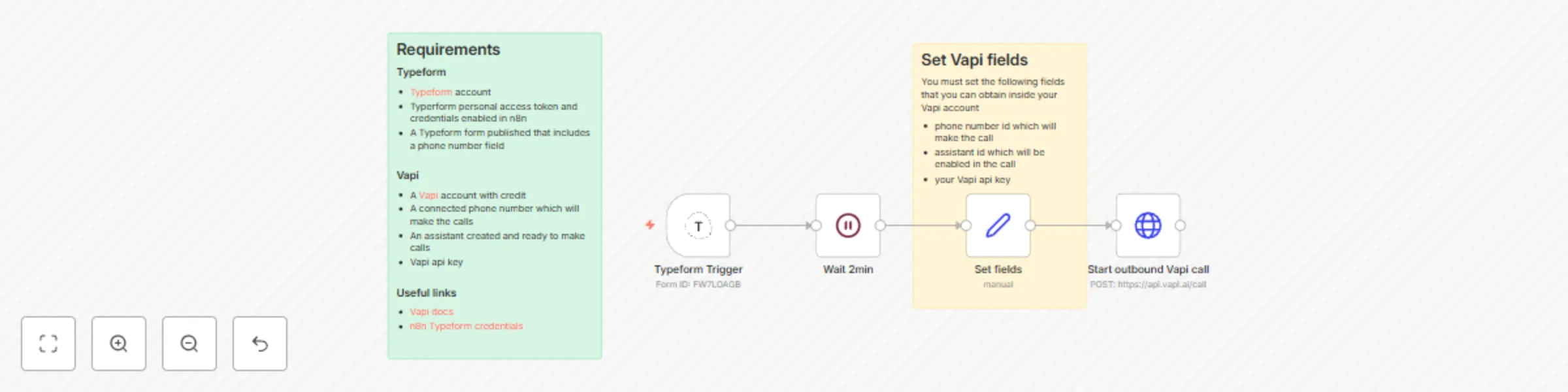
This n8n automation connects your Typeform forms with Vapi AI , allowing you to immediately call new form respondents with a...
n8n-nodes-base.stickynote, n8n-nodes-base.httprequest, n8n-nodes-base.set, n8n-nodes-base.wait, n8n-nodes-base.typeformtrigger
This workflow is cataloged by N8N Workflows and links back to its original n8n.io source page by Aitor | 1Node.
Original n8n.io sourceThis n8n automation connects your Typeform forms with Vapi AI, allowing you to immediately call new form respondents with a personalized message from a Vapi AI assistant, as soon as a form submission is received.
phone number id - connected in Vapiassistant id - the assistant enabled in the callVapi API key - your secure API keyhttps://api.vapi.ai/callPersonalize the Call Content:
Include additional fields in your Typeform (e.g., first name, interest, location). In n8n, map these form fields into the payload sent to Vapi. Update your Vapi assistant’s prompt/script to reference these variables for a highly personalized experience.
Conditional Call Logic:
Use n8n's logic nodes (e.g., IF, Switch) to, for example:
Advanced Routing:
Configure the workflow to choose different assistants, phone numbers, or call scripts based on the respondent’s answers. Store assistant IDs or numbers as environment variables or reference them from a lookup table for dynamic selection.
Greeting by Name:
If your Typeform collects first_name, map it into the Vapi payload. Your assistant script can begin, "Hi {{first_name}}, thanks for your interest in XYZ!"
Custom Message Based on Product Interest:
Add a product_interest field in Typeform. Pass its value to Vapi and have the assistant mention the product, e.g., “I see you’re interested in our Premium Plan…”
Reference Appointment Times or Locations:
Collect appointment_time and/or city fields, and tailor the call to reconfirm booking details using these inputs.
Call Not Triggering:
Ensure your Typeform webhook connection and credentials are correctly set up in n8n. Check that your workflow is active and the trigger node is configured for the correct form.
Invalid Phone Number Format:
Vapi requires numbers in full international format (e.g., +11234567890). Use n8n expressions to clean or verify the incoming number if needed.
Missing Data in the Call:
Confirm that additional fields (e.g., first_name) exist in the Typeform response and that your mapping in n8n matches the exact field names.
Failed API Call:
Double-check your Vapi phone number id, assistant id, and API key. Use n8n’s execution logs to inspect the payload sent to Vapi for debugging.
Duplicate Calls:
If your Typeform allows multiple submissions, add logic in n8n to check for and avoid duplicate calls, for example by maintaining a record of called numbers.
Feel free to contact us at 1 Node Get instant access to a library of free resources we created.
This catalog entry is organized from the workflow JSON. The node-level section below shows the executable blocks available for review before importing the template.
| Workflow | Auto-call new Typeform submissions with Vapi voice assistant |
|---|---|
| Complexity | intermediate |
| Nodes | 6 |
| Categories | Lead Nurturing, AI Chatbot |
| Author | Aitor | 1Node |
| Published | 28 Jul 2025 |
Use the JSON export at /data/workflows/6573/6573.json as the source template for this automation.
Open n8n, import the downloaded JSON, and review each node before activating the workflow.
Replace placeholder credentials, API keys, webhook URLs, account IDs, and environment-specific values with your own settings.
Run the workflow manually or in a staging workspace, inspect node output, and confirm downstream systems receive the expected data.
Enable the workflow only after testing, then monitor executions, errors, and rate limits during the first production runs.
Review imported nodes carefully before activation. This catalog entry is intended to help you inspect the workflow structure, understand required services, and find related templates faster.
Node names, credentials, schedules, webhook paths, and external service limits may need adjustment for your workspace.
This n8n automation connects your Typeform forms with Vapi AI , allowing you to immediately call new form respondents with a...
Review the workflow JSON, configure any required credentials in n8n, and test the automation in a safe workspace before using it in production.
Yes. Use the block-by-block analysis and the downloadable JSON to inspect each node, then adjust credentials, prompts, schedules, filters, or destinations for your Lead Nurturing, AI Chatbot use case.