Analyze suspicious email contents with ChatGPT Vision

Workflow preview

Workflow preview
100%
Analyze suspicious email contents with ChatGPT Vision preview
Open on n8n.io

Important notice

This workflow is provided as-is. Please review and test before using in production.

1. Workflow Overview

Phishing Email Detection and Reporting with n8n Who is this for? This workflow is designed for IT teams, security professionals, and managed service providers (MSPs) looking to automate the process...

Best for

  • SecOps automation workflows
  • AI Summarization automation workflows
  • advanced n8n builders looking for reusable templates

Tools used

n8n-nodes-base.gmailtrigger, n8n-nodes-base.microsoftoutlooktrigger, n8n-nodes-base.httprequest, n8n-nodes-base.set, n8n-nodes-base.code, @n8n/n8n-nodes-langchain.openai, n8n-nodes-base.jira, n8n-nodes-base.stickynote

Source and attribution

This workflow is cataloged by N8N Workflows and links back to its original n8n.io source page by Angel Menendez.

Original n8n.io source

1.1 Workflow description

Title
Analyze suspicious email contents with ChatGPT Vision
Workflow name
Analyze suspicious email contents with ChatGPT Vision

Phishing Email Detection and Reporting with n8n

Who is this for?

This workflow is designed for IT teams, security professionals, and managed service providers (MSPs) looking to automate the process of detecting, analyzing, and reporting phishing emails.

What problem is this workflow solving?

Phishing emails are a significant cybersecurity threat, and manually detecting and reporting them is time-consuming and prone to errors. This workflow streamlines the process by automating email analysis, generating detailed reports, and logging incidents in a centralized system like Jira.

What this workflow does

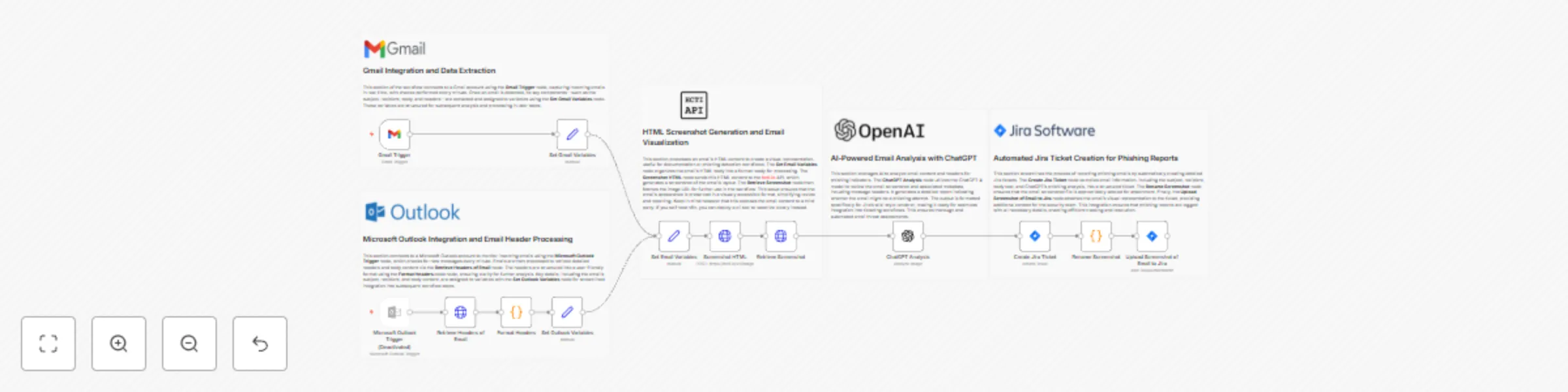
This workflow automates phishing email detection and reporting by integrating Gmail and Microsoft Outlook email triggers, analyzing the content and headers of incoming emails, and generating Jira tickets for flagged phishing emails. Here’s what happens:

  1. Email Triggers: Captures incoming emails from Gmail or Microsoft Outlook.
  2. Email Analysis: Extracts email content, headers, and metadata for analysis.
  3. HTML Screenshot: Converts the email’s HTML body into a visual screenshot.
  4. AI Phishing Detection: Leverages ChatGPT to analyze the email and detect potential phishing indicators.
  5. Jira Integration: Automatically creates a Jira ticket with detailed analysis and attaches the email screenshot for review by the security team.
  6. Customizable Reports: Includes options to customize ticket descriptions and adapt the workflow to organizational needs.
Setup
  1. Authentication: Set up Gmail and Microsoft Outlook OAuth credentials in n8n to access your email accounts securely.
  2. API Keys: Add API credentials for the HTML screenshot service (hcti.io) and ChatGPT.
  3. Jira Integration: Configure your Jira project and issue types in the workflow.
  4. Workflow Configuration: Update sticky notes and nodes to include any additional setup or configuration details unique to your system.
How to customize this workflow to your needs
  • Email Filters: Modify email triggers to filter specific subjects or sender addresses.
  • Analysis Scope: Adjust the ChatGPT prompt to refine phishing detection logic.
  • Integration: Replace Jira with your preferred ticketing system or modify the ticket fields to include additional information.

This workflow provides an end-to-end automated solution for phishing email management, enhancing efficiency and reducing security risks. It’s perfect for teams looking to minimize manual effort and improve incident response times.

1.2 Logical Blocks

This catalog entry is organized from the workflow JSON. The node-level section below shows the executable blocks available for review before importing the template.

2. Block-by-Block Analysis

Block 1 - Gmail Trigger

Type / Role
n8n-nodes-base.gmailTrigger - gmailTrigger
Config choices
Version 1.2

Block 2 - Microsoft Outlook Trigger

Type / Role
n8n-nodes-base.microsoftOutlookTrigger - microsoftOutlookTrigger
Config choices
Version 1

Block 3 - Screenshot HTML

Type / Role
n8n-nodes-base.httpRequest - httpRequest
Config choices
Version 4.2

Block 4 - Retrieve Screenshot

Type / Role
n8n-nodes-base.httpRequest - httpRequest
Config choices
Version 4.2

Block 5 - Set Outlook Variables

Type / Role
n8n-nodes-base.set - set
Config choices
Version 3.4

Block 6 - Set Gmail Variables

Type / Role
n8n-nodes-base.set - set
Config choices
Version 3.4

Block 7 - Retrieve Headers of Email

Type / Role
n8n-nodes-base.httpRequest - httpRequest
Config choices
Version 4.2

Block 8 - Format Headers

Type / Role
n8n-nodes-base.code - code
Config choices
Version 2

Block 9 - Set Email Variables

Type / Role
n8n-nodes-base.set - set
Config choices
Version 3.4

Block 10 - ChatGPT Analysis

Type / Role
@n8n/n8n-nodes-langchain.openAi - openAi
Config choices
Version 1.6

Block 11 - Create Jira Ticket

Type / Role
n8n-nodes-base.jira - jira
Config choices
Version 1

Block 12 - Rename Screenshot

Type / Role
n8n-nodes-base.code - code
Config choices
Version 2

Block 13 - Upload Screenshot of Email to Jira

Type / Role
n8n-nodes-base.jira - jira
Config choices
Version 1

Block 14 - Sticky Note

Type / Role
n8n-nodes-base.stickyNote - stickyNote
Config choices
Version 1

Block 15 - Sticky Note1

Type / Role
n8n-nodes-base.stickyNote - stickyNote
Config choices
Version 1

Block 16 - Sticky Note2

Type / Role
n8n-nodes-base.stickyNote - stickyNote
Config choices
Version 1

Block 17 - Sticky Note3

Type / Role
n8n-nodes-base.stickyNote - stickyNote
Config choices
Version 1

Block 18 - Sticky Note4

Type / Role
n8n-nodes-base.stickyNote - stickyNote
Config choices
Version 1

3. Summary Table

Workflow Analyze suspicious email contents with ChatGPT Vision
Complexity advanced
Nodes 18
Categories SecOps, AI Summarization
Author Angel Menendez
Published 20 Dec 2024

4. Reproducing the Workflow from Scratch

  1. 1. Download the workflow JSON

    Use the JSON export at /data/workflows/2665/2665.json as the source template for this automation.

  2. 2. Import the template into n8n

    Open n8n, import the downloaded JSON, and review each node before activating the workflow.

  3. 3. Configure credentials and variables

    Replace placeholder credentials, API keys, webhook URLs, account IDs, and environment-specific values with your own settings.

  4. 4. Test with sample data

    Run the workflow manually or in a staging workspace, inspect node output, and confirm downstream systems receive the expected data.

  5. 5. Activate and monitor

    Enable the workflow only after testing, then monitor executions, errors, and rate limits during the first production runs.

5. General Notes & Resources

Review imported nodes carefully before activation. This catalog entry is intended to help you inspect the workflow structure, understand required services, and find related templates faster.

Node names, credentials, schedules, webhook paths, and external service limits may need adjustment for your workspace.

Frequently asked questions

What does Analyze suspicious email contents with ChatGPT Vision do?

Phishing Email Detection and Reporting with n8n Who is this for? This workflow is designed for IT teams, security professionals, and managed service providers (MSPs) looking to automate the process...

What do I need before importing this workflow?

Review the workflow JSON, configure any required credentials in n8n, and test the automation in a safe workspace before using it in production.

Can I customize this workflow?

Yes. Use the block-by-block analysis and the downloadable JSON to inspect each node, then adjust credentials, prompts, schedules, filters, or destinations for your SecOps, AI Summarization use case.