Block 1 - AI Agent
- Type / Role
- @n8n/n8n-nodes-langchain.agent - agent
- Config choices
- Version 1.7


 Early Deal
This workflow is provided as-is. Please review and test before using in production.
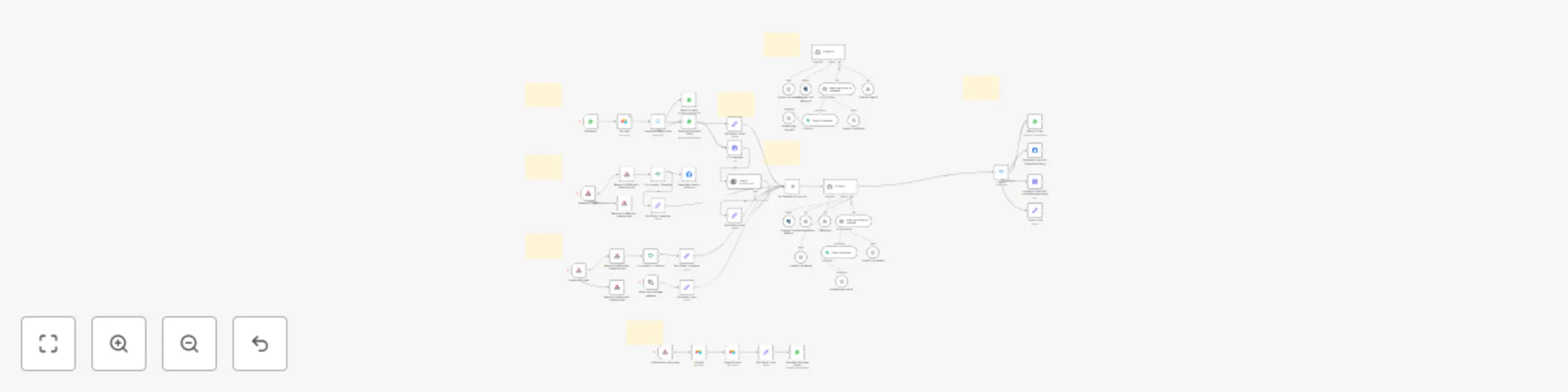
This workflow automates multi channel AI driven sales engagement for lead qualification, service information delivery, and consultation booking. It integrates WhatsApp, Facebook Messenger, Instagra...
@n8n/n8n-nodes-langchain.agent, n8n-nodes-base.noop, n8n-nodes-base.switch, n8n-nodes-base.webhook, n8n-nodes-base.set, n8n-nodes-base.respondtowebhook, n8n-nodes-base.if, @n8n/n8n-nodes-langchain.embeddingsopenai
This workflow is cataloged by N8N Workflows and links back to its original n8n.io source page by Sam Yassine.
Original n8n.io sourceThis workflow automates multi-channel AI-driven sales engagement for lead qualification, service information delivery, and consultation booking. It integrates WhatsApp, Facebook Messenger, Instagram DM, and an n8n chat interface with a backend CRM (Airtable), a knowledge base (Supabase), and conversational AI (OpenAI), all orchestrated by n8n.
Messaging Platforms: WhatsApp, Facebook Messenger, Instagram DM, n8n Built-in Chat
AI Core & Processing: OpenAI (GPT-4o for main agent logic, Whisper for audio transcription)
CRM & Data Management: Airtable (for initial WhatsApp lead lookup, lead form submissions, and as the backend for the crmAgent sub-workflow operations)
Knowledge Base: Supabase (Vector Store for technical_and_sales_knowledge tool)
Chat Memory: PostgreSQL (for the main AI Agent's conversation history)
Orchestration & Automation: n8n (Self-hosted, utilizing Langchain community nodes)
Calendar Service: Integrated via the calendarAgent sub-workflow
CRM Service: Integrated via the crmAgent sub-workflow (interacting with Airtable)
Trigger: A new interaction is initiated through one of the following channels:
A new message is received via the WhatsApp Trigger.
A new message is received via the Facebook Trigger (Webhook).
A new message is received via the Instagram Trigger (Webhook).
A new message is received via the n8n Chat Trigger.
Alternatively, a new lead is submitted via the Airtable Form Submitted Webhook.
Channel-Specific Ingestion & Pre-processing:
The system attempts to find an existing lead in Airtable using the sender's phone number.
Incoming messages are routed by the Handle Message Types switch:
Text messages are passed to the Edit Fields - chat1 node to prepare input for the AI Agent, including any found lead information.
Audio messages are processed: the WhatsApp Business Cloud node gets the media URL, the HTTP Request node downloads the audio, OpenAI transcribes it to text, and Edit Fields - chat2 prepares this transcribed text and lead information for the AI Agent.
Unsupported message types trigger the Reply To User1 node to send a notification that the message type cannot be processed.
The system responds to webhook verification (Respond to Webhook - facebook get) and acknowledges new messages (Respond to Webhook - facebook post).
The If is not echo - facebook node filters out messages sent by the page.
The Sales Agent Demo - typing_on node sends a typing indicator.
The Edit Fields - facebook node prepares the message text, sender ID, and Facebook-specific context for the AI Agent.
The system responds to webhook verification (Respond to Webhook - instagram get) and acknowledges new messages (Respond to Webhook - instagram post).
The If is not echo - instagram node filters out messages sent by the business account.
The Edit Fields - instagram node prepares the message text, sender ID, and Instagram-specific context for the AI Agent.
The Edit Fields - chat node prepares the user's input and session information for the AI Agent.
Processed data from all active messaging channels (WhatsApp text/audio, Facebook, Instagram, n8n Chat) is funneled through the No Operation, do nothing node to the main AI Agent.
The AI Agent (using OpenAI Chat Model - GPT-4o, and Postgres Chat Memory) engages the user according to its system prompt, aiming to qualify them for Paint Protection Film (PPF), Ceramic Coating, or Window Tint.
The AI Agent uses the technical_and_sales_knowledge tool (which queries the Demo Supabase vector store via Embeddings OpenAI and OpenAI Chat Model1) to provide service details and answer questions.
The AI Agent uses the crmAgent tool (a sub-workflow) to log contact details (Name, Email, service interest) and update opportunity statuses in Airtable.
The AI Agent uses the calendarAgent tool (a sub-workflow) to book consultation appointments once preferred dates/times are provided. This occurs after contact details are logged in the CRM.
The AI Agent's final textual response is passed to the Switch node.
The Switch node routes the response to the appropriate node for delivery on the original channel:
Reply To User for WhatsApp.
Facebook Graph API - Sales Agent Demo for Facebook Messenger.
Instagram Graph API - smb.sales.agent.demo for Instagram DM.
Output - chat for the n8n Chat interface.
When the Airtable Form Submitted webhook receives data, the Airtable node fetches the full record.
The Create Contact node creates a new contact in the Airtable 'Contacts' table.
The Edit Fields - form node prepares data for a notification.
The WhatsApp Business Cloud2 node sends a templated WhatsApp message to the lead, confirming their form submission.
This catalog entry is organized from the workflow JSON. The node-level section below shows the executable blocks available for review before importing the template.
Showing the first 24 of 58 workflow blocks. Download the JSON for the full node graph.
| Workflow | AI sales agent: WhatsApp, FB, IG, OpenAI, Airtable, Supabase auto-booking |
|---|---|
| Complexity | advanced |
| Nodes | 58 |
| Categories | Lead Nurturing, AI Chatbot |
| Author | Sam Yassine |
| Published | 15 May 2025 |
Use the JSON export at /data/workflows/4083/4083.json as the source template for this automation.
Open n8n, import the downloaded JSON, and review each node before activating the workflow.
Replace placeholder credentials, API keys, webhook URLs, account IDs, and environment-specific values with your own settings.
Run the workflow manually or in a staging workspace, inspect node output, and confirm downstream systems receive the expected data.
Enable the workflow only after testing, then monitor executions, errors, and rate limits during the first production runs.
Review imported nodes carefully before activation. This catalog entry is intended to help you inspect the workflow structure, understand required services, and find related templates faster.
Node names, credentials, schedules, webhook paths, and external service limits may need adjustment for your workspace.
This workflow automates multi channel AI driven sales engagement for lead qualification, service information delivery, and consultation booking. It integrates WhatsApp, Facebook Messenger, Instagra...
Review the workflow JSON, configure any required credentials in n8n, and test the automation in a safe workspace before using it in production.
Yes. Use the block-by-block analysis and the downloadable JSON to inspect each node, then adjust credentials, prompts, schedules, filters, or destinations for your Lead Nurturing, AI Chatbot use case.