Block 1 - MCP Server Trigger
- Type / Role
- @n8n/n8n-nodes-langchain.mcpTrigger - mcpTrigger
- Config choices
- Version 2


 Early Deal
This workflow is provided as-is. Please review and test before using in production.
Zoho CRM MCP Server Integration (n8n Workflow) Overview This n8n flow integrates Zoho CRM with an MCP (Model Context Protocol) Server and OpenAI Chat Model , enabling AI driven automation for...
@n8n/n8n-nodes-langchain.mcptrigger, n8n-nodes-base.zohocrmtool, @n8n/n8n-nodes-langchain.chattrigger, @n8n/n8n-nodes-langchain.agent, @n8n/n8n-nodes-langchain.lmchatopenai, @n8n/n8n-nodes-langchain.memorybufferwindow, @n8n/n8n-nodes-langchain.mcpclienttool, n8n-nodes-base.stickynote
This workflow is cataloged by N8N Workflows and links back to its original n8n.io source page by Rohit Dabra.
Original n8n.io sourceThis n8n flow integrates Zoho CRM with an MCP (Model Context Protocol) Server and OpenAI Chat Model, enabling AI-driven automation for CRM lead management. It allows an AI Agent to create, update, delete, and fetch leads in Zoho CRM through natural language instructions.
Watch the full demo here:
👉 YouTube Demo Video
| Component | Purpose |
|---|---|
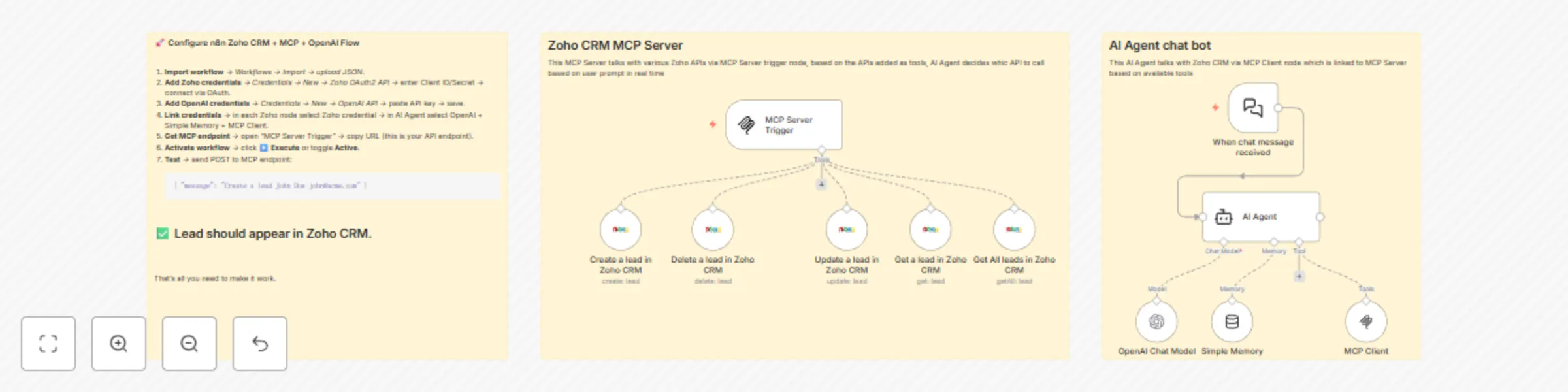
| MCP Server Trigger | Acts as the entry point for requests sent to the MCP Server (external systems or chat interfaces). |
| Zoho CRM Nodes | Handle CRUD operations for leads (create, update, delete, get, getAll). |
| AI Agent | Uses the OpenAI Chat Model and Memory to interpret and respond to incoming chat messages. |
| OpenAI Chat Model | Provides the LLM (Large Language Model) intelligence for the AI Agent. |
| Simple Memory | Stores short-term memory context for chat continuity. |
| MCP Client | Bridges communication between the AI Agent and the MCP Server for bi-directional message handling. |
Trigger: MCP Server Trigger — receives API requests or chat events.
Zoho CRM Actions:
Create a lead in Zoho CRMUpdate a lead in Zoho CRMGet a lead in Zoho CRMGet all leads in Zoho CRMDelete a lead in Zoho CRMEach of these nodes connects to the Zoho CRM credentials and performs the respective operation on Zoho CRM’s “Leads” module.
Trigger: When chat message received — initiates flow when a message is received.
AI Agent Node: Uses:
OpenAI Chat Model → for natural language understanding and generation.Simple Memory → to maintain context between interactions.MCP Client → to call MCP actions (which include Zoho CRM operations).This creates a conversational interface allowing users to type things like:
> “Add a new lead named John Doe with email [email protected]”
The AI agent interprets this and routes the request to the proper Zoho CRM action node automatically.
You must connect Zoho CRM API to n8n.
Go to Credentials → New → Zoho OAuth2 API.
Follow Zoho’s official n8n documentation.
Provide the following:
Environment: Production
Data Center: e.g., zoho.in or zoho.com depending on your region
Client ID and Client Secret — from Zoho API Console (https://api-console.zoho.com/)
Scope:
ZohoCRM.modules.leads.ALL
Redirect URL: Use the callback URL shown in n8n (copy it before saving credentials)
Click Connect and complete the OAuth consent.
✅ Once authenticated, all Zoho CRM nodes (Create, Update, Delete, etc.) will be ready.
In n8n, go to Credentials → New → OpenAI API.
Enter:
Save credentials.
In the AI Agent node, select this OpenAI credential under Model.
Open the AI Agent node.
Choose:
Configure AI instructions (System Prompt) — for example:
You are an AI assistant that helps manage leads in Zoho CRM.
When the user asks to create, update, or delete a lead, use the appropriate tool.
Provide confirmations in natural language.
> 🔄 This enables a continuous conversation loop between external clients and the AI-powered CRM automation system.
Once everything is connected:
Activate the workflow.
From your chat interface or Postman, send a message to the MCP Server endpoint:
{
  "message": "Create a new lead named Alice Johnson with email [email protected]"
}
Observe:
| User Query | Action Triggered |
|---|---|
| “Add John as a lead with phone number 9876543210” | Create lead in Zoho CRM |
| “Update John’s company to Acme Inc.” | Update lead in Zoho CRM |
| “Show me all leads from last week” | Get All Leads |
| “Delete lead John Doe” | Delete lead |
| Layer | Technology |
|---|---|
| Automation Engine | n8n |
| AI Layer | OpenAI GPT Chat Model |
| CRM | Zoho CRM |
| Communication Protocol | MCP (Model Context Protocol) |
| Memory | Simple Memory |
| Trigger | HTTP-based MCP Server |
This catalog entry is organized from the workflow JSON. The node-level section below shows the executable blocks available for review before importing the template.
| Workflow | AI-Powered Zoho CRM Lead Management with OpenAI GPT |
|---|---|
| Complexity | intermediate |
| Nodes | 14 |
| Categories | Lead Nurturing, AI Chatbot |
| Author | Rohit Dabra |
| Published | 11 Oct 2025 |
Use the JSON export at /data/workflows/9480/9480.json as the source template for this automation.
Open n8n, import the downloaded JSON, and review each node before activating the workflow.
Replace placeholder credentials, API keys, webhook URLs, account IDs, and environment-specific values with your own settings.
Run the workflow manually or in a staging workspace, inspect node output, and confirm downstream systems receive the expected data.
Enable the workflow only after testing, then monitor executions, errors, and rate limits during the first production runs.
Review imported nodes carefully before activation. This catalog entry is intended to help you inspect the workflow structure, understand required services, and find related templates faster.
Node names, credentials, schedules, webhook paths, and external service limits may need adjustment for your workspace.
Zoho CRM MCP Server Integration (n8n Workflow) Overview This n8n flow integrates Zoho CRM with an MCP (Model Context Protocol) Server and OpenAI Chat Model , enabling AI driven automation for...
Review the workflow JSON, configure any required credentials in n8n, and test the automation in a safe workspace before using it in production.
Yes. Use the block-by-block analysis and the downloadable JSON to inspect each node, then adjust credentials, prompts, schedules, filters, or destinations for your Lead Nurturing, AI Chatbot use case.