Block 1 - Salesforce Trigger
- Type / Role
- n8n-nodes-base.salesforceTrigger - salesforceTrigger
- Config choices
- Version 1


 Early Deal
This workflow is provided as-is. Please review and test before using in production.
Boost your sales team’s efficiency with an end to end, privacy first lead scoring engine—ready to drop straight into your n8n instance. What it does Salesforce Trigger watches for new or updated...
n8n-nodes-base.salesforcetrigger, n8n-nodes-base.splitinbatches, @n8n/n8n-nodes-langchain.openai, n8n-nodes-base.slack, n8n-nodes-base.httprequest, n8n-nodes-base.code, n8n-nodes-base.stickynote
This workflow is cataloged by N8N Workflows and links back to its original n8n.io source page by Le Nguyen.
Original n8n.io sourceBoost your sales team’s efficiency with an end-to-end, privacy-first lead-scoring engine—ready to drop straight into your n8n instance.
🔹 What it does
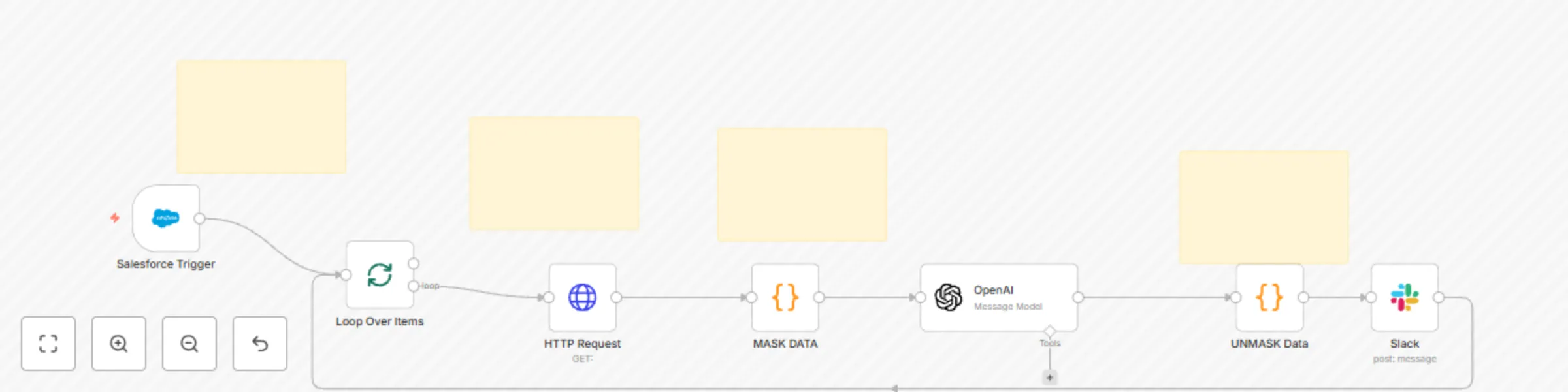
Salesforce Trigger watches for new or updated Leads every hour.
HTTP Request fetches the full record so you never miss a field.
Mask Data (JS Code) automatically tokenises PII (name, email, address, etc.) before any external call—ideal for GDPR/SOC 2 compliance.
OpenAI (GPT-4o) scores each lead 0-100, assigns a grade A-F, lists key reasons, recommends one next action, and even drafts a personalised email template.
Unmask Data (JS Code) swaps the tokens back in only when you explicitly need them—so sensitive data never leaks to logs or AI prompts.
Slack Node delivers a concise, team-friendly summary (score, grade, reasons, next step, and draft email) right to the rep who needs it.
🔹 Why you’ll love it
Security by design – field-level masking with reversible tokens.
No-code friendly – clear sticky notes explain every step; swap Salesforce for any CRM in minutes.
AI you can trust – scoring rubric baked into the system prompt for consistent results.
Instant hand-off – reps get an actionable Slack message instead of another spreadsheet.
Perfect for rev-ops teams that want smarter prioritisation without rebuilding their stack—or exposing customer data. Plug it in, set your own masking list, and start converting the leads that matter most.
This catalog entry is organized from the workflow JSON. The node-level section below shows the executable blocks available for review before importing the template.
| Workflow | AI-powered lead scoring with Salesforce, GPT-4o, and Slack with data masking |
|---|---|
| Complexity | intermediate |
| Nodes | 11 |
| Categories | Lead Generation, AI Summarization |
| Author | Le Nguyen |
| Published | 02 Jun 2025 |
Use the JSON export at /data/workflows/4592/4592.json as the source template for this automation.
Open n8n, import the downloaded JSON, and review each node before activating the workflow.
Replace placeholder credentials, API keys, webhook URLs, account IDs, and environment-specific values with your own settings.
Run the workflow manually or in a staging workspace, inspect node output, and confirm downstream systems receive the expected data.
Enable the workflow only after testing, then monitor executions, errors, and rate limits during the first production runs.
Review imported nodes carefully before activation. This catalog entry is intended to help you inspect the workflow structure, understand required services, and find related templates faster.
Node names, credentials, schedules, webhook paths, and external service limits may need adjustment for your workspace.
Boost your sales team’s efficiency with an end to end, privacy first lead scoring engine—ready to drop straight into your n8n instance. What it does Salesforce Trigger watches for new or updated...
Review the workflow JSON, configure any required credentials in n8n, and test the automation in a safe workspace before using it in production.
Yes. Use the block-by-block analysis and the downloadable JSON to inspect each node, then adjust credentials, prompts, schedules, filters, or destinations for your Lead Generation, AI Summarization use case.