AI-driven lead management and inquiry automation with ERPNext & n8n

Workflow preview

Workflow preview
100%
AI-driven lead management and inquiry automation with ERPNext & n8n preview
Open on n8n.io

Important notice

This workflow is provided as-is. Please review and test before using in production.

1. Workflow Overview

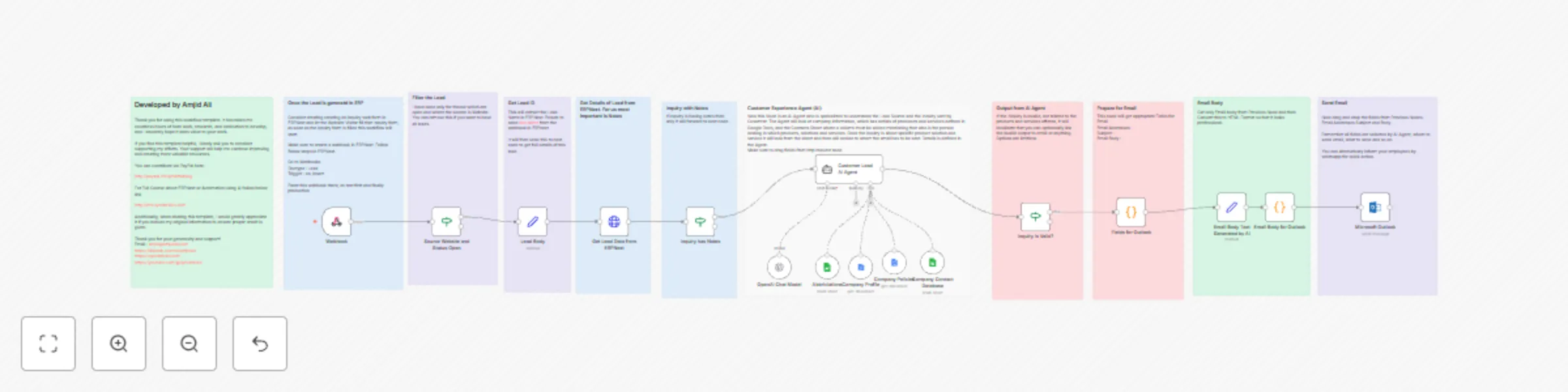
This workflow template automates lead management and customer inquiry processing by integrating ERPNext, AI agents, and email notifications. It streamlines the process of capturing leads, analyzing...

Best for

  • Lead Generation automation workflows
  • AI Summarization automation workflows
  • advanced n8n builders looking for reusable templates

Tools used

@n8n/n8n-nodes-langchain.agent, @n8n/n8n-nodes-langchain.lmchatopenai, n8n-nodes-base.googlesheetstool, n8n-nodes-base.set, n8n-nodes-base.if, n8n-nodes-base.microsoftoutlook, n8n-nodes-base.code, n8n-nodes-base.googledocstool

Source and attribution

This workflow is cataloged by N8N Workflows and links back to its original n8n.io source page by Amjid Ali.

Original n8n.io source

1.1 Workflow description

Title
AI-driven lead management and inquiry automation with ERPNext & n8n
Workflow name
AI-driven lead management and inquiry automation with ERPNext & n8n
Overview

This workflow template automates lead management and customer inquiry processing by integrating ERPNext, AI agents, and email notifications. It streamlines the process of capturing leads, analyzing inquiries, and generating actionable responses. The workflow uses ERPNext to capture inquiries, analyzes them with AI, and notifies the appropriate team or individual, all while maintaining a professional approach.


What This Template Does

  1. ERPNext Webhook Integration:

    • Captures leads and inquiries through ERPNext webhooks.
    • Triggers the workflow when a new lead is created.
  2. AI-Powered Inquiry Analysis:

    • Uses AI to extract key details from lead notes (e.g., customer name, organization, inquiry summary).
    • Classifies inquiries as valid or invalid based on relevance to products, services, or solutions.
  3. Contact Assignment:

    • Matches inquiries to the appropriate contact(s) using a Google Sheets database or ERPNext contact information.
    • Handles multiple contacts if required.
  4. Email Notifications:

    • Generates professional email notifications for valid inquiries.
    • Sends emails to the appropriate contact(s) with inquiry details and action steps.
  5. Invalid Lead Handling:

    • Identifies invalid inquiries (e.g., unrelated to products or services) and flags them for follow-up or dismissal.
  6. Custom Email Formatting:

    • Converts plain text into professionally formatted HTML emails.
    • Ensures that communication is clear, concise, and visually appealing.

How It Works

Step 1: Capture Lead Data
  • Webhook in ERPNext:

    • Create a webhook in ERPNext for the "Lead" DocType.
    • Set the trigger to on_insert to capture new leads in real-time.
  • Lead Details:

    • The workflow fetches lead details, including notes, contact information, and the source of the lead.
Step 2: Validate and Analyze Inquiry
  • AI Agent for Analysis:

    • An AI agent analyzes the lead notes to extract key details and classify the inquiry as valid or invalid.
    • The analysis includes checking the relevance of the inquiry to products, services, or solutions offered by the company.
  • Invalid Leads:

    • If the inquiry is invalid, the workflow flags it and stops further processing.
Step 3: Assign Contact(s)
  • Google Sheets Integration:

    • Uses a Google Sheets database to map products, services, or solutions to responsible contacts.
    • Ensures that inquiries are directed to the right person or team.
  • Multiple Contacts:

    • Handles cases where multiple contacts are responsible for a particular product or service.
Step 4: Generate and Send Email Notifications
  • AI-Generated Emails:

    • The workflow generates a professional email summarizing the inquiry.
    • Emails include details like customer name, organization, inquiry summary, and action steps.
  • Custom HTML Formatting:

    • Emails are converted to HTML for a polished and professional appearance.
  • Send Notifications:

    • Sends email notifications through Microsoft Outlook or another configured email client.
    • Optionally, notifies via WhatsApp or SMS for urgent inquiries.
Step 5: Post-Inquiry Actions
  • ERPNext Record Updates:
    • Updates the lead record in ERPNext with relevant details, including inquiry status and contact information.

Setup Instructions

Prerequisites
  1. ERPNext:
    • A configured ERPNext instance with lead data and a webhook for the "Lead" DocType.
  2. Google Sheets:
    • A sheet mapping products, services, or solutions to responsible contacts.
  3. AI Integration:
    • Credentials for OpenAI or other supported AI platforms.
  4. Email Client:
    • Credentials for Microsoft Outlook or another email client.

Step-by-Step Setup

  1. ERPNext Configuration:

    • Create a webhook for the "Lead" DocType in ERPNext.
    • Test the webhook with sample data to ensure proper integration.
  2. Workflow Import:

    • Import the workflow template into n8n.
    • Configure nodes with your API credentials for ERPNext, Google Sheets, and AI tools.
  3. Google Sheets Integration:

    • Prepare a Google Sheet with columns for product, service, or solution and the responsible contact(s).
    • Link the sheet to the workflow.
  4. AI Agent Configuration:

    • Customize the AI agent’s prompts to align with your business’s products and services.
    • Adjust criteria for valid and invalid inquiries as needed.
  5. Email Setup:

    • Configure the email client node with your email service credentials.
    • Customize the email template for your organization.
  6. Testing:

    • Run the workflow with sample leads to validate the entire process.
    • Check email notifications, contact assignments, and record updates in ERPNext.

Dos and Don’ts

Dos:
  • Test Thoroughly: Test the workflow with various scenarios before deploying in production.
  • Secure Credentials: Keep API and email credentials secure to avoid unauthorized access.
  • Customize Prompts: Tailor AI prompts to match your business needs and language style.
  • Use Professional Email Templates: Ensure emails are clear and well-formatted.
Don’ts:
  • Skip Validation: Always validate inquiry data to avoid sending irrelevant notifications.
  • Overload the Workflow: Avoid adding unnecessary nodes that can slow down processing.
  • Ignore Errors: Monitor logs and address errors promptly for a smooth workflow.

Resources

GET n8n Now

N8N COURSE

n8n Book

1.2 Logical Blocks

This catalog entry is organized from the workflow JSON. The node-level section below shows the executable blocks available for review before importing the template.

2. Block-by-Block Analysis

Block 1 - Customer Lead AI Agent

Type / Role
@n8n/n8n-nodes-langchain.agent - agent
Config choices
Version 1.7

Block 2 - OpenAI Chat Model

Type / Role
@n8n/n8n-nodes-langchain.lmChatOpenAi - lmChatOpenAi
Config choices
Version 1

Block 3 - Abbriviations

Type / Role
n8n-nodes-base.googleSheetsTool - googleSheetsTool
Config choices
Version 4.5

Block 4 - Lead Body

Type / Role
n8n-nodes-base.set - set
Config choices
Version 3.4

Block 5 - Source Website and Status Open

Type / Role
n8n-nodes-base.if - if
Config choices
Version 2.2

Block 6 - Microsoft Outlook

Type / Role
n8n-nodes-base.microsoftOutlook - microsoftOutlook
Config choices
Version 2

Block 7 - Email Body Text Generated by AI

Type / Role
n8n-nodes-base.set - set
Config choices
Version 3.4

Block 8 - Fields for Outlook

Type / Role
n8n-nodes-base.code - code
Config choices
Version 2

Block 9 - Email Body for Outlook

Type / Role
n8n-nodes-base.code - code
Config choices
Version 2

Block 10 - Inquiry has Notes

Type / Role
n8n-nodes-base.if - if
Config choices
Version 2.2

Block 11 - Inquiry is Valid?

Type / Role
n8n-nodes-base.if - if
Config choices
Version 2.2

Block 12 - Company Profile

Type / Role
n8n-nodes-base.googleDocsTool - googleDocsTool
Config choices
Version 2

Block 13 - Company Policies

Type / Role
n8n-nodes-base.googleDocsTool - googleDocsTool
Config choices
Version 2

Block 14 - Company Contact Database

Type / Role
n8n-nodes-base.googleSheetsTool - googleSheetsTool
Config choices
Version 4.5

Block 15 - Sticky Note4

Type / Role
n8n-nodes-base.stickyNote - stickyNote
Config choices
Version 1

Block 16 - Sticky Note6

Type / Role
n8n-nodes-base.stickyNote - stickyNote
Config choices
Version 1

Block 17 - Sticky Note

Type / Role
n8n-nodes-base.stickyNote - stickyNote
Config choices
Version 1

Block 18 - Sticky Note2

Type / Role
n8n-nodes-base.stickyNote - stickyNote
Config choices
Version 1

Block 19 - Sticky Note7

Type / Role
n8n-nodes-base.stickyNote - stickyNote
Config choices
Version 1

Block 20 - Sticky Note12

Type / Role
n8n-nodes-base.stickyNote - stickyNote
Config choices
Version 1

Block 21 - Sticky Note13

Type / Role
n8n-nodes-base.stickyNote - stickyNote
Config choices
Version 1

Block 22 - Sticky Note14

Type / Role
n8n-nodes-base.stickyNote - stickyNote
Config choices
Version 1

Block 23 - Sticky Note11

Type / Role
n8n-nodes-base.stickyNote - stickyNote
Config choices
Version 1

Block 24 - Sticky Note16

Type / Role
n8n-nodes-base.stickyNote - stickyNote
Config choices
Version 1

Showing the first 24 of 27 workflow blocks. Download the JSON for the full node graph.

3. Summary Table

Workflow AI-driven lead management and inquiry automation with ERPNext & n8n
Complexity advanced
Nodes 27
Categories Lead Generation, AI Summarization
Author Amjid Ali
Published 20 Jan 2025

4. Reproducing the Workflow from Scratch

  1. 1. Download the workflow JSON

    Use the JSON export at /data/workflows/2758/2758.json as the source template for this automation.

  2. 2. Import the template into n8n

    Open n8n, import the downloaded JSON, and review each node before activating the workflow.

  3. 3. Configure credentials and variables

    Replace placeholder credentials, API keys, webhook URLs, account IDs, and environment-specific values with your own settings.

  4. 4. Test with sample data

    Run the workflow manually or in a staging workspace, inspect node output, and confirm downstream systems receive the expected data.

  5. 5. Activate and monitor

    Enable the workflow only after testing, then monitor executions, errors, and rate limits during the first production runs.

5. General Notes & Resources

Review imported nodes carefully before activation. This catalog entry is intended to help you inspect the workflow structure, understand required services, and find related templates faster.

Node names, credentials, schedules, webhook paths, and external service limits may need adjustment for your workspace.

Frequently asked questions

What does AI-driven lead management and inquiry automation with ERPNext & n8n do?

This workflow template automates lead management and customer inquiry processing by integrating ERPNext, AI agents, and email notifications. It streamlines the process of capturing leads, analyzing...

What do I need before importing this workflow?

Review the workflow JSON, configure any required credentials in n8n, and test the automation in a safe workspace before using it in production.

Can I customize this workflow?

Yes. Use the block-by-block analysis and the downloadable JSON to inspect each node, then adjust credentials, prompts, schedules, filters, or destinations for your Lead Generation, AI Summarization use case.