Block 1 - When clicking ‘Execute workflow’
- Type / Role
- n8n-nodes-base.manualTrigger - manualTrigger
- Config choices
- Version 1


 Early Deal
This workflow is provided as-is. Please review and test before using in production.
Description: Streamline your lead management process with this AI driven n8n automation template. The workflow fetches opportunities from HighLevel (GHL), enriches them with contact details, and us...
n8n-nodes-base.manualtrigger, n8n-nodes-base.stickynote, n8n-nodes-base.if, n8n-nodes-base.emailsend, @n8n/n8n-nodes-langchain.agent, n8n-nodes-base.highlevel, @n8n/n8n-nodes-langchain.lmchatazureopenai, n8n-nodes-base.code
This workflow is cataloged by N8N Workflows and links back to its original n8n.io source page by Rahul Joshi.
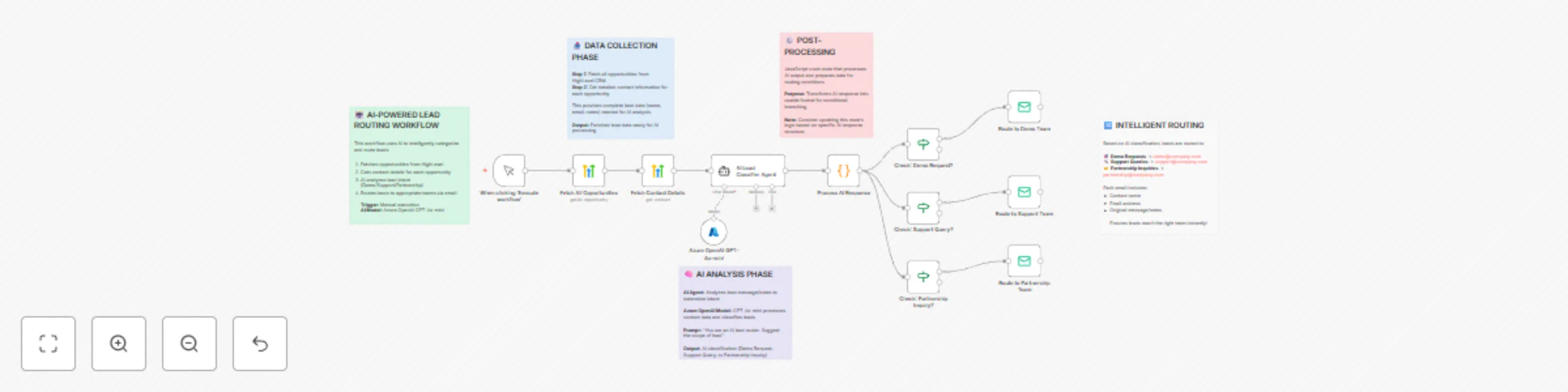
Original n8n.io sourceStreamline your lead management process with this AI-driven n8n automation template. The workflow fetches opportunities from HighLevel (GHL), enriches them with contact details, and uses Azure OpenAI GPT-4o-mini to analyze each lead’s intent (e.g., Demo Request, Support Query, or Partnership Inquiry). It then automatically routes the lead to the right internal team via email, ensuring instant follow-up and zero delays in response time. Perfect for sales, support, and partnership teams who want to save time on manual triage and ensure every inquiry reaches the correct department within seconds.
⚡ Manual or Scheduled Trigger Run the workflow manually for on-demand classification or schedule it to execute periodically.
📥 Fetch Opportunities from HighLevel Retrieves all opportunities from your GHL CRM, serving as the starting dataset for AI-powered intent detection.
👤 Fetch Detailed Contact Information Enriches each opportunity with full contact details such as name, email, and message notes.
🧠 AI-Powered Lead Classification Uses Azure OpenAI GPT-4o-mini via the LangChain AI Agent to analyze the lead’s message and determine the intent. Possible outputs include:
🔀 Intelligent Routing to Relevant Teams
📧 Instant Team Notifications Sends neatly formatted emails from a centralized sender ([email protected]) to ensure smooth handoff and accountability.
🤖 AI intent classification using Azure OpenAI GPT-4o-mini 🔀 Automated lead routing via email 📋 Structured data enrichment from HighLevel ⚙️ Smart conditional logic for 3 lead categories 📩 End-to-end automation from CRM intake to response
📞 Automatically route demo requests to the sales team 🛠️ Send support-related queries directly to helpdesk 🤝 Forward partnership inquiries to business development 💡 Reduce response delays and manual triage errors
HighLevel (GHL) – for opportunity and contact data Azure OpenAI – for AI-driven lead classification SMTP / Gmail – for team routing email notifications
✅ Automates manual lead sorting and tagging ✅ Ensures every inquiry reaches the right team ✅ Increases response speed and lead conversion ✅ Scalable AI logic adaptable to any organization
This catalog entry is organized from the workflow JSON. The node-level section below shows the executable blocks available for review before importing the template.
| Workflow | AI-driven lead classification & routing with HighLevel and Azure GPT-4o-mini |
|---|---|
| Complexity | advanced |
| Nodes | 17 |
| Categories | Lead Generation, AI Summarization |
| Author | Rahul Joshi |
| Published | 25 Oct 2025 |
Use the JSON export at /data/workflows/10150/10150.json as the source template for this automation.
Open n8n, import the downloaded JSON, and review each node before activating the workflow.
Replace placeholder credentials, API keys, webhook URLs, account IDs, and environment-specific values with your own settings.
Run the workflow manually or in a staging workspace, inspect node output, and confirm downstream systems receive the expected data.
Enable the workflow only after testing, then monitor executions, errors, and rate limits during the first production runs.
Review imported nodes carefully before activation. This catalog entry is intended to help you inspect the workflow structure, understand required services, and find related templates faster.
Node names, credentials, schedules, webhook paths, and external service limits may need adjustment for your workspace.
Description: Streamline your lead management process with this AI driven n8n automation template. The workflow fetches opportunities from HighLevel (GHL), enriches them with contact details, and us...
Review the workflow JSON, configure any required credentials in n8n, and test the automation in a safe workspace before using it in production.
Yes. Use the block-by-block analysis and the downloadable JSON to inspect each node, then adjust credentials, prompts, schedules, filters, or destinations for your Lead Generation, AI Summarization use case.