Tianyi
Workflows by Tianyi

Automate research-based newsletters with Perplexity, GPT-4, and image generation
This n8n workflow automates the process of creating and sending high-quality newsletters with images generated by a GPT image generator. It is triggered on a schedule. ## What is included? - 1 n8n workflow (json) - 1 Setup tutorial doc - 1 video guidance on how to connect n8n with all Google products - 1 video guidance on how to connect n8n with Google Cloud Storage ## Who is this for? This template is ideal for: - Content creators looking to automate their newsletter process. - Marketers seeking to efficiently produce engaging newsletters with AI-generated content and imagery. - Anyone wanting to create and send personalized newsletters on a schedule. ## What problem is this workflow solving? Manually creating and sending newsletters can be time-consuming, especially when including relevant and engaging content and imagery. This workflow automates the content generation (using AI and web search), image creation, and sending process, freeing up time and ensuring consistent communication with clients. ## What this workflow does: This workflow automates the following steps: **Scheduled Trigger:** The workflow is triggered automatically on a predefined schedule. **Get Newsletter Topic:** Retrieves the first unpublished newsletter topic from a Google Sheet titled "Newsletter Topics". It then updates the status of this topic and records the publication date to avoid duplication in future runs. **AI Newsletter & Image Generator:** This is the core content creation step. It uses an AI agent (configured with OpenAI and Perplexity APIs) to generate an engaging newsletter and a detailed, ultra-realistic image prompt based on the selected topic and real-time web research. **GPT Image Generation:** Uses the OpenAI API to generate an image based on the detailed image prompt created in the previous step. **Get Client List:** Retrieves client names and email addresses from a Google Sheet titled "Clients". **Send Newsletter:** Sends the personalized newsletter via Gmail to each client on the list, including the AI-generated title, content, and the uploaded image. The email body HTML is customizable. ## Setup: 1. **Configure the workflow's run frequency** within the "Schedule Trigger" node. 2. **Create a Google Sheet named "Newsletter Topics" and "Clients"** in your Google Drive. 3. **Enter your OpenAI and Perplexity API key** in the 'Input' node. 4. **Connect your Gmail account** to the "SendNewsletter" node. ## How to customize this workflow: **Adjust the prompt for your newsletter style** in the "AI Agent" node. **Adjust the Email Body HTML for your newsletter style** in the "SendNewsletter" node. Optionally, enable the "Tavily WebSearch" node and configure it if you prefer to use Tavily instead of Perplexity for web search. ## Category: Marketing, Content Creation, Automation
The ultimate Instagram automation for high-quality images & text with GPT-Image
 This **n8n workflow** revolutionizes Instagram content creation by **automating everything from idea input to publishing high-quality, AI-generated posts** with realistic images or infographics. Whether you're an entrepreneur, a content creator, or a marketer, this workflow lets you consistently deliver professional-grade posts without manual effort. It leverages power of **OpenAI Image Generator** to generate engaging captions, create stunning visuals, and publish directly to Instagram — fully automated! It allows you to generate and post highly relevant images with statistics, graphs, and charts, hyper-realistic images, or any custom image style you want. --- ## What is included? ✅ 1 n8n Workflow (.json) file ✅ 4 Video Guidance Tutorials: - **Setup Tutorial**: How to set up this workflow from scratch. - **Instagram Connection Tutorial**: How to connect n8n to Instagram (and all other Facebook products). - **Google Cloud Storage Connection Tutorial**: How to upload and host images on Google Cloud. - **Google Product Integration Tutorial**: How to connect n8n with all Google products. --- ## Who is this for? This template is ideal for: - Content creators who want to automate Instagram posting with AI assistance. - Entrepreneurs and brands aiming to build a consistent social media presence. - Social media managers seeking to save time while maintaining high-quality output. - Anyone looking to auto-generate professional posts without needing graphic design skills. --- ## What problem is this workflow solving? Building a consistent, high-quality Instagram feed is time-consuming. This workflow solves key challenges by: - Automating **research, writing, image generation, hosting, and publishing**. - Saving hours of manual content creation work each week. - Allowing easy scalability of your Instagram marketing efforts. - Giving the option to create data-driven infographics or hyper-realistic images. - Ensuring posts stay engaging, informative, and visually appealing — without creative burnout. --- ## What this workflow does This workflow automates the following steps: - **Idea Input**: Accepts a post idea through a form or scheduled posting based on a default niche. - **Research & Caption Generation**: Uses Web Search and GPT to research the topic and generate an engaging Instagram caption with trending hashtags. - **Image Generation**: - **Option 1**: Generate an infographic with statistics, graphs, and charts. - **Option 2**: Create a hyperrealistic, AI-generated photo based on real-world elements **(fully customizable to any image style)**. - **Publishing**: Posts the image and caption automatically to **Instagram** via the **Facebook Graph API**. --- ## Setup 1. **Trigger Options**: - **By Schedule**: Configure regular post publishing. - **By Form**: Submit a post idea anytime manually. 2. **Choose Image Style**: - Enable **graphs/statistics** for data-driven visuals. - Choose **hyperrealistic images** for lifestyle, travel, fashion, and more. 3. **Customize Language and Niche**: - Set your default language (English by default) and niche topic. 4. **API Keys**: - Insert your OpenAI API Key and Tavily API Key inside the workflow for activation. 5. **Connect Your Accounts**: - OpenAI for text and image generation. - Google Cloud Storage for image hosting (please refer to the video guidance). - Facebook Graph API for publishing to Instagram (please refer to the video guidance).. --- ## How to Customize This Workflow - **Post Style**: Adjust the AI prompt settings to tweak the tone and style of your Instagram captions. - **Image Look**: Customize the image generation prompt to change image style, themes, and resolutions. - **Frequency**: Modify schedule triggers to post as frequently (or infrequently) as you like. --- ## Category Marketing | Social Media Automation | Content Creation
Automated AI product photography and Instagram post generator (Deepseek/Segmind)
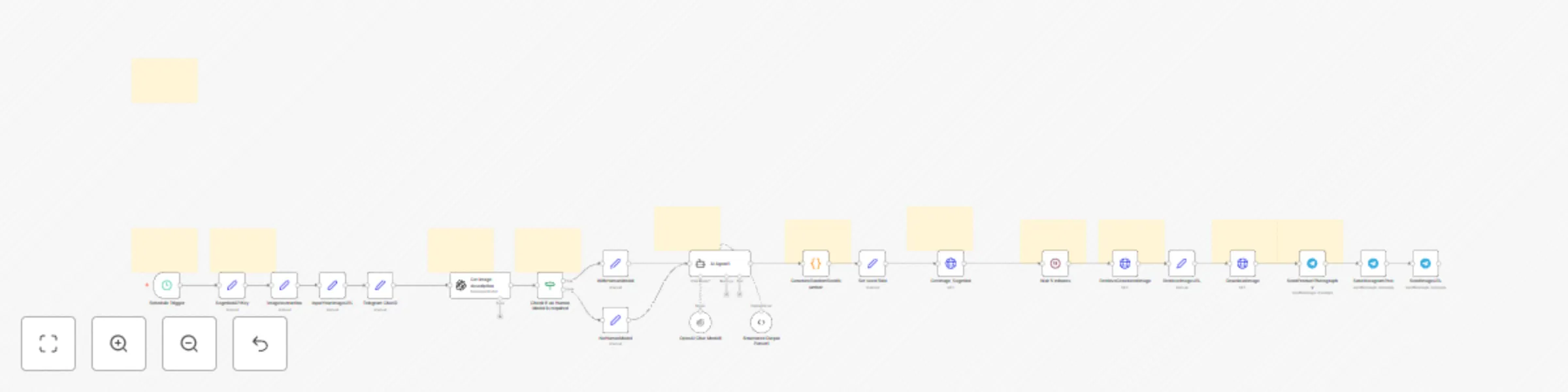
**Automatically generate professional-grade product photography and ready-to-use Instagram posts** using the power of AI, delivered straight to your Telegram for approval. **Setup is incredibly simple:** All you need is your product image URL and a API key from Segmind. --- ## Who is this for? This template is ideal for: - **E-commerce store owners** looking to create high-quality product visuals affordably (The estimated cost is approximately $0.10 per product photography and accompanying Instagram post). - **Dropshippers** needing unique product images to stand out. - **Social Media Managers & Marketers** seeking to automate content creation for platforms like Instagram. - **Small Businesses** wanting professional marketing assets without the high cost or effort. - Anyone needing consistent, eye-catching product photos and social media captions on a regular schedule. --- ## What problem is this workflow solving? Creating professional product images is often expensive and time-consuming, requiring photographers, studios, and editing time. Consistently generating fresh and engaging social media content, especially for visual platforms like Instagram, adds another layer of complexity and effort. This workflow **eliminates these bottlenecks** by automating both high-quality image generation and relevant caption creation, freeing up your time and budget. --- ## What this workflow does: This n8n workflow automates the entire process on a schedule **you** define (e.g., every hour, every day): 1. **Scheduled Start:** Triggers automatically based on your chosen time interval (e.g., every hour). 2. **Product Analysis:** Takes your input product image URL and uses AI (GPT) to understand the product details. 3. **AI Prompt Generation:** Based on the product analysis and your preference (whether to include a human model or not), it uses AI (Deepseek) to craft a sophisticated prompt specifically for generating professional product photography via Segmind. 4. **Instagram Post Creation:** Simultaneously, the AI (Deepseek) generates an engaging Instagram post caption, complete with relevant hashtags, tailored to your product. 5. **AI Image Generation:** Sends the product image, the generated prompt, and product details to the Segmind API to create a brand new, studio-quality product photograph. 6. **Telegram Validation:** Downloads the newly generated product photo and sends both the photo and the generated Instagram post text directly to your specified Telegram chat. This allows you to quickly review and approve the content before using it. --- ## Setup: Get Running in Minutes! This workflow is designed for **maximum ease of setup**: 1. **Get Segmind API Key:** Sign up or log in to Segmind and grab your API key here: https://cloud.segmind.com/console/api-keys 2. **Enter API Key:** In the n8n workflow, click on the `SegmindAPIKey` node and paste your copied API key into the `Value` field. 3. **Enter Product Image URL:** Click the `InputYourImageURL` node and paste the web address (URL) of your product image into the `Value` field. 4. **(Optional) Human Model Preference:** Click the `ImageInstruction` node. Set the `HumanModel` value to `true` if you want a human model potentially included in the photo, or `false` if you want the product showcased alone or in a setting. 5. **Set Your Schedule:** Click the `Schedule Trigger` node. Define how often you want the workflow to run (e.g., under Interval, set `1` and select `Hours` from the dropdown for hourly runs). 6. **Configure Telegram:** Make sure you have a Telegram Bot credential configured in n8n. Then, in the `SendProductPhotography` and `SendInstagramPost` nodes, enter the correct `Chat ID` for where you want to receive the validation messages. [A video guidance is made to help you with telegram setup] 7. **Activate Workflow:** Toggle the workflow to "Active" in the top right corner of n8n. **That's it!** The workflow will now automatically generate and send product photos and Instagram posts to your Telegram at your defined interval. --- ## How to customize this workflow: While the default setup works great, you can easily tweak it: - **Photography Style:** Modify the main prompt within the `AI Agent1` node to guide the AI towards a specific aesthetic (e.g., "minimalist background," "bright natural lighting," "dark moody atmosphere"). - **Instagram Post Tone:** Adjust the instructions within the `AI Agent1` node to change the style or focus of the generated Instagram captions. - **Schedule:** Change the trigger interval in the `Schedule Trigger` node anytime. - **AI Models:** Experiment by changing the selected models in the `OpenAI`, `OpenAI Chat Model1` (Deepseek). --- ## Category: Marketing, Social Media, E-commerce, Automation, AI, Content Creation, Product Photography
Ultimate AI assistant: Automate email, calendar, webSearch, Notion, RAG & X
This is an ultimate AI assistant: **Handle emails, schedule meetings, search the web, take notes, post to social media, and retrieve information from your knowledge base**, all through simple Telegram commands **(text, voice, or image)**. ## What is included: - 1 Ready-to-use n8n workflow file (`.json`) - 4 Instructional videos demonstrating how to connect n8n with: - Google Products (Gmail, Calendar, Sheets) - Telegram - Pinecone Vector Store - Notion ## Who is this for? This workflow is ideal for: - Individuals seeking to automate personal and professional tasks. - Professionals needing efficient management of emails, calendars, and contacts. - Content creators or researchers requiring quick information retrieval and drafting capabilities. - Anyone wanting a centralized AI assistant. ## What problem is this workflow solving? Managing numerous digital tasks across different platforms can be time-consuming and fragmented. This workflow consolidates control into Telegram, leveraging AI to understand your needs and automate actions across email, calendar, contacts, web search, note-taking (Notion), social media (X), and your personal knowledge base (Pinecone RAG), saving you time and effort. It ensures tasks are handled correctly using a built-in verification step. ## What this workflow does: This workflow acts as a central AI Agent that: 1. **Receives Input via Telegram:** Accepts text messages, voice notes (transcribes them using OpenAI), or images (analyzes them using OpenAI). 2. **Understands Requests:** Uses an AI Agent (powered by models like GPT) to interpret the user's instructions. 3. **Orchestrates Tools:** Selects and uses the appropriate tools based on the request: - **Email (Gmail):** Send, read, reply, draft, and label emails. - **Calendar (Google Calendar):** Create, get, update, and delete events, managing attendees if needed. - **Contacts (Google Sheets):** Look up and add contact information. - **Web Search (Tavily):** Search the internet for up-to-date information. - **Knowledge Retrieval (Pinecone):** Query your personal vector database (RAG). - **Note Taking (Notion):** Create notes in a specified Notion database. - **Social Media (X/Twitter):** Post tweets directly to X. 4. **Maintains Context:** Uses Window Buffer Memory to remember recent interactions. 5. **Ensures Accuracy:** Employs a "Think" tool to double-check tool usage and task completion. 6. **Responds via Telegram:** Sends the results or confirmation back to the user in the Telegram chat. ## Setup: 1. **Telegram:** Connect your Telegram bot credentials. 2. **AI Model:** Connect your OpenAI API key. 3. **Email:** Connect your Gmail account. 4. **Calendar:** Connect your Google Calendar account. 5. **Contacts:** Connect your Google Sheets account. 6. **Knowledge Base (RAG):** Connect Pinecone. 7. **Note Taking:** Connect Notion and configure Notion Database. 8. **Web Search:** Add Tavily API key. 9. **Social Media:** Connect your X (Twitter) account. *(Refer to the included videos for detailed setup guidance)* ## How to customize this workflow: - **AI Prompts:** Modify the system messages and prompts within the "AI Agent" node. - **AI Models:** Swap out the language model. - **Tools:** Add, remove, or replace tool nodes. ## Category: Automation, AI Agent, Personal Assistant, Productivity, Task Management, Telegram
Automated LinkedIn job hunter: get your best daily job matches by email
## Overview This n8n template automates the tedious process of searching for jobs on LinkedIn. By integrating with tools for web scraping and leveraging AI (Google Gemini) for intelligent matching, this workflow delivers a curated list of the top 5 most relevant job opportunities published within past 24h directly to your inbox daily, based on your unique resume and preferences.The cost is only 0.1 USD per day and there is no subscription needed. ## Who is this for? This template is ideal for: - Active job seekers wanting to save time and effort. - Professionals looking to discreetly monitor relevant new opportunities. - Individuals seeking a highly personalized job feed tailored to their resume and preferences. - Anyone overwhelmed by manual job searching on LinkedIn. ## What is Included: - **n8n Workflow Template:** The complete workflow file (`.json`) ready to import into your n8n instance. - **Video Guidance:** A step-by-step video walkthrough showing you exactly how to set up and configure the workflow. ## What problem is this workflow solving? Finding the right job on LinkedIn can be overwhelming and time-consuming. Sifting through hundreds of listings, tailoring searches, and checking daily takes significant effort. This workflow solves the problem of manual, repetitive job searching by automating the discovery and filtering process, ensuring you see the most relevant opportunities without the daily grind and reducing the risk of missing out on your ideal role. ## What this workflow does: This workflow automates the following steps: 1. **Scheduled Job Fetching:** Runs automatically (default: daily at 8 AM) to find the latest jobs. 2. **Resume Processing:** Downloads your resume (PDF) from Google Drive and extracts the text content. 3. **Targeted LinkedIn Scraping:** Uses Apify to scrape recent job listings from LinkedIn based on your custom search URL. 4. **AI-Powered Matching:** Employs an AI agent (Google Gemini) to analyze scraped jobs against your resume text and specified preferences. 5. **Top 5 Ranking & Selection:** Identifies and ranks the opportunities, selecting the 5 best matches for you. 6. **Personalized Email Reporting:** Generates and sends a detailed HTML email containing the top 5 jobs, including company name, job title, industry, a personalized reason for the match, and a direct application link. ## Setup: Follow these steps to configure the workflow: 1. **Core Connections:** - Connect your Google Drive and Gmail accounts to n8n via the Credentials section. - Ensure your n8n environment has access/credentials configured for the AI model used by the AI Agent node (e.g., Google Gemini). 2. **Apify Integration:** - Sign up for an Apify account ([apify.com](https://apify.com/)) and obtain your API key. - **Action:** In the `Input` node, paste your Apify API Key into the `Value` field for the `ApifyAPIKey` assignment. 3. **Resume Setup:** - Upload your current resume in PDF format to your Google Drive. - **Action:** Find the File ID of the uploaded resume in Google Drive (part of the shareable link). Paste this File ID into the `File ID` parameter within the `DownloadResume` (Google Drive) node. 4. **LinkedIn Search Definition:** - Go to LinkedIn Jobs ([www.linkedin.com/jobs/search/](https://www.linkedin.com/jobs/search/)) using an *incognito/private* browser window to ensure you get a public URL. - Apply all your desired filters (keywords, location, date posted, job type, industry, etc.). - Copy the *complete URL* from your browser's address bar. - **Action:** In the `ScrapeLinkedin` (HTTP Request) node, navigate to the `Body` > `JSON` parameter. Replace the example URL within the `urls` array `[ "YOUR_LINKEDIN_SEARCH_URL_HERE" ]` with the URL you just copied. *Make sure the URL is enclosed in double quotes.* 5. **Personalization Inputs:** - **Action:** Go to the `Input` node: - In the `Preference` assignment, replace the example text in the `Value` field with your detailed job preferences (e.g., "Seeking remote Data Scientist roles in SaaS companies with less than 1000 employees, strong preference for Python/ML focus"). - In the `EmailAddressToReceiveJobRecommendations` assignment, enter the email address where you want to receive the daily job list in the `Value` field. 6. **Email Sender Configuration:** - **Action:** In the `Email the top job recommendations` (Gmail) node, ensure the correct Gmail credential (the account you want to send emails *from*) is selected. ## How to customize this workflow: - **Run Schedule:** Modify the settings in the `Schedule Trigger` node to change the time or frequency (e.g., twice daily, weekly). - **Job Search Criteria:** Update the LinkedIn search URL in the `ScrapeLinkedin` node whenever you want to target different roles, industries, or locations. - **Matching Preferences:** Refine the text in the `Preference` field within the `Input` node to guide the AI's matching process more accurately. - **AI Behavior:** Advanced users can adjust the system prompt within the `AI Agent: Find Best-matched jobs` node to change how the AI analyzes or presents information (ensure the output structure still matches the `Structured Output Parser` and email node expectations). - **Number of Jobs Scraped:** Change the `count` value (e.g., from 100) in the `JSON Body` of the `ScrapeLinkedin` node. Note that higher numbers may increase Apify costs/usage. - **Number of Jobs Emailed:** To change the number of recommendations (e.g., top 3 or top 10), you'll need to: - Modify the AI prompt in the `AI Agent: Find Best-matched jobs` node to request the desired number. - Adjust the `Structured Output Parser` node's example/schema if needed. - Update the HTML code in the `Email the top job recommendations` node to correctly loop through and display the new number of jobs. - **Email Appearance:** Edit the HTML within the `Message` field of the `Email the top job recommendations` node to customize the email's style, colours, or layout. ## Category: Job Search, Automation, AI, Productivity, Career Management
Self-learning AI assistant with permanent memory | GPT,Telegram & Pinecone RAG
## Your AI secretary that self-learning every day and remembers everything you said (text, audio, image). **Imagine having a personal AI secretary accessible right from your Telegram, ready to assist you with information and remember everything you discuss.** This n8n workflow transforms Telegram into your intelligent assistant, capable of understanding text, audio, and images, and continuously learning from your interactions. **It integrates RAG's offline data ingestion and online querying functionalities, letting you save inspiration and key information permanently in real-time, and giving you an AI assistant that remembers all your dialogues and information.** It builds and queries a powerful vector database in real-time, ensuring relevant and accurate responses. **Video guidance on how to set up Telegram integration is also included.** **Who is this for?** This template is ideal for: - Individuals seeking a personal AI assistant for quick information retrieval and note-taking. - Professionals who need to keep track of important conversations and insights. - Anyone interested in leveraging the power of Retrieval-Augmented Generation (RAG) and vector databases for personal knowledge management. - Users who want a self-learning AI that improves over time based on their interactions. **What problem is this workflow solving?** **This workflow integrates RAG's offline data ingestion and online querying functionalities, letting you save inspiration and key information permanently in real-time, and giving you an AI assistant that remembers all your dialogues and information.** This workflow addresses the challenge of information overload and the need for an easily accessible, personalized knowledge base. It eliminates the need to manually organize notes and search through past conversations. By automatically storing and retrieving information from a vector database, this workflow makes it effortless to access the knowledge you need, when you need it. It also provides a way to retain information from various media types like voice notes and images. **What this workflow does:** This workflow automates the following steps: - **Instant Information Capture:** Receives text messages, audio notes (transcribed), and images (with content analysis) directly from your Telegram. - **Intelligent Question Answering:** When you ask a question, the AI searches its knowledge base (Pinecone vector store) for relevant information and provides a comprehensive answer. It even considers your recent conversations for context. - **Automatic Knowledge Storage:** When you make a statement or provide information, the AI extracts key details and saves them in a Google Docs "memory palace." - **Daily Self-Learning:** Every day, the workflow automatically takes all the information stored in the Google Docs, converts it into a vector representation, and adds it to its knowledge base (Pinecone vector store). This ensures the AI continuously learns and remembers everything you've shared. - **Image Understanding:** Extracts text and information from images you send. - **Audio Transcription:** Automatically transcribes your voice notes into text for processing and storage. - **Short-Term Memory:** Remembers recent interactions within a session for more context-aware conversations. **Setup:** To get started, you'll need to connect the following services to your n8n instance: 1. **Telegram:** Connect your Telegram bot API credentials. A video guidance is included for telegram integration setup. 2. **OpenAI:** Provide your OpenAI API key for audio transcription and image analysis. 3. **Pinecone:** Set up a Pinecone account and provide your API key and environment. Create a namespace in Pinecone. 4. **Google Docs:** Connect your Google account with access to Google Docs. You'll need to create a Google Doc that will serve as the daily "memory palace" and provide its ID in the workflow. **How to customize this workflow:** - **Adjust the AI Agent's Personality:** Modify the system prompt in the "AI Agent" node to tailor the AI's tone and behavior. - **Expand Knowledge Sources:** Integrate other data sources into the daily learning process, such as emails or other documents, by adding more nodes to the scheduled trigger workflow. - **Add More Tools for the AI Agent:** Integrate additional tools into the AI Agent, such as web search or other APIs, to further enhance its capabilities. - **Modify the Daily Schedule:** Adjust the schedule trigger to run at a different time or interval.
Daily AI news briefing and summarization with Google Gemini and Telegram
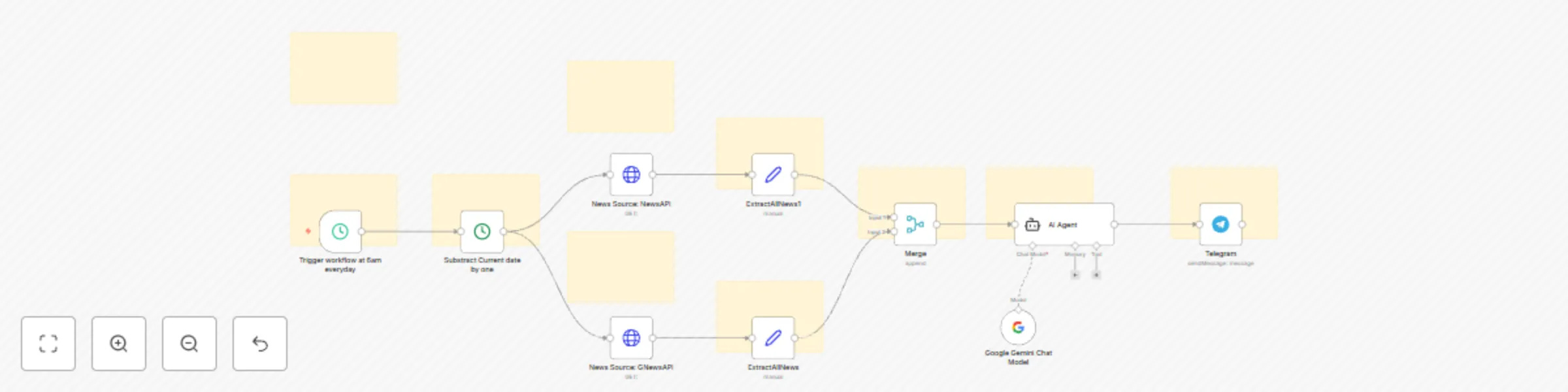
**Stay ahead with personalized AI news delivered straight to your Telegram!** This powerful n8n workflow automates your daily news consumption, leveraging AI to bring you the most relevant trends in AI, (or cryptocurrency, the stock market) and more – all from two free news API sources (GNewsAPI and NewsAPI). **What's Included:** 1. **The n8n Workflow** 2. **Video Guidance for Telegram Integration:** A clear and concise video tutorial demonstrating how to set up the Telegram integration within your n8n instance. **Who is this for?** This template is ideal for: * Individuals wanting to stay updated on the latest AI trends and advancements. * Tech enthusiasts eager to track the latest AI breakthroughs and applications. * Anyone seeking a free, automated, and highly customizable news briefing delivered directly to their Telegram. * Individuals who want to save time and stay informed without the hassle of manual news searching. **What problem is this workflow solving?** Keeping up with the constant influx of information in fast-paced sectors like AI, crypto, and the stock market can be overwhelming and time-consuming. This n8n workflow solves this problem by automatically gathering news from two free news APIs: News API and GNews API, filtering it with AI, and delivering a concise, personalized briefing directly to your Telegram, ensuring you're always in the know without the manual effort. **What this workflow does:** This workflow automates the following steps using two free news API sources (GNewsAPI and NewsAPI): * **Automated News Gathering**: Fetches the latest news on your chosen topics from two distinct free API sources. * **Intelligent AI Filtering**: Employs an AI agent to identify and extract the most pertinent news articles related to your specified interests (default: AI, but easily customizable). * **Concise AI Summarization:** The AI agent creates brief summaries of the key information from the top news articles. * **Direct Telegram Delivery:** Sends a daily digest of the summarized news directly to your Telegram account for convenient access. * **Effortless Customization**: Allows you to easily tailor the news topics to focus on AI, cryptocurrency, stock market updates, or any other area you need to monitor. **Setup:** 1. **Easy Telegram Integration (Video Guidance Included)**: Follow our step-by-step video tutorial to seamlessly integrate Telegram with this n8n workflow, enabling automated news delivery to your preferred chat. 2. **Free API Keys**: This workflow utilizes the free tiers of two popular news APIs: GNewsAPI and NewsAPI. You will need to obtain your own free API keys for these services and input them into the respective HTTP Request nodes within n8n. Clear instructions on how to get these free keys are provided. 3. **First Run**: Activate the workflow and execute it once to verify that all connections are established and functioning correctly. **How to customize this workflow:** * **Tailor Your News Topics**: Easily customize the news you receive by modifying the search queries in the "News Source: GNewsAPI" and "News Source: NewsAPI" nodes. For example, change q=AI to q=Bitcoin for crypto news or q=Tesla stock for stock market updates. * **Adjust the Language**: Change the lang=en parameter in the API URLs to receive news in your preferred language. * **Set Your Delivery Schedule**: Modify the trigger time in the "Trigger workflow at 6am everyday" node to have your personalized news briefing delivered at the time that suits you best. * **Expand Your Sources:** For even more comprehensive news coverage, you can explore and integrate additional free news APIs by adding more HTTP Request nodes to the workflow. **Category:** News Automation, AI, Cryptocurrency, Stock Market, Information, Personal Productivity, Free Resources
Automated faceless YouTube video generator using Leonardo AI and Creatomate
# Automate Your Video Content Creation: AI-Powered Video Generation This n8n template streamlines the creation of high-quality, faceless videos, automating the entire process from scriptwriting to final video production. Leveraging AI tools like Leonardo AI and Creatomate, this workflow empowers content creators to efficiently produce engaging videos without on-camera presence. ## Who is this for? This template is ideal for: * Content creators looking to scale their presence on YouTube, Instagram, and TikTok. * Marketers seeking to automate video marketing campaigns. * Anyone wanting to produce professional-looking videos quickly and easily. * Individuals wishing to create faceless video content. ## What problem is this workflow solving? Creating engaging videos can be time-consuming and resource-intensive. This workflow eliminates the manual effort involved in scripting, image sourcing, and video editing, allowing creators to focus on strategy and content ideation. It addresses the challenge of consistent video production by automating repetitive tasks. ## What this workflow does: This workflow automates the following steps: * **AI-Driven Scriptwriting:** Uses an LLM (default: DeepSeek V3) to generate a compelling video script based on your system prompt and desired number of scenarios. * **AI Image Generation:** Integrates with Leonardo AI to create visually appealing images for each scenario in the script. You define the image style and resolution. * **Automated Video Editing:** Connects to Creatomate to assemble the script and images into a polished video, ready for upload. You’ll use a pre-created “AI generated story template” within Creatomate. ## Setup: * **Video Script Generation:** Provide a detailed system prompt describing your video’s topic, target audience, and key message. Specify the number of scenarios. Select your preferred LLM (DeepSeek V3 is the default). * **Image Generation:** Connect your Leonardo AI account. Choose your preferred image generation model and set the video resolution. Craft a detailed prompt for Leonardo AI, defining the image style (e.g., “cinematic,” “cartoon,” “realistic”). * **Video Editing:** Link your Creatomate account. Create an empty “AI generated story template” in Creatomate. Copy the cURL from the Creatomate template to the video generation node. Link your ElevenLabs account to Creatomate and choose the desired voice. ## How to customize this workflow: * **Script Customization:** Refine the system prompt to guide the AI. Experiment with different LLMs. * **Image Style:** Adjust the Leonardo AI prompt. Explore different image generation models. * **Video Editing:** Modify the Creatomate template to customize transitions, text overlays, and other elements. Add voiceover using the ElevenLabs integration in Creatomate. ## Category: Marketing, Social Media, Content Creation
Automate crypto news posting to X & Telegram with AI summarization
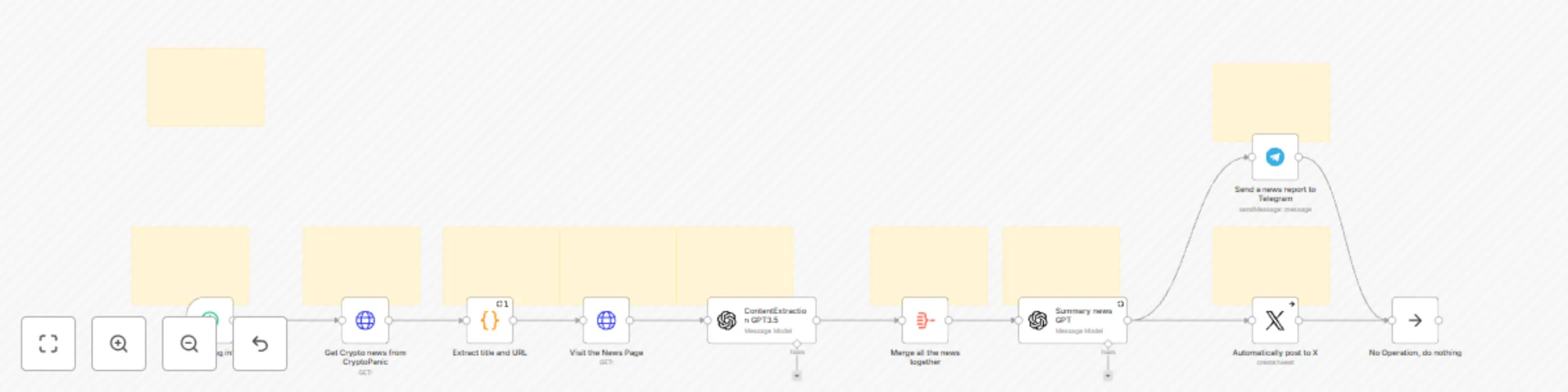
## Automate Crypto News Posting to X & Telegram with AI Summarization This n8n template automates the process of curating and sharing the latest cryptocurrency news on X (formerly Twitter) and Telegram. By leveraging AI for content summarization, this workflow allows you to effortlessly maintain an active social media presence, keeping your audience informed about the dynamic crypto market without manual effort. ### Who is this for? This template is ideal for: * **Content Creators & Marketers:** Aiming to consistently share valuable news and engage their audience without manual content curation. * **Crypto Influencers & Educators:** Looking to provide timely news updates to their followers across multiple platforms. * **Crypto Communities & DAOs:** Seeking to automate news dissemination within their Telegram channels and wider X audience. * **Anyone interested in automated news monitoring and sharing.** ### What problem is this workflow solving? Manually tracking, summarizing, and posting crypto news across different social media platforms is time-consuming and requires constant effort. This workflow eliminates these manual tasks, allowing users to: * **Save Time & Effort:** Automate the entire news curation and posting process. * **Maintain Consistent Presence:** Ensure a regular flow of valuable crypto news updates on X and Telegram. * **Increase Audience Engagement:** Provide timely and summarized news to keep your audience informed and engaged. * **Focus on Strategy:** Free up time to focus on broader content strategy and audience growth instead of repetitive manual posting. ### What this workflow does: This workflow automates the following key steps: 1. **Scheduled News Retrieval:** Uses a Schedule Trigger to run every 90 minutes (configurable), initiating the news gathering process. 2. **Real-time Crypto News Aggregation:** Fetches the latest cryptocurrency news from the CryptoPanic API. 3. **Recent News Filtering:** Filters news articles to include only those published within the last 30 minutes, ensuring timely updates. 4. **Content Extraction from News URLs:** Visits individual news URLs and extracts the full article content. 5. **AI-Powered Content Summarization:** Leverages GPT or other LLMs to extract the core content from news articles. 6. **Content Aggregation:** Merges content from multiple news articles into a single input for summarization. 7. **AI-Driven Social Media Content Generation:** Utilizes GPT or other LLMs to summarize the aggregated news and create two distinct outputs: * **Concise & Engaging X Post:** Optimized for Twitter's character limit, designed to be attention-grabbing. * **Detailed Telegram Report:** A more comprehensive summary suitable for a Telegram channel or group. 8. **Automated Posting to X (Twitter):** Automatically posts the generated X summary to your connected Twitter account. 9. **Automated Delivery to Telegram:** Automatically sends the detailed Telegram report to your specified Telegram chat ID. ### Setup: To get started, you will need to configure the following services and credentials: 1. **CryptoPanic API Token:** * Obtain a free API token from the CryptoPanic website: [https://cryptopanic.com/](https://cryptopanic.com/) * In n8n, navigate to the "HTTP Request" node (named "HTTP Request"). * In the node parameters, locate the "URL" field and replace `"YOURTOKEN"` in the URL with your obtained CryptoPanic API token. 2. **OpenAI API Key:** * Obtain an API key from OpenAI: [https://platform.openai.com/](https://platform.openai.com/) * **For Content Extraction:** In n8n, connect your OpenAI account to the "ContentExtraction GPT3.5" node (named "ContentExtraction GPT3.5"). Use your OpenAI API key for the credentials. * **For News Summarization & Social Media Content Generation:** In n8n, connect your OpenAI account to the "Summary news GPT" node (named "Summary news GPT"). Use your OpenAI API key for the credentials. 3. **X (Twitter) Developer Credentials:** * Create a developer account and project on the X Developer Portal: [https://developer.twitter.com/](https://developer.twitter.com/) * Obtain the necessary API keys and tokens for your X app. * In n8n, connect your X Developer account credentials to the "X" node (named "X"). 4. **Telegram Bot and Chat ID:** * Create a Telegram bot using BotFather on Telegram. Obtain your bot's API token. * Obtain the Chat ID of the Telegram chat where you want to send news reports. * In n8n, connect your Telegram Bot API token to the "Telegram" node (named "Telegram"). * In the "Telegram" node parameters, replace `"YOUR_TELEGRAM_CHAT_ID"` with your Telegram Chat ID. ### How to customize this workflow: * **Adapt to ANY Topic:** Change the "HTTP Request" node to use a news API for your desired topic (AI, Sports, World News, etc.). Critically, adjust the prompts in the "Summary news GPT" node to be relevant to your chosen topic so the AI generates appropriate summaries and social media content. * **Adjust Scheduling Frequency:** Modify the "Schedule Trigger" node to change how often the workflow runs and posts news. * **Adjust Scheduling Frequency:** Modify the "Schedule Trigger" node to change the frequency of news updates (e.g., change the interval from 90 minutes to a different value). * **Modify News Filtering:** Customize the Python code in the "Extract Meta" node to adjust the news filtering criteria. You can change the time window (currently 30 minutes) or filter based on other criteria from the CryptoPanic API response. * **Experiment with GPT Models:** In the "Summary news GPT" node, try different OpenAI models (e.g., `gpt-4`, `gpt-3.5-turbo-16k`) to see how they affect the summarization quality and output. Note that more advanced models may incur higher API costs. * **Customize AI Prompts:** Fine-tune the system and user prompts in the "Summary news GPT" node to alter the tone, style, or format of the generated X and Telegram content. You can adjust the persona of the AI blogger, the desired level of detail in summaries, or specific keywords to include. * **Extend to Other Platforms:** Add nodes to post to other social media platforms like LinkedIn, Facebook, or Discord by adapting the "Summary news GPT" prompts and integrating relevant n8n nodes for those platforms. ### Category: Marketing, Social Media, AI, News Automation, Content Creation **Workflow by:** Tianyi (muzi) [n8n Creators Profile: https://n8n.io/creators/muzi/](https://n8n.io/creators/muzi/)