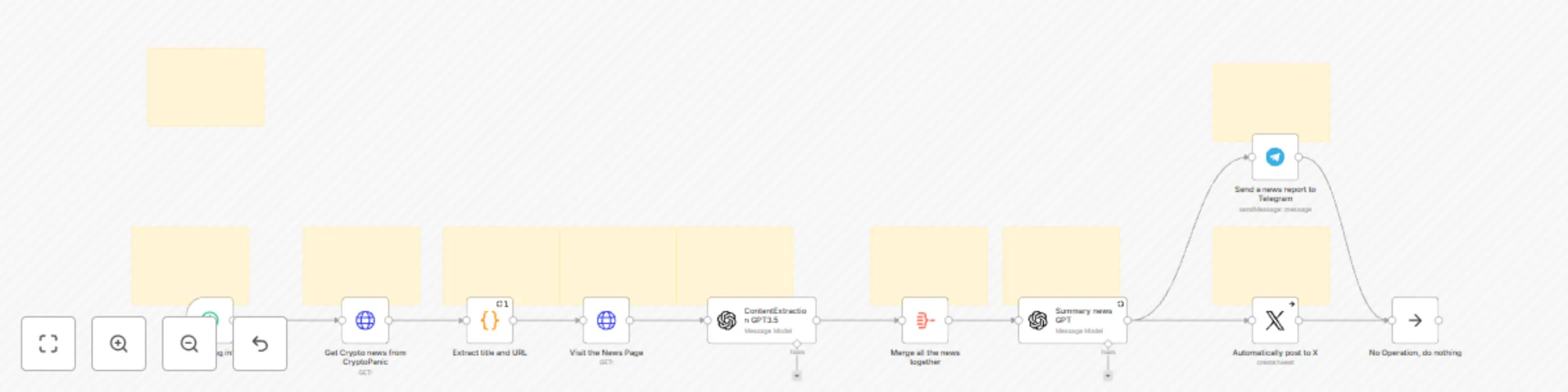
Automate crypto news posting to X & Telegram with AI summarization

Workflow preview

Workflow preview
100%
Automate crypto news posting to X & Telegram with AI summarization preview
Open on n8n.io

Important notice

This workflow is provided as-is. Please review and test before using in production.

1. Workflow Overview

Automate Crypto News Posting to X & Telegram with AI Summarization This n8n template automates the process of curating and sharing the latest cryptocurrency news on X (formerly Twitter) and Telegra...

Best for

  • Social Media automation workflows
  • Multimodal AI automation workflows
  • advanced n8n builders looking for reusable templates

Tools used

n8n-nodes-base.noop, n8n-nodes-base.stickynote, @n8n/n8n-nodes-langchain.openai, n8n-nodes-base.scheduletrigger, n8n-nodes-base.httprequest, n8n-nodes-base.aggregate, n8n-nodes-base.twitter, n8n-nodes-base.telegram

Source and attribution

This workflow is cataloged by N8N Workflows and links back to its original n8n.io source page by Tianyi.

Original n8n.io source

1.1 Workflow description

Title
Automate crypto news posting to X & Telegram with AI summarization
Workflow name
Automate crypto news posting to X & Telegram with AI summarization

Automate Crypto News Posting to X & Telegram with AI Summarization

This n8n template automates the process of curating and sharing the latest cryptocurrency news on X (formerly Twitter) and Telegram. By leveraging AI for content summarization, this workflow allows you to effortlessly maintain an active social media presence, keeping your audience informed about the dynamic crypto market without manual effort.

Who is this for?

This template is ideal for:

  • Content Creators & Marketers: Aiming to consistently share valuable news and engage their audience without manual content curation.
  • Crypto Influencers & Educators: Looking to provide timely news updates to their followers across multiple platforms.
  • Crypto Communities & DAOs: Seeking to automate news dissemination within their Telegram channels and wider X audience.
  • Anyone interested in automated news monitoring and sharing.

What problem is this workflow solving?

Manually tracking, summarizing, and posting crypto news across different social media platforms is time-consuming and requires constant effort. This workflow eliminates these manual tasks, allowing users to:

  • Save Time & Effort: Automate the entire news curation and posting process.
  • Maintain Consistent Presence: Ensure a regular flow of valuable crypto news updates on X and Telegram.
  • Increase Audience Engagement: Provide timely and summarized news to keep your audience informed and engaged.
  • Focus on Strategy: Free up time to focus on broader content strategy and audience growth instead of repetitive manual posting.

What this workflow does:

This workflow automates the following key steps:

  1. Scheduled News Retrieval: Uses a Schedule Trigger to run every 90 minutes (configurable), initiating the news gathering process.
  2. Real-time Crypto News Aggregation: Fetches the latest cryptocurrency news from the CryptoPanic API.
  3. Recent News Filtering: Filters news articles to include only those published within the last 30 minutes, ensuring timely updates.
  4. Content Extraction from News URLs: Visits individual news URLs and extracts the full article content.
  5. AI-Powered Content Summarization: Leverages GPT or other LLMs to extract the core content from news articles.
  6. Content Aggregation: Merges content from multiple news articles into a single input for summarization.
  7. AI-Driven Social Media Content Generation: Utilizes GPT or other LLMs to summarize the aggregated news and create two distinct outputs:
    • Concise & Engaging X Post: Optimized for Twitter's character limit, designed to be attention-grabbing.
    • Detailed Telegram Report: A more comprehensive summary suitable for a Telegram channel or group.
  8. Automated Posting to X (Twitter): Automatically posts the generated X summary to your connected Twitter account.
  9. Automated Delivery to Telegram: Automatically sends the detailed Telegram report to your specified Telegram chat ID.

Setup:

To get started, you will need to configure the following services and credentials:

  1. CryptoPanic API Token:

    • Obtain a free API token from the CryptoPanic website: https://cryptopanic.com/
    • In n8n, navigate to the "HTTP Request" node (named "HTTP Request").
    • In the node parameters, locate the "URL" field and replace "YOURTOKEN" in the URL with your obtained CryptoPanic API token.
  2. OpenAI API Key:

    • Obtain an API key from OpenAI: https://platform.openai.com/
    • For Content Extraction: In n8n, connect your OpenAI account to the "ContentExtraction GPT3.5" node (named "ContentExtraction GPT3.5"). Use your OpenAI API key for the credentials.
    • For News Summarization & Social Media Content Generation: In n8n, connect your OpenAI account to the "Summary news GPT" node (named "Summary news GPT"). Use your OpenAI API key for the credentials.
  3. X (Twitter) Developer Credentials:

    • Create a developer account and project on the X Developer Portal: https://developer.twitter.com/
    • Obtain the necessary API keys and tokens for your X app.
    • In n8n, connect your X Developer account credentials to the "X" node (named "X").
  4. Telegram Bot and Chat ID:

    • Create a Telegram bot using BotFather on Telegram. Obtain your bot's API token.
    • Obtain the Chat ID of the Telegram chat where you want to send news reports.
    • In n8n, connect your Telegram Bot API token to the "Telegram" node (named "Telegram").
    • In the "Telegram" node parameters, replace "YOUR_TELEGRAM_CHAT_ID" with your Telegram Chat ID.

How to customize this workflow:

  • Adapt to ANY Topic: Change the "HTTP Request" node to use a news API for your desired topic (AI, Sports, World News, etc.). Critically, adjust the prompts in the "Summary news GPT" node to be relevant to your chosen topic so the AI generates appropriate summaries and social media content.
  • Adjust Scheduling Frequency: Modify the "Schedule Trigger" node to change how often the workflow runs and posts news.
  • Adjust Scheduling Frequency: Modify the "Schedule Trigger" node to change the frequency of news updates (e.g., change the interval from 90 minutes to a different value).
  • Modify News Filtering: Customize the Python code in the "Extract Meta" node to adjust the news filtering criteria. You can change the time window (currently 30 minutes) or filter based on other criteria from the CryptoPanic API response.
  • Experiment with GPT Models: In the "Summary news GPT" node, try different OpenAI models (e.g., gpt-4, gpt-3.5-turbo-16k) to see how they affect the summarization quality and output. Note that more advanced models may incur higher API costs.
  • Customize AI Prompts: Fine-tune the system and user prompts in the "Summary news GPT" node to alter the tone, style, or format of the generated X and Telegram content. You can adjust the persona of the AI blogger, the desired level of detail in summaries, or specific keywords to include.
  • Extend to Other Platforms: Add nodes to post to other social media platforms like LinkedIn, Facebook, or Discord by adapting the "Summary news GPT" prompts and integrating relevant n8n nodes for those platforms.

Category:

Marketing, Social Media, AI, News Automation, Content Creation

Workflow by: Tianyi (muzi) n8n Creators Profile: https://n8n.io/creators/muzi/

1.2 Logical Blocks

This catalog entry is organized from the workflow JSON. The node-level section below shows the executable blocks available for review before importing the template.

2. Block-by-Block Analysis

Block 1 - No Operation, do nothing

Type / Role
n8n-nodes-base.noOp - noOp
Config choices
Version 1

Block 2 - Sticky Note1

Type / Role
n8n-nodes-base.stickyNote - stickyNote
Config choices
Version 1

Block 3 - Sticky Note5

Type / Role
n8n-nodes-base.stickyNote - stickyNote
Config choices
Version 1

Block 4 - Sticky Note6

Type / Role
n8n-nodes-base.stickyNote - stickyNote
Config choices
Version 1

Block 5 - Sticky Note7

Type / Role
n8n-nodes-base.stickyNote - stickyNote
Config choices
Version 1

Block 6 - Sticky Note10

Type / Role
n8n-nodes-base.stickyNote - stickyNote
Config choices
Version 1

Block 7 - Sticky Note

Type / Role
n8n-nodes-base.stickyNote - stickyNote
Config choices
Version 1

Block 8 - Sticky Note9

Type / Role
n8n-nodes-base.stickyNote - stickyNote
Config choices
Version 1

Block 9 - Sticky Note11

Type / Role
n8n-nodes-base.stickyNote - stickyNote
Config choices
Version 1

Block 10 - Summary news GPT

Type / Role
@n8n/n8n-nodes-langchain.openAi - openAi
Config choices
Version 1.7

Block 11 - Sticky Note12

Type / Role
n8n-nodes-base.stickyNote - stickyNote
Config choices
Version 1

Block 12 - ContentExtraction GPT3.5

Type / Role
@n8n/n8n-nodes-langchain.openAi - openAi
Config choices
Version 1.8

Block 13 - Sticky Note8

Type / Role
n8n-nodes-base.stickyNote - stickyNote
Config choices
Version 1

Block 14 - Set the posting interval

Type / Role
n8n-nodes-base.scheduleTrigger - scheduleTrigger
Config choices
Version 1.2

Block 15 - Get Crypto news from CryptoPanic

Type / Role
n8n-nodes-base.httpRequest - httpRequest
Config choices
Version 4.2

Block 16 - Merge all the news together

Type / Role
n8n-nodes-base.aggregate - aggregate
Config choices
Version 1

Block 17 - Automatically post to X

Type / Role
n8n-nodes-base.twitter - twitter
Config choices
Version 2

Block 18 - Send a news report to Telegram

Type / Role
n8n-nodes-base.telegram - telegram
Config choices
Version 1.2

Block 19 - Visit the News Page

Type / Role
n8n-nodes-base.httpRequest - httpRequest
Config choices
Version 4.2

Block 20 - Extract title and URL

Type / Role
n8n-nodes-base.code - code
Config choices
Version 2

3. Summary Table

Workflow Automate crypto news posting to X & Telegram with AI summarization
Complexity advanced
Nodes 20
Categories Social Media, Multimodal AI
Author Tianyi
Published 21 Feb 2025

4. Reproducing the Workflow from Scratch

  1. 1. Download the workflow JSON

    Use the JSON export at /data/workflows/2961/2961.json as the source template for this automation.

  2. 2. Import the template into n8n

    Open n8n, import the downloaded JSON, and review each node before activating the workflow.

  3. 3. Configure credentials and variables

    Replace placeholder credentials, API keys, webhook URLs, account IDs, and environment-specific values with your own settings.

  4. 4. Test with sample data

    Run the workflow manually or in a staging workspace, inspect node output, and confirm downstream systems receive the expected data.

  5. 5. Activate and monitor

    Enable the workflow only after testing, then monitor executions, errors, and rate limits during the first production runs.

5. General Notes & Resources

Review imported nodes carefully before activation. This catalog entry is intended to help you inspect the workflow structure, understand required services, and find related templates faster.

Node names, credentials, schedules, webhook paths, and external service limits may need adjustment for your workspace.

Frequently asked questions

What does Automate crypto news posting to X & Telegram with AI summarization do?

Automate Crypto News Posting to X & Telegram with AI Summarization This n8n template automates the process of curating and sharing the latest cryptocurrency news on X (formerly Twitter) and Telegra...

What do I need before importing this workflow?

Review the workflow JSON, configure any required credentials in n8n, and test the automation in a safe workspace before using it in production.

Can I customize this workflow?

Yes. Use the block-by-block analysis and the downloadable JSON to inspect each node, then adjust credentials, prompts, schedules, filters, or destinations for your Social Media, Multimodal AI use case.