Block 1 - Merge
- Type / Role
- n8n-nodes-base.merge - merge
- Config choices
- Version 3


 Early Deal
This workflow is provided as-is. Please review and test before using in production.
Stay ahead with personalized AI news delivered straight to your Telegram! This powerful n8n workflow automates your daily news consumption, leveraging AI to bring you the most relevant trends in AI...
n8n-nodes-base.merge, n8n-nodes-base.stickynote, @n8n/n8n-nodes-langchain.agent, @n8n/n8n-nodes-langchain.lmchatgooglegemini, n8n-nodes-base.telegram, n8n-nodes-base.httprequest, n8n-nodes-base.datetime, n8n-nodes-base.set
This workflow is cataloged by N8N Workflows and links back to its original n8n.io source page by Tianyi.
Original n8n.io sourceStay ahead with personalized AI news delivered straight to your Telegram! This powerful n8n workflow automates your daily news consumption, leveraging AI to bring you the most relevant trends in AI, (or cryptocurrency, the stock market) and more – all from two free news API sources (GNewsAPI and NewsAPI).
What's Included:
Who is this for?
This template is ideal for:
Individuals wanting to stay updated on the latest AI trends and advancements.
Tech enthusiasts eager to track the latest AI breakthroughs and applications.
Anyone seeking a free, automated, and highly customizable news briefing delivered directly to their Telegram.
Individuals who want to save time and stay informed without the hassle of manual news searching.
What problem is this workflow solving?
Keeping up with the constant influx of information in fast-paced sectors like AI, crypto, and the stock market can be overwhelming and time-consuming. This n8n workflow solves this problem by automatically gathering news from two free news APIs: News API and GNews API, filtering it with AI, and delivering a concise, personalized briefing directly to your Telegram, ensuring you're always in the know without the manual effort.
What this workflow does:
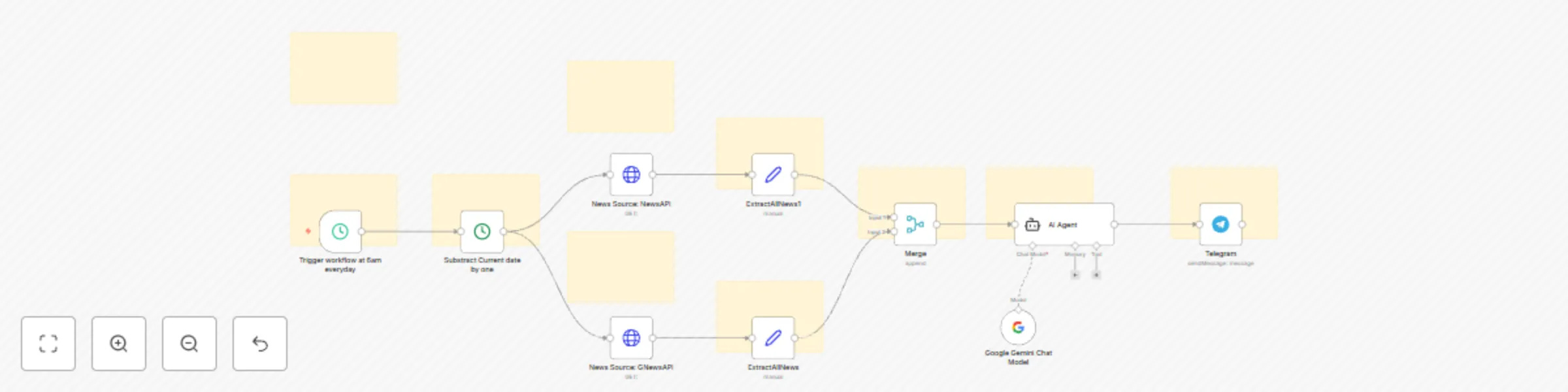
This workflow automates the following steps using two free news API sources (GNewsAPI and NewsAPI):
Automated News Gathering: Fetches the latest news on your chosen topics from two distinct free API sources.
Intelligent AI Filtering: Employs an AI agent to identify and extract the most pertinent news articles related to your specified interests (default: AI, but easily customizable).
Concise AI Summarization: The AI agent creates brief summaries of the key information from the top news articles.
Direct Telegram Delivery: Sends a daily digest of the summarized news directly to your Telegram account for convenient access.
Effortless Customization: Allows you to easily tailor the news topics to focus on AI, cryptocurrency, stock market updates, or any other area you need to monitor.
Setup:
Easy Telegram Integration (Video Guidance Included): Follow our step-by-step video tutorial to seamlessly integrate Telegram with this n8n workflow, enabling automated news delivery to your preferred chat.
Free API Keys: This workflow utilizes the free tiers of two popular news APIs: GNewsAPI and NewsAPI. You will need to obtain your own free API keys for these services and input them into the respective HTTP Request nodes within n8n. Clear instructions on how to get these free keys are provided.
First Run: Activate the workflow and execute it once to verify that all connections are established and functioning correctly.
How to customize this workflow:
Tailor Your News Topics: Easily customize the news you receive by modifying the search queries in the "News Source: GNewsAPI" and "News Source: NewsAPI" nodes. For example, change q=AI to q=Bitcoin for crypto news or q=Tesla stock for stock market updates.
Adjust the Language: Change the lang=en parameter in the API URLs to receive news in your preferred language.
Set Your Delivery Schedule: Modify the trigger time in the "Trigger workflow at 6am everyday" node to have your personalized news briefing delivered at the time that suits you best.
Expand Your Sources: For even more comprehensive news coverage, you can explore and integrate additional free news APIs by adding more HTTP Request nodes to the workflow.
Category:
News Automation, AI, Cryptocurrency, Stock Market, Information, Personal Productivity, Free Resources
This catalog entry is organized from the workflow JSON. The node-level section below shows the executable blocks available for review before importing the template.
| Workflow | Daily AI news briefing and summarization with Google Gemini and Telegram |
|---|---|
| Complexity | advanced |
| Nodes | 20 |
| Categories | Personal Productivity, AI Summarization |
| Author | Tianyi |
| Published | 15 Mar 2025 |
Use the JSON export at /data/workflows/3173/3173.json as the source template for this automation.
Open n8n, import the downloaded JSON, and review each node before activating the workflow.
Replace placeholder credentials, API keys, webhook URLs, account IDs, and environment-specific values with your own settings.
Run the workflow manually or in a staging workspace, inspect node output, and confirm downstream systems receive the expected data.
Enable the workflow only after testing, then monitor executions, errors, and rate limits during the first production runs.
Review imported nodes carefully before activation. This catalog entry is intended to help you inspect the workflow structure, understand required services, and find related templates faster.
Node names, credentials, schedules, webhook paths, and external service limits may need adjustment for your workspace.
Stay ahead with personalized AI news delivered straight to your Telegram! This powerful n8n workflow automates your daily news consumption, leveraging AI to bring you the most relevant trends in AI...
Review the workflow JSON, configure any required credentials in n8n, and test the automation in a safe workspace before using it in production.
Yes. Use the block-by-block analysis and the downloadable JSON to inspect each node, then adjust credentials, prompts, schedules, filters, or destinations for your Personal Productivity, AI Summarization use case.