E

Eduard

24
Workflows

Workflows by Eduard

Workflow preview: Process telegram image albums with Data Tables Cache and NanoBanana AI
Free advanced

Process telegram image albums with Data Tables Cache and NanoBanana AI

This n8n workflow template simplifies processing of media group messages sent by users in Telegram. It caches image album messages using [Data Tables](https://docs.n8n.io/data/data-tables/), and then sends them to a Nano Banana model for processing. This template showcases n8n's new Data Tables feature as a powerful caching layer to process entire image albums from Telegram. ------------------------------------------------------------------------------------------------------------------------------------------------ ### How it works * **Media Group handling**: captures all images and the shared caption when user sends an album via Telegram. * **Data Table caching**: stores all incoming messages in a Data Table to prevent data loss and allow for batch processing. * **Scheduled processing**: a timer trigger periodically finds and processes completed image albums from the cache. * **Multi-modal AI**: sends the full set of images and the text prompt to the NanoBanana model via OpenRouter. * **User feedback**: automatically notifies the user when processing begins and when the result is ready. ### How to use * Import the workflow template into your n8n instance. * Create a new Data Table with the following columns (all of type String): `chat_id`, `message_id`, `media_group`, `message`, `status`. * Configure your Telegram credentials and connect your bot. * Update the "prepare user messages" node with your Telegram bot token to create the image download links. * Set up your OpenRouter credentials. * Activate the workflow. Now you can send a group of images with a caption to your Telegram bot. ### Requirements * An n8n instance (cloud or self-hosted) with Data Tables enabled. Minimal n8n version is `1.113` * A Telegram account and a Telegram bot token. * An OpenRouter account with access to the NanoBanana model. Customizing this workflow ------------------------- * **Adjust the processing schedule**: modify the **Schedule Trigger** node to change how often the workflow checks for new media groups to process. * **Handle other message types**: The workflow handles only the media groups. You can easily build logic for text messages, documents, or commands by adding nodes instead of the placeholder node (**"Process other messages as usual"**). * **Extend the functionality**: add more nodes after the AI generates an image to perform different actions, such as saving the file, sending it to another service, or creating a social media post.

E
Eduard
Support Chatbot
6 Oct 2025
694
0
Workflow preview: GitHub workflow version control dashboard with commit history and rollbacks
Free advanced

GitHub workflow version control dashboard with commit history and rollbacks

This n8n template provides enterprise-level version control for your workflows using GitHub integration. Stop losing hours to broken workflows and manual exports – get proper commit history, visual diffs, and one-click rollbacks. ## This is the first template for n8n that provides real version control with commit-level granularity. **Perfect for power users and tech teams managing multiple complex workflows.** ![n8nghdashboardgif400p8fps.gif](fileId:2293) *Animation demonstrates early bird version and may differ from the latest one* ### How it works * **Automated sync**: Workflows are automatically synced to GitHub on your preferred schedule * **Smart categorization**: Dashboard shows which workflows are synced, n8n-only, or GitHub-only * **Complete commit history**: View every change with timestamps, authors, and commit messages * **Flexible import**: Import workflows from GitHub as new workflows or replace existing ones * **Individual workflow control**: Sync specific workflows with custom commit messages ### How to use * Import the workflow template into your n8n instance * Generate your n8n API key from your instance settings * Configure your GitHub credentials and repository settings * Set up the webhook endpoint for the dashboard interface * Access the dashboard via the generated webhook URL * Configure automatic sync schedule or use manual sync options ### Requirements * n8n instance (cloud or self-hosted) with API access * GitHub account and repository * Basic understanding of Git workflows ## Customizing this workflow * DIY or available as part of consulting services * Professional customization for specific deployment workflows and integrations * Custom sync schedules and commit message formats can be configured during setup

E
Eduard
DevOps
1 Sep 2025
188
0
Workflow preview: Create evergreen content with GitHub dynamic images & URL redirects
Free advanced

Create evergreen content with GitHub dynamic images & URL redirects

**Transform static digital assets into dynamic, self-updating powerhouses that stay relevant for years to come!** This workflow solves a common problem: once you publish forms, emails, or templates, their content becomes frozen in time. Users discovering them months later see outdated information, missed opportunities, and stale offers. Stop losing opportunities to stale content – make your digital assets work harder and stay fresher, automatically! **Here's how it works:** - 🔗 **Stable embed links** mean your original assets never need updating - 🔄 **Dynamic URL redirects** that automatically point to the latest pages - 🖼️ **Auto-updating images** that showcase fresh offers or content - 📅 **Scheduled updates** keep everything current without manual intervention **Perfect for:** - Workflow sticky notes that become evergreen marketing billboards - Registration forms with current promotions - Email signatures with latest offers - Website banners that stay seasonally relevant - Any digital asset you want to "future-proof" **The magic:** Set it up once, embed the stable URLs/images in your content, then forget about it. Years later, users will still see fresh, as current information automatically pulled from your workflow. **Requirements:** Free accounts with [GitHub](https://github.com/) (image storage) and [shorten.rest ](https://shorten.rest/) (URL redirects). Both can be swapped for your preferred services. --- Follow me on [LinkedIn](https://www.linkedin.com/in/parsadanyan/) for more tips on AI automation and n8n workflows!

E
Eduard
Social Media
2 Jul 2025
568
0
Workflow preview: Create character-consistent images with FLUX Kontext & post to social via upload post
Free advanced

Create character-consistent images with FLUX Kontext & post to social via upload post

**Create, iterate, and share! Transform a single image through multiple scenes while maintaining consistency.** ## ✨ What this workflow does This template showcases **FLUX.1 Kontext** - [Black Forest Labs' in-context image generation model](https://bfl.ai/announcements/flux-1-kontext) that excels at maintaining character features across multiple transformations. Combined with the [Upload Post community node](https://www.npmjs.com/package/n8n-nodes-upload-post) for effortless multi-platform social media posting, you can create and share compelling visual stories instantly. The workflow demonstrates FLUX Kontext's core strength: **character consistency across multiple image generations**. Starting with a single input image, it: 1. 🖼️ **Loads an initial character image** (example: a cute animal mascot) 2. 📝 **Defines multiple scene transformation prompts** 3. 🔄 **Iteratively generates new scenes** while preserving exact character features 4. 🎯 **Maintains visual consistency** by reusing binary data from previous generations 5. 📱 **Auto-posts the complete transformation series** to multiple social platforms simultaneously ## 🚀 Key Features: The Consistency Advantage - **Character Preservation**: FLUX Kontext's signature feature - maintains character features and style across transformations (requires specific prompting techniques) - **Iterative Context Building**: Each generation uses the previous image as context, creating visual continuity - **Binary Data Reuse**: Smart workflow design that feeds output from one generation as input to the next - **Multi-Scene Storytelling**: Transform your character across different environments while keeping them recognizable - **One-Click Multi-Platform Posting**: [Upload Post](https://www.upload-post.com/?linkId=lp_144414&sourceId=post-now&tenantId=upload-post-app)* eliminates the tedious process of posting to each platform individually ## 📱 Why use Upload Post? Posting the same content to TikTok, Instagram, LinkedIn, YouTube, Facebook, X (Twitter), and Threads individually is time-consuming and error-prone. The [Upload Post service](https://www.upload-post.com/?linkId=lp_144414&sourceId=post-now&tenantId=upload-post-app)* simplifies this process: ✅ **Connect once, post everywhere**: Link all your social media accounts to Upload Post ✅ **Single API call**: Post to multiple platforms with one simple node ✅ **No more platform juggling**: Skip the endless switching between apps and dashboards ✅ **Consistent timing**: All platforms get your content simultaneously ✅ **Trusted by 3,751+ users**: Proven solution for content creators and marketers Instead of spending 30+ minutes manually posting to each platform, **Upload Post does it all in seconds** with a single n8n node! ## 🛠️ Prerequisites ### Required Accounts: 1. **Black Forest Labs API**: Create account at [dashboard.bfl.ai](https://dashboard.bfl.ai/) - Get your API key for FLUX Kontext Pro access 2. **Upload Post Account**: Sign up at [upload-post.com](https://www.upload-post.com/?linkId=lp_144414&sourceId=post-now&tenantId=upload-post-app)* - Connect your social media profiles (TikTok, Instagram, LinkedIn, YouTube, Facebook, X/Twitter, Threads) - Get API credentials for automated posting - **Free tier available**: 10 uploads/month [![image.png](fileId:1462)](https://www.upload-post.com/?linkId=lp_144414&sourceId=post-now&tenantId=upload-post-app) ## 💡 Perfect For: - **Character Designers** maintaining brand character integrity across scenes - **Social Media Managers** creating engaging visual story series without manual posting - **Brand Marketers** ensuring character consistency across campaigns - **Storytellers** building visual narratives with consistent protagonists - **Agencies** managing multiple client accounts efficiently ## 🔧 Customization Options: - **Modify transformation prompts** to create your own character journey - **Adjust iteration steps** - **Change initial character image** - **Configure social platform targeting** (choose which platforms to post to) - **Customize post content** and formatting - **Experiment with different consistency scenarios** *\* Affiliate link*

E
Eduard
Content Creation
8 Jun 2025
2419
0
Workflow preview: Compare sequential, agent-based, and parallel LLM processing with Claude 3.7
Free advanced

Compare sequential, agent-based, and parallel LLM processing with Claude 3.7

This workflow demonstrates three distinct approaches to chaining LLM operations using Claude 3.7 Sonnet. Connect to any section to experience the differences in implementation, performance, and capabilities. ## What you'll find: ### 1️⃣ Naive Sequential Chaining The simplest but least efficient approach - connecting LLM nodes in a direct sequence. Easy to set up for beginners but becomes unwieldy and slow as your chain grows. ### 2️⃣ Agent-Based Processing with Memory Process a list of instructions through a single AI Agent that maintains conversation history. This structured approach provides better context management while keeping your workflow organized. ### 3️⃣ Parallel Processing for Maximum Speed Split your prompts and process them simultaneously for much faster results. Ideal when you need to run multiple independent tasks without shared context. ## Setup Instructions: 1. **API Credentials**: Configure your Anthropic API key in the credentials manager. This workflow uses Claude 3.7 Sonnet, but you can modify the model in each Anthropic Chat Model node, or pick an entirely different LLM. 2. **For Cloud Users**: If using the parallel processing method (section 3), replace `{{ $env.WEBHOOK_URL }}` in the "LLM steps - parallel" HTTP Request node with your n8n instance URL. 3. **Test Data**: The workflow fetches content from the n8n blog by default. You can modify this part to use a different content or a data source. 4. **Customization**: Each section contains a set of example prompts. Modify the "Initial prompts" nodes to change the questions asked to the LLM. Compare these methods to understand the trade-offs between simplicity, speed, and context management in your AI workflows! --- Follow me on [LinkedIn](https://www.linkedin.com/in/parsadanyan/) for more tips on AI automation and n8n workflows!

E
Eduard
Engineering
12 Apr 2025
1816
0
Workflow preview: 🎨 Interactive image editor with FLUX.1 fill tool for inpainting
Free advanced

🎨 Interactive image editor with FLUX.1 fill tool for inpainting

> Like this template? [Connect with Eduard](https://www.linkedin.com/in/parsadanyan/) via LinkedIn. This workflow is a prototype of an AI-powered image editing interface, similar to Photoshop's Generative Fill feature, but running entirely in the browser. It provides a web-based editor that allows users to: * Select areas in images using an adjustable brush tool * Input text prompts to guide the AI generation * Compare original and generated images side by side * Iterate on edits with different prompts and settings * Save or reuse generated images > 🎨 Perfect for [product catalog management](https://www.reddit.com/r/n8n/comments/1h98n7a/have_a_product_catalog_make_a_flux1_in_painting/), seasonal content updates, and creative image editing tasks! 📋 Requirements -------------- * [FLUX API Access](https://api.bfl.ai/): You'll need API credentials from FLUX to use this workflow. * Configure the [HTTP Header Auth credential](https://docs.n8n.io/integrations/builtin/core-nodes/n8n-nodes-base.httprequest/) in n8n with your FLUX API key 🔧 Key Components ---------------- * [FLUX Fill API](https://api.us1.bfl.ai/scalar#tag/tasks/POST/v1/flux-pro-1.0-fill) for AI-powered image generation * [Konva.js](https://konvajs.org/) for canvas manipulation * [img-comparison-slider](https://www.npmjs.com/package/img-comparison-slider) for result visualization * [Custom CSS/JS](https://github.com/ed-parsadanyan/n8n-flux-fill-demo) for editor functionality 1. **Simple Editor Interface** * HTML page with an editor is served on the Webhook call * Adjustable brush selection tool * Provides several mock examples and allows uploading custom images * Basic prompt and FLUX model parameter controls 2. **Image Processing Pipeline** * Handles image and mask separately * Processes FLUX Fill API requests * Delivers results back to the editor 3. **Result Viewer** * Split-screen comparison of original and generated images * Interactive slider for before/after comparison * Options to save or continue editing * Support for multiple iteration cycles 🎯 Use Cases ----------- This prototype is particularly useful for: * Testing AI-powered image editing concepts * Quick product visualization experiments * Exploring creative image variations * Demonstrating inpainting capabilities > 💡 **Pro Tip**: Save masks for frequently edited areas to quickly generate variations with different prompts! The workflow can be extended to integrate with various data sources and can be customized for specific business needs.

E
Eduard
Content Creation
17 Jan 2025
17533
0
Workflow preview: 📚 Auto-generate documentation for n8n workflows with GPT and Docsify
Free advanced

📚 Auto-generate documentation for n8n workflows with GPT and Docsify

This workflow creates a documentation system for n8n instances using Docsify.js. It serves a dynamic documentation website that allows users to: - View an overview of all workflows in a tabular format - Filter workflows by tags - Access automatically generated documentation for each workflow - Edit documentation with a live Markdown preview - Visualize workflow structures using Mermaid.js diagrams > 📺 Check out the [short 2-min demonstration](https://www.linkedin.com/feed/update/urn:li:activity:7276671057992847361/) on LinkedIn. Don't forget to connect! ## 🔧 Key Components 1. **Main Documentation Portal** - Serves a Docsify-powered website - Provides a navigation sidebar with workflow tags - Displays workflow status, creation date, and documentation links 2. **Documentation Generator** - Uses GPT model to auto-generate workflow descriptions - Creates Mermaid.js diagrams of workflow structures - Maintains consistent documentation format 3. **Live Editor** - Split-screen Markdown editor with preview - Real-time Mermaid diagram rendering - Save/Cancel functionality ## ⚙️ Technical Details ### Environment Setup - Requires write access to the specified project directory - Uses environment variables for n8n instance URL configuration - Implements webhook endpoints for serving documentation ### ⚠️ Security Considerations > Note: The current implementation doesn't include authentication for editing. Consider adding authentication for production use. ### Dependencies - Docsify.js for documentation rendering - Mermaid.js for workflow visualization - OpenAI GPT for documentation generation ## 🔍 Part of the n8n Observability Series This workflow is part of a broader series focused on n8n instance observability. Check out these related workflows: 1. [Workflow Dashboard](https://n8n.io/workflows/2269) - Get comprehensive analytics of your n8n instance 2. [Visualize Your n8n Workflows with Mermaid.js](https://n8n.io/workflows/2378) - Create beautiful workflow visualizations Each workflow in this series helps you better understand and manage your n8n automation ecosystem!

E
Eduard
Internal Wiki
23 Dec 2024
11434
0
Workflow preview: 🔍 Visualize your n8n workflows with Mermaid.js!
Free intermediate

🔍 Visualize your n8n workflows with Mermaid.js!

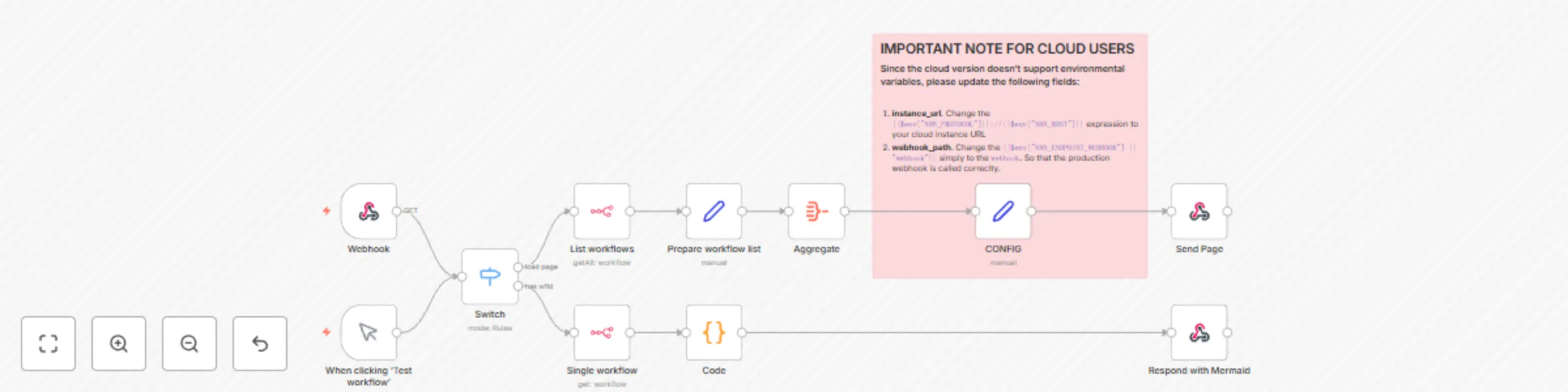
## Are you a visual thinker working with n8n? 🎨 View and understand workflow structures at a glance with this template! Built with mermaid.js, Bootstrap 5 and AXAJ to create an interactive web page displaying n8n workflows as flowcharts. 🌟 Perfect for documentation, presentations, or just getting a clearer picture of your automation processes. Need customization help? Reach out to [Eduard](https://www.linkedin.com/in/parsadanyan/)! ### Benefits * 📊 Instant workflow visualization * 📱 Responsive design * 🔗 Direct links to n8n workflows * 🧩 Special shapes for different node types * 🚫 Disabled node indication * 🔒 No external dependencies – just paste the workflow and call the webhook * 🛠️ Easily customizable – enhance the JS script or add custom styling ### ⚠️ Important note for cloud users ⚠️ Since the cloud version doesn't support environmental variables, please make the following changes in the CONFIG node: * Update the `instance_url` variable: Enter your n8n URL instead of `{{$env["N8N_PROTOCOL"]}}://{{$env["N8N_HOST"]}}` * Change the `webhook_path` to simply "webhook" instead of `{{$env["N8N_ENDPOINT_WEBHOOK"] || "webhook"}}` ### 🌟 Examples 1. Multiple flowcharts on a single page: ![image.png](fileId:830) 2. Several shapes for different nodes: ![image.png](fileId:826) 3. Langchain nodes with special connections styling: ![image.png](fileId:829)

E
Eduard
Engineering
13 Aug 2024
7197
0
Workflow preview: 🚀 Boost your customer service with this WhatsApp Business bot!
Free advanced

🚀 Boost your customer service with this WhatsApp Business bot!

This n8n workflow demonstrates how to automate customer interactions and appointment management via WhatsApp Business bot. 1. After submitting a Google Form, the user receives a notification via WhatsApp. These notifications are sent via a template message. 2. In case user sends a message to the bot, the text and user data is stored in [Google Sheets](https://docs.google.com/spreadsheets/d/1T-B0yepcrCHxQpn7Sj6QjTa0VqwwVBQhO5ZcIUSxWJE/edit?resourcekey=&gid=1621824221#gid=1621824221). 3. To reply back to the user, fill in the `ReplyText` column and change the Status to 'Ready'. In a few seconds n8n will fetch the unsent replies and deliver them one by one via WhatsApp Business node. Customize this workflow to fit your specific needs, connect different online services and enhance your customer communication! 🎉 ## Setup Instructions To get this workflow up and running, you'll need to: 1. 👇 Create a WhatsApp template message on the Meta Business portal. <details>![messagetemplate.png](fileId:817)</details> 2. Obtain an Access Token and WhatsApp Business Account ID from the Meta Developers Portal. This is needed for the **WhatsApp Business Node** to send messages. ![credentialssetup.png](fileId:815) 3. Set up a **WhatsApp Trigger** node with App ID and App Secret from the Meta Developers Portal. ![credentialswebhook.png](fileId:814) 4. Right after that copy the **WhatsApp Trigger** URL and add it as a Callback URL in the Meta Developers Portal. This trigger is needed to receive incoming messages and their status updates. ![credentialstrigger.png](fileId:816) 5. Connect your Google Sheets account for data storage and management. Check out the [documentation page](https://docs.n8n.io/integrations/builtin/credentials/google/). ## ⚠️ Important Notes - WhatsApp allows automatic *custom text* messages only within 24 hours of the last user message. Outside with time frame only *approved template messages* can be sent. - The workflow uses a Google Sheet to manage form submissions, incoming messages and prepare responses. You can replace these nodes and connect the WhatsApp bot with other systems.

E
Eduard
Support Chatbot
11 Jul 2024
51423
0
Workflow preview: 🦅 Get a bird's-eye view of your n8n instance with the Workflow Dashboard!
Free advanced

🦅 Get a bird's-eye view of your n8n instance with the Workflow Dashboard!

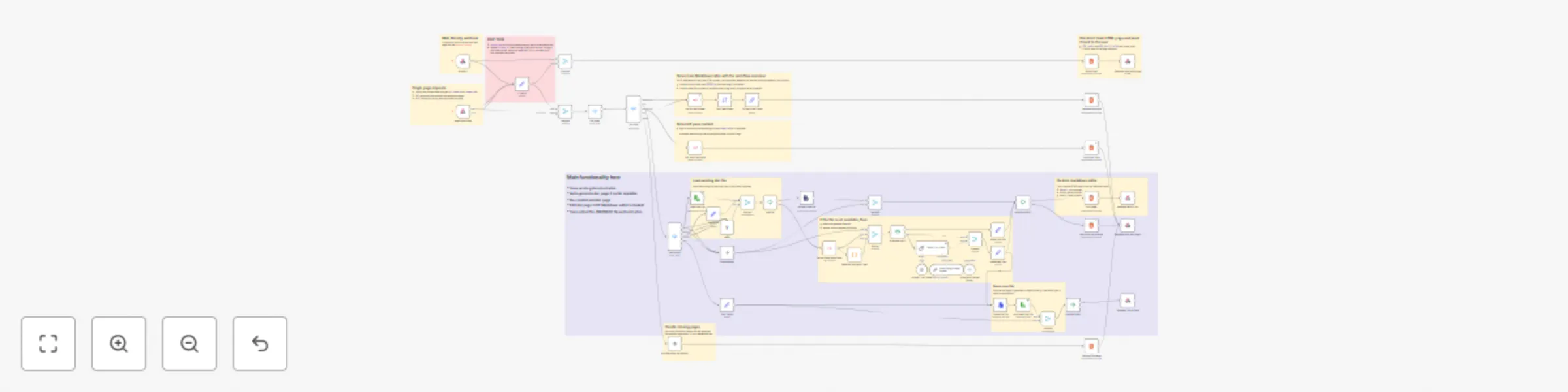
## ⚡ UPDATE on May 2025 – added section with all n8n instance webhooks Using n8n a lot? Soar above the limitations of the default n8n dashboard! This template gives you an overview of your workflows, nodes, and tags – all in one place. 💪 Built using XML stylesheets and the Bootstrap 5 library, this workflow is self-contained and does not depend on any third-party software. 🙌 It generates a comprehensive overview JSON that can be easily integrated with other BI tools for further analysis and visualization. 📊 **Reach out to [Eduard](https://www.linkedin.com/in/parsadanyan/) if you need help adapting this workflow to your specific use-case!** ## 🚀 Benefits: - **Workflow Summary** 📈: Instant overview of your workflows, active counts, and triggers. - **Left-Side Panel** 📋: Quick access to all your workflows, nodes, and tags for seamless navigation. - **Workflow Details** 🔬: Deep dive into each workflow's nodes, timestamps, and tags. - **Node Analysis** 🧩: Identify the most frequently used nodes across your workflows. - **Tag Organization** 🗂️: Workflows are grouped according to their tags. - **Webhooks** ⚡: List of all webhook endpoints with the links to workflows. - **Visually Stunning** 🎨: Clean, intuitive, and easy-to-navigate dashboard design. - **XML & Bootstrap 5** 🛠️: Built using XML stylesheets and Bootstrap 5, ensuring a self-contained and responsive dashboard. - **No Dependencies** 🔒: The workflow does not rely on any third-party software. Bootstrap 5 files are loaded via CDN but can be delivered directly from your server. ## ⚠️ Important note for cloud users Since the cloud version doesn't support environmental variables, please make the following changes: 1. **get-nodes-via-jmespath** node. Update the `instance_url` variable: enter your n8n URL instead of `{{$env["N8N_PROTOCOL"]}}://{{$env["N8N_HOST"]}}` 2. **Create HTML** node. Please provide the n8n instance URL instead of `{{ $env.WEBHOOK_URL }}` ## 🌟Example: ![Untitled design 6_.png](fileId:795) Follow me on [LinkedIn](https://www.linkedin.com/in/parsadanyan/) for more tips on AI automation and n8n workflows!

E
Eduard
DevOps
17 May 2024
9568
0
Workflow preview: Get your website indexed by Google automatically
Free advanced

Get your website indexed by Google automatically

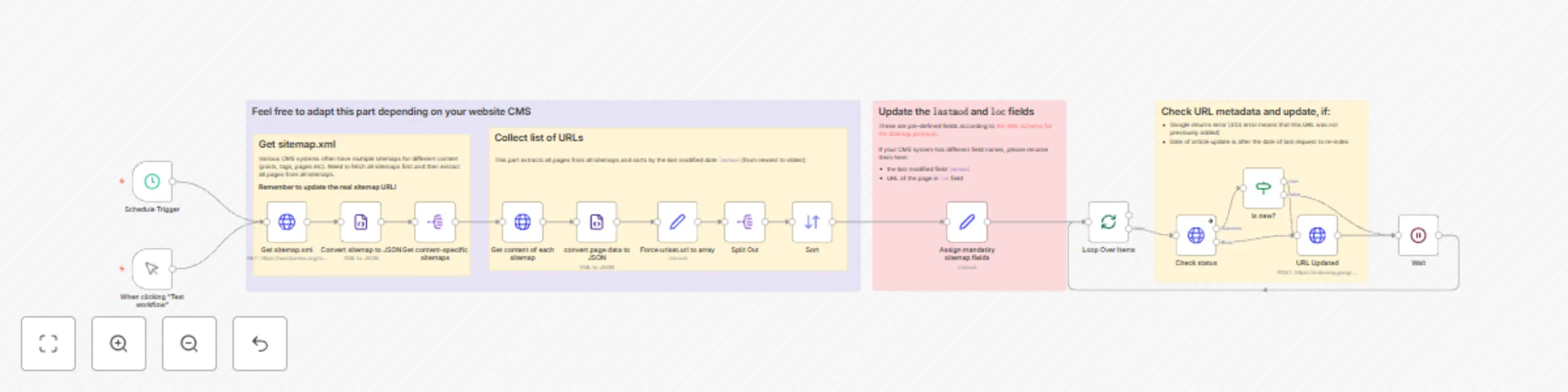
# 🚀 Supercharge Your Website Indexing with This Powerful n8n Workflow! 🌐 Google page indexing too slow? Tired of manually clicking through each page in the Google Search Console? 😴 Say goodbye to that tedious process and hello to automation with this n8n workflow! 🎉 **NB: this workflow was tested with sitemap.xml generated by Ghost CMS and WordPress. Reach out to [Eduard](https://www.linkedin.com/in/parsadanyan/) if you need help adapting this workflow to your specific use-case!** ## ⚙️ How this automation works 1. 📅 The workflow runs on a schedule or when you click "Test workflow". 2. 🌐 It fetches the website's primary sitemap.xml and extracts all the content-specific sitemaps (this is a typical structure of the sitemap). 3. 📑 Each content-specific sitemap is then parsed to retrieve the individual page data. 4. 🔄 The extracted page data is converted to JSON format for easy manipulation. 5. 🗃️ The `lastmod` (last modified date) and `loc` (page URL) fields are assigned to each page entry to ensure compliance with the [Sitemap protocol](https://www.sitemaps.org/protocol.html). 6. 🔀 The page entries are sorted by the `lastmod` field in descending order (newest to oldest). 7. 🔁 The workflow then loops over each page entry and performs the following steps: - 🔍 Checks the URL metadata in the Google Indexing API. - ✅ If the page is new or has been updated since the last indexing request, it sends a request to the Google Indexing API to update the URL. - ⏳ Wait a sec and move on with the next page. ## 🌟 Benefits - ⏰ Save time by automating the indexing process. - 🎯 Ensure all your website pages are consistently indexed by Google. - 🚀 Improve your website's visibility and search engine rankings. - 🛠️ Customize the workflow to fit your specific CMS and requirements. ## 🔧 Getting started To start using this powerful n8n workflow, follow these steps: 1. ☑️ Make sure to verify the website ownership in the [Google Search Console](https://search.google.com/search-console). 2. 👨‍💻 Import the workflow JSON into your n8n instance. 3. **Edit the `Get sitemap.xml` node and update the URL with your website's valid sitemap.xml** 4. 🔑 Set up the necessary credentials for the Google Indexing API. 5. 🎚️ Adjust the schedule trigger to run the workflow at your desired frequency. 7. 🎉 Sit back and let the workflow handle the indexing process for you! Ready to take your website indexing to the next level? 🚀 Try this workflow now and see the difference it makes! 😊 ### ⚠️ IMPORTANT NOTE 1 Need help with connecting Google Cloud Platform to n8n? Check out our [article on connecting Google Sheets to n8n](https://blog.n8n.io/google-sheets-as-database/#step-1-obtain-google-service-account-credentials). The process is mainly the same. When activating Google APIs, make sure to add `Web Search Indexing API`. Also, in the credential page of n8n, add the `https://www.googleapis.com/auth/indexing` scope: ![image.png](fileId:781) Check out [Yulia's page](https://n8n.io/creators/yulia/) for more n8n workflows! ### ⚠️ IMPORTANT NOTE 2 Free Google Cloud Platform account allows (re)indexing only 200 pages per day. If your website has more, then the workflow will automatically fail on quota limit ⛔. Next day it will skip the previously added items and continue with remaining pages. ***Example:*** Assuming you have a free Google account, 500 pages on your website and they don't change for 3 days: * On the first day 200 pages will be added for indexing and the workflow will fail due to quota limits. * On the second day, the workflow will check 200 pages again and skip them (because the date of re-indexing is later then the page last modified date). The next 200 pages will be added to indexing. Workflow will fail again due to quota limits. * On the third day 400 pages will be checked and skipped, the last 100 pages will be added for indexing and the workflow finishes successfully.

E
Eduard
Market Research
1 Apr 2024
13586
0
Workflow preview: AI agent that can scrape webpages
Free advanced

AI agent that can scrape webpages

![n8nReAct.webp](fileId:720) ⚙️🛠️🚀🤖🦾 This template is a PoC of a ReAct AI Agent capable of fetching random pages (not only Wikipedia or Google search results). On the top part there's a manual chat node connected to a LangChain ReAct Agent. The agent has access to a workflow tool for getting page content. The page content extraction starts with converting query parameters into a JSON object. There are 3 pre-defined parameters: - **url** – an address of the page to fetch - **method** = full / simplified - **maxlimit** - maximum length for the final page. For longer pages an error message is returned back to the agent Page content fetching is a multistep process: 1. An HTTP Request mode tries to get the page content. If the page content was successfuly retrieved, a series of post-processing begin: 2. Extract HTML BODY; content 3. Remove all unnecessary tags to recuce the page size 4. Further eliminate external URLs and IMG scr values (based on the method query parameter) 5. Remaining HTML is converted to Markdown, thus recuding the page lengh even more while preserving the basic page structure 6. The remaining content is sent back to an Agent if it's not too long (maxlimit = 70000 by default, see CONFIG node). *NB:* - You can isolate the HTTP Request part into a separate workflow. - Check the Workflow Tool description, it guides the agent to provide a query string with several parameters instead of a JSON object. Please reach out to [Eduard](https://www.linkedin.com/in/parsadanyan/) is you need further assistance with you n8n workflows and automations! Note that to use this template, you need to be on n8n version 1.19.4 or later.

E
Eduard
Engineering
6 Dec 2023
268473
0
Workflow preview: Discord AI-powered bot
Free intermediate

Discord AI-powered bot

This workflow is a template example for making Discord GPT-powered bots. Incoming user requests are analysed and categorised via OpenAI node with the help of a hand-crafted prompt. The response message is then routed to a different Discord channel. ![workflow.png](fileId:712)

E
Eduard
Support Chatbot
25 Jul 2023
29293
0
Workflow preview: Telegram AI chatbot
Free advanced

Telegram AI chatbot

The workflow starts by listening for messages from Telegram users. The message is then processed, and based on its content, different actions are taken. If it's a regular chat message, the workflow generates a response using the OpenAI API and sends it back to the user. If it's a command to create an image, the workflow generates an image using the OpenAI API and sends the image to the user. If the command is unsupported, an error message is sent. Throughout the workflow, there are additional nodes for displaying notes and simulating typing actions. ![bot_workflow_annotated.png](fileId:711)

E
Eduard
Support Chatbot
6 Jul 2023
213327
0
Workflow preview: Export SQL table into CSV file
Free intermediate

Export SQL table into CSV file

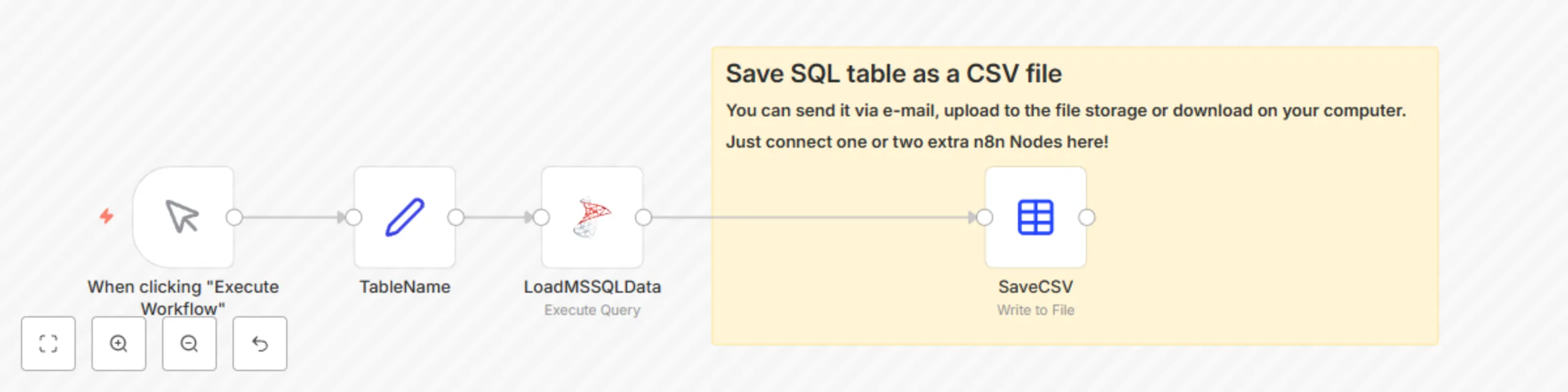
This workflow demonstrates how easy it is to export SQL query to CSV automatically! ![workflowexamplefix.png](fileId:707) Before running the workflow please make sure you have access to a local or remote MSSQL server with a [sample AdventureWorks database](https://learn.microsoft.com/en-us/sql/samples/adventureworks-install-configure?view=sql-server-ver16&tabs=ssms). The detailed process is explained in the tutorial [https://blog.n8n.io/sql-export-to-csv/](https://blog.n8n.io/sql-export-to-csv/)

E
Eduard
File Management
6 May 2023
8711
0
Workflow preview: OpenAI examples: ChatGPT, DALLE-2, Whisper-1 – 5-in-1
Free advanced

OpenAI examples: ChatGPT, DALLE-2, Whisper-1 – 5-in-1

## Primer workflow for OpenAI models: ChatGPT, DALLE-2, Whisper This workflow contains 5 examples on how to work with OpenAI API. - Transcribe voice into text via Whisper model *(disabled, please put your own mp3 file with voice)* - The old way of using OpenAI conversational model via text-davinci-003 - Examples 1.x. Simple ChatGPT calls. Text completion and text edit - Example 2. Provide system and user content into ChatGPT - Examples 3.x. Create system / user / assistanc content via Code Node. Promtp chaining technique example - Example 4. Generate code via ChatGPT - Example 5. Return multiple answers. Useful for providing picking the most relevant reply ## IMPORTANT! ## Do not run the whole workflow, it's rather slow ### Better execute the last node of each branch or simply disconnect branches that are not needed ![image.png](fileId:703)

E
Eduard
Engineering
15 Mar 2023
26453
0
Workflow preview: Convert SQL table into Excel spreadsheet
Free intermediate

Convert SQL table into Excel spreadsheet

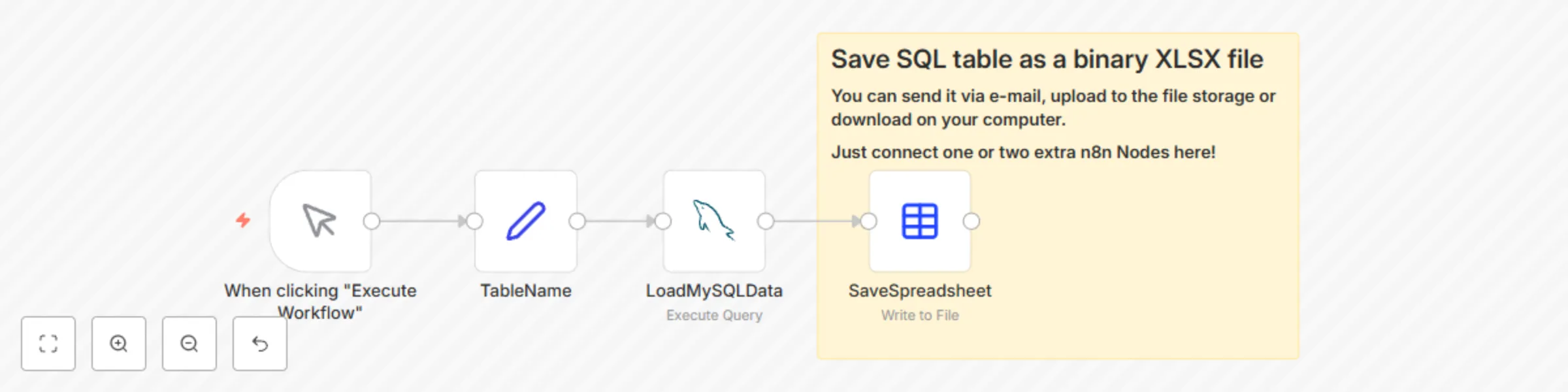
This workflow demonstrates how easy it is to export SQL query to Excel automatically! ![n8ncanvassmall.png](fileId:700) Before running the workflow please make sure you have access to a remote SQL server (MS SQL, MySQL, PostgreSQL etc.) with a sample table: ``` Date,Band,ConcertName,Country,City,Location,LocationAddress, 2023-05-28,Ozzy Osbourne,No More Tours 2 - Special Guest: Judas Priest,Germany,Berlin,Mercedes-Benz Arena Berlin,"Mercedes-Platz 1, 10243 Berlin-Friedrichshain", 2023-05-08,Elton John,Farewell Yellow Brick Road Tour 2023,Germany,Berlin,Mercedes-Benz Arena Berlin,"Mercedes-Platz 1, 10243 Berlin-Friedrichshain", 2023-05-26,Hans Zimmer Live,Europe Tour 2023,Germany,Berlin,Mercedes-Benz Arena Berlin,"Mercedes-Platz 1, 10243 Berlin-Friedrichshain", 2023-07-07,Depeche Mode,Memento Mori World Tour 2023,Germany,Berlin,Olympiastadion Berlin,"Olympischer Platz 3, 14053 Berlin-Charlottenburg", ``` **The detailed process is explained in the tutorial** [https://blog.n8n.io/export-sql-to-excel](https://blog.n8n.io/export-sql-to-excel)

E
Eduard
Document Extraction
23 Jan 2023
5751
0
Workflow preview: Import CSV into MySQL
Free beginner

Import CSV into MySQL

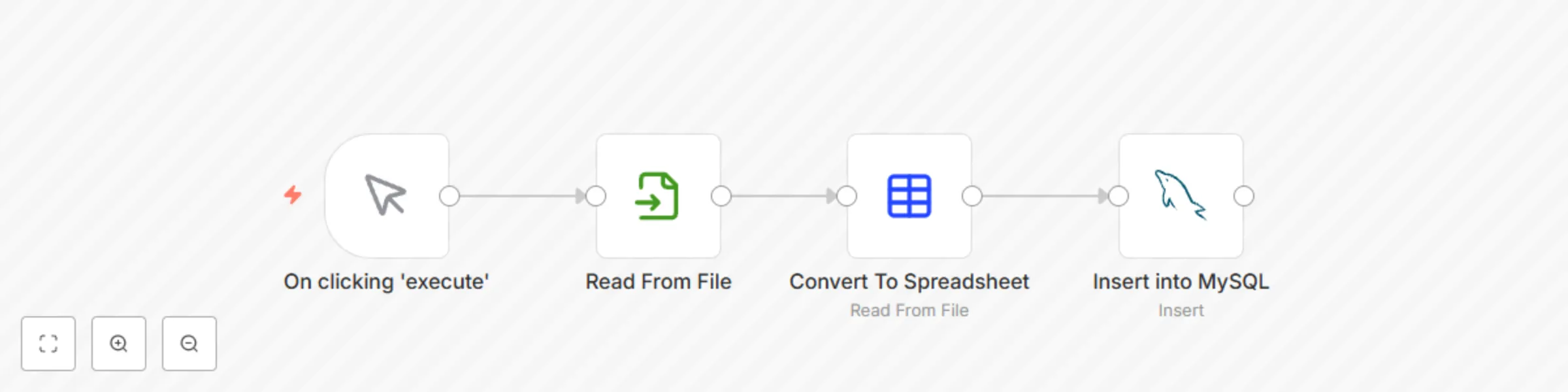
This workflow demonstrates how CSV file can be automatically imported into existing MySQL database. ![_25n8nworkflow.png](fileId:689) Before running the workflow please make sure you have a file on the server: ``` /home/node/.n8n/concerts-2023.csv ``` And the content of the file is the following: ``` Date,Band,ConcertName,Country,City,Location,LocationAddress, 2023-05-28,Ozzy Osbourne,No More Tours 2 - Special Guest: Judas Priest,Germany,Berlin,Mercedes-Benz Arena Berlin,"Mercedes-Platz 1, 10243 Berlin-Friedrichshain", 2023-05-08,Elton John,Farewell Yellow Brick Road Tour 2023,Germany,Berlin,Mercedes-Benz Arena Berlin,"Mercedes-Platz 1, 10243 Berlin-Friedrichshain", 2023-05-26,Hans Zimmer Live,Europe Tour 2023,Germany,Berlin,Mercedes-Benz Arena Berlin,"Mercedes-Platz 1, 10243 Berlin-Friedrichshain", 2023-07-07,Depeche Mode,Memento Mori World Tour 2023,Germany,Berlin,Olympiastadion Berlin,"Olympischer Platz 3, 14053 Berlin-Charlottenburg", ``` **The detailed process is explained in the tutorial** [https://blog.n8n.io/import-csv-into-mysql](https://blog.n8n.io/import-csv-into-mysql)

E
Eduard
Engineering
20 Dec 2022
15287
0
Workflow preview: Generate random mock data with no code and zero dependencies
Free advanced

Generate random mock data with no code and zero dependencies

## 🎲 Random Data Generator 🎲 This beginner-friendly workflow allows you to generate random mock data effortlessly, without any programming or external dependencies. 🚀 Here's how it works: 1. 📝 Provide some default values for the random generator using the "Code" node. Don't worry, no coding is needed, it's just a simple JSON! You can even use the "Ask AI" in the cloud version of n8n to generate mock values for you. These values are permanently stored in the workflow ensuring swift and reliable execution. 2. 🔀 The "Firstname," "Lastname," and "Occupation" nodes extract invividual variables. Two Merge nodes create a combination of all possible values. Adapt this section based on your needs. 3. 🎲 The "Random" node shuffles the generated data. 4. 🔢 Use the "Limit" node to control the number of output items. 5. ✨ Perform additional post-processing, such as deriving email addresses based on the user's name and surname. And there you have it! With just a few clicks, you'll have a set of realistic mock data ready to test your workflows. 🎉 Want to learn more? Check out the full tutorial on YouTube! 📺 [![Click to watch the video](https://i.ytimg.com/vi/3AVJFk3uXBg/hqdefault.jpg)](https://www.youtube.com/watch?v=3AVJFk3uXBg) Happy data generating! 😄

E
Eduard
Personal Productivity
1 Oct 2022
935
0
Workflow preview: Markdown timesheet report generation
Free intermediate

Markdown timesheet report generation

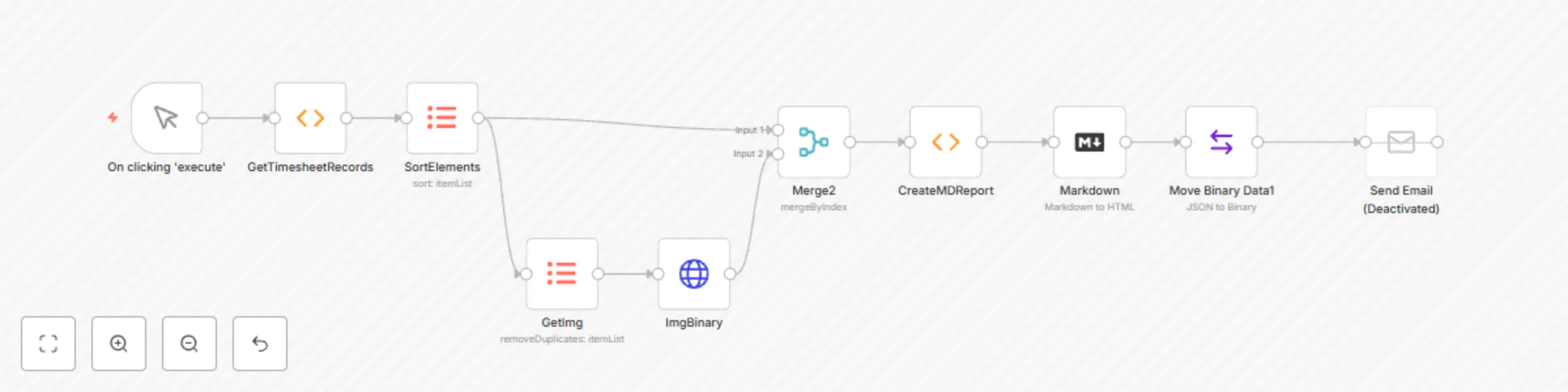
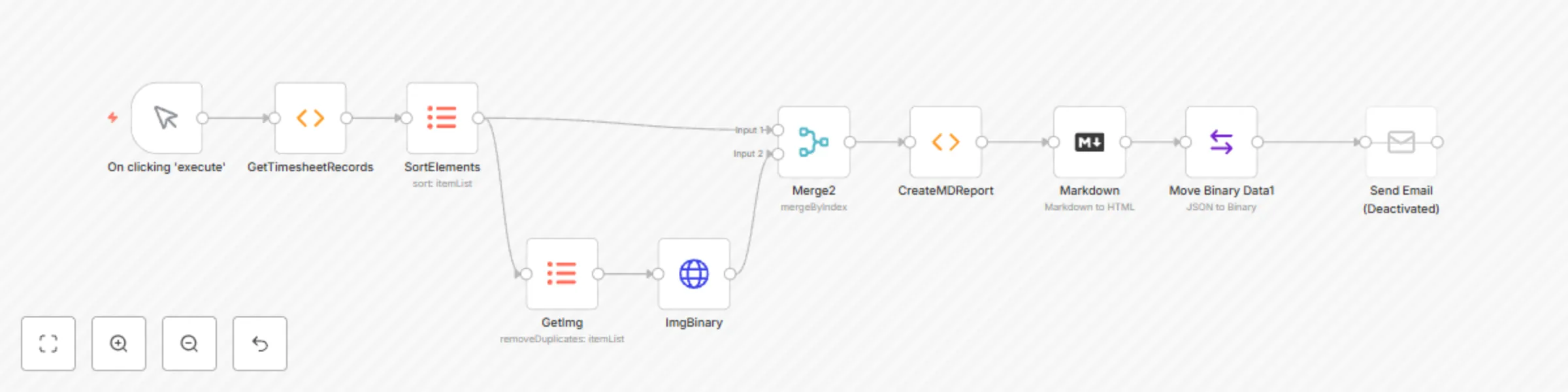
This tutorial demonstrates the creation of the HTML report via Markdown node. The main idea is to prepare a very long gext variable via the Function Node and then convert it to the HTML file. The resulting report can be downloaded from the workflow canvas directly or send via email as an attachment. ![markdownworkflow.png](fileId:647)

E
Eduard
Document Extraction
3 Jun 2022
1744
0
Workflow preview: Markdown report generation
Free intermediate

Markdown report generation

This workflow illustrates how HTML reports can be created using *Markdown* Node. An example data consists of a Time Sheet table for 2 persons. Based on this table a markdown document is generated using *Function* Node. After that a final HTML report is created and is saved as binary file. This file can be either downloaded directly from the workflow canvas or sent as an email attachement. ![markdownworkflow.png](1)

E
Eduard
Document Extraction
3 Jun 2022
4669
0
Workflow preview: Extend n8n with additional tools
Free advanced

Extend n8n with additional tools

This workflow extends n8n and uses R language graphic capabilities. This is a Telegram bot which fetches weather data via the openweathermap.org API, plots an image using ggoplot2 package from R and sends the image to the Telegram user. ![workflow-screenshot](fileId:631)

E
Eduard
Personal Productivity
22 Apr 2022
5659
0
Workflow preview: Multilanguage telegram bot
Free advanced

Multilanguage telegram bot

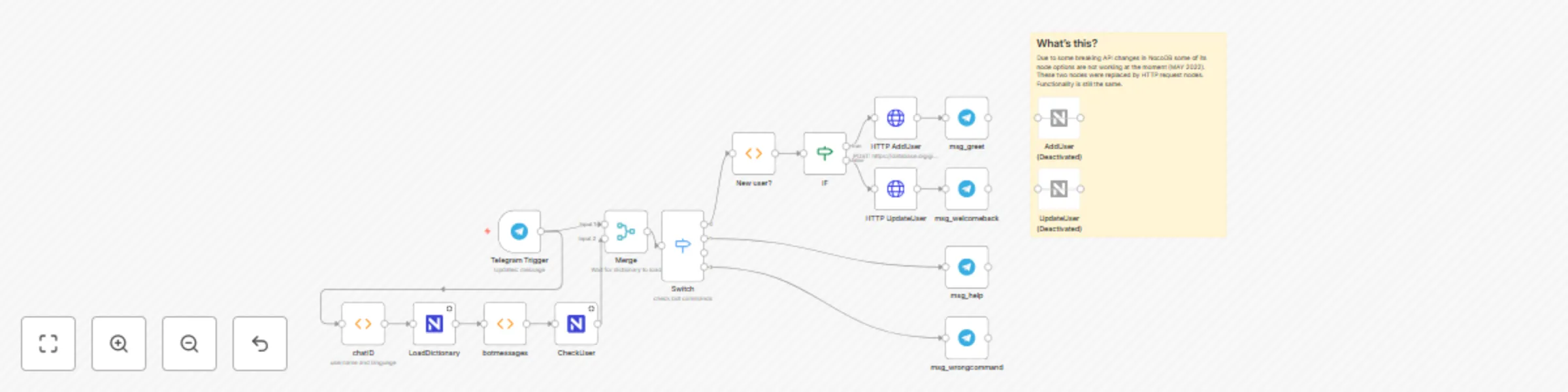
An example workflow for a multilanguage Telegram bot. It allows adding many new languages to the bot without editing the workflow. **Important note!** Due to some breaking API changes in NocoDB some of its node options are not working at the moment (MAY 2022). These two nodes were replaced by HTTP request nodes. Functionality is still the same. ![n8nmultilanghighlight2.png](fileId:629)

E
Eduard
Miscellaneous
9 Apr 2022
9294
0
Workflow preview: Parse Ycombinator news page
Free intermediate

Parse Ycombinator news page

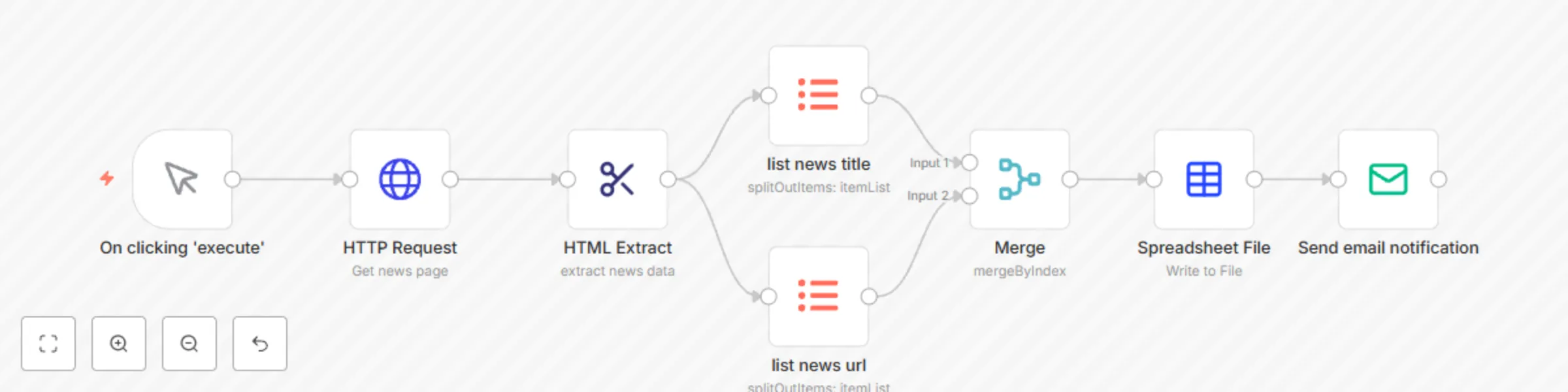
Extract data from a webpage (Ycombinator news page) and create a nice list using itemList node. It seems that current version in n8n (0.141.1) requires to extract each variable one by one. Hopefully in a futute it will be possible to create the table using just one itemList node. Another nice feature of the workflow is an automatically generated file name with the resulting table. Check out the "fileName" option of the Spreadsheet File node: ``` "Ycombinator_news_{{new Date().toISOString().split('T', 1)[0]}}.{{$parameter[\"fileFormat\"]}}" ``` The resulting table is saved as .xls file and delivered via email ![workflow-screenshot](fileId:543)

E
Eduard
Market Research
4 Oct 2021
3100
0