Get your website indexed by Google automatically

Workflow preview

Workflow preview
100%
Get your website indexed by Google automatically preview
Open on n8n.io

Important notice

This workflow is provided as-is. Please review and test before using in production.

1. Workflow Overview

Supercharge Your Website Indexing with This Powerful n8n Workflow! Google page indexing too slow? Tired of manually clicking through each page in the Google Search Console? Say goodbye to ...

Best for

  • Market Research automation workflows
  • advanced n8n builders looking for reusable templates

Tools used

n8n-nodes-base.manualtrigger, n8n-nodes-base.splitout, n8n-nodes-base.httprequest, n8n-nodes-base.splitinbatches, n8n-nodes-base.wait, n8n-nodes-base.scheduletrigger, n8n-nodes-base.stickynote, n8n-nodes-base.if

Source and attribution

This workflow is cataloged by N8N Workflows and links back to its original n8n.io source page by Eduard.

Original n8n.io source

1.1 Workflow description

Title
Get your website indexed by Google automatically
Workflow name
Get your website indexed by Google automatically

🚀 Supercharge Your Website Indexing with This Powerful n8n Workflow! 🌐

Google page indexing too slow? Tired of manually clicking through each page in the Google Search Console? 😴 Say goodbye to that tedious process and hello to automation with this n8n workflow! 🎉

NB: this workflow was tested with sitemap.xml generated by Ghost CMS and WordPress. Reach out to Eduard if you need help adapting this workflow to your specific use-case!

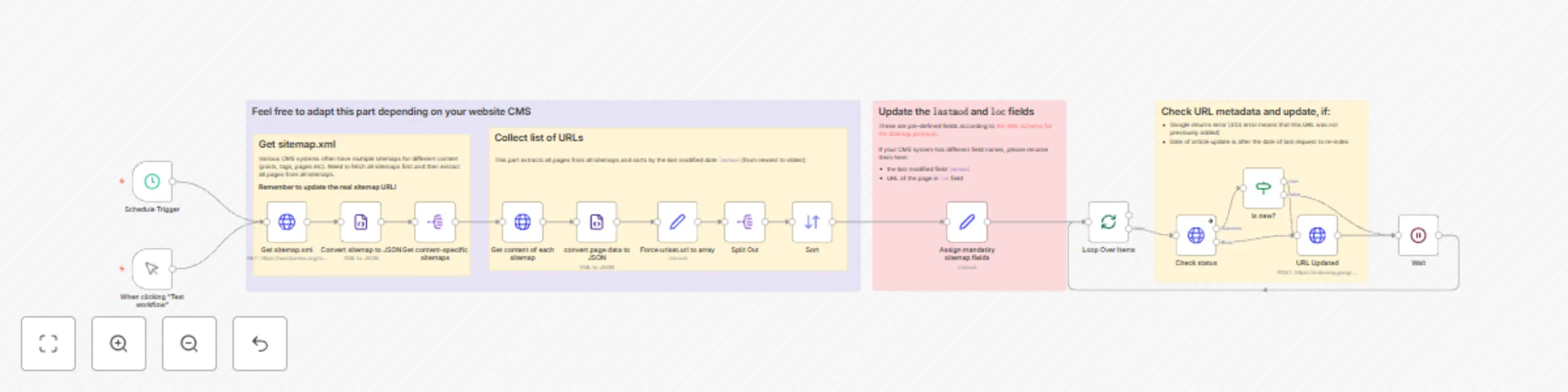
⚙️ How this automation works

  1. 📅 The workflow runs on a schedule or when you click "Test workflow".
  2. 🌐 It fetches the website's primary sitemap.xml and extracts all the content-specific sitemaps (this is a typical structure of the sitemap).
  3. 📑 Each content-specific sitemap is then parsed to retrieve the individual page data.
  4. 🔄 The extracted page data is converted to JSON format for easy manipulation.
  5. 🗃️ The lastmod (last modified date) and loc (page URL) fields are assigned to each page entry to ensure compliance with the Sitemap protocol.
  6. 🔀 The page entries are sorted by the lastmod field in descending order (newest to oldest).
  7. 🔁 The workflow then loops over each page entry and performs the following steps:
    • 🔍 Checks the URL metadata in the Google Indexing API.
    • ✅ If the page is new or has been updated since the last indexing request, it sends a request to the Google Indexing API to update the URL.
    • ⏳ Wait a sec and move on with the next page.

🌟 Benefits

  • ⏰ Save time by automating the indexing process.
  • 🎯 Ensure all your website pages are consistently indexed by Google.
  • 🚀 Improve your website's visibility and search engine rankings.
  • 🛠️ Customize the workflow to fit your specific CMS and requirements.

🔧 Getting started

To start using this powerful n8n workflow, follow these steps:

  1. ☑️ Make sure to verify the website ownership in the Google Search Console.
  2. 👨‍💻 Import the workflow JSON into your n8n instance.
  3. Edit the Get sitemap.xml node and update the URL with your website's valid sitemap.xml
  4. 🔑 Set up the necessary credentials for the Google Indexing API.
  5. 🎚️ Adjust the schedule trigger to run the workflow at your desired frequency.
  6. 🎉 Sit back and let the workflow handle the indexing process for you!

Ready to take your website indexing to the next level? 🚀 Try this workflow now and see the difference it makes! 😊

⚠️ IMPORTANT NOTE 1

Need help with connecting Google Cloud Platform to n8n? Check out our article on connecting Google Sheets to n8n. The process is mainly the same. When activating Google APIs, make sure to add Web Search Indexing API. Also, in the credential page of n8n, add the https://www.googleapis.com/auth/indexing scope:

Check out Yulia's page for more n8n workflows!

⚠️ IMPORTANT NOTE 2

Free Google Cloud Platform account allows (re)indexing only 200 pages per day. If your website has more, then the workflow will automatically fail on quota limit ⛔. Next day it will skip the previously added items and continue with remaining pages.

Example: Assuming you have a free Google account, 500 pages on your website and they don't change for 3 days:

  • On the first day 200 pages will be added for indexing and the workflow will fail due to quota limits.
  • On the second day, the workflow will check 200 pages again and skip them (because the date of re-indexing is later then the page last modified date). The next 200 pages will be added to indexing. Workflow will fail again due to quota limits.
  • On the third day 400 pages will be checked and skipped, the last 100 pages will be added for indexing and the workflow finishes successfully.

1.2 Logical Blocks

This catalog entry is organized from the workflow JSON. The node-level section below shows the executable blocks available for review before importing the template.

2. Block-by-Block Analysis

Block 1 - When clicking "Test workflow"

Type / Role
n8n-nodes-base.manualTrigger - manualTrigger
Config choices
Version 1

Block 2 - Split Out

Type / Role
n8n-nodes-base.splitOut - splitOut
Config choices
Version 1

Block 3 - Check status

Type / Role
n8n-nodes-base.httpRequest - httpRequest
Config choices
Version 4.1

Block 4 - Loop Over Items

Type / Role
n8n-nodes-base.splitInBatches - splitInBatches
Config choices
Version 3

Block 5 - Wait

Type / Role
n8n-nodes-base.wait - wait
Config choices
Version 1

Block 6 - URL Updated

Type / Role
n8n-nodes-base.httpRequest - httpRequest
Config choices
Version 4.1

Block 7 - Schedule Trigger

Type / Role
n8n-nodes-base.scheduleTrigger - scheduleTrigger
Config choices
Version 1.1

Block 8 - Sticky Note1

Type / Role
n8n-nodes-base.stickyNote - stickyNote
Config choices
Version 1

Block 9 - is new?

Type / Role
n8n-nodes-base.if - if
Config choices
Version 2

Block 10 - Sticky Note2

Type / Role
n8n-nodes-base.stickyNote - stickyNote
Config choices
Version 1

Block 11 - Sticky Note3

Type / Role
n8n-nodes-base.stickyNote - stickyNote
Config choices
Version 1

Block 12 - Sticky Note

Type / Role
n8n-nodes-base.stickyNote - stickyNote
Config choices
Version 1

Block 13 - Get content-specific sitemaps

Type / Role
n8n-nodes-base.splitOut - splitOut
Config choices
Version 1

Block 14 - Convert sitemap to JSON

Type / Role
n8n-nodes-base.xml - xml
Config choices
Version 1

Block 15 - Force urlset.url to array

Type / Role
n8n-nodes-base.set - set
Config choices
Version 3.3

Block 16 - Sticky Note4

Type / Role
n8n-nodes-base.stickyNote - stickyNote
Config choices
Version 1

Block 17 - Assign mandatiry sitemap fields

Type / Role
n8n-nodes-base.set - set
Config choices
Version 3.3

Block 18 - convert page data to JSON

Type / Role
n8n-nodes-base.xml - xml
Config choices
Version 1

Block 19 - Get sitemap.xml

Type / Role
n8n-nodes-base.httpRequest - httpRequest
Config choices
Version 4.1

Block 20 - Get content of each sitemap

Type / Role
n8n-nodes-base.httpRequest - httpRequest
Config choices
Version 4.1

Block 21 - Sort

Type / Role
n8n-nodes-base.sort - sort
Config choices
Version 1

3. Summary Table

Workflow Get your website indexed by Google automatically
Complexity advanced
Nodes 21
Categories Market Research
Author Eduard
Published 31 Mar 2024

4. Reproducing the Workflow from Scratch

  1. 1. Download the workflow JSON

    Use the JSON export at /data/workflows/2210/2210.json as the source template for this automation.

  2. 2. Import the template into n8n

    Open n8n, import the downloaded JSON, and review each node before activating the workflow.

  3. 3. Configure credentials and variables

    Replace placeholder credentials, API keys, webhook URLs, account IDs, and environment-specific values with your own settings.

  4. 4. Test with sample data

    Run the workflow manually or in a staging workspace, inspect node output, and confirm downstream systems receive the expected data.

  5. 5. Activate and monitor

    Enable the workflow only after testing, then monitor executions, errors, and rate limits during the first production runs.

5. General Notes & Resources

Review imported nodes carefully before activation. This catalog entry is intended to help you inspect the workflow structure, understand required services, and find related templates faster.

Node names, credentials, schedules, webhook paths, and external service limits may need adjustment for your workspace.

Frequently asked questions

What does Get your website indexed by Google automatically do?

Supercharge Your Website Indexing with This Powerful n8n Workflow! Google page indexing too slow? Tired of manually clicking through each page in the Google Search Console? Say goodbye to ...

What do I need before importing this workflow?

Review the workflow JSON, configure any required credentials in n8n, and test the automation in a safe workspace before using it in production.

Can I customize this workflow?

Yes. Use the block-by-block analysis and the downloadable JSON to inspect each node, then adjust credentials, prompts, schedules, filters, or destinations for your Market Research use case.