YouTube transcription & translation to Google Docs with Gemini AI

Workflow preview

Workflow preview
100%
YouTube transcription & translation to Google Docs with Gemini AI preview
Open on n8n.io

Important notice

This workflow is provided as-is. Please review and test before using in production.

1. Workflow Overview

YouTube Transcription, Summarization & Translation to Google Docs This workflow automates the end to end process of converting YouTube videos into structured, multilingual written content. It trans...

Best for

  • Content Creation automation workflows
  • Multimodal AI automation workflows
  • intermediate n8n builders looking for reusable templates

Tools used

n8n-nodes-base.stickynote, n8n-nodes-base.googledocs, @n8n/n8n-nodes-langchain.chainllm, n8n-nodes-base.code, n8n-nodes-base.httprequest, n8n-nodes-base.webhook, @n8n/n8n-nodes-langchain.lmchatgooglegemini

Source and attribution

This workflow is cataloged by N8N Workflows and links back to its original n8n.io source page by WeblineIndia.

Original n8n.io source

1.1 Workflow description

Title
YouTube transcription & translation to Google Docs with Gemini AI
Workflow name
YouTube transcription & translation to Google Docs with Gemini AI

YouTube Transcription, Summarization & Translation to Google Docs

This workflow automates the end-to-end process of converting YouTube videos into structured, multilingual written content. It transcribes the video's speech, optionally summarizes it, translates it into the chosen language and stores the result in a well-formatted Google Doc—ready for review, sharing or publication.

Who’s It For

  • Content creators and bloggers repurposing video content.
  • Educators and researchers converting lectures into readable notes.
  • Marketing teams localizing video material for international audiences.
  • Students summarizing and translating study material.
  • YouTube viewers who want written notes or blog-ready formats.

How It Works

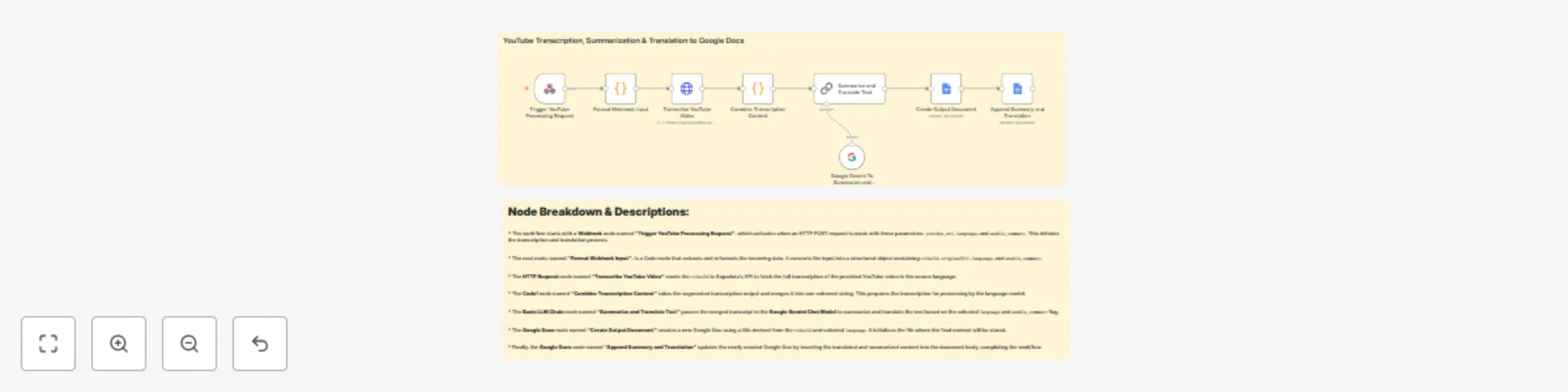
  1. A Webhook triggers the flow with inputs: youtube_url, language and enable_summary.
  2. A Code node formats these inputs into videoId, originalUrl, language and enable_summary.
  3. An HTTP Request node sends the video to Supadata API for full transcription.
  4. Another Code node combines all transcript segments into one body of text.
  5. The Basic LLM Chain node uses the Google Gemini Chat Model to summarize and translate the transcript if requested.
  6. A Google Docs node creates a new document with a title based on videoId and language.
  7. A final Google Docs node appends the processed summary and translation into the created document.

How to Set Up

  1. Webhook Input: Send a POST request with three fields: youtube_url, language, enable_summary.
  2. Configure Supadata API: Add the HTTP URL and Authorization Header for transcription.
  3. Set up Gemini Chat Model: Use Google Vertex AI/Gemini integration in the Basic LLM Chain node.
  4. Create Google Docs Credentials: Connect your Google account using OAuth2.
  5. Document Naming Logic: You may adjust document titles using expressions (e.g., {{ videoId }} - {{ language }}).

Requirements

  • Supadata API key (or any video-to-text API).
  • Google account with Google Docs access.
  • Google Gemini access via n8n’s LLM integration.
  • n8n Cloud or self-hosted instance.
  • Basic understanding of webhook setup (or a form frontend).

How to Customize

  • Change LLM model: Swap Gemini with GPT-4 or Claude in the LLM Chain node.
  • Summarization toggle: Use the enable_summary flag to control verbosity.
  • Document layout: Customize headings, font styles and content sections in Google Docs.
  • Multiple languages: Extend the workflow to translate into multiple languages and generate one document per language.
  • Sharing options: Add Gmail or Slack nodes to notify users once the document is generated.

Add‑ons

  • Notion Export: Send the document summary directly into Notion using the Notion node.
  • Slack Notification: Notify your team with a link to the Google Doc using the Slack node.
  • Google Sheets Logging: Log video URLs, timestamps, and language used for auditing.
  • n8n Forms Integration: Allow users to submit video URLs and language via a hosted n8n form.

Use Case Examples

  • Repurposing Videos into Blogs: Automatically convert YouTube podcasts into multilingual blog posts.
  • Educational Notes: Extract and translate lecture content into shareable study documents.
  • International Marketing Teams: Summarize and localize product explainer videos for different countries.
  • Transcription Library: Create a searchable database of translated transcripts from niche educational YouTube channels.

Common Troubleshooting

Issue Possible Cause Solution
Webhook not triggering Incorrect webhook URL or POST format Double-check payload and content-type (application/json)
Transcription API fails Invalid video ID or API key Validate YouTube URL and Supadata API access
Empty translation/summarization Transcript was empty or prompt was weak Ensure the video contains spoken content and refine prompt
Google Doc not created OAuth2 credentials not authorized properly Reconnect Google Docs credentials in n8n
Gemini LLM Chain fails Model misconfigured or request malformed Verify your model selection and payload structure

Need Help?

Need help getting this set up or customizing it for your workflow?

✅ We can help you:

  • Set up transcription and translation APIs
  • Modify the summarization prompt
  • Customize document layouts or automate sharing

👉 Contact WeblineIndia's automation experts !

1.2 Logical Blocks

This catalog entry is organized from the workflow JSON. The node-level section below shows the executable blocks available for review before importing the template.

2. Block-by-Block Analysis

Block 1 - Sticky Note

Type / Role
n8n-nodes-base.stickyNote - stickyNote
Config choices
Version 1

Block 2 - Append Summary and Translation

Type / Role
n8n-nodes-base.googleDocs - googleDocs
Config choices
Version 2

Block 3 - Create Output Document

Type / Role
n8n-nodes-base.googleDocs - googleDocs
Config choices
Version 2

Block 4 - Summarize and Translate Text

Type / Role
@n8n/n8n-nodes-langchain.chainLlm - chainLlm
Config choices
Version 1.7

Block 5 - Combine Transcription Content

Type / Role
n8n-nodes-base.code - code
Config choices
Version 2

Block 6 - Transcribe YouTube Video

Type / Role
n8n-nodes-base.httpRequest - httpRequest
Config choices
Version 4.2

Block 7 - Format Webhook Input

Type / Role
n8n-nodes-base.code - code
Config choices
Version 2

Block 8 - Trigger YouTube Processing Request

Type / Role
n8n-nodes-base.webhook - webhook
Config choices
Version 2

Block 9 - Sticky Note1

Type / Role
n8n-nodes-base.stickyNote - stickyNote
Config choices
Version 1

Block 10 - Google Gemini To Summarize and Translate Text

Type / Role
@n8n/n8n-nodes-langchain.lmChatGoogleGemini - lmChatGoogleGemini
Config choices
Version 1

3. Summary Table

Workflow YouTube transcription & translation to Google Docs with Gemini AI
Complexity intermediate
Nodes 10
Categories Content Creation, Multimodal AI
Author WeblineIndia
Published 11 Aug 2025

4. Reproducing the Workflow from Scratch

  1. 1. Download the workflow JSON

    Use the JSON export at /data/workflows/7245/7245.json as the source template for this automation.

  2. 2. Import the template into n8n

    Open n8n, import the downloaded JSON, and review each node before activating the workflow.

  3. 3. Configure credentials and variables

    Replace placeholder credentials, API keys, webhook URLs, account IDs, and environment-specific values with your own settings.

  4. 4. Test with sample data

    Run the workflow manually or in a staging workspace, inspect node output, and confirm downstream systems receive the expected data.

  5. 5. Activate and monitor

    Enable the workflow only after testing, then monitor executions, errors, and rate limits during the first production runs.

5. General Notes & Resources

Review imported nodes carefully before activation. This catalog entry is intended to help you inspect the workflow structure, understand required services, and find related templates faster.

Node names, credentials, schedules, webhook paths, and external service limits may need adjustment for your workspace.

Frequently asked questions

What does YouTube transcription & translation to Google Docs with Gemini AI do?

YouTube Transcription, Summarization & Translation to Google Docs This workflow automates the end to end process of converting YouTube videos into structured, multilingual written content. It trans...

What do I need before importing this workflow?

Review the workflow JSON, configure any required credentials in n8n, and test the automation in a safe workspace before using it in production.

Can I customize this workflow?

Yes. Use the block-by-block analysis and the downloadable JSON to inspect each node, then adjust credentials, prompts, schedules, filters, or destinations for your Content Creation, Multimodal AI use case.