Block 1 - Sticky Note
- Type / Role
- n8n-nodes-base.stickyNote - stickyNote
- Config choices
- Version 1


 Early Deal
This workflow is provided as-is. Please review and test before using in production.
Yelp Business Scraper by URL via Bright Data API with Google Sheets Storage Overview This n8n workflow automates the process of scraping comprehensive business information from Yelp using individua...
n8n-nodes-base.stickynote, n8n-nodes-base.formtrigger, n8n-nodes-base.httprequest, n8n-nodes-base.wait, n8n-nodes-base.if, n8n-nodes-base.googlesheets
This workflow is cataloged by N8N Workflows and links back to its original n8n.io source page by Incrementors.
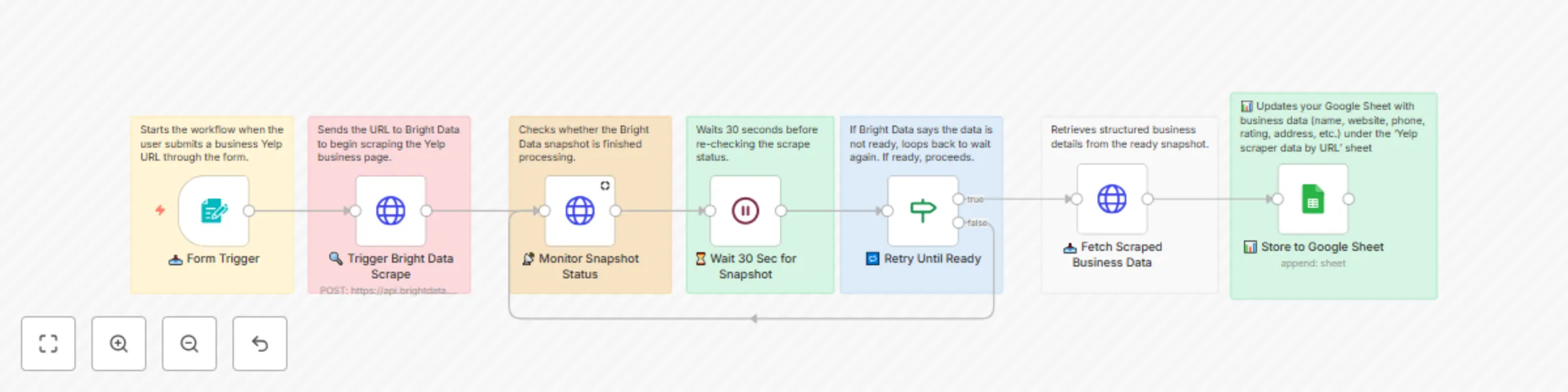
Original n8n.io sourceThis n8n workflow automates the process of scraping comprehensive business information from Yelp using individual business URLs. It integrates with Bright Data for professional web scraping and Google Sheets for centralized data storage, providing detailed business intelligence for market research, competitor analysis, and lead generation.
https://api.brightdata.com/datasets/v3/triggergd_lgugwl0519h1p14rwkhttps://api.brightdata.com/datasets/v3/progress/{snapshot_id}status === "ready"https://api.brightdata.com/datasets/v3/snapshot/{snapshot_id}Form Input → Trigger Scrape → Monitor Status → Wait 30s → Check Ready
↑ ↓
└─── Loop ─────┘
↓
Fetch Data → Store to Sheet
gd_lgugwl0519h1p14rwk (Yelp business scraper)| Field | Description | Example |
|---|---|---|
| Name | Business name | "Joe's Pizza Restaurant" |
| Overall Rating | Average customer rating | "4.5" |
| Reviews Count | Total number of reviews | "247" |
| URL | Original Yelp business URL | "https://www.yelp.com/biz/joes-pizza..." |
| Images/Videos URLs | Media content links | "https://s3-media1.fl.yelpcdn.com/..." |
Set up credentials:
Update API key references:
BRIGHT_DATA_API_KEY in all HTTP request nodesgd_lgugwl0519h1p14rwkCreate target spreadsheet:
Set up OAuth2 credentials:
Update workflow references:
YOUR_GOOGLE_SHEET_ID with actual Sheet IDYOUR_GOOGLE_SHEETS_CREDENTIAL_ID with credential referenceTest with sample URL:
Activate workflow:
The workflow captures comprehensive business information including:
Modify the input to accept multiple URLs:
[
  {"url": "https://www.yelp.com/biz/business-1"},
  {"url": "https://www.yelp.com/biz/business-2"},
  {"url": "https://www.yelp.com/biz/business-3"}
]
Add more extraction fields by updating the dataset configuration:
Add alert mechanisms:
**For any questions or support, please contact:
[email protected]
or fill out this form: https://www.incrementors.com/contact-us/
This catalog entry is organized from the workflow JSON. The node-level section below shows the executable blocks available for review before importing the template.
| Workflow | Yelp business scraper by URL with Bright Data API and Google Sheets |
|---|---|
| Complexity | intermediate |
| Nodes | 14 |
| Categories | Market Research |
| Author | Incrementors |
| Published | 24 Jul 2025 |
Use the JSON export at /data/workflows/6373/6373.json as the source template for this automation.
Open n8n, import the downloaded JSON, and review each node before activating the workflow.
Replace placeholder credentials, API keys, webhook URLs, account IDs, and environment-specific values with your own settings.
Run the workflow manually or in a staging workspace, inspect node output, and confirm downstream systems receive the expected data.
Enable the workflow only after testing, then monitor executions, errors, and rate limits during the first production runs.
Review imported nodes carefully before activation. This catalog entry is intended to help you inspect the workflow structure, understand required services, and find related templates faster.
Node names, credentials, schedules, webhook paths, and external service limits may need adjustment for your workspace.
Yelp Business Scraper by URL via Bright Data API with Google Sheets Storage Overview This n8n workflow automates the process of scraping comprehensive business information from Yelp using individua...
Review the workflow JSON, configure any required credentials in n8n, and test the automation in a safe workspace before using it in production.
Yes. Use the block-by-block analysis and the downloadable JSON to inspect each node, then adjust credentials, prompts, schedules, filters, or destinations for your Market Research use case.