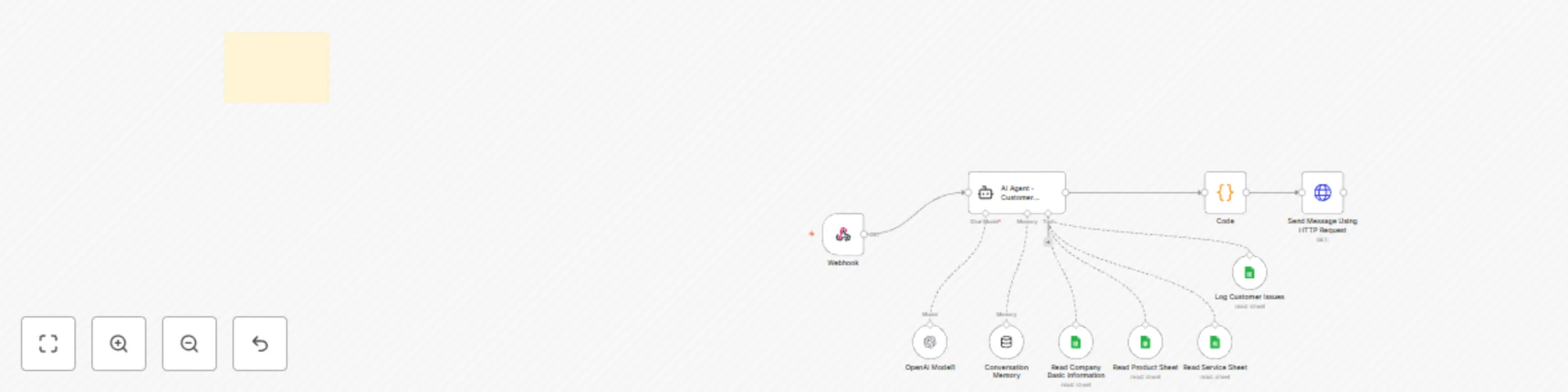
WhatsApp support assistant with GPT-4 Mini & Google Sheets data training

Workflow preview

Workflow preview
100%
WhatsApp support assistant with GPT-4 Mini & Google Sheets data training preview
Open on n8n.io

Important notice

This workflow is provided as-is. Please review and test before using in production.

1. Workflow Overview

WhatsApp AI HelpDesk – Smart SupportBot Using Trained Data & WasenderAPI Overview This n8n workflow enables automated AI driven support replies via your personal WhatsApp number using WasenderAPI.c...

Best for

  • Support Chatbot automation workflows
  • AI Chatbot automation workflows
  • intermediate n8n builders looking for reusable templates

Tools used

@n8n/n8n-nodes-langchain.agent, @n8n/n8n-nodes-langchain.lmchatopenai, @n8n/n8n-nodes-langchain.memorybufferwindow, n8n-nodes-base.googlesheetstool, n8n-nodes-base.webhook, n8n-nodes-base.code, n8n-nodes-base.httprequest, n8n-nodes-base.stickynote

Source and attribution

This workflow is cataloged by N8N Workflows and links back to its original n8n.io source page by SpaGreen Creative.

Original n8n.io source

1.1 Workflow description

Title
WhatsApp support assistant with GPT-4 Mini & Google Sheets data training
Workflow name
WhatsApp support assistant with GPT-4 Mini & Google Sheets data training

WhatsApp AI HelpDesk – Smart SupportBot Using Trained Data & WasenderAPI

Overview

This n8n workflow enables automated AI-driven support replies via your personal WhatsApp number using WasenderAPI.com. The bot intelligently responds to user messages based on trained data stored in Google Sheets, helping you avoid the high cost of WhatsApp Business API.


What It Does

  • Reads real-time data from a connected Google Sheet
  • Sends AI-generated responses based on predefined training data
  • Automatically applies rate limits to avoid account blocking
  • Updates each contact's support status after responding

Who’s It For

This workflow is ideal for:

  • Freelancers and small businesses offering support through WhatsApp
  • Customer service teams seeking to automate common queries
  • Entrepreneurs looking to deploy a cost-effective support assistant
  • SaaS founders managing WhatsApp inquiries without expensive API costs

Prerequisites

Make sure the following components are ready:


Setup Instructions

1. Connect WasenderAPI

  • Add your WhatsApp session to WasenderAPI
  • In n8n, create a Webhook node
  • Copy the webhook URL and paste it into your WasenderAPI session settings

2. Connect OpenAI

  • Add an OpenAI node in n8n
  • Authenticate using your OpenAI credentials
  • Configure the prompt to reference the data from your Google Sheet

3. Connect Google Sheets

  • Add a Google Sheets node
  • Authenticate using your Google account
  • Select the appropriate Spreadsheet and Worksheet
  • Format your sheet similarly to the sample template above

How to Customize the Workflow

To tailor the workflow to your business needs:

  • Update the training data in your Google Sheet to include your own FAQs, product info, or customer scripts
  • Adjust prompt instructions in the OpenAI node to change the tone, style, or behavior of the response
  • Add filtering logic using IF or SWITCH nodes to categorize and route different types of messages
  • Integrate CRM or ticketing systems via additional HTTP or database nodes
  • Set custom response delay or batching using WAIT or LIMIT nodes to control the load

Support & Community

Need help setting up or customizing the workflow? Reach out here:

1.2 Logical Blocks

This catalog entry is organized from the workflow JSON. The node-level section below shows the executable blocks available for review before importing the template.

2. Block-by-Block Analysis

Block 1 - AI Agent - Customer Support Agent

Type / Role
@n8n/n8n-nodes-langchain.agent - agent
Config choices
Version 1.7

Block 2 - OpenAI Model1

Type / Role
@n8n/n8n-nodes-langchain.lmChatOpenAi - lmChatOpenAi
Config choices
Version 1.2

Block 3 - Conversation Memory

Type / Role
@n8n/n8n-nodes-langchain.memoryBufferWindow - memoryBufferWindow
Config choices
Version 1.3

Block 4 - Log Customer Issues

Type / Role
n8n-nodes-base.googleSheetsTool - googleSheetsTool
Config choices
Version 4.5

Block 5 - Webhook

Type / Role
n8n-nodes-base.webhook - webhook
Config choices
Version 2

Block 6 - Code

Type / Role
n8n-nodes-base.code - code
Config choices
Version 2

Block 7 - Send Message Using HTTP Request

Type / Role
n8n-nodes-base.httpRequest - httpRequest
Config choices
Version 4.2

Block 8 - Read Company Basic Information

Type / Role
n8n-nodes-base.googleSheetsTool - googleSheetsTool
Config choices
Version 4.5

Block 9 - Read Product Sheet

Type / Role
n8n-nodes-base.googleSheetsTool - googleSheetsTool
Config choices
Version 4.5

Block 10 - Read Service Sheet

Type / Role
n8n-nodes-base.googleSheetsTool - googleSheetsTool
Config choices
Version 4.5

Block 11 - Sticky Note1

Type / Role
n8n-nodes-base.stickyNote - stickyNote
Config choices
Version 1

3. Summary Table

Workflow WhatsApp support assistant with GPT-4 Mini & Google Sheets data training
Complexity intermediate
Nodes 11
Categories Support Chatbot, AI Chatbot
Author SpaGreen Creative
Published 25 Jul 2025

4. Reproducing the Workflow from Scratch

  1. 1. Download the workflow JSON

    Use the JSON export at /data/workflows/6452/6452.json as the source template for this automation.

  2. 2. Import the template into n8n

    Open n8n, import the downloaded JSON, and review each node before activating the workflow.

  3. 3. Configure credentials and variables

    Replace placeholder credentials, API keys, webhook URLs, account IDs, and environment-specific values with your own settings.

  4. 4. Test with sample data

    Run the workflow manually or in a staging workspace, inspect node output, and confirm downstream systems receive the expected data.

  5. 5. Activate and monitor

    Enable the workflow only after testing, then monitor executions, errors, and rate limits during the first production runs.

5. General Notes & Resources

Review imported nodes carefully before activation. This catalog entry is intended to help you inspect the workflow structure, understand required services, and find related templates faster.

Node names, credentials, schedules, webhook paths, and external service limits may need adjustment for your workspace.

Frequently asked questions

What does WhatsApp support assistant with GPT-4 Mini & Google Sheets data training do?

WhatsApp AI HelpDesk – Smart SupportBot Using Trained Data & WasenderAPI Overview This n8n workflow enables automated AI driven support replies via your personal WhatsApp number using WasenderAPI.c...

What do I need before importing this workflow?

Review the workflow JSON, configure any required credentials in n8n, and test the automation in a safe workspace before using it in production.

Can I customize this workflow?

Yes. Use the block-by-block analysis and the downloadable JSON to inspect each node, then adjust credentials, prompts, schedules, filters, or destinations for your Support Chatbot, AI Chatbot use case.