Block 1 - Scan each IP
- Type / Role
- n8n-nodes-base.httpRequest - httpRequest
- Config choices
- Version 4.1


 Early Deal
This workflow is provided as-is. Please review and test before using in production.
This n8n workflow, which runs every Monday at 5:00 AM, initiates a comprehensive process to monitor and analyze network security by scrutinizing IP addresses and their associated ports. It begins b...
n8n-nodes-base.httprequest, n8n-nodes-base.itemlists, n8n-nodes-base.filter, n8n-nodes-base.set, n8n-nodes-base.html, n8n-nodes-base.markdown, n8n-nodes-base.splitinbatches, n8n-nodes-base.stickynote
This workflow is cataloged by N8N Workflows and links back to its original n8n.io source page by n8n Team.
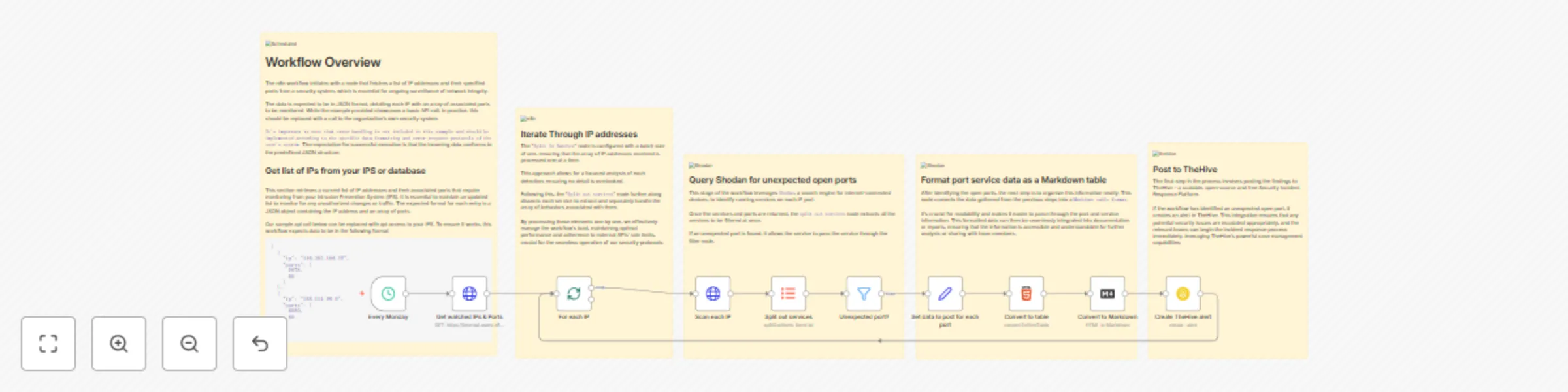
Original n8n.io sourceThis n8n workflow, which runs every Monday at 5:00 AM, initiates a comprehensive process to monitor and analyze network security by scrutinizing IP addresses and their associated ports. It begins by fetching a list of watched IP addresses and expected ports through an HTTP request. Each IP address is then processed in a sequential loop.
For every IP, the workflow sends a GET request to Shodan, a renowned search engine for internet-connected devices, to gather detailed information about the IP. It then extracts the data field from Shodan's response, converting it into an array. This array contains information on all ports Shodan has data for regarding the IP.
A filter node compares the ports returned from Shodan with the expected list obtained initially. If a port doesn't match the expected list, it is retained for further processing; otherwise, it's filtered out. For each such unexpected port, the workflow assembles data including the IP, hostnames from Shodan, the unexpected port number, service description, and detailed data from Shodan like HTTP status code, date, time, and headers.
This collected data is then formatted into an HTML table, which is subsequently converted into Markdown format. Finally, the workflow generates an alert in TheHive, a popular security incident response platform. This alert contains details like the title indicating unexpected ports for the specific IP, a description comprising the Markdown table with Shodan data, medium severity, current date and time, tags, Traffic Light Protocol (TLP) set to Amber, a new status, type as 'Unexpected open port', the source as n8n, a unique source reference combining the IP with the current Unix time, and enabling follow and JSON parameters options. This comprehensive workflow thus aids in the proactive monitoring and management of network security.
This catalog entry is organized from the workflow JSON. The node-level section below shows the executable blocks available for review before importing the template.
| Workflow | Weekly Shodan query - report accidents |
|---|---|
| Complexity | advanced |
| Nodes | 15 |
| Categories | SecOps |
| Author | n8n Team |
| Published | 13 Nov 2023 |
Use the JSON export at /data/workflows/1977/1977.json as the source template for this automation.
Open n8n, import the downloaded JSON, and review each node before activating the workflow.
Replace placeholder credentials, API keys, webhook URLs, account IDs, and environment-specific values with your own settings.
Run the workflow manually or in a staging workspace, inspect node output, and confirm downstream systems receive the expected data.
Enable the workflow only after testing, then monitor executions, errors, and rate limits during the first production runs.
Review imported nodes carefully before activation. This catalog entry is intended to help you inspect the workflow structure, understand required services, and find related templates faster.
Node names, credentials, schedules, webhook paths, and external service limits may need adjustment for your workspace.
This n8n workflow, which runs every Monday at 5:00 AM, initiates a comprehensive process to monitor and analyze network security by scrutinizing IP addresses and their associated ports. It begins b...
Review the workflow JSON, configure any required credentials in n8n, and test the automation in a safe workspace before using it in production.
Yes. Use the block-by-block analysis and the downloadable JSON to inspect each node, then adjust credentials, prompts, schedules, filters, or destinations for your SecOps use case.