Block 1 - Every Sunday at 6 PM
- Type / Role
- n8n-nodes-base.scheduleTrigger - scheduleTrigger
- Config choices
- Version 1


 Early Deal
This workflow is provided as-is. Please review and test before using in production.
Weekly Gratitude Pulse: Automated Appreciation DMs for Slack & Discord Communities Foster belonging with a weekly, automated appreciation message sent directly to members who engaged in your Slack ...
n8n-nodes-base.scheduletrigger, n8n-nodes-base.httprequest, n8n-nodes-base.function, n8n-nodes-base.airtable
This workflow is cataloged by N8N Workflows and links back to its original n8n.io source page by Shelly-Ann Davy.
Original n8n.io sourceFoster belonging with a weekly, automated appreciation message sent directly to members who engaged in your Slack or Discord community. The Weekly Gratitude Pulse runs every Sunday at 6 PM, quietly recognizing presence — not performance — with a warm, personalized DM that says: “You showed up. We see you. Thank you.”
No manual tracking. No public callouts. Just gentle, scalable care.
Perfect for coaches, Etsy sellers, and solopreneurs who want to nurture emotional safety and connection — without adding to their workload.
Deploy this workflow in under 10 minutes.
{{SLACK_BOT_TOKEN}} with a token that has:channels:historyusers:readim:write (for DMs){{SLACK_CHANNEL_ID}} (e.g., your main community channel)Read Message HistorySend MessagesCreate DM{{DISCORD_BOT_TOKEN}} and {{GUILD_ID}}> 🔗 Guide: Slack API Permissions | Discord Bot Setup
Uses a templated message like:
> “Hey {{Name}},
> Just wanted to say — I noticed you were around this week, and I’m so glad you were.
> You’re part of what makes this space feel like home. 💛
> Rest well, and I’ll see you in the week ahead.
> — [Your Name]”
Customize the message in the Set Message node.
Community Wellness TrackerGratitude Logs| Field | Type | Description |
|---|---|---|
Date Sent |
Date | When the DM was sent |
User ID |
Text | Slack/Discord user ID |
Username |
Text | Display name (e.g., @alex) |
Engagement Type |
Multi-select | Message, Reaction, Thread Reply |
Message Preview |
Text | First 50 characters of their post |
Gratitude Sent |
Checkbox | true after DM sent |
Channel |
Text | Source channel (e.g., #general) |
> 📊 Use a Monthly View to reflect on community rhythm — not to rank, but to honor.
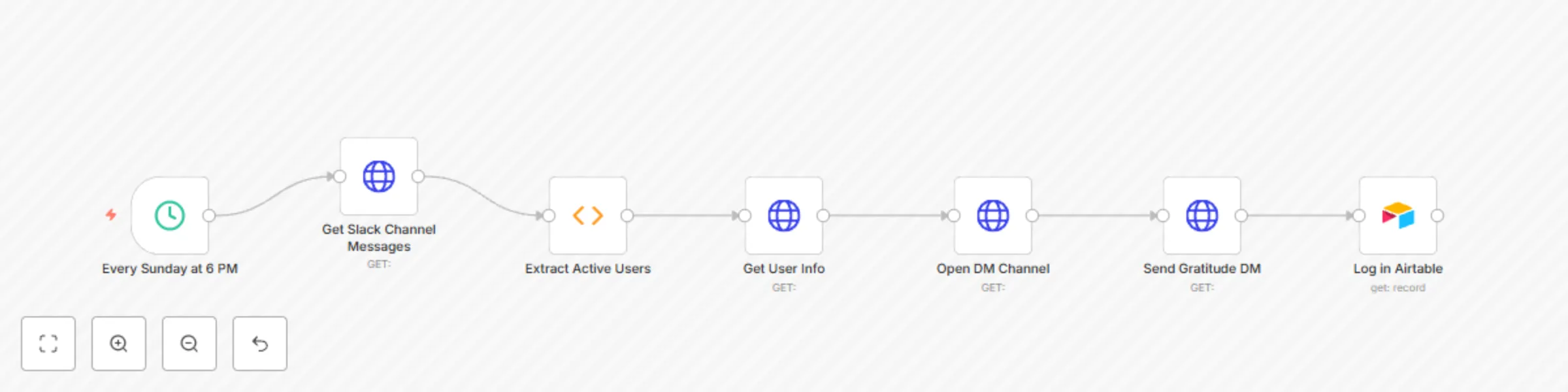
The Weekly Gratitude Pulse runs a thoughtful, automated cycle:
🔁 This creates a culture of quiet recognition — where showing up is enough.
channels:history, users:read, im:writeRead Message History, Send Messages, Create DMGratitude Logs table> ⚠️ Note: Slack DMs require resolving user → IM channel via conversations.open. Discord requires users.get and channels.create for DMs.
Make it your own:
This isn’t engagement farming.
It’s digital hospitality — automation with a heartbeat.
This catalog entry is organized from the workflow JSON. The node-level section below shows the executable blocks available for review before importing the template.
| Workflow | Weekly gratitude pulse: Automated appreciation DMs for Slack & Discord communities |
|---|---|
| Complexity | intermediate |
| Nodes | 7 |
| Categories | Social Media, AI Chatbot |
| Author | Shelly-Ann Davy |
| Published | 02 Sept 2025 |
Use the JSON export at /data/workflows/8170/8170.json as the source template for this automation.
Open n8n, import the downloaded JSON, and review each node before activating the workflow.
Replace placeholder credentials, API keys, webhook URLs, account IDs, and environment-specific values with your own settings.
Run the workflow manually or in a staging workspace, inspect node output, and confirm downstream systems receive the expected data.
Enable the workflow only after testing, then monitor executions, errors, and rate limits during the first production runs.
Review imported nodes carefully before activation. This catalog entry is intended to help you inspect the workflow structure, understand required services, and find related templates faster.
Node names, credentials, schedules, webhook paths, and external service limits may need adjustment for your workspace.
Weekly Gratitude Pulse: Automated Appreciation DMs for Slack & Discord Communities Foster belonging with a weekly, automated appreciation message sent directly to members who engaged in your Slack ...
Review the workflow JSON, configure any required credentials in n8n, and test the automation in a safe workspace before using it in production.
Yes. Use the block-by-block analysis and the downloadable JSON to inspect each node, then adjust credentials, prompts, schedules, filters, or destinations for your Social Media, AI Chatbot use case.