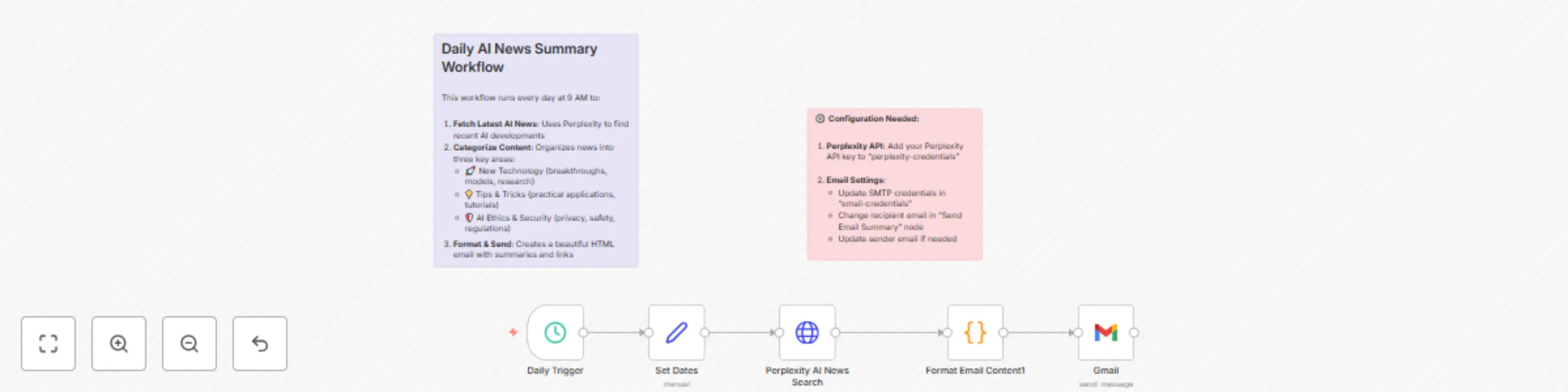
Weekly AI News Digest with Perplexity AI and Gmail Newsletter

Workflow preview

Workflow preview
100%
Weekly AI News Digest with Perplexity AI and Gmail Newsletter preview
Open on n8n.io

Important notice

This workflow is provided as-is. Please review and test before using in production.

1. Workflow Overview

This automated workflow delivers a weekly digest of the most important AI news directly to your inbox. Every Monday at 9 AM, it uses Perplexity AI to research the latest developments and organizes ...

Best for

  • Social Media automation workflows
  • AI Summarization automation workflows
  • intermediate n8n builders looking for reusable templates

Tools used

n8n-nodes-base.scheduletrigger, n8n-nodes-base.set, n8n-nodes-base.stickynote, n8n-nodes-base.httprequest, n8n-nodes-base.gmail, n8n-nodes-base.code

Source and attribution

This workflow is cataloged by N8N Workflows and links back to its original n8n.io source page by Derek Schatz.

Original n8n.io source

1.1 Workflow description

Title
Weekly AI News Digest with Perplexity AI and Gmail Newsletter
Workflow name
Weekly AI News Digest with Perplexity AI and Gmail Newsletter

Overview

This automated workflow delivers a weekly digest of the most important AI news directly to your inbox. Every Monday at 9 AM, it uses Perplexity AI to research the latest developments and organizes them into four key categories: New Technology, Trending Topics, Top Stories, and AI Security. The workflow then formats this information into a beautifully designed HTML email with summaries, significance explanations, and source links.

What It Does

  • Automatically searches for the latest AI news using Perplexity AI
  • Categorizes content into four focused areas most relevant to AI enthusiasts and professionals
  • Generates comprehensive summaries explaining why each story matters
  • Creates a professional HTML email with styled sections and clickable links
  • Sends weekly on Monday at 9 AM (customizable schedule)
  • Includes error handling with fallback content if news parsing fails

Setup Instructions

Import the Workflow

  • Copy the JSON code and import it into your n8n instance
  • The workflow will appear as “Daily AI News Summary”

Configure Perplexity API

  • Sign up for a Perplexity API account at perplexity.ai

  • Create new credentials in n8n:

    • Type: “OpenAI”
    • Name: “perplexity-credentials”
    • API Key: Your Perplexity API key
    • Base URL: https://api.perplexity.ai

Set Up Email Credentials

  • Configure SMTP credentials in n8n:

    • Name: “email-credentials”
    • Add your email provider’s SMTP settings
    • Test the connection to ensure emails can be sent

Customize Email Settings

  • Open the “Send Email Summary” node
  • Update the toEmail field with your email address
  • Modify the fromEmail if needed (must match your SMTP credentials)

Optional Customizations

  • Change Schedule: Modify the “Daily Trigger” node to run at your preferred time
  • Adjust Categories: Edit the Perplexity prompt to focus on different AI topics or change the theme altogether
  • Modify Styling: Update the HTML template in the “Format Email Content” node

Test and Activate

  • Run a test execution to ensure everything works correctly
  • Activate the workflow to start receiving daily AI news summaries

Requirements

  • n8n instance (cloud or self-hosted)
  • Perplexity API account and key
  • SMTP email access (Gmail, Outlook, etc.)

1.2 Logical Blocks

This catalog entry is organized from the workflow JSON. The node-level section below shows the executable blocks available for review before importing the template.

2. Block-by-Block Analysis

Block 1 - Daily Trigger

Type / Role
n8n-nodes-base.scheduleTrigger - scheduleTrigger
Config choices
Version 1.2

Block 2 - Set Dates

Type / Role
n8n-nodes-base.set - set
Config choices
Version 3.4

Block 3 - Workflow Documentation

Type / Role
n8n-nodes-base.stickyNote - stickyNote
Config choices
Version 1

Block 4 - Setup Instructions

Type / Role
n8n-nodes-base.stickyNote - stickyNote
Config choices
Version 1

Block 5 - Perplexity AI News Search

Type / Role
n8n-nodes-base.httpRequest - httpRequest
Config choices
Version 4.2

Block 6 - Gmail

Type / Role
n8n-nodes-base.gmail - gmail
Config choices
Version 2.1

Block 7 - Format Email Content1

Type / Role
n8n-nodes-base.code - code
Config choices
Version 2

3. Summary Table

Workflow Weekly AI News Digest with Perplexity AI and Gmail Newsletter
Complexity intermediate
Nodes 7
Categories Social Media, AI Summarization
Author Derek Schatz
Published 27 May 2025

4. Reproducing the Workflow from Scratch

  1. 1. Download the workflow JSON

    Use the JSON export at /data/workflows/4412/4412.json as the source template for this automation.

  2. 2. Import the template into n8n

    Open n8n, import the downloaded JSON, and review each node before activating the workflow.

  3. 3. Configure credentials and variables

    Replace placeholder credentials, API keys, webhook URLs, account IDs, and environment-specific values with your own settings.

  4. 4. Test with sample data

    Run the workflow manually or in a staging workspace, inspect node output, and confirm downstream systems receive the expected data.

  5. 5. Activate and monitor

    Enable the workflow only after testing, then monitor executions, errors, and rate limits during the first production runs.

5. General Notes & Resources

Review imported nodes carefully before activation. This catalog entry is intended to help you inspect the workflow structure, understand required services, and find related templates faster.

Node names, credentials, schedules, webhook paths, and external service limits may need adjustment for your workspace.

Frequently asked questions

What does Weekly AI News Digest with Perplexity AI and Gmail Newsletter do?

This automated workflow delivers a weekly digest of the most important AI news directly to your inbox. Every Monday at 9 AM, it uses Perplexity AI to research the latest developments and organizes ...

What do I need before importing this workflow?

Review the workflow JSON, configure any required credentials in n8n, and test the automation in a safe workspace before using it in production.

Can I customize this workflow?

Yes. Use the block-by-block analysis and the downloadable JSON to inspect each node, then adjust credentials, prompts, schedules, filters, or destinations for your Social Media, AI Summarization use case.