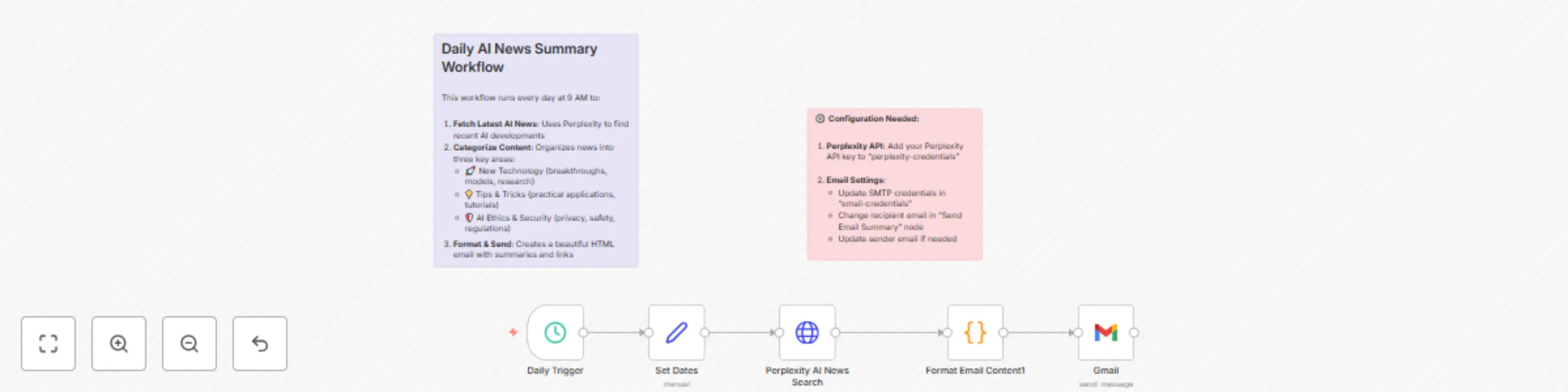
Weekly AI News Digest with Perplexity AI and Gmail Newsletter
## Overview
This automated workflow delivers a weekly digest of the most important AI news directly to your inbox. Every Monday at 9 AM, it uses Perplexity AI to research the latest developments and organizes them into four key categories: New Technology, Trending Topics, Top Stories, and AI Security. The workflow then formats this information into a beautifully designed HTML email with summaries, significance explanations, and source links.
## What It Does
* Automatically searches for the latest AI news using Perplexity AI
* Categorizes content into four focused areas most relevant to AI enthusiasts and professionals
* Generates comprehensive summaries explaining why each story matters
* Creates a professional HTML email with styled sections and clickable links
* Sends weekly on Monday at 9 AM (customizable schedule)
* Includes error handling with fallback content if news parsing fails
## Setup Instructions
### Import the Workflow
* Copy the JSON code and import it into your n8n instance
* The workflow will appear as **“Daily AI News Summary”**
### Configure Perplexity API
* Sign up for a Perplexity API account at [perplexity.ai](https://perplexity.ai)
* Create new credentials in n8n:
* **Type:** “OpenAI”
* **Name:** “perplexity-credentials”
* **API Key:** Your Perplexity API key
* **Base URL:** `https://api.perplexity.ai`
### Set Up Email Credentials
* Configure SMTP credentials in n8n:
* **Name:** “email-credentials”
* Add your email provider’s SMTP settings
* Test the connection to ensure emails can be sent
### Customize Email Settings
* Open the **“Send Email Summary”** node
* Update the `toEmail` field with your email address
* Modify the `fromEmail` if needed (must match your SMTP credentials)
### Optional Customizations
* **Change Schedule:** Modify the “Daily Trigger” node to run at your preferred time
* **Adjust Categories:** Edit the Perplexity prompt to focus on different AI topics or change the theme altogether
* **Modify Styling:** Update the HTML template in the “Format Email Content” node
## Test and Activate
* Run a test execution to ensure everything works correctly
* Activate the workflow to start receiving daily AI news summaries
## Requirements
* n8n instance (cloud or self-hosted)
* Perplexity API account and key
* SMTP email access (Gmail, Outlook, etc.)