Website downtime alert via LINE + Supabase log
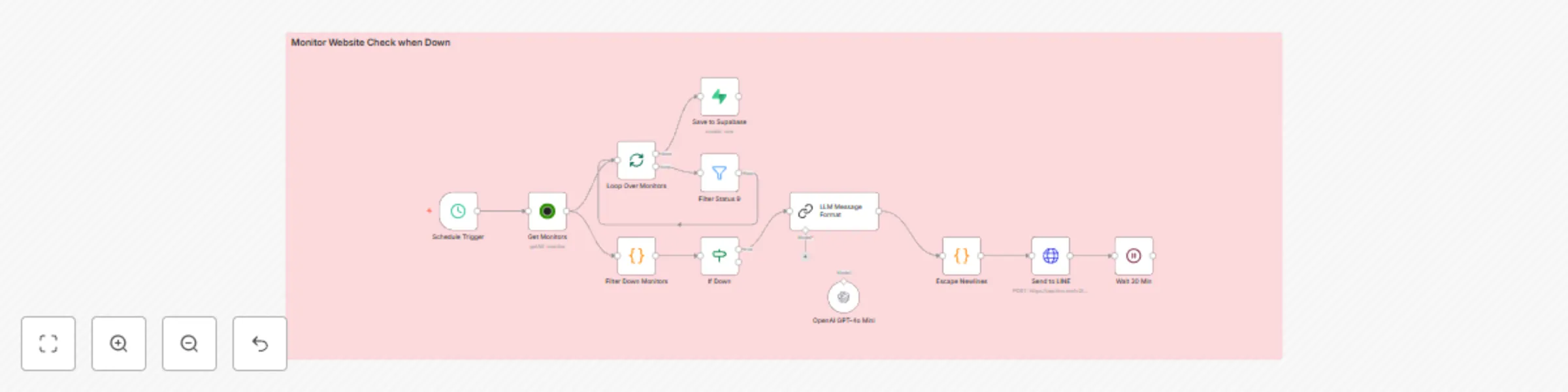
Workflow preview

$20/month : Unlimited workflows
2500 executions/month

THE #1 IN WEB SCRAPING
Scrape any website without limits
HOSTINGER  Early Deal
DISCOUNT 20% Try free
Early DealDISCOUNT 20%
Self-hosted n8n
Unlimited workflows - from $4.99/mo

#1 hub for scraping, AI & automation
6000+ actors - $5 credits/mo
Important notice
This workflow is provided as-is. Please review and test before using in production.
Overview
This workflow automatically checks the status of your websites using UptimeRobot API. If any site is down or unstable, it will:
- Generate a natural-language alert message using GPT-4o
- Push the message to a LINE group (with funny IT-style encouragement)
- Log all DOWN status entries into your Supabase database
- Wait 30 minutes before repeating
🔧 How It Works
- Schedule Trigger – Runs on a fixed interval (every few minutes).
- UptimeRobot Node – Fetches website monitor data.
- Code Node (Filter) – Filters only websites with status 8 (may be down) or 9 (down).
- IF Node – If any site is down, proceed.
- LangChain LLM Node – Formats alert with a humorous message using GPT-4o.
- Line Notify (HTTP Request) – Sends the alert to your LINE group.
- Loop Over Items – Loops through all monitors.
- Filter Down (Status = 9) – Selects only “fully down” sites.
- Supabase Node – Logs these into synlora_uptime_down table.
- Wait Node – Delays next alert by 30 minutes to avoid spamming.
⚙️ Setup Steps
Required:
- 🔗 UptimeRobot API Key
- 📲 LINE Channel Access Token and Group ID
- 🧠 OpenAI Key (GPT-4o Mini)
- 🗃️ Supabase Project & Table
Step-by-step:
- Go to UptimeRobot → Get API key and ensure monitors are set up.
- Create a Supabase table with fields: website, status, uptime_id.
- Create a LINE Messaging API bot, join it to your group, and get:
- Access Token
- Group ID (userId or groupId)
- Add your OpenAI API Key for GPT-4o Mini (or switch to your preferred LLM).
- Import the workflow JSON into n8n.
- Set credentials in all necessary nodes.
- Activate the workflow.