Block 1 - OpenAI Chat Model
- Type / Role
- @n8n/n8n-nodes-langchain.lmChatOpenAi - lmChatOpenAi
- Config choices
- Version 1.2


 Early Deal
This workflow is provided as-is. Please review and test before using in production.
This workflow allows you to scrape website content, clean the HTML, extract structured information using GPT 5 mini, and store the results along with SEO keywords into Airtable. Ideal for building ...
@n8n/n8n-nodes-langchain.lmchatopenai, n8n-nodes-base.formtrigger, n8n-nodes-base.wait, n8n-nodes-base.splitout, n8n-nodes-base.airtable, n8n-nodes-base.merge, n8n-nodes-base.stickynote, n8n-nodes-base.httprequest
This workflow is cataloged by N8N Workflows and links back to its original n8n.io source page by Abhishek Patoliya.
Original n8n.io sourceThis workflow allows you to scrape website content, clean the HTML, extract structured information using GPT-5-mini, and store the results along with SEO keywords into Airtable. Ideal for building keyword lists and organizing web content for SEO research.
Ensure your Airtable table has the following fields:
| Field Name | Type | Notes |
|---|---|---|
| Website Name | String | Name or URL of the website |
| Data | String | Cleaned website text |
| Keyword | String | Extracted SEO keyword list |
| Status | Options | Values: Todo, In progress, Done |
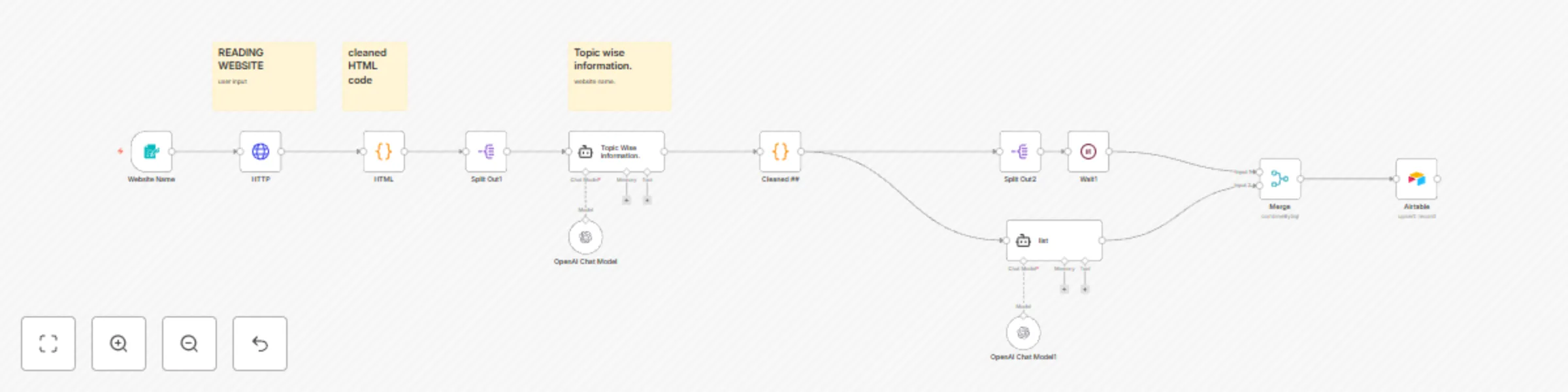
✅ Form Trigger: Collects website URL from the user.
✅ HTTP Request: Fetches the website content.
✅ HTML Cleaner (Code Node): Strips out styles, tags, and whitespace to get clean text.
✅ Topic Extractor (AI Agent + GPT-5-mini): Extracts topic-wise information from the cleaned website content.
✅ Text Cleaner (Code Node):
Removes unwanted symbols like ### and **.
✅ Keyword Extractor (AI Agent + GPT-5-mini): Generates a list of 90 important SEO keywords.
✅ Airtable Upsert: Stores the cleaned data, keywords, and status in Airtable.
✅ Automatic website content scraping ✅ Clean HTML and extract plain text ✅ Use GPT-5-mini for topic-wise information extraction ✅ Generate 90-keyword SEO lists ✅ Store and manage data in Airtable
| Current Name | Suggested Name |
|---|---|
| Website Name | Website URL Input Form |
| HTTP Request | Fetch Website Content |
| Code | HTML to Plain Text Cleaner |
| Split Out1 | Clean Text Splitter |
| AI Agent1 | Topic Extractor (GPT-5-mini) |
| Code1 | Text Cleanup Formatter |
| Split Out2 | Final Text Splitter |
| AI Agent | Keyword Extractor (GPT-5-mini) |
| Airtable | Airtable Data Upsert |
| Wait1 | Delay Before Merge |
| Merge | Combine Data for Airtable |
This catalog entry is organized from the workflow JSON. The node-level section below shows the executable blocks available for review before importing the template.
| Workflow | Website content scraper & SEO keyword extractor with GPT-5-mini and Airtable |
|---|---|
| Complexity | advanced |
| Nodes | 16 |
| Categories | Market Research, AI Summarization |
| Author | Abhishek Patoliya |
| Published | 03 Jul 2025 |
Use the JSON export at /data/workflows/5657/5657.json as the source template for this automation.
Open n8n, import the downloaded JSON, and review each node before activating the workflow.
Replace placeholder credentials, API keys, webhook URLs, account IDs, and environment-specific values with your own settings.
Run the workflow manually or in a staging workspace, inspect node output, and confirm downstream systems receive the expected data.
Enable the workflow only after testing, then monitor executions, errors, and rate limits during the first production runs.
Review imported nodes carefully before activation. This catalog entry is intended to help you inspect the workflow structure, understand required services, and find related templates faster.
Node names, credentials, schedules, webhook paths, and external service limits may need adjustment for your workspace.
This workflow allows you to scrape website content, clean the HTML, extract structured information using GPT 5 mini, and store the results along with SEO keywords into Airtable. Ideal for building ...
Review the workflow JSON, configure any required credentials in n8n, and test the automation in a safe workspace before using it in production.
Yes. Use the block-by-block analysis and the downloadable JSON to inspect each node, then adjust credentials, prompts, schedules, filters, or destinations for your Market Research, AI Summarization use case.