Abhishek Patoliya
Workflows by Abhishek Patoliya
Daily & on-demand weather reports with OpenWeatherMap to Telegram
This powerful **n8n automation** sends you **daily weather updates** directly to your **Telegram chat** using **live data from OpenWeatherMap**. It supports **automatic daily updates** and **manual lookups** via form input. --- ## ✅ Prerequisites Before you begin, make sure you have: * A working **n8n instance** (v1.0 or later recommended). * An account with **OpenWeatherMap** (free plan is sufficient). * A **Telegram Bot** created via [@BotFather](https://t.me/botfather). * Your **Telegram user ID** or **chat ID**. --- ## 🔐 API & Bot Setup ### 🧩 OpenWeatherMap API 1. Go to [https://openweathermap.org/api](https://openweathermap.org/api) 2. Sign up and verify your account. 3. Navigate to **API Keys** in your account dashboard. 4. Copy your **API key** (used later in the HTTP Request node). ### 🤖 Telegram Bot 1. Open [@BotFather](https://t.me/botfather) in Telegram. 2. Run `/newbot` and follow the prompts: * Choose a name and username for your bot. * You’ll get a **bot token** (copy this). 3. Start a chat with your new bot to activate it. 4. To get your **Telegram User ID**, use [@userinfobot](https://t.me/userinfobot) or an n8n Telegram Trigger node. --- ## 🔄 Trigger Options ### ⏰ Schedule Trigger (Automatic) * Runs **daily at 8:00 AM IST**. * Ideal for consistent, passive updates. ### 📝 Form Trigger (Manual) * Input 🌆 **City** and 🌍 **Country** manually. * Instantly receive weather info in Telegram. --- ## 🧠 How the Flow Works 1. **Trigger Activated** (Scheduled or Form) 2. **City & Country fetched** (default or from form) 3. **HTTP Request** sent to OpenWeatherMap with API key 4. **Weather Data Parsed & Formatted**: * 📅 Current Date * 📍 City & Country * 🌤️ Weather Description * 🌡️ Temperature (°C) * 💧 Humidity (%) * 🌬️ Wind Speed (m/s) * 🔼 Atmospheric Pressure * 🌅 Sunrise Time (IST) * 🌇 Sunset Time (IST) 5. **Message Sent to Telegram** --- ## 🧰 Nodes Used * **Schedule Trigger** – Runs every day at 8:00 AM IST * **Form Trigger** – Accepts user input * **Set Node** – Default city/country values and date formatting * **HTTP Request** – Calls OpenWeatherMap API * **Function Node** – Converts timestamps to IST * **Telegram Node** – Sends formatted weather message --- ## 📦 Example Telegram Output ``` 📅 Wednesday, 10 July 2025 🌤 Weather in Mumbai, IN: Condition: Clear sky Temperature: 30°C 💧 Humidity: 70% 🌬 Wind Speed: 3 m/s 🔼 Pressure: 1013 hPa 🌅 Sunrise: 5:57:12 AM 🌇 Sunset: 6:53:45 PM ``` --- ## 🛠️ Customization Tips ### 🏙️ Change Default City/Country * Locate the **Set Node** (used before the API call). * Replace `"Mumbai"` and `"IN"` with your preferred location. * Or connect the **Form Trigger** input to allow dynamic values. ### 🕗 Change Schedule Time * Open the **Schedule Trigger** node. * Adjust to your preferred time zone and daily timing (e.g., 7 AM IST). ### 🧪 Add Extra Data * OpenWeatherMap returns more fields like visibility, UV index, etc. * You can include these in your Telegram message via the **Function Node** and **Set Node**. ---
Website content scraper & SEO keyword extractor with GPT-5-mini and Airtable
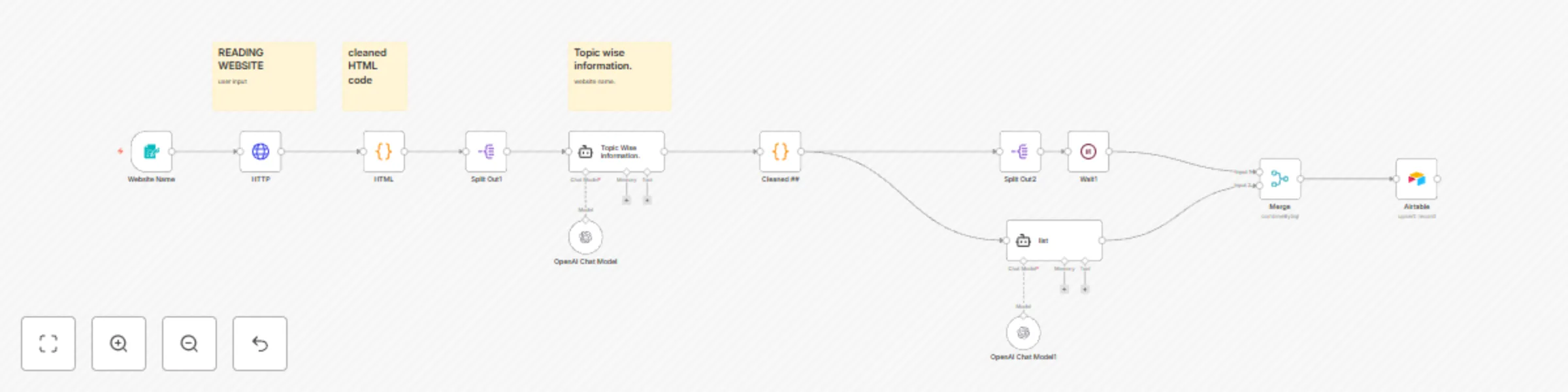
This workflow allows you to scrape website content, clean the HTML, extract structured information using GPT-5-mini, and store the results along with SEO keywords into Airtable. Ideal for building keyword lists and organizing web content for SEO research. --- ## **Setup Instructions** ### **1. Prerequisites** * n8n Community or Cloud instance * Airtable account with a base and table ready * OpenAI API Key with access to GPT-5-mini --- ### **2. Airtable Structure** Ensure your Airtable table has the following fields: | Field Name | Type | Notes | | ------------ | ------- | ------------------------------- | | Website Name | String | Name or URL of the website | | Data | String | Cleaned website text | | Keyword | String | Extracted SEO keyword list | | Status | Options | Values: Todo, In progress, Done | --- ### **3. Node Setup** ✅ **Form Trigger:** Collects website URL from the user. ✅ **HTTP Request:** Fetches the website content. ✅ **HTML Cleaner (Code Node):** Strips out styles, tags, and whitespace to get clean text. ✅ **Topic Extractor (AI Agent + GPT-5-mini):** Extracts topic-wise information from the cleaned website content. ✅ **Text Cleaner (Code Node):** Removes unwanted symbols like `###` and `**`. ✅ **Keyword Extractor (AI Agent + GPT-5-mini):** Generates a list of 90 important SEO keywords. ✅ **Airtable Upsert:** Stores the cleaned data, keywords, and status in Airtable. --- ### **4. Key Features** ✅ Automatic website content scraping ✅ Clean HTML and extract plain text ✅ Use GPT-5-mini for topic-wise information extraction ✅ Generate 90-keyword SEO lists ✅ Store and manage data in Airtable --- ### **5. Use Cases** * SEO Keyword Research * Competitor Website Content Analysis * Structured Website Data Collection --- ## **Additional Workflow Recommendations** ### **✅ Rename Nodes for Clarity** | Current Name | Suggested Name | | ------------ | ------------------------------- | | Website Name | Website URL Input Form | | HTTP Request | Fetch Website Content | | Code | HTML to Plain Text Cleaner | | Split Out1 | Clean Text Splitter | | AI Agent1 | Topic Extractor (GPT-5-mini) | | Code1 | Text Cleanup Formatter | | Split Out2 | Final Text Splitter | | AI Agent | Keyword Extractor (GPT-5-mini) | | Airtable | Airtable Data Upsert | | Wait1 | Delay Before Merge | | Merge | Combine Data for Airtable | ---
Manage tasks & send scheduled reminders with Telegram Bot, Google Sheets & GPT-4o mini
This n8n automation lets you build a complete AI-powered task management system that integrates **Telegram**, **Google Sheets**, and **GPT-4o mini** to help users easily manage to-do lists and receive daily task reminders. Users can interact with the system via **Telegram**, while the AI assistant (powered by GPT-4o mini) processes commands naturally, updates a central **Google Sheet**, and ensures scheduled reminders are sent for pending tasks. --- ## **✨ Key Features** ✅ Add, list, update, complete, or delete tasks via Telegram ✅ AI-powered conversational responses using GPT-4o ✅ All tasks stored and synced in Google Sheets ✅ Daily scheduled task summary and pending reminders sent to Telegram ✅ Friendly, human-like assistant responses ✅ Fully configurable and easy to set up --- ## **🛠️ Workflow Functionality Breakdown** ### 1. **User Interacts on Telegram** * Sends commands like: * `add buy groceries` * `list tasks` * `complete submit report` * `delete dentist appointment` ### 2. **AI-Powered Processing** * A GPT-4o agent processes user messages * Ensures clear, friendly responses * Determines task intent: add, update, delete, list, complete ### 3. **Google Sheets Sync** * Every operation is logged to Google Sheets * Google Sheets acts as the master task database * Sheet structure includes: * `Task` * `Status` (`pending` or `done`) * `Created At` (timestamp) * `Due Date` (optional) * `Notes` (optional) ### 4. **Scheduled Daily Task Summary** * At 9 PM daily, the workflow: * Fetches tasks from Google Sheets * Generates a warm, conversational summary via GPT-4o * Sends the summary to the user on Telegram ### 5. **Automated Reminders** * Checks for pending tasks due today * Sends reminder messages to Telegram --- ## **✅ Prerequisites** Before setting up the workflow, ensure you have: ✔️ An **n8n** instance (Cloud or self-hosted) ✔️ A **Telegram Bot Token** ✔️ Access to **Google Sheets API** (OAuth2 credentials) ✔️ An **OpenAI API Key** with GPT-4o access ✔️ A Google Sheet structured as per the specification below --- ## **📝 Google Sheet Structure** Your Google Sheet should have the following columns: | Column Name | Description | | -------------- | ---------------------------------------------------- | | **Task** | Short task description | | **Status** | `pending` or `done` | | **Created At** | Date & time task was created (`YYYY-MM-DD HH:mm:ss`) | | **Due Date** | (Optional) When task is due (`YYYY-MM-DD HH:mm:ss`) | | **Notes** | (Optional) Additional details | **Important:** The first row should be the header row with these exact column names. --- ## **🔧 Setup Instructions** ### 1. **Telegram Bot Setup** * Create a bot via [BotFather](https://core.telegram.org/bots#botfather) * Obtain the **Bot Token** * Connect Telegram Trigger and Telegram Send nodes using your Bot Token in n8n ### 2. **Google Sheets API Setup** * Follow [n8n Google Sheets integration guide](https://docs.n8n.io/integrations/builtin/app-nodes/n8n-nodes-base.googlesheets/) * Set up OAuth2 credentials * Provide access to your task Google Sheet ### 3. **OpenAI API Setup** * Obtain an API key from [OpenAI](https://platform.openai.com/account/api-keys) * Ensure GPT-4o mini access is enabled * Add OpenAI credentials to relevant nodes ### 4. **Sheet Linking** * Replace the **Google Sheet ID** in the workflow with your own * Confirm sheet names and column structure match exactly ### 5. **Schedule Configuration (Optional)** * Adjust the daily summary time (`Schedule Trigger` node) as desired --- ## **⚙️ Configuration Options** * 🔧 Adjust AI prompt instructions for tone/style * 🔧 Change reminder times in the schedule trigger * 🔧 Customize Google Sheet columns if needed (update mappings accordingly) * 🔧 Add multi-user support with chat ID checks (advanced) --- ## **📂 Files Included** * Full n8n JSON workflow ready to import --- ## **💡 Tips** * You can extend this with Slack, WhatsApp, or Email reminders * Combine with Notion, ClickUp, or CRM integrations for more powerful task management * Consider adding a "Priority" column for advanced sorting --- **Ready to stay organized with AI-powered task management?** Import this workflow, link your accounts, and your Telegram assistant is good to go! 🚀 ---