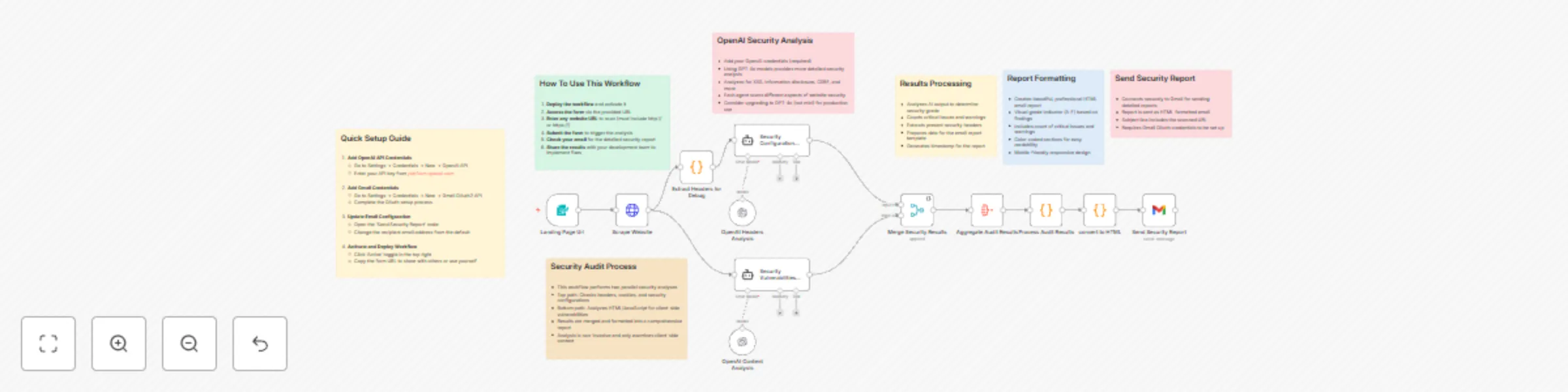
WebSecScan: AI-powered website security auditor

Workflow preview

Workflow preview
100%
WebSecScan: AI-powered website security auditor preview
Open on n8n.io

Important notice

This workflow is provided as-is. Please review and test before using in production.

1. Workflow Overview

WebSecScan: AI Powered Website Security Auditor This n8n workflow provides comprehensive website security analysis by leveraging OpenAI's models to detect vulnerabilities, configuration issues, and...

Best for

  • SecOps automation workflows
  • AI Summarization automation workflows
  • advanced n8n builders looking for reusable templates

Tools used

n8n-nodes-base.formtrigger, n8n-nodes-base.httprequest, @n8n/n8n-nodes-langchain.lmchatopenai, @n8n/n8n-nodes-langchain.agent, n8n-nodes-base.merge, n8n-nodes-base.aggregate, n8n-nodes-base.code, n8n-nodes-base.gmail

Source and attribution

This workflow is cataloged by N8N Workflows and links back to its original n8n.io source page by Dale Dunlop.

Original n8n.io source

1.1 Workflow description

Title
WebSecScan: AI-powered website security auditor
Workflow name
WebSecScan: AI-powered website security auditor

WebSecScan: AI-Powered Website Security Auditor

This n8n workflow provides comprehensive website security analysis by leveraging OpenAI's models to detect vulnerabilities, configuration issues, and security misconfigurations. The workflow generates a professional HTML security report delivered directly via Gmail.

Key Features

  • Dual-Layer Security Analysis: Performs parallel security audits using specialized OpenAI agents:

    • Header Configuration Audit: Analyzes HTTP headers, CORS policies, CSP implementation, and cookie security
    • Vulnerability Assessment: Identifies XSS vectors, information disclosure, and client-side weaknesses
  • Detailed Security Grading: Automatically calculates a security grade (A+ to F) based on findings severity and quantity

  • Professional Report Generation: Creates a comprehensive HTML report with:

    • Security grade visualization
    • Color-coded vulnerability categories
    • Detailed recommendations with example configuration fixes
    • Header presence/absence indicators
    • Implementation guidance for remediation
  • Non-Invasive Testing: Performs analysis without active scanning or exploitation attempts

Technical Implementation

  • Multi-Agent Architecture: Utilizes two specialized OpenAI agents with custom prompts tailored for security analysis

  • Advanced Header Analysis: Detects presence and proper implementation of critical security headers:

    • Content-Security-Policy
    • Strict-Transport-Security
    • X-Content-Type-Options
    • X-Frame-Options
    • Referrer-Policy
    • Permissions-Policy
  • Intelligent Issue Detection: Uses JavaScript processing to analyze OpenAI outputs and count critical/warning issues

  • Responsive HTML Report: Dynamically generates a mobile-friendly report with detailed findings and recommendations

Setup Requirements

1. OpenAI API Configuration

  1. Create an OpenAI API key at platform.openai.com
  2. In n8n, go to Settings → Credentials → New → OpenAI API
  3. Enter your API key and save

2. Gmail Integration

  1. Navigate to Settings → Credentials → New → Gmail OAuth2 API
  2. Complete the OAuth authentication flow
  3. Configure recipient email in the "Send Security Report" node

3. Workflow Customization (Optional)

  • Modify the form title/description in the Landing Page node
  • Upgrade from gpt-4o-mini to gpt-4o for more comprehensive analysis
  • Add additional recipients to the email report

Usage Instructions

  1. Activate the workflow and access the form via the generated URL
  2. Enter any website URL to analyze (including the http:// or https:// prefix)
  3. Receive a detailed security report via email within minutes
  4. Share findings with your development team to implement fixes

This workflow represents a non-invasive security assessment tool. For production environments, complement with professional penetration testing services.

1.2 Logical Blocks

This catalog entry is organized from the workflow JSON. The node-level section below shows the executable blocks available for review before importing the template.

2. Block-by-Block Analysis

Block 1 - Landing Page Url

Type / Role
n8n-nodes-base.formTrigger - formTrigger
Config choices
Version 2.2

Block 2 - Scrape Website

Type / Role
n8n-nodes-base.httpRequest - httpRequest
Config choices
Version 4.2

Block 3 - OpenAI Headers Analysis

Type / Role
@n8n/n8n-nodes-langchain.lmChatOpenAi - lmChatOpenAi
Config choices
Version 1.2

Block 4 - OpenAI Content Analysis

Type / Role
@n8n/n8n-nodes-langchain.lmChatOpenAi - lmChatOpenAi
Config choices
Version 1.2

Block 5 - Security Vulnerabilities Audit

Type / Role
@n8n/n8n-nodes-langchain.agent - agent
Config choices
Version 1.7

Block 6 - Security Configuration Audit

Type / Role
@n8n/n8n-nodes-langchain.agent - agent
Config choices
Version 1.7

Block 7 - Merge Security Results

Type / Role
n8n-nodes-base.merge - merge
Config choices
Version 3

Block 8 - Aggregate Audit Results

Type / Role
n8n-nodes-base.aggregate - aggregate
Config choices
Version 1

Block 9 - Process Audit Results

Type / Role
n8n-nodes-base.code - code
Config choices
Version 2

Block 10 - Send Security Report

Type / Role
n8n-nodes-base.gmail - gmail
Config choices
Version 2.1

Block 11 - Sticky Note - Setup Instructions

Type / Role
n8n-nodes-base.stickyNote - stickyNote
Config choices
Version 1

Block 12 - Sticky Note - OpenAI Analysis

Type / Role
n8n-nodes-base.stickyNote - stickyNote
Config choices
Version 1

Block 13 - Sticky Note - Email Configuration

Type / Role
n8n-nodes-base.stickyNote - stickyNote
Config choices
Version 1

Block 14 - Sticky Note - Audit Process

Type / Role
n8n-nodes-base.stickyNote - stickyNote
Config choices
Version 1

Block 15 - Sticky Note - How To Use

Type / Role
n8n-nodes-base.stickyNote - stickyNote
Config choices
Version 1

Block 16 - Sticky Note - Report Formatting

Type / Role
n8n-nodes-base.stickyNote - stickyNote
Config choices
Version 1

Block 17 - Sticky Note - Results Processing

Type / Role
n8n-nodes-base.stickyNote - stickyNote
Config choices
Version 1

Block 18 - Extract Headers for Debug

Type / Role
n8n-nodes-base.code - code
Config choices
Version 2

Block 19 - convert to HTML

Type / Role
n8n-nodes-base.code - code
Config choices
Version 2

3. Summary Table

Workflow WebSecScan: AI-powered website security auditor
Complexity advanced
Nodes 19
Categories SecOps, AI Summarization
Author Dale Dunlop
Published 24 Mar 2025

4. Reproducing the Workflow from Scratch

  1. 1. Download the workflow JSON

    Use the JSON export at /data/workflows/3314/3314.json as the source template for this automation.

  2. 2. Import the template into n8n

    Open n8n, import the downloaded JSON, and review each node before activating the workflow.

  3. 3. Configure credentials and variables

    Replace placeholder credentials, API keys, webhook URLs, account IDs, and environment-specific values with your own settings.

  4. 4. Test with sample data

    Run the workflow manually or in a staging workspace, inspect node output, and confirm downstream systems receive the expected data.

  5. 5. Activate and monitor

    Enable the workflow only after testing, then monitor executions, errors, and rate limits during the first production runs.

5. General Notes & Resources

Review imported nodes carefully before activation. This catalog entry is intended to help you inspect the workflow structure, understand required services, and find related templates faster.

Node names, credentials, schedules, webhook paths, and external service limits may need adjustment for your workspace.

Frequently asked questions

What does WebSecScan: AI-powered website security auditor do?

WebSecScan: AI Powered Website Security Auditor This n8n workflow provides comprehensive website security analysis by leveraging OpenAI's models to detect vulnerabilities, configuration issues, and...

What do I need before importing this workflow?

Review the workflow JSON, configure any required credentials in n8n, and test the automation in a safe workspace before using it in production.

Can I customize this workflow?

Yes. Use the block-by-block analysis and the downloadable JSON to inspect each node, then adjust credentials, prompts, schedules, filters, or destinations for your SecOps, AI Summarization use case.