Turn websites into RAG chatbot knowledge bases with Apify, OpenAI and Pinecone

Workflow preview

Workflow preview
100%
Turn websites into RAG chatbot knowledge bases with Apify, OpenAI and Pinecone preview
Open on n8n.io

1. Workflow Overview

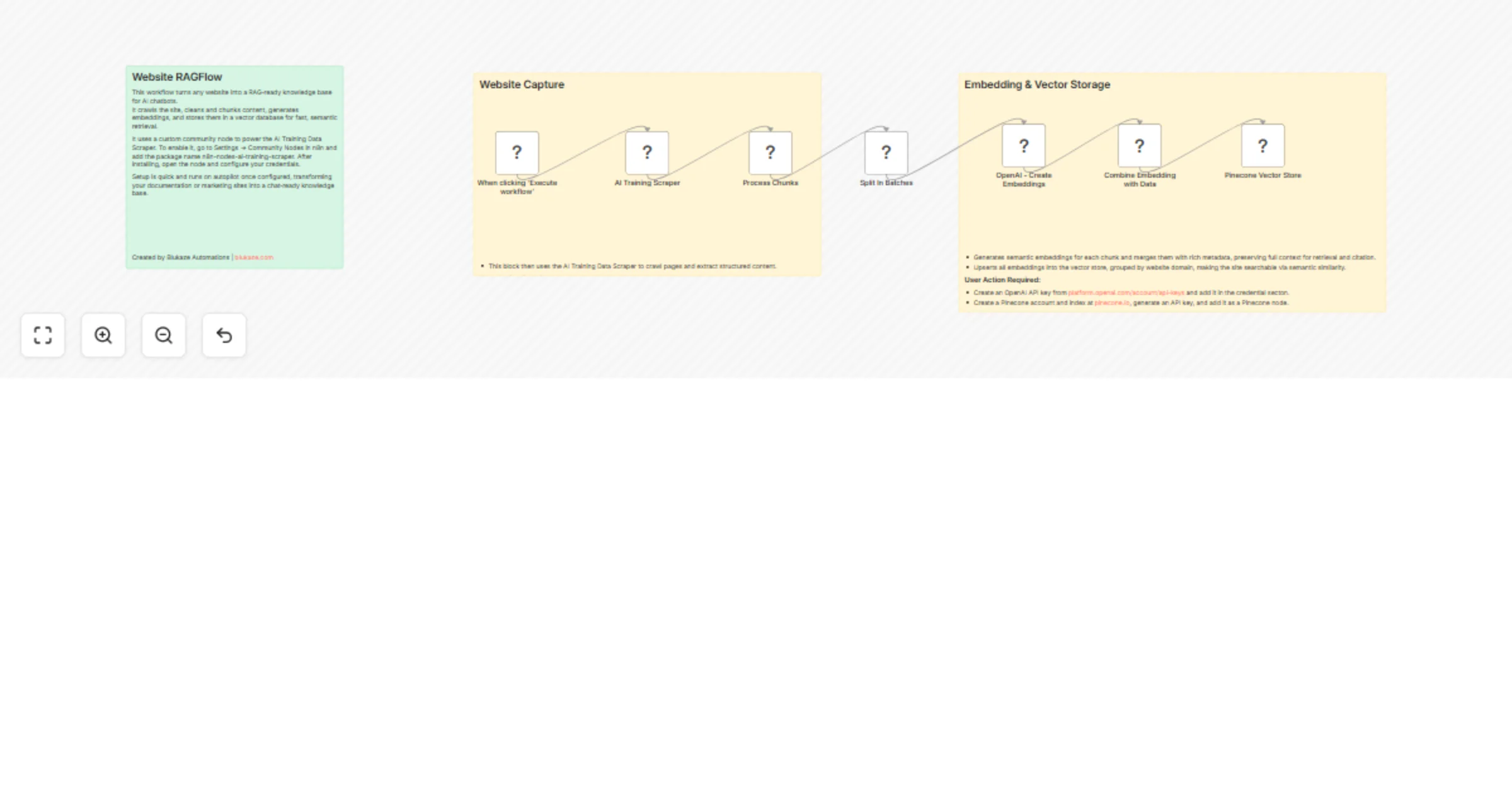
This n8n template transforms any website into a fully functional RAG ready chatbot knowledge base. It crawls sites using the AI Training Data Scraper community node, chunks content intelligently, g...

Best for

  • Internal Wiki automation workflows
  • AI RAG automation workflows
  • intermediate n8n builders looking for reusable templates

Tools used

n8n-nodes-base.code, n8n-nodes-base.splitinbatches, @n8n/n8n-nodes-langchain.openai, n8n-nodes-ai-training-scraper.aitrainingscraper, @n8n/n8n-nodes-langchain.vectorstorepinecone, n8n-nodes-base.manualtrigger, n8n-nodes-base.stickynote

Source and attribution

This workflow is cataloged by N8N Workflows and links back to its original n8n.io source page by Paul Abraham.

Original n8n.io source

1.1 Workflow description

Title
Turn websites into RAG chatbot knowledge bases with Apify, OpenAI and Pinecone
Workflow name
Turn websites into RAG chatbot knowledge bases with Apify, OpenAI and Pinecone

This n8n template transforms any website into a fully functional RAG-ready chatbot knowledge base. It crawls sites using the AI Training Data Scraper community node, chunks content intelligently, generates embeddings, and stores everything in Pinecone for semantic search-powered conversations. Perfect for turning documentation, blogs, or marketing sites into instant AI chat assistants.

Use cases

  • Convert documentation sites into intelligent support chatbots
  • Build product knowledge bases from marketing websites
  • Create internal search tools from company intranets
  • Power customer support agents with scraped competitor analysis
  • Generate training data for fine-tuning company-specific AI models

Good to know This workflow connects to external services requiring API credentials. Works on n8n Cloud and self-hosted instances. Initial setup takes 10 minutes including community node installation.

Requirements

  • n8n Cloud or self-hosted instance
  • Community Node
  • Apify API key
  • OpenAI API key
  • Pinecone account & index

Customising this workflow

  • Replace Pinecone with Qdrant, Weaviate, or pgvector for self-hosted vector storage
  • Swap OpenAI embeddings with Ollama or Hugging Face for zero-cost processing
  • Add content filtering by language, code presence, or section type
  • Extend with conversation memory using Redis or Postgres
  • Build a frontend dashboard for managing multiple website indexes
  • Add multi-site RAG (query across multiple domains simultaneously)

1.2 Logical Blocks

This catalog entry is organized from the workflow JSON. The node-level section below shows the executable blocks available for review before importing the template.

2. Block-by-Block Analysis

Block 1 - Process Chunks

Type / Role
n8n-nodes-base.code - code
Config choices
Version 2

Block 2 - Split In Batches

Type / Role
n8n-nodes-base.splitInBatches - splitInBatches
Config choices
Version 3

Block 3 - OpenAI - Create Embeddings

Type / Role
@n8n/n8n-nodes-langchain.openAi - openAi
Config choices
Version 1.3

Block 4 - Combine Embedding with Data

Type / Role
n8n-nodes-base.code - code
Config choices
Version 2

Block 5 - AI Training Scraper

Type / Role
n8n-nodes-ai-training-scraper.aiTrainingScraper - aiTrainingScraper
Config choices
Version 1

Block 6 - Pinecone Vector Store

Type / Role
@n8n/n8n-nodes-langchain.vectorStorePinecone - vectorStorePinecone
Config choices
Version 1.3

Block 7 - When clicking ‘Execute workflow’

Type / Role
n8n-nodes-base.manualTrigger - manualTrigger
Config choices
Version 1

Block 8 - Sticky Note

Type / Role
n8n-nodes-base.stickyNote - stickyNote
Config choices
Version 1

Block 9 - Sticky Note1

Type / Role
n8n-nodes-base.stickyNote - stickyNote
Config choices
Version 1

Block 10 - Sticky Note2

Type / Role
n8n-nodes-base.stickyNote - stickyNote
Config choices
Version 1

3. Summary Table

Workflow Turn websites into RAG chatbot knowledge bases with Apify, OpenAI and Pinecone
Complexity intermediate
Nodes 10
Categories Internal Wiki, AI RAG
Author Paul Abraham
Published 07 Feb 2026

4. Reproducing the Workflow from Scratch

  1. 1. Download the workflow JSON

    Use the JSON export at /data/workflows/13248/13248.json as the source template for this automation.

  2. 2. Import the template into n8n

    Open n8n, import the downloaded JSON, and review each node before activating the workflow.

  3. 3. Configure credentials and variables

    Replace placeholder credentials, API keys, webhook URLs, account IDs, and environment-specific values with your own settings.

  4. 4. Test with sample data

    Run the workflow manually or in a staging workspace, inspect node output, and confirm downstream systems receive the expected data.

  5. 5. Activate and monitor

    Enable the workflow only after testing, then monitor executions, errors, and rate limits during the first production runs.

5. General Notes & Resources

Review imported nodes carefully before activation. This catalog entry is intended to help you inspect the workflow structure, understand required services, and find related templates faster.

Node names, credentials, schedules, webhook paths, and external service limits may need adjustment for your workspace.

Frequently asked questions

What does Turn websites into RAG chatbot knowledge bases with Apify, OpenAI and Pinecone do?

This n8n template transforms any website into a fully functional RAG ready chatbot knowledge base. It crawls sites using the AI Training Data Scraper community node, chunks content intelligently, g...

What do I need before importing this workflow?

Review the workflow JSON, configure any required credentials in n8n, and test the automation in a safe workspace before using it in production.

Can I customize this workflow?

Yes. Use the block-by-block analysis and the downloadable JSON to inspect each node, then adjust credentials, prompts, schedules, filters, or destinations for your Internal Wiki, AI RAG use case.