Trustpilot insights scraper: Auto reviews via Bright Data + Google Sheets sync

Workflow preview

Workflow preview
100%
Trustpilot insights scraper: Auto reviews via Bright Data + Google Sheets sync preview
Open on n8n.io

Important notice

This workflow is provided as-is. Please review and test before using in production.

1. Workflow Overview

Trustpilot Insights Scraper: Auto Reviews via Bright Data + Google Sheets Sync Overview A comprehensive n8n automation that scrapes Trustpilot business reviews using Bright Data and automatically s...

Best for

  • Market Research automation workflows
  • advanced n8n builders looking for reusable templates

Tools used

n8n-nodes-base.if, n8n-nodes-base.stickynote, n8n-nodes-base.formtrigger, n8n-nodes-base.httprequest, n8n-nodes-base.wait, n8n-nodes-base.googlesheets

Source and attribution

This workflow is cataloged by N8N Workflows and links back to its original n8n.io source page by Shiv Gupta.

Original n8n.io source

1.1 Workflow description

Title
Trustpilot insights scraper: Auto reviews via Bright Data + Google Sheets sync
Workflow name
Trustpilot insights scraper: Auto reviews via Bright Data + Google Sheets sync

Trustpilot Insights Scraper: Auto Reviews via Bright Data + Google Sheets Sync

Overview

A comprehensive n8n automation that scrapes Trustpilot business reviews using Bright Data and automatically stores structured data in Google Sheets.

Workflow Architecture

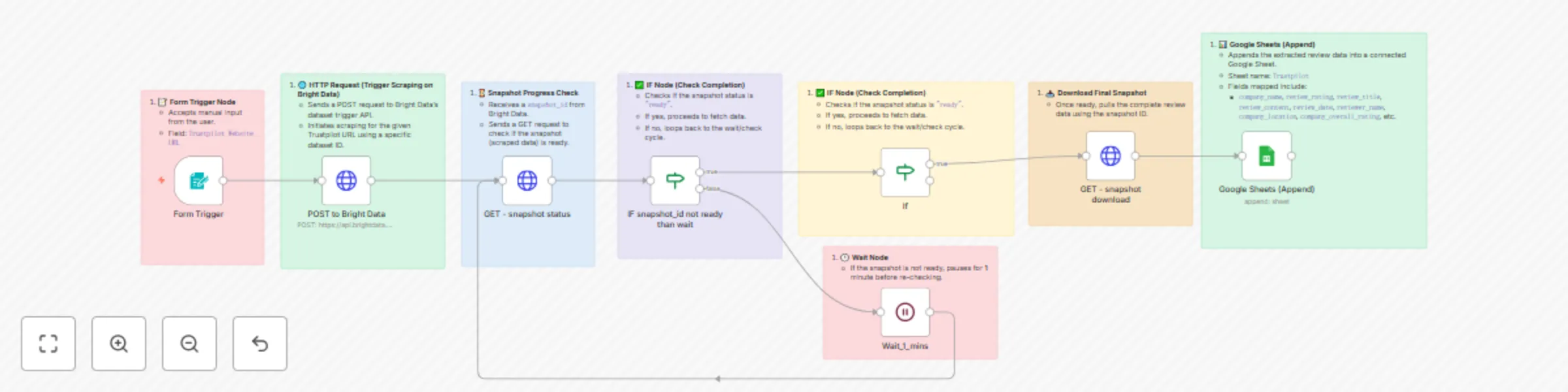
1. 📝 Form Trigger Node

Purpose: Manual input interface for users

  • Type: n8n-nodes-base.formTrigger
  • Configuration:
    • Form Title: "Website URL"
    • Field: "Trustpilot Website URL"
  • Function: Accepts Trustpilot URL input from users to initiate the scraping process

2. 🌐 HTTP Request (Trigger Scraping)

Purpose: Initiates scraping on Bright Data platform

  • Type: n8n-nodes-base.httpRequest
  • Method: POST
  • Endpoint: https://api.brightdata.com/datasets/v3/trigger
  • Configuration:
    • Query Parameters:
      • dataset_id: gd_lm5zmhwd2sni130p
      • include_errors: true
      • limit_multiple_results: 2
    • Headers:
      • Authorization: Bearer BRIGHT_DATA_API_KEY
    • Body: JSON with input URL and 35+ custom output fields
Custom Output Fields

The workflow extracts the following data points:

  • Company Information: company_name, company_logo, company_overall_rating, company_total_reviews, company_about, company_email, company_phone, company_location, company_country, company_category, company_id, company_website
  • Review Data: review_id, review_date, review_rating, review_title, review_content, review_date_of_experience, review_url, date_posted
  • Reviewer Information: reviewer_name, reviewer_location, reviews_posted_overall
  • Review Metadata: is_verified_review, review_replies, review_useful_count
  • Rating Distribution: 5_star, 4_star, 3_star, 2_star, 1_star
  • Additional Fields: url, company_rating_name, is_verified_company, breadcrumbs, company_other_categories

3. ⌛ Snapshot Progress Check

Purpose: Monitors scraping job status

  • Type: n8n-nodes-base.httpRequest
  • Method: GET
  • Endpoint: https://api.brightdata.com/datasets/v3/progress/{{ $json.snapshot_id }}
  • Configuration:
    • Query Parameters: format=json
    • Headers: Authorization: Bearer BRIGHT_DATA_API_KEY
  • Function: Receives snapshot_id from previous step and checks if data is ready

4. ✅ IF Node (Status Check)

Purpose: Determines next action based on scraping status

  • Type: n8n-nodes-base.if
  • Condition: $json.status === "ready"
  • Logic:
    • If True: Proceeds to data download
    • If False: Triggers wait cycle

5. 🕒 Wait Node

Purpose: Implements polling delay for incomplete jobs

  • Type: n8n-nodes-base.wait
  • Duration: 1 minute
  • Function: Pauses execution before re-checking snapshot status

6. 🔄 Loop Logic

Purpose: Continuous monitoring until completion

  • Flow: Wait → Check Status → Evaluate → (Loop or Proceed)
  • Prevents: API rate limiting and unnecessary requests

7. 📥 Snapshot Download

Purpose: Retrieves completed scraped data

  • Type: n8n-nodes-base.httpRequest
  • Method: GET
  • Endpoint: https://api.brightdata.com/datasets/v3/snapshot/{{ $json.snapshot_id }}
  • Configuration:
    • Query Parameters: format=json
    • Headers: Authorization: Bearer BRIGHT_DATA_API_KEY

8. 📊 Google Sheets Integration

Purpose: Stores extracted data in spreadsheet

  • Type: n8n-nodes-base.googleSheets
  • Operation: Append
  • Configuration:
    • Document ID: 1yQ10Q2qSjm-hhafHF2sXu-hohurW5_KD8fIv4IXEA3I
    • Sheet Name: "Trustpilot"
    • Mapping: Auto-map all 35+ fields
    • Credentials: Google OAuth2 integration

Data Flow

User Input (URL) 
    ↓
Bright Data API Call
    ↓
Snapshot ID Generated
    ↓
Status Check Loop
    ↓
Data Ready Check
    ↓
Download Complete Dataset
    ↓
Append to Google Sheets

Technical Specifications

Authentication

  • Bright Data: Bearer token authentication
  • Google Sheets: OAuth2 integration

Error Handling

  • Includes error tracking in Bright Data requests
  • Conditional logic prevents infinite loops
  • Wait periods prevent API rate limiting

Data Processing

  • Mapping Mode: Auto-map input data
  • Schema: 35+ predefined fields with string types
  • Conversion: No type conversion (preserves raw data)

Setup Requirements

Prerequisites

  1. Bright Data Account: Active account with API access
  2. Google Account: With Sheets API enabled
  3. n8n Instance: Self-hosted or cloud version

Configuration Steps

  1. API Keys: Configure Bright Data bearer token
  2. OAuth Setup: Connect Google Sheets credentials
  3. Dataset ID: Verify correct Bright Data dataset ID
  4. Sheet Access: Ensure proper permissions for target spreadsheet

Environment Variables

  • BRIGHT_DATA_API_KEY: Your Bright Data API authentication token

Use Cases

Business Intelligence

  • Competitor analysis and market research
  • Customer sentiment monitoring
  • Brand reputation tracking

Data Analytics

  • Review trend analysis
  • Rating distribution studies
  • Customer feedback aggregation

Automation Benefits

  • Scalability: Handle multiple URLs sequentially
  • Reliability: Built-in error handling and retry logic
  • Efficiency: Automated data collection and storage
  • Consistency: Standardized data format across all scrapes

Limitations and Considerations

Rate Limits

  • Bright Data API has usage limitations
  • 1-minute wait periods help manage request frequency

Data Volume

  • Limited to 2 results per request (configurable)
  • Large datasets may require multiple workflow runs

Compliance

  • Ensure compliance with Trustpilot's terms of service
  • Respect robots.txt and rate limiting guidelines

Monitoring and Maintenance

Status Tracking

  • Monitor workflow execution logs
  • Check Google Sheets for data accuracy
  • Review Bright Data usage statistics

Regular Updates

  • Update API keys as needed
  • Verify dataset ID remains valid
  • Test workflow functionality periodically

Workflow Metadata

  • Version ID: dd3afc3c-91fc-474e-99e0-1b25e62ab392
  • Instance ID: bc8ca75c203589705ae2e446cad7181d6f2a7cc1766f958ef9f34810e53b8cb2
  • Execution Order: v1
  • Active Status: Currently inactive (requires manual activation)
  • Template Status: Credentials setup completed

For any questions or support, please contact: Email or fill out this form

1.2 Logical Blocks

This catalog entry is organized from the workflow JSON. The node-level section below shows the executable blocks available for review before importing the template.

2. Block-by-Block Analysis

Block 1 - If

Type / Role
n8n-nodes-base.if - if
Config choices
Version 2.2

Block 2 - Sticky Note

Type / Role
n8n-nodes-base.stickyNote - stickyNote
Config choices
Version 1

Block 3 - Sticky Note1

Type / Role
n8n-nodes-base.stickyNote - stickyNote
Config choices
Version 1

Block 4 - Sticky Note2

Type / Role
n8n-nodes-base.stickyNote - stickyNote
Config choices
Version 1

Block 5 - Sticky Note3

Type / Role
n8n-nodes-base.stickyNote - stickyNote
Config choices
Version 1

Block 6 - Sticky Note4

Type / Role
n8n-nodes-base.stickyNote - stickyNote
Config choices
Version 1

Block 7 - Sticky Note5

Type / Role
n8n-nodes-base.stickyNote - stickyNote
Config choices
Version 1

Block 8 - Sticky Note6

Type / Role
n8n-nodes-base.stickyNote - stickyNote
Config choices
Version 1

Block 9 - Sticky Note7

Type / Role
n8n-nodes-base.stickyNote - stickyNote
Config choices
Version 1

Block 10 - Form Trigger

Type / Role
n8n-nodes-base.formTrigger - formTrigger
Config choices
Version 2.2

Block 11 - POST to Bright Data

Type / Role
n8n-nodes-base.httpRequest - httpRequest
Config choices
Version 4.2

Block 12 - GET - snapshot status

Type / Role
n8n-nodes-base.httpRequest - httpRequest
Config choices
Version 4.2

Block 13 - Wait_1_mins

Type / Role
n8n-nodes-base.wait - wait
Config choices
Version 1.1

Block 14 - IF snapshot_id not ready than wait

Type / Role
n8n-nodes-base.if - if
Config choices
Version 2.2

Block 15 - GET - snapshot download

Type / Role
n8n-nodes-base.httpRequest - httpRequest
Config choices
Version 4.2

Block 16 - Google Sheets (Append)

Type / Role
n8n-nodes-base.googleSheets - googleSheets
Config choices
Version 4.6

3. Summary Table

Workflow Trustpilot insights scraper: Auto reviews via Bright Data + Google Sheets sync
Complexity advanced
Nodes 16
Categories Market Research
Author Shiv Gupta
Published 23 Jun 2025

4. Reproducing the Workflow from Scratch

  1. 1. Download the workflow JSON

    Use the JSON export at /data/workflows/5145/5145.json as the source template for this automation.

  2. 2. Import the template into n8n

    Open n8n, import the downloaded JSON, and review each node before activating the workflow.

  3. 3. Configure credentials and variables

    Replace placeholder credentials, API keys, webhook URLs, account IDs, and environment-specific values with your own settings.

  4. 4. Test with sample data

    Run the workflow manually or in a staging workspace, inspect node output, and confirm downstream systems receive the expected data.

  5. 5. Activate and monitor

    Enable the workflow only after testing, then monitor executions, errors, and rate limits during the first production runs.

5. General Notes & Resources

Review imported nodes carefully before activation. This catalog entry is intended to help you inspect the workflow structure, understand required services, and find related templates faster.

Node names, credentials, schedules, webhook paths, and external service limits may need adjustment for your workspace.

Frequently asked questions

What does Trustpilot insights scraper: Auto reviews via Bright Data + Google Sheets sync do?

Trustpilot Insights Scraper: Auto Reviews via Bright Data + Google Sheets Sync Overview A comprehensive n8n automation that scrapes Trustpilot business reviews using Bright Data and automatically s...

What do I need before importing this workflow?

Review the workflow JSON, configure any required credentials in n8n, and test the automation in a safe workspace before using it in production.

Can I customize this workflow?

Yes. Use the block-by-block analysis and the downloadable JSON to inspect each node, then adjust credentials, prompts, schedules, filters, or destinations for your Market Research use case.