Block 1 - Main — Overview & Setup
- Type / Role
- n8n-nodes-base.stickyNote - stickyNote
- Config choices
- Version 1


 Early Deal
Submit a screen recording URL, customer name, and bug type through a simple web form. The workflow automatically scans the recording using WayinVideo AI to pinpoint the exa...
n8n-nodes-base.stickynote, n8n-nodes-base.formtrigger, n8n-nodes-base.httprequest, n8n-nodes-base.wait, n8n-nodes-base.if, @n8n/n8n-nodes-langchain.agent, @n8n/n8n-nodes-langchain.lmchatopenai, n8n-nodes-base.googlesheets
This workflow is cataloged by N8N Workflows and links back to its original n8n.io source page by isaWOW.
Original n8n.io sourceSubmit a screen recording URL, customer name, and bug type through a simple web form. The workflow automatically scans the recording using WayinVideo AI to pinpoint the exact moment the bug occurs, then uses GPT-4o-mini to write a structured support ticket with priority, steps to reproduce, and a fix suggestion. The completed ticket is saved instantly as a new row in your Google Sheet — ready for your dev team. Built for support agents, QA teams, and SaaS companies who want to triage bugs faster without manual video scrubbing.
Estimated Setup Time: 10–15 minutes
Get your WayinVideo API key — Sign in to your WayinVideo account at WayinVideo, go to your API settings, and copy your key.
Add the WayinVideo key to the Find Bug Moments step — Open the node called 2. WayinVideo — Find Bug Moments and replace YOUR_WAYINVIDEO_API_KEY in the Authorization header with your actual key.
Add the WayinVideo key to the Get Bug Moments step — Open the node called 4. WayinVideo — Get Bug Moments and replace YOUR_WAYINVIDEO_API_KEY in the Authorization header with your actual key.
> ⚠️ Your WayinVideo API key appears in two nodes — replace it in both 2. WayinVideo — Find Bug Moments and 4. WayinVideo — Get Bug Moments or the workflow will fail.
Add your OpenAI API key — In n8n, go to Credentials and create a new OpenAI credential. Paste your API key there. Then connect that credential to the node called 6a. OpenAI — Chat Model (GPT-4o-mini).
Create your Google Sheet — Make a new Google Sheet with a tab named exactly Bug Tickets. Add these column headers in row 1:
| Customer Name | Bug Type | Recording URL | Bug Moments Found | Top Bug Timestamp | Bug Ticket | Status | Date Submitted |
Connect your Google account — In n8n, create a Google Sheets OAuth2 credential and connect your Google account. Apply that credential to the node called 7. Google Sheets — Save Bug Ticket.
Add your Google Sheet ID — Open the node 7. Google Sheets — Save Bug Ticket and replace YOUR_GOOGLE_SHEET_ID with your actual Sheet ID. You can find this in the Google Sheet URL — it is the long string of characters between /d/ and /edit.
Activate the workflow — Toggle the workflow to Active. Open the form URL from the 1. Form — Bug Recording + Details node and submit a test bug report to confirm everything is working.
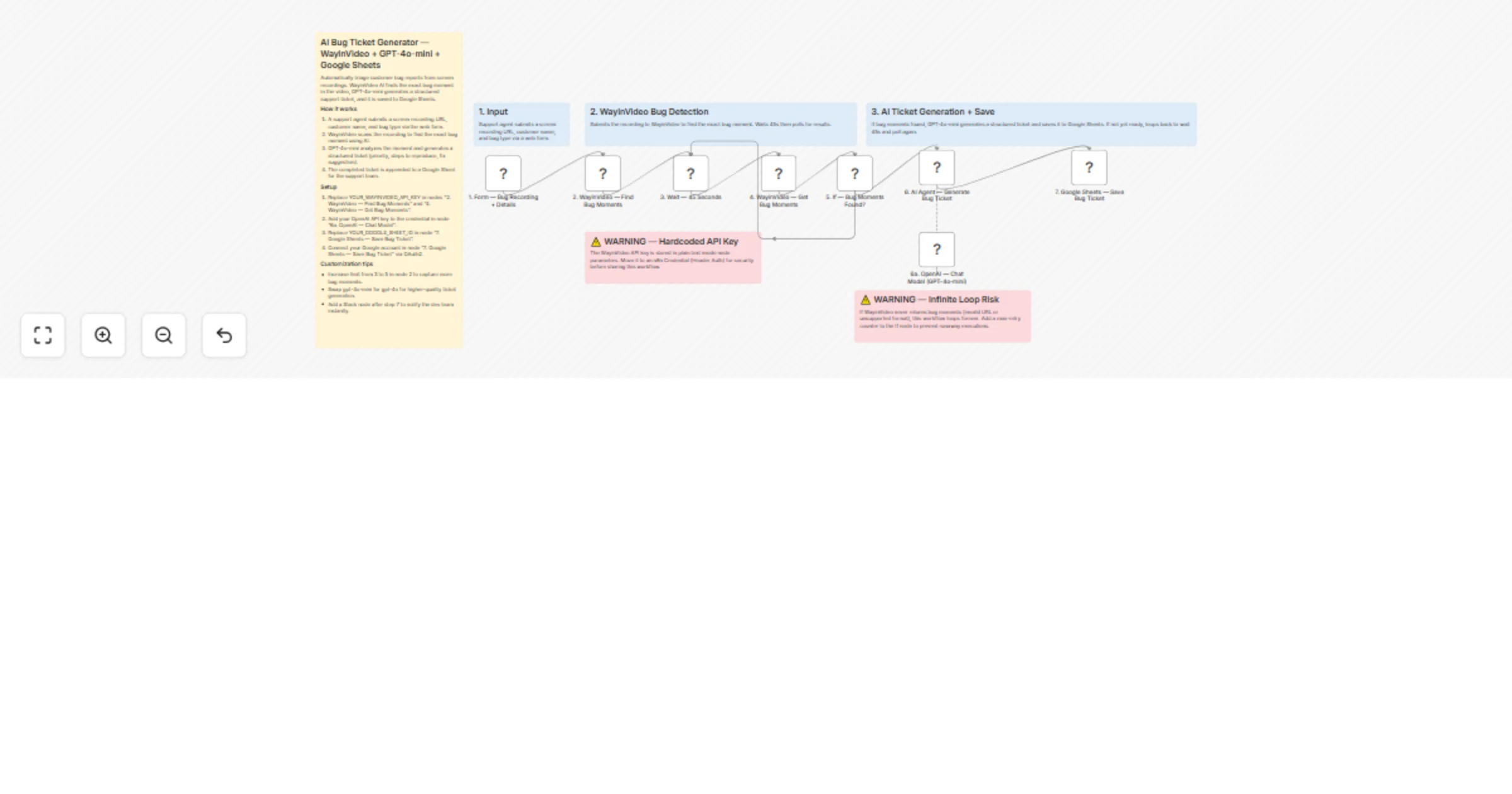
Step 1 — Web Form (Bug Recording + Details) A support agent opens a web form and fills in three fields: the screen recording URL, the customer's name, and the type of bug (for example: Login Error, Payment Failure, or App Crash). Submitting the form kicks off the entire workflow automatically.
Step 2 — WayinVideo — Find Bug Moments The recording URL is sent to the WayinVideo API with an instruction to search for moments matching the reported bug type. WayinVideo scans the video using AI and starts building a list of the most relevant bug moments, including timestamps and relevance scores. The API returns a job ID that is used in the next steps.
Step 3 — Wait 45 Seconds The workflow pauses for 45 seconds to give WayinVideo time to process the video before checking for results.
Step 4 — WayinVideo — Get Bug Moments Using the job ID from Step 2, the workflow requests the results from WayinVideo. This returns a list of clips, each with a title, description, start and end timestamp, and a relevance score.
Step 5 — Check: Bug Moments Found? The workflow checks whether WayinVideo has returned any bug moment clips yet.
> ⚠️ If WayinVideo never returns results (for example, if the URL is broken or the video format is unsupported), this loop will repeat indefinitely. Consider adding a retry limit to avoid runaway executions.
Step 6 — AI Agent — Generate Bug Ticket GPT-4o-mini receives the customer details from the form and the bug moment data from WayinVideo. It writes a complete structured support ticket covering: a one-sentence bug summary, priority level, bug category, exact video timestamp, steps to reproduce, expected vs actual behaviour, which team to assign it to, and a suggested fix.
Step 7 — Google Sheets — Save Bug Ticket The completed ticket is appended as a new row in your Google Sheet. The row includes the customer name, bug type, recording URL, number of bug moments found, the top bug timestamp, the full ticket text, a status of "Open", and the submission date and time.
✅ Exact bug timestamp detection — WayinVideo pinpoints the precise moment in the recording where the bug occurs, so your dev team doesn't have to watch the whole video ✅ Auto-priority assignment — GPT-4o-mini assigns Critical, High, Medium, or Low priority based on the type of bug reported ✅ Auto-team routing — The AI decides whether the ticket belongs to Backend Dev, Frontend Dev, QA, DevOps, or Product — no manual triage needed ✅ Smart retry loop — The workflow polls WayinVideo automatically every 45 seconds until results are ready, with no manual intervention required ✅ Structured ticket format — Every ticket follows the same format with all required fields, making it consistent and ready to import into any project management tool ✅ Zero-code form — Support agents submit bug reports through a hosted web form — no n8n access needed ✅ Full audit trail in Sheets — Every ticket is logged with submission date, recording URL, and status so nothing falls through the cracks
Capture more bug moments — In the node 2. WayinVideo — Find Bug Moments, change "limit": 3 to "limit": 5 to detect up to five bug moments per recording instead of three.
Use a more powerful AI model — In the node 6a. OpenAI — Chat Model (GPT-4o-mini), switch from gpt-4o-mini to gpt-4o for higher-quality ticket writing on complex or ambiguous bugs.
Send instant Slack alerts — Add a Slack node after 7. Google Sheets — Save Bug Ticket to notify your dev channel as soon as a new ticket is saved, including the priority level and timestamp.
Add a max-retry counter — To prevent the polling loop from running forever, add a counter variable that increments each loop and an extra condition in 5. If — Bug Moments Found? to stop after a set number of attempts (for example, 10 retries).
Push tickets to Jira or Linear — Replace or add after the Google Sheets node an HTTP Request node that calls the Jira or Linear API to create an issue automatically from the generated ticket content.
Support multiple languages — Change "target_lang": "en" in 2. WayinVideo — Find Bug Moments to another language code (for example "fr" or "de") to handle recordings in other languages.
Need help setting this up or want a custom version built for your team or agency?
📧 Email: [email protected] 🌐 Website: https://isawow.com/
This catalog entry is organized from the workflow JSON. The node-level section below shows the executable blocks available for review before importing the template.
| Workflow | Triage video bug support tickets using WayinVideo and GPT-4o-mini to Google Sheets |
|---|---|
| Complexity | intermediate |
| Nodes | 14 |
| Categories | Ticket Management, AI Summarization |
| Author | isaWOW |
| Published | 01 Apr 2026 |
Use the JSON export at /data/workflows/14553/14553.json as the source template for this automation.
Open n8n, import the downloaded JSON, and review each node before activating the workflow.
Replace placeholder credentials, API keys, webhook URLs, account IDs, and environment-specific values with your own settings.
Run the workflow manually or in a staging workspace, inspect node output, and confirm downstream systems receive the expected data.
Enable the workflow only after testing, then monitor executions, errors, and rate limits during the first production runs.
Review imported nodes carefully before activation. This catalog entry is intended to help you inspect the workflow structure, understand required services, and find related templates faster.
Node names, credentials, schedules, webhook paths, and external service limits may need adjustment for your workspace.
Submit a screen recording URL, customer name, and bug type through a simple web form. The workflow automatically scans the recording using WayinVideo AI to pinpoint the exa...
Review the workflow JSON, configure any required credentials in n8n, and test the automation in a safe workspace before using it in production.
Yes. Use the block-by-block analysis and the downloadable JSON to inspect each node, then adjust credentials, prompts, schedules, filters, or destinations for your Ticket Management, AI Summarization use case.