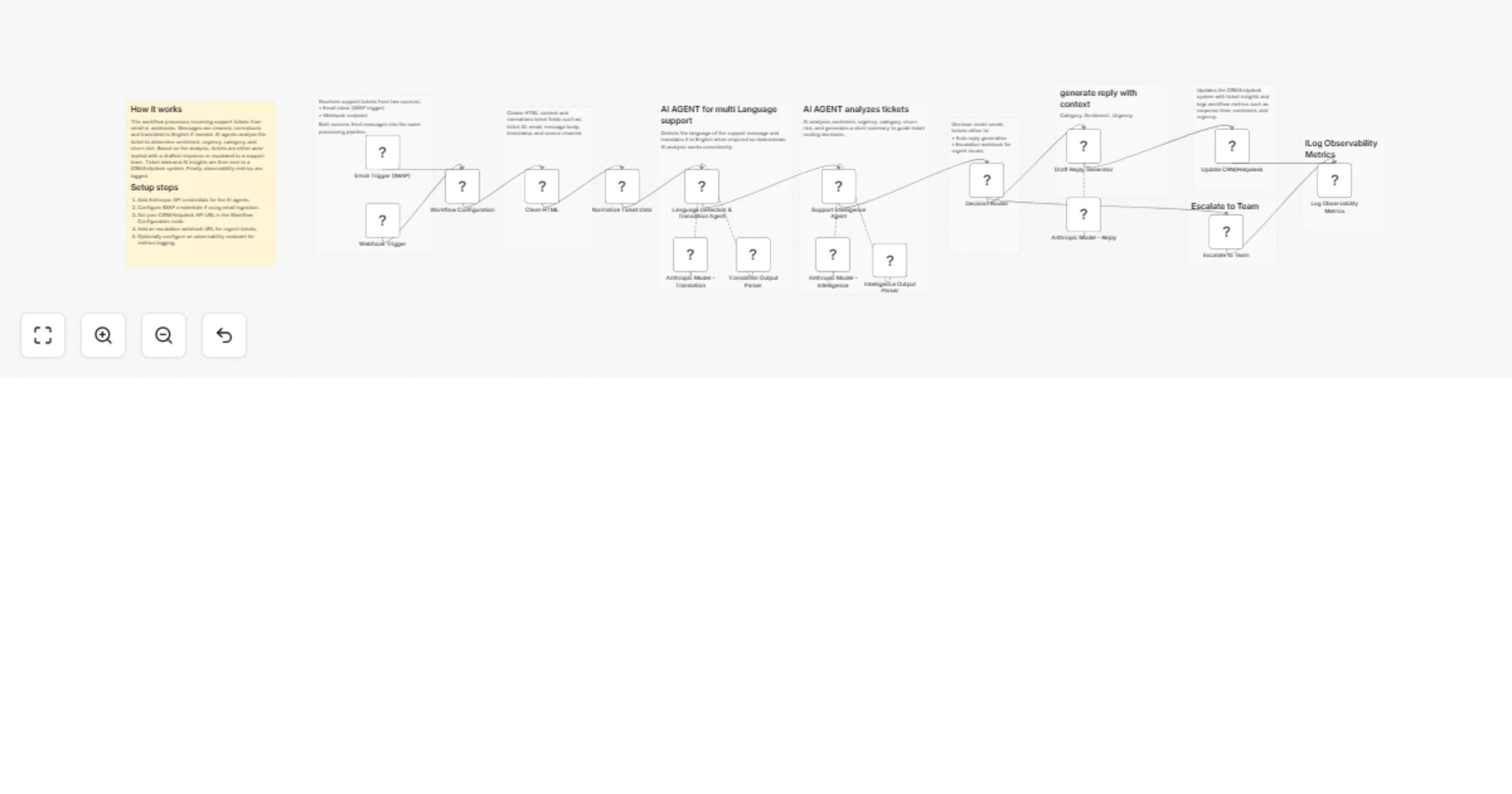
Triage and reply to multilingual support tickets with Anthropic Claude

Workflow preview

Workflow preview
100%
Triage and reply to multilingual support tickets with Anthropic Claude preview
Open on n8n.io

1. Workflow Overview

Overview This workflow automates customer support ticket processing using AI powered analysis. Incoming tickets from email (IMAP) or a webhook endpoint are automatically cleaned, translated to Engl...

Best for

  • Ticket Management automation workflows
  • AI Summarization automation workflows
  • advanced n8n builders looking for reusable templates

Tools used

n8n-nodes-base.emailreadimap, n8n-nodes-base.webhook, n8n-nodes-base.set, n8n-nodes-base.html, @n8n/n8n-nodes-langchain.agent, @n8n/n8n-nodes-langchain.lmchatanthropic, @n8n/n8n-nodes-langchain.outputparserstructured, n8n-nodes-base.switch

Source and attribution

This workflow is cataloged by N8N Workflows and links back to its original n8n.io source page by ResilNext.

Original n8n.io source

1.1 Workflow description

Title
Triage and reply to multilingual support tickets with Anthropic Claude
Workflow name
Triage and reply to multilingual support tickets with Anthropic Claude

Overview

This workflow automates customer support ticket processing using AI-powered analysis.

Incoming tickets from email (IMAP) or a webhook endpoint are automatically cleaned, translated to English if necessary, analyzed with AI, and routed based on urgency and category.

The workflow can automatically generate draft replies for simple tickets or escalate critical issues to your support team. It also updates your CRM or helpdesk system with structured ticket insights and logs observability metrics for monitoring support performance.

This automation helps support teams reduce manual triage work, respond faster to customers, and ensure urgent issues receive immediate attention.


How It Works

1. Ticket Intake

The workflow begins when a support request is received from one of two sources:

  • IMAP Email Trigger – Reads incoming support emails from a mailbox.
  • Webhook Trigger – Accepts tickets from external systems such as websites, chatbots, or applications.

Both triggers feed the message into a unified processing pipeline.

2. Content Cleaning

The workflow extracts readable text from incoming messages using an HTML extraction node. This ensures that emails or formatted messages can be analyzed reliably.

3. Ticket Data Normalization

Incoming data is standardized to ensure consistent processing across all ticket sources. The workflow generates fields such as:

  • ticket_id
  • user_email
  • original_message
  • timestamp
  • source_channel

4. Language Detection & Translation

An AI agent detects the original language of the ticket. If the message is not written in English, it is automatically translated while preserving the original meaning and tone.

5. AI Support Intelligence

A second AI agent analyzes the ticket and produces structured insights including:

  • Sentiment (positive, neutral, negative)
  • Urgency level (low, medium, high, critical)
  • Ticket category
  • Issue summary
  • Customer churn risk score
  • Recommended action path

6. Intelligent Routing

A Switch node routes the ticket based on the AI analysis:

  • Auto Reply Path – Generates a draft response.
  • Escalation Path – Sends the ticket to a support escalation webhook.

7. Draft Reply Generation

If the ticket qualifies for automatic handling, an AI agent generates a professional support response based on the ticket content, sentiment, and category.

8. CRM / Helpdesk Update

The workflow sends structured ticket information to a CRM or helpdesk system, including:

  • Ticket ID
  • Category
  • Sentiment
  • Urgency
  • Churn risk score
  • AI-generated summary
  • Draft reply

9. Observability Metrics

The workflow logs operational metrics such as response time, ticket category, urgency, sentiment, and escalation status. These metrics can be sent to an observability or monitoring system.


Setup Instructions

  1. Configure Email Credentials (Optional) Add IMAP credentials if you want to process support emails.

  2. Configure the Webhook Trigger Use the webhook URL generated by the workflow to receive support tickets from external systems.

  3. Add AI Model Credentials Connect your Anthropic API credentials to power the AI agents used for translation, analysis, and response generation.

  4. Configure Workflow Variables In the Workflow Configuration node, provide:

  • CRM or Helpdesk API URL
  • Escalation webhook URL
  • Observability logging endpoint (optional)
  1. Connect Your CRM or Helpdesk System Ensure the API endpoint accepts JSON payloads containing ticket data and AI insights.

Use Cases

  • AI-powered customer support ticket triage
  • Handling multilingual support requests
  • Automatically generating draft responses
  • Escalating critical support tickets
  • Monitoring support performance metrics

Requirements

  • Anthropic API credentials
  • IMAP email credentials (optional)
  • CRM or Helpdesk API endpoint
  • Escalation webhook endpoint
  • Optional observability or monitoring endpoint

1.2 Logical Blocks

This catalog entry is organized from the workflow JSON. The node-level section below shows the executable blocks available for review before importing the template.

2. Block-by-Block Analysis

Block 1 - Email Trigger (IMAP)

Type / Role
n8n-nodes-base.emailReadImap - emailReadImap
Config choices
Version 2.1

Block 2 - Webhook Trigger

Type / Role
n8n-nodes-base.webhook - webhook
Config choices
Version 2.1

Block 3 - Workflow Configuration

Type / Role
n8n-nodes-base.set - set
Config choices
Version 3.4

Block 4 - Clean HTML

Type / Role
n8n-nodes-base.html - html
Config choices
Version 1.2

Block 5 - Normalize Ticket Data

Type / Role
n8n-nodes-base.set - set
Config choices
Version 3.4

Block 6 - Language Detection & Translation Agent

Type / Role
@n8n/n8n-nodes-langchain.agent - agent
Config choices
Version 3

Block 7 - Anthropic Model - Translation

Type / Role
@n8n/n8n-nodes-langchain.lmChatAnthropic - lmChatAnthropic
Config choices
Version 1.3

Block 8 - Translation Output Parser

Type / Role
@n8n/n8n-nodes-langchain.outputParserStructured - outputParserStructured
Config choices
Version 1.3

Block 9 - Support Intelligence Agent

Type / Role
@n8n/n8n-nodes-langchain.agent - agent
Config choices
Version 3

Block 10 - Anthropic Model - Intelligence

Type / Role
@n8n/n8n-nodes-langchain.lmChatAnthropic - lmChatAnthropic
Config choices
Version 1.3

Block 11 - Intelligence Output Parser

Type / Role
@n8n/n8n-nodes-langchain.outputParserStructured - outputParserStructured
Config choices
Version 1.3

Block 12 - Decision Router

Type / Role
n8n-nodes-base.switch - switch
Config choices
Version 3.4

Block 13 - Draft Reply Generator

Type / Role
@n8n/n8n-nodes-langchain.agent - agent
Config choices
Version 3

Block 14 - Anthropic Model - Reply

Type / Role
@n8n/n8n-nodes-langchain.lmChatAnthropic - lmChatAnthropic
Config choices
Version 1.3

Block 15 - Update CRM/Helpdesk

Type / Role
n8n-nodes-base.httpRequest - httpRequest
Config choices
Version 4.3

Block 16 - Escalate to Team

Type / Role
n8n-nodes-base.httpRequest - httpRequest
Config choices
Version 4.3

Block 17 - Log Observability Metrics

Type / Role
n8n-nodes-base.code - code
Config choices
Version 2

Block 18 - Sticky Note

Type / Role
n8n-nodes-base.stickyNote - stickyNote
Config choices
Version 1

Block 19 - Sticky Note1

Type / Role
n8n-nodes-base.stickyNote - stickyNote
Config choices
Version 1

Block 20 - Sticky Note2

Type / Role
n8n-nodes-base.stickyNote - stickyNote
Config choices
Version 1

Block 21 - Sticky Note3

Type / Role
n8n-nodes-base.stickyNote - stickyNote
Config choices
Version 1

Block 22 - Sticky Note4

Type / Role
n8n-nodes-base.stickyNote - stickyNote
Config choices
Version 1

Block 23 - Sticky Note5

Type / Role
n8n-nodes-base.stickyNote - stickyNote
Config choices
Version 1

Block 24 - Sticky Note6

Type / Role
n8n-nodes-base.stickyNote - stickyNote
Config choices
Version 1

Showing the first 24 of 27 workflow blocks. Download the JSON for the full node graph.

3. Summary Table

Workflow Triage and reply to multilingual support tickets with Anthropic Claude
Complexity advanced
Nodes 27
Categories Ticket Management, AI Summarization
Author ResilNext
Published 08 Mar 2026

4. Reproducing the Workflow from Scratch

  1. 1. Download the workflow JSON

    Use the JSON export at /data/workflows/13940/13940.json as the source template for this automation.

  2. 2. Import the template into n8n

    Open n8n, import the downloaded JSON, and review each node before activating the workflow.

  3. 3. Configure credentials and variables

    Replace placeholder credentials, API keys, webhook URLs, account IDs, and environment-specific values with your own settings.

  4. 4. Test with sample data

    Run the workflow manually or in a staging workspace, inspect node output, and confirm downstream systems receive the expected data.

  5. 5. Activate and monitor

    Enable the workflow only after testing, then monitor executions, errors, and rate limits during the first production runs.

5. General Notes & Resources

Review imported nodes carefully before activation. This catalog entry is intended to help you inspect the workflow structure, understand required services, and find related templates faster.

Node names, credentials, schedules, webhook paths, and external service limits may need adjustment for your workspace.

Frequently asked questions

What does Triage and reply to multilingual support tickets with Anthropic Claude do?

Overview This workflow automates customer support ticket processing using AI powered analysis. Incoming tickets from email (IMAP) or a webhook endpoint are automatically cleaned, translated to Engl...

What do I need before importing this workflow?

Review the workflow JSON, configure any required credentials in n8n, and test the automation in a safe workspace before using it in production.

Can I customize this workflow?

Yes. Use the block-by-block analysis and the downloadable JSON to inspect each node, then adjust credentials, prompts, schedules, filters, or destinations for your Ticket Management, AI Summarization use case.