Block 1 - Gmail Trigger
- Type / Role
- n8n-nodes-base.gmailTrigger - gmailTrigger
- Config choices
- Version 1.2


 Early Deal
This workflow is provided as-is. Please review and test before using in production.
This n8n workflow automates the transformation of press releases into polished articles. It converts the content of an email and its attachments (PDF or Word documents) into an AI written article/b...
n8n-nodes-base.gmailtrigger, n8n-nodes-base.extractfromfile, n8n-nodes-base.httprequest, @n8n/n8n-nodes-langchain.lmchatanthropic, n8n-nodes-base.code, n8n-nodes-base.if, @n8n/n8n-nodes-langchain.openai, n8n-nodes-base.gmail
This workflow is cataloged by N8N Workflows and links back to its original n8n.io source page by Julian Reich .
Original n8n.io sourceThis n8n workflow automates the transformation of press releases into polished articles. It converts the content of an email and its attachments (PDF or Word documents) into an AI-written article/blog post.
This workflow assists editors and journalists in managing incoming press-releases from governments, companies, NGOs, or individuals. The result is a draft article that can easily be reviewed by the editor, who receives it in a reply email containing both the original input and the output, plus an AI-generated self-assessment. This self-assessment represents an additional feedback loop where the AI compares the input with the output to evaluate the quality and accuracy of its transformation.
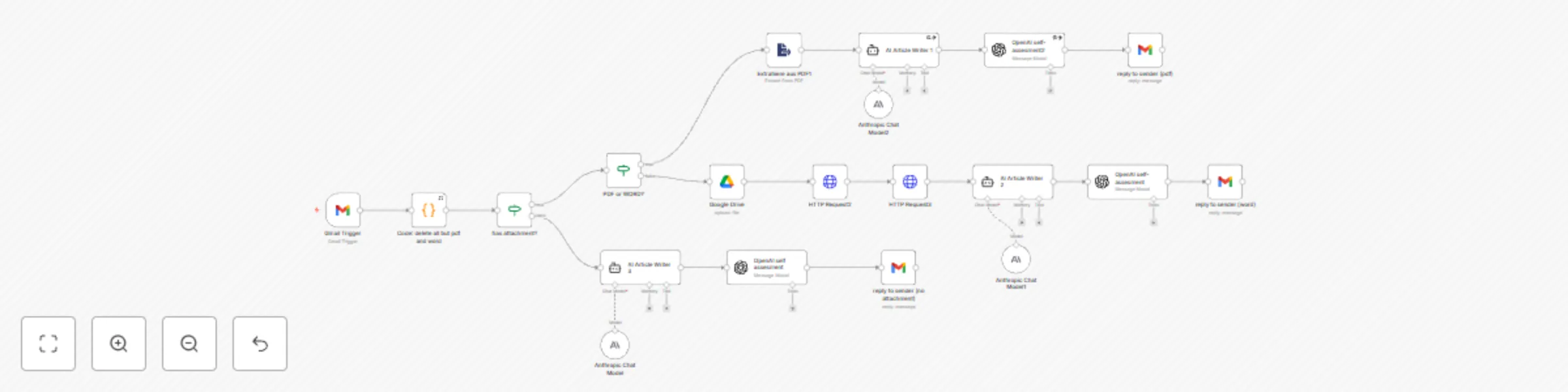
Triggered by incoming emails in Google, it first filters attachments, retaining only Word and PDF files while removing other formats like JPGs. The workflow then follows one of three paths:
- If no attachments remain, it processes the inline email message directly.
- For PDF attachments, it uses an extractor to obtain the document content.
- For Word attachments, it extracts the text content by a http request.
In each case, the extracted content is then passed to an AI agent that converts the press release into a well-structured article according to predefined prompts. A separate AI evaluation step provides a self-assessment by comparing the output with the original input to ensure quality and accuracy. Finally, the workflow generates a reply email to the sender containing three components: the original input, the AI-generated article, and the self-assessment. This streamlined process helps editors and journalists efficiently manage incoming press releases, delivering draft articles that require minimal additional editing."
Please analyze and compare the following input and output content:
(for example)
Original Input: {{ $('HTTP Request3').item.json.data }} {{ $('Gmail Trigger').item.json.text }}
Generated Output: {{ $json.output }}
Provide a detailed self-assessment that evaluates:
handlebars
EDITED ARTICLE
{{ $('AI Article Writer 2').item.json.output }}
SELF-ASSESSMENT Rating: 1 (poor) to 5 (excellent) {{ $json.message.content }}
ORIGINAL MESSAGE
{{ $('Gmail Trigger').item.json.text }}
ATTACHMENT CONTENT
{{ $('HTTP Request3').item.json.data }}
Note: Adjust the template fields according to the input source (PDF, Word document, or inline message). For inline messages, you may not need the "ATTACHMENT CONTENT" section.
This catalog entry is organized from the workflow JSON. The node-level section below shows the executable blocks available for review before importing the template.
| Workflow | Transform press releases (PDF & Word) into polished articles with Gmail & OpenAI |
|---|---|
| Complexity | advanced |
| Nodes | 20 |
| Categories | Content Creation, Multimodal AI |
| Author | Julian Reich |
| Published | 24 Mar 2025 |
Use the JSON export at /data/workflows/3302/3302.json as the source template for this automation.
Open n8n, import the downloaded JSON, and review each node before activating the workflow.
Replace placeholder credentials, API keys, webhook URLs, account IDs, and environment-specific values with your own settings.
Run the workflow manually or in a staging workspace, inspect node output, and confirm downstream systems receive the expected data.
Enable the workflow only after testing, then monitor executions, errors, and rate limits during the first production runs.
Review imported nodes carefully before activation. This catalog entry is intended to help you inspect the workflow structure, understand required services, and find related templates faster.
Node names, credentials, schedules, webhook paths, and external service limits may need adjustment for your workspace.
This n8n workflow automates the transformation of press releases into polished articles. It converts the content of an email and its attachments (PDF or Word documents) into an AI written article/b...
Review the workflow JSON, configure any required credentials in n8n, and test the automation in a safe workspace before using it in production.
Yes. Use the block-by-block analysis and the downloadable JSON to inspect each node, then adjust credentials, prompts, schedules, filters, or destinations for your Content Creation, Multimodal AI use case.