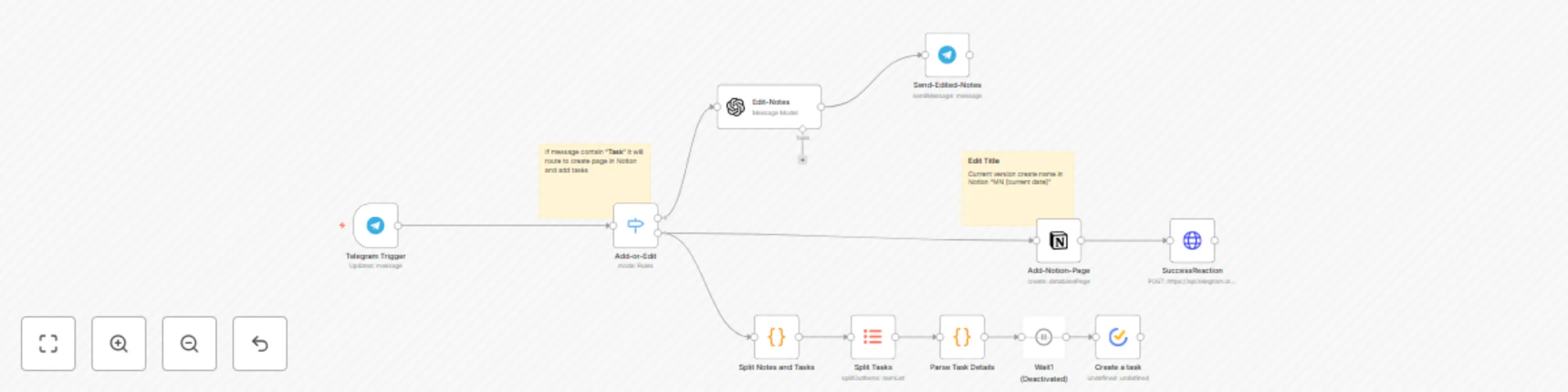
Transform meeting notes into tasks using GPT-4.1-mini, Notion & TickTick via Telegram

Workflow preview

Workflow preview
100%
Transform meeting notes into tasks using GPT-4.1-mini, Notion & TickTick via Telegram preview
Open on n8n.io

Important notice

This workflow is provided as-is. Please review and test before using in production.

1. Workflow Overview

This n8n template automates the transformation of raw meeting notes into structured tasks and documents using GPT (or another model) , syncing th...

Best for

  • Project Management automation workflows
  • AI Summarization automation workflows
  • intermediate n8n builders looking for reusable templates

Tools used

n8n-nodes-base.code, n8n-nodes-base.itemlists, n8n-nodes-base.telegramtrigger, n8n-nodes-ticktick.ticktick, n8n-nodes-base.wait, n8n-nodes-base.stickynote, n8n-nodes-base.notion, n8n-nodes-base.httprequest

Source and attribution

This workflow is cataloged by N8N Workflows and links back to its original n8n.io source page by Pavel Zamorev.

Original n8n.io source

1.1 Workflow description

Title
Transform meeting notes into tasks using GPT-4.1-mini, Notion & TickTick via Telegram
Workflow name
Transform meeting notes into tasks using GPT-4.1-mini, Notion & TickTick via Telegram

This n8n template automates the transformation of raw meeting notes into structured tasks and documents using GPT (or another model) , syncing them to Notion and TickTick via a Telegram bot.

Use Cases

  • Automate note-taking and formatting for daily standups, brainstorming sessions, or client calls.
  • Reduce cognitive load by eliminating manual tracking of ideas and tedious formatting.
  • Convert discussions into actionable tasks instantly with TickTick and structured notes in Notion.

How It Works

  • Capture Notes: Send raw meeting notes to a Telegram bot.
  • AI Processing: The workflow sends the text to AI, which:
    • Removes duplicates and extracts key points.
    • Formats content into structured Markdown notes for Notion.
    • Identifies tasks with deadlines (e.g., "- Prepare presentation (Responsible: John, Deadline: Friday)").
  • Task Parsing: Extracts task titles, removing metadata like "Responsible" and "Deadline."
  • Review & Edit: The bot returns formatted notes and tasks for review in Telegram.
  • Sync & Publish:
    • Notes are published to a Notion database.
    • Tasks are exported to TickTick via API.
  • Confirmation: A Telegram reaction (e.g., 👌 emoji) confirms successful processing.

Setup Instructions

  1. Set Up Telegram Bot:
    1. Create a Telegram bot via BotFather and obtain an API token.
    2. Add the token to the "Telegram Trigger" and "Send-Edited-Notes" nodes under credentials (telegramApi).
  2. Configure OpenAI:
    1. Obtain an OpenAI API key and add it to the "Edit-Notes" node (openAiApi credentials).
    2. Ensure the model is set to gpt-4.1-mini in the node parameters.
  3. Set Up Notion:
    1. Create a Notion database for notes (e.g., "Meetings").
    2. Add the database ID to the "Create a Database Page" node (databaseId).
    3. Configure Notion API credentials (notionApi) in the node.
  4. Set Up TickTick:
    1. Obtain a TickTick API key and add it to the "Create a Task" node (tickTickOAuth2Api credentials).
    2. Specify your TickTick project ID in the node (projectId).
  5. Deploy Workflow:
    1. Ensure your n8n instance is self-hosted to support community nodes (TickTick, Notion).
    2. Activate the workflow in n8n.
  6. Test:
    1. Send a test message to the Telegram bot (e.g., "Discussed project timeline. Tasks: - Prepare slides (Responsible: Alice, Deadline: Friday)").
    2. Verify that notes appear in Notion, tasks in TickTick, and a 👌 reaction in Telegram.

Configuration Examples

Telegram Trigger:
{
  "parameters": {
    "updates": ["message"],
    "additionalFields": {}
  },
  "credentials": {
    "telegramApi": {
      "id": "your-telegram-api-id",
      "name": "meeting notes"
    }
  }
}
OpenAI Prompt (in "Edit-Notes" node):
Analyze the quick meeting notes from {{ $json.message.text }} 
Generate meeting notes and a task list in the following format:\nMeeting Notes:\n- [Note 1]\n- [Note 2]\n\nTasks:\n- [Task 1] \n- [Task 2] 
Notion Database Page
{
  "parameters": {
    "resource": "databasePage",
    "databaseId": "your-notion-database-id",
    "title": "MN {{ $now }}",
    "blockUi": {
      "blockValues": [
        {
          "textContent": "{{ $json.message.text }}"
        }
      ]
    }
  }
}

Requirements

  • Requires an OpenAI API key (or another model).
  • APIs: Pre-configured Notion and TickTick API credentials are required. The template includes setup guides.
  • Setup: Uses community nodes, requiring a self-hosted n8n instance.

Customizing This Workflow

  • Replace the Telegram bot with a webhook or form for alternative inputs (e.g., mobile apps).
  • Modify the OpenAI prompt in the "Edit-Notes" node to customize note and task formats.
  • Add filters in the "Split Notes and Tasks" node to prioritize tasks (e.g., ++#urgent++).
  • Integrate Google Calendar via an additional HTTP Request node to auto-set deadlines based on text (e.g., "by Friday").

1.2 Logical Blocks

This catalog entry is organized from the workflow JSON. The node-level section below shows the executable blocks available for review before importing the template.

2. Block-by-Block Analysis

Block 1 - Split Notes and Tasks

Type / Role
n8n-nodes-base.code - code
Config choices
Version 1

Block 2 - Split Tasks

Type / Role
n8n-nodes-base.itemLists - itemLists
Config choices
Version 1

Block 3 - Parse Task Details

Type / Role
n8n-nodes-base.code - code
Config choices
Version 1

Block 4 - Telegram Trigger

Type / Role
n8n-nodes-base.telegramTrigger - telegramTrigger
Config choices
Version 1.2

Block 5 - Create a task

Type / Role
n8n-nodes-ticktick.tickTick - tickTick
Config choices
Version 1

Block 6 - Wait1

Type / Role
n8n-nodes-base.wait - wait
Config choices
Version 1

Block 7 - Sticky Note

Type / Role
n8n-nodes-base.stickyNote - stickyNote
Config choices
Version 1

Block 8 - Sticky Note1

Type / Role
n8n-nodes-base.stickyNote - stickyNote
Config choices
Version 1

Block 9 - Add-Notion-Page

Type / Role
n8n-nodes-base.notion - notion
Config choices
Version 2.2

Block 10 - SuccessReaction

Type / Role
n8n-nodes-base.httpRequest - httpRequest
Config choices
Version 4.2

Block 11 - Add-or-Edit

Type / Role
n8n-nodes-base.switch - switch
Config choices
Version 3.2

Block 12 - Edit-Notes

Type / Role
@n8n/n8n-nodes-langchain.openAi - openAi
Config choices
Version 1.8

Block 13 - Send-Edited-Notes

Type / Role
n8n-nodes-base.telegram - telegram
Config choices
Version 1.2

3. Summary Table

Workflow Transform meeting notes into tasks using GPT-4.1-mini, Notion & TickTick via Telegram
Complexity intermediate
Nodes 13
Categories Project Management, AI Summarization
Author Pavel Zamorev
Published 05 Jul 2025

4. Reproducing the Workflow from Scratch

  1. 1. Download the workflow JSON

    Use the JSON export at /data/workflows/5696/5696.json as the source template for this automation.

  2. 2. Import the template into n8n

    Open n8n, import the downloaded JSON, and review each node before activating the workflow.

  3. 3. Configure credentials and variables

    Replace placeholder credentials, API keys, webhook URLs, account IDs, and environment-specific values with your own settings.

  4. 4. Test with sample data

    Run the workflow manually or in a staging workspace, inspect node output, and confirm downstream systems receive the expected data.

  5. 5. Activate and monitor

    Enable the workflow only after testing, then monitor executions, errors, and rate limits during the first production runs.

5. General Notes & Resources

Review imported nodes carefully before activation. This catalog entry is intended to help you inspect the workflow structure, understand required services, and find related templates faster.

Node names, credentials, schedules, webhook paths, and external service limits may need adjustment for your workspace.

Frequently asked questions

What does Transform meeting notes into tasks using GPT-4.1-mini, Notion & TickTick via Telegram do?

This n8n template automates the transformation of raw meeting notes into structured tasks and documents using GPT (or another model) , syncing th...

What do I need before importing this workflow?

Review the workflow JSON, configure any required credentials in n8n, and test the automation in a safe workspace before using it in production.

Can I customize this workflow?

Yes. Use the block-by-block analysis and the downloadable JSON to inspect each node, then adjust credentials, prompts, schedules, filters, or destinations for your Project Management, AI Summarization use case.