P

Pavel Zamorev

1
Workflow

Workflows by Pavel Zamorev

Workflow preview: Transform meeting notes into tasks using GPT-4.1-mini, Notion & TickTick via Telegram
Free intermediate

Transform meeting notes into tasks using GPT-4.1-mini, Notion & TickTick via Telegram

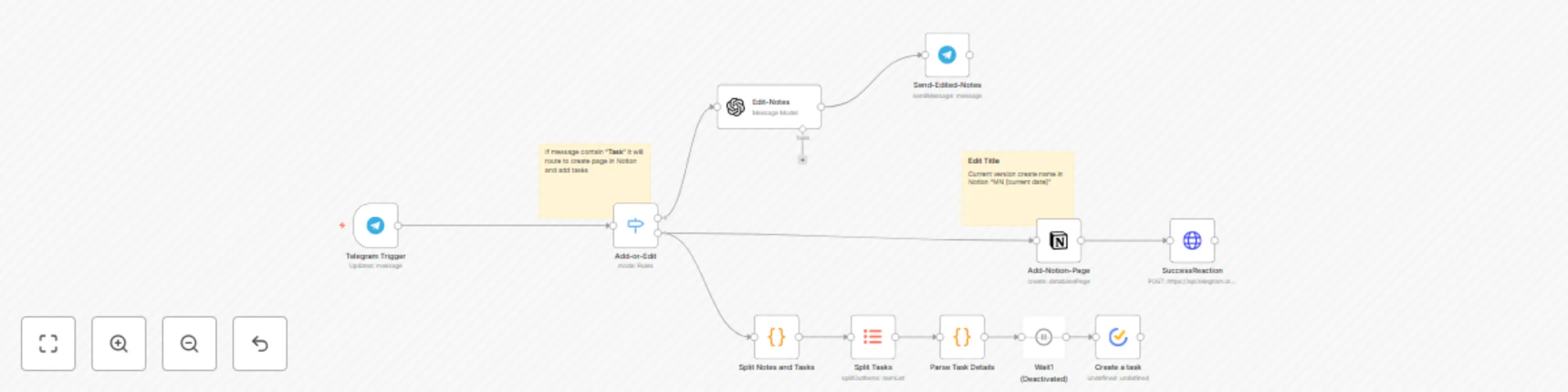
![Screenshot 20250721 at 23.30.52.png](fileId:1817) This n8n template automates the transformation of raw meeting notes into structured tasks and documents using GPT (or another model) , syncing them to Notion and TickTick via a Telegram bot. ## Use Cases - Automate note-taking and formatting for daily standups, brainstorming sessions, or client calls. - Reduce cognitive load by eliminating manual tracking of ideas and tedious formatting. - Convert discussions into actionable tasks instantly with TickTick and structured notes in Notion. ## How It Works - Capture Notes: Send raw meeting notes to a Telegram bot. - AI Processing: The workflow sends the text to AI, which: - Removes duplicates and extracts key points. - Formats content into structured Markdown notes for Notion. - Identifies tasks with deadlines (e.g., "- Prepare presentation (Responsible: John, Deadline: Friday)"). - Task Parsing: Extracts task titles, removing metadata like "Responsible" and "Deadline." - Review & Edit: The bot returns formatted notes and tasks for review in Telegram. - Sync & Publish: - Notes are published to a Notion database. - Tasks are exported to TickTick via API. - Confirmation: A Telegram reaction (e.g., 👌 emoji) confirms successful processing. ## Setup Instructions 1. Set Up Telegram Bot: 1. Create a Telegram bot via BotFather and obtain an API token. 2. Add the token to the "Telegram Trigger" and "Send-Edited-Notes" nodes under credentials (telegramApi). 2. Configure OpenAI: 1. Obtain an OpenAI API key and add it to the "Edit-Notes" node (openAiApi credentials). 2. Ensure the model is set to gpt-4.1-mini in the node parameters. 3. Set Up Notion: 1. Create a Notion database for notes (e.g., "Meetings"). 2. Add the database ID to the "Create a Database Page" node (databaseId). 3. Configure Notion API credentials (notionApi) in the node. 4. Set Up TickTick: 1. Obtain a TickTick API key and add it to the "Create a Task" node (tickTickOAuth2Api credentials). 2. Specify your TickTick project ID in the node (projectId). 5. Deploy Workflow: 1. Ensure your n8n instance is self-hosted to support community nodes (TickTick, Notion). 2. Activate the workflow in n8n. 6. Test: 1. Send a test message to the Telegram bot (e.g., "Discussed project timeline. Tasks: - Prepare slides (Responsible: Alice, Deadline: Friday)"). 2. Verify that notes appear in Notion, tasks in TickTick, and a 👌 reaction in Telegram. ## Configuration Examples #### Telegram Trigger: ``` { "parameters": { "updates": ["message"], "additionalFields": {} }, "credentials": { "telegramApi": { "id": "your-telegram-api-id", "name": "meeting notes" } } } ``` #### OpenAI Prompt (in "Edit-Notes" node): ``` Analyze the quick meeting notes from {{ $json.message.text }} Generate meeting notes and a task list in the following format:\nMeeting Notes:\n- [Note 1]\n- [Note 2]\n\nTasks:\n- [Task 1] \n- [Task 2] ``` #### Notion Database Page ``` { "parameters": { "resource": "databasePage", "databaseId": "your-notion-database-id", "title": "MN {{ $now }}", "blockUi": { "blockValues": [ { "textContent": "{{ $json.message.text }}" } ] } } } ``` ## Requirements - Requires an OpenAI API key (or another model). - APIs: Pre-configured Notion and TickTick API credentials are required. The template includes setup guides. - Setup: Uses community nodes, requiring a self-hosted n8n instance. ## Customizing This Workflow - Replace the Telegram bot with a webhook or form for alternative inputs (e.g., mobile apps). - Modify the OpenAI prompt in the "Edit-Notes" node to customize note and task formats. - Add filters in the "Split Notes and Tasks" node to prioritize tasks (e.g., ++#urgent++). - Integrate Google Calendar via an additional HTTP Request node to auto-set deadlines based on text (e.g., "by Friday").

P
Pavel Zamorev
Project Management
5 Jul 2025
914
0