Block 1 - On form submission
- Type / Role
- n8n-nodes-base.formTrigger - formTrigger
- Config choices
- Version 2.2


 Early Deal
This workflow is provided as-is. Please review and test before using in production.
Automated Website Traffic Tracker with Google Sheets Logging Track website traffic and backlinks effortlessly using the [Website Traffic Checker Ahref API](https://rapidapi.com/skdeveloper/api/w...
n8n-nodes-base.formtrigger, n8n-nodes-base.set, n8n-nodes-base.httprequest, n8n-nodes-base.if, n8n-nodes-base.emailsend, n8n-nodes-base.code, n8n-nodes-base.googlesheets, n8n-nodes-base.stickynote
This workflow is cataloged by N8N Workflows and links back to its original n8n.io source page by Sk developer .
Original n8n.io sourceTrack website traffic and backlinks effortlessly using the Website Traffic Checker - Ahref API. This n8n workflow automates data retrieval and logging into Google Sheets, making it perfect for SEO professionals and digital marketers.
Accepts a domain via a simple web form.
Sends the domain to Website Traffic Checker - Ahref API.
If successful:
If failed:
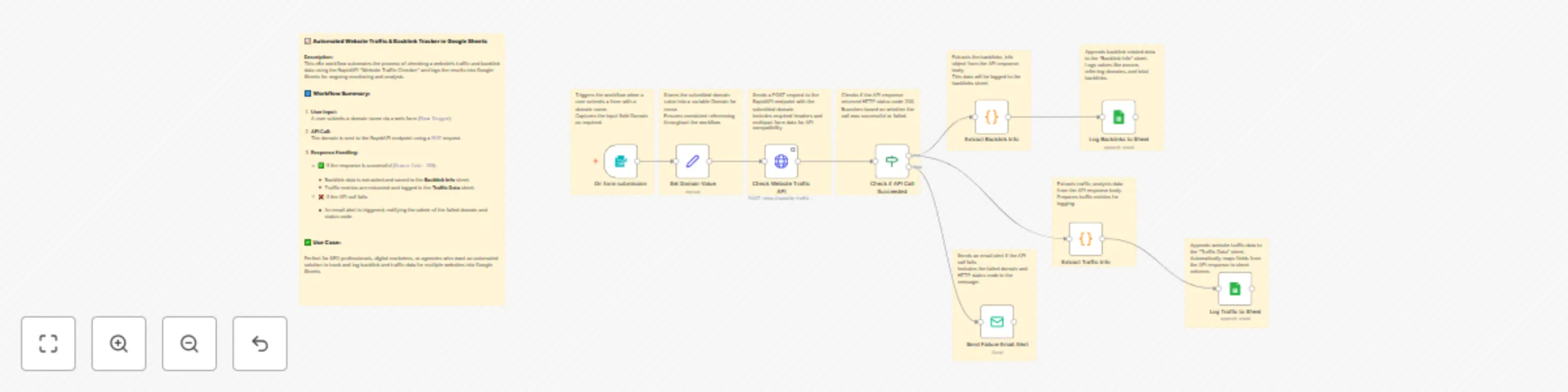
| Node | Purpose |
|---|---|
| 🟢 Form Trigger | Starts the workflow when a domain is submitted via form. |
| 🟩 Set Domain Value | Stores the submitted domain into a variable. |
| 🌐 HTTP Request | Calls Website Traffic Checker - Ahref API. |
| ✅ IF Node | Checks if the API responded with statusCode = 200. |
| ❌ Email Node (Fail) | Sends an alert email if API fails. |
| 📦 Code (Backlink Info) | Extracts backlink data from API response. |
| 📄 Google Sheet: Backlink Info | Appends backlink data to a sheet. |
| 📦 Code (Traffic Info) | Extracts traffic data from API response. |
| 📄 Google Sheet: Traffic Data | Appends traffic metrics to another sheet. |
| Column | Description |
|---|---|
website |
Domain submitted |
ascore |
Authority score |
referring domain |
Number of referring domains |
total backlinks |
Total backlinks |
| Column | Description |
|---|---|
| accuracy | Accuracy level of the traffic data |
| bounce_rate | Bounce rate percentage |
| desktop_share | Percentage of traffic from desktop devices |
| direct | Direct traffic sources |
| display_ad | Display ad traffic sources |
| display_date | Date when traffic data was captured |
| Traffic from email campaigns | |
| mobile_share | Percentage of traffic from mobile devices |
| pages_per_visit | Average number of pages per visit |
| paid | Paid traffic sources |
| prev_bounce_rate | Bounce rate in the previous period |
| prev_direct | Previous period's direct traffic |
| prev_display_ad | Previous period's display ad traffic |
| prev_mail | Previous period's email traffic |
| prev_pages_per_visit | Previous period's pages per visit |
| prev_referral | Previous period's referral traffic |
| prev_search_organic | Previous organic search traffic |
| prev_search_paid | Previous paid search traffic |
| prev_social_organic | Previous organic social traffic |
| prev_social_paid | Previous paid social traffic |
| prev_time_on_site | Previous time spent on site |
| prev_users | Number of users in the previous period |
| prev_visits | Visits in the previous period |
| rank | Global rank of the website |
| referral | Referral traffic |
| search | Total search traffic |
| search_organic | Organic search traffic |
| search_paid | Paid search traffic |
| social | Total social traffic |
| social_organic | Organic social traffic |
| social_paid | Paid social traffic |
| target | Targeted country or demographic |
| time_on_site | Average time spent on site |
| unknown_channel | Traffic from unknown sources |
| users | Number of unique users |
| visits | Total number of visits |
x-rapidapi-key from the Endpoints tab.Go to your HTTP Request node.
Under Headers, set:
x-rapidapi-host = website-traffic-checker-ahref.p.rapidapi.comx-rapidapi-key = your API keyGoogle Sheets credentials in n8n.documentId field.> Make sure your Google Sheet has edit access and headers already created.
This catalog entry is organized from the workflow JSON. The node-level section below shows the executable blocks available for review before importing the template.
| Workflow | Track website traffic & backlinks with Ahref API and Google Sheets |
|---|---|
| Complexity | advanced |
| Nodes | 19 |
| Categories | Content Creation, Market Research |
| Author | Sk developer |
| Published | 19 Sept 2025 |
Use the JSON export at /data/workflows/8757/8757.json as the source template for this automation.
Open n8n, import the downloaded JSON, and review each node before activating the workflow.
Replace placeholder credentials, API keys, webhook URLs, account IDs, and environment-specific values with your own settings.
Run the workflow manually or in a staging workspace, inspect node output, and confirm downstream systems receive the expected data.
Enable the workflow only after testing, then monitor executions, errors, and rate limits during the first production runs.
Review imported nodes carefully before activation. This catalog entry is intended to help you inspect the workflow structure, understand required services, and find related templates faster.
Node names, credentials, schedules, webhook paths, and external service limits may need adjustment for your workspace.
Automated Website Traffic Tracker with Google Sheets Logging Track website traffic and backlinks effortlessly using the [Website Traffic Checker Ahref API](https://rapidapi.com/skdeveloper/api/w...
Review the workflow JSON, configure any required credentials in n8n, and test the automation in a safe workspace before using it in production.
Yes. Use the block-by-block analysis and the downloadable JSON to inspect each node, then adjust credentials, prompts, schedules, filters, or destinations for your Content Creation, Market Research use case.