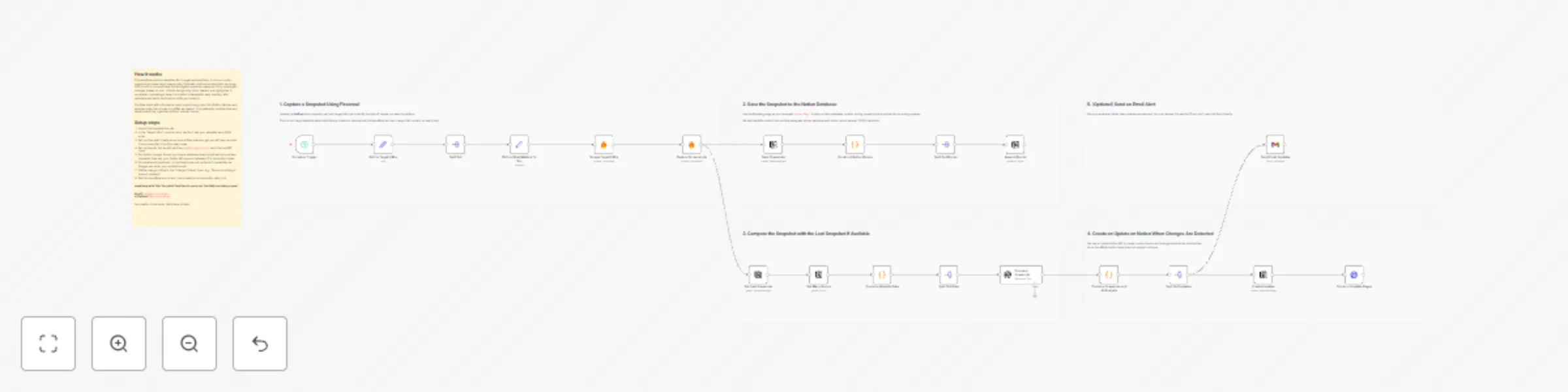
Track website changes with Firecrawl, GPT-5-Mini, Notion, and Gmail

Workflow preview

Workflow preview
100%
Track website changes with Firecrawl, GPT-5-Mini, Notion, and Gmail preview
Open on n8n.io

Important notice

This workflow is provided as-is. Please review and test before using in production.

1. Workflow Overview

Stay Updated on Website Changes Automatically Manually checking websites for updates or competitor changes can be tedious. This workflow automates the process by scraping target pages, capturing sc...

Best for

  • Market Research automation workflows
  • AI Summarization automation workflows
  • advanced n8n builders looking for reusable templates

Tools used

n8n-nodes-base.scheduletrigger, n8n-nodes-base.set, n8n-nodes-base.splitout, n8n-nodes-base.code, @mendable/n8n-nodes-firecrawl.firecrawl, n8n-nodes-base.notion, @n8n/n8n-nodes-langchain.openai, n8n-nodes-base.httprequest

Source and attribution

This workflow is cataloged by N8N Workflows and links back to its original n8n.io source page by ScoutNow.

Original n8n.io source

1.1 Workflow description

Title
Track website changes with Firecrawl, GPT-5-Mini, Notion, and Gmail
Workflow name
Track website changes with Firecrawl, GPT-5-Mini, Notion, and Gmail

Stay Updated on Website Changes Automatically

Manually checking websites for updates or competitor changes can be tedious. This workflow automates the process by scraping target pages, capturing screenshots, and analyzing content changes using Firecrawl and GPT-5-mini. All updates are saved in Notion, and you can optionally receive email alerts — keeping you informed without lifting a finger.


Key Features

  • Automated Website Monitoring
    Tracks changes on multiple target URLs on a daily schedule.

  • Visual & Text-Based Updates
    Captures screenshots and generates concise text summaries for each change.

  • Notion Integration
    Stores snapshots, comparisons, and summaries directly in Notion for easy reference.

  • GPT-Powered Comparison
    Highlights meaningful changes between snapshots using GPT-5-mini.

  • Change Criteria Input
    Define what type of updates matter to you — focus on specific content changes or ignore minor differences.

  • Email Alerts via Gmail
    Sends notifications when updates occur, so you never miss important changes.

  • Reusable Notion Page Template
    Includes a structured template for consistent tracking and reporting: View Template


Email Updates:

Notion Page Template:

Notion Update Example:


Setup Instructions

1. Add Target URLs

Paste one or more websites you want to monitor. The workflow accepts multiple URLs in JSON format for scalable tracking.


2. Setup Firecrawl Credential

Use Firecrawl to scrape website data without dealing with complex API setups.

Steps:

  1. Go to firecrawl.dev/app and sign up.
  2. Copy your API Key from the dashboard.
  3. In n8n, open the Firecrawl node, add a new credential, and paste the key.
  4. Test the node to ensure the connection works.

3. Setup OpenAI API Key

The workflow uses GPT-5-mini to analyze and summarize website changes.

Steps:

  1. Sign up at OpenAI if you haven’t already.
  2. Generate a new API Key in your OpenAI dashboard.
  3. In n8n, open the GPT node, add a new credential, and paste the API key.
  4. Test the node to ensure it can successfully call the API.

4. Setup Gmail for Email Alerts

  1. In n8n, open the Gmail node.
  2. Click Add New Credentials and select OAuth2.
  3. Follow the Google OAuth setup to allow n8n to send emails on your behalf.
  4. Choose the recipient and customize the alert formatting to include snapshots and summaries.

5. Configure the Workflow

  1. Import the workflow into n8n.
  2. Add your target URLs in JSON format.
  3. Paste your Firecrawl API Key into the Firecrawl node.
  4. Add your OpenAI API key to the GPT node.
  5. Authenticate Gmail if email notifications are desired.
  6. Set your preferred change criteria to filter meaningful updates.
  7. Adjust the schedule for daily execution or your preferred frequency.

How It Works

  1. Schedule Trigger: Runs daily or on-demand.
  2. Fetch Pages: Scrapes target websites using Firecrawl.
  3. Capture & Compare: Screenshots and text are stored and compared using GPT-5-mini.
  4. Apply Change Criteria: Only updates that meet your defined criteria are logged.
  5. Save Updates: Changes are stored in Notion with visual and text summaries.
  6. Optional Alerts: Sends Gmail notifications with updates.

Example Use Cases

  • Monitor competitor websites for product, pricing, or design changes.
  • Track updates on blogs, documentation, or landing pages.
  • Automatically log changes for research, reporting, or team awareness.
  • Get notified instantly when key pages are updated.

Requirements

Tool Purpose
Firecrawl API Key Scrape website content
OpenAI API Key Generate summaries and compare changes with GPT-5-mini
n8n Run and schedule the automation
Notion Store snapshots, summaries, and comparisons
Gmail (OAuth2) Send alert emails

Have questions about this template? Feel free to reach out. Our DMs are always open!

Email: [email protected]
X (Twitter): @ScoutNowApp

1.2 Logical Blocks

This catalog entry is organized from the workflow JSON. The node-level section below shows the executable blocks available for review before importing the template.

2. Block-by-Block Analysis

Block 1 - Schedule Trigger

Type / Role
n8n-nodes-base.scheduleTrigger - scheduleTrigger
Config choices
Version 1.2

Block 2 - Define Target URLs

Type / Role
n8n-nodes-base.set - set
Config choices
Version 3.4

Block 3 - Define What Matters To You

Type / Role
n8n-nodes-base.set - set
Config choices
Version 3.4

Block 4 - Split Out

Type / Role
n8n-nodes-base.splitOut - splitOut
Config choices
Version 1

Block 5 - Construct Notion Blocks

Type / Role
n8n-nodes-base.code - code
Config choices
Version 2

Block 6 - Capture Screenshots

Type / Role
@mendable/n8n-nodes-firecrawl.firecrawl - firecrawl
Config choices
Version 1

Block 7 - Scrape Target URLs

Type / Role
@mendable/n8n-nodes-firecrawl.firecrawl - firecrawl
Config choices
Version 1

Block 8 - Save Snapshots

Type / Role
n8n-nodes-base.notion - notion
Config choices
Version 2.2

Block 9 - Split Out Blocks

Type / Role
n8n-nodes-base.splitOut - splitOut
Config choices
Version 1

Block 10 - Append Blocks

Type / Role
n8n-nodes-base.notion - notion
Config choices
Version 2.2

Block 11 - Get Last Snapshots

Type / Role
n8n-nodes-base.notion - notion
Config choices
Version 2.2

Block 12 - Combine Website Data

Type / Role
n8n-nodes-base.code - code
Config choices
Version 2

Block 13 - Split Out Data

Type / Role
n8n-nodes-base.splitOut - splitOut
Config choices
Version 1

Block 14 - Split Out Updates

Type / Role
n8n-nodes-base.splitOut - splitOut
Config choices
Version 1

Block 15 - Get Many Blocks

Type / Role
n8n-nodes-base.notion - notion
Config choices
Version 2.2

Block 16 - Compare Snapshots

Type / Role
@n8n/n8n-nodes-langchain.openAi - openAi
Config choices
Version 2

Block 17 - Combine Snapshots and AI Analysis

Type / Role
n8n-nodes-base.code - code
Config choices
Version 2

Block 18 - Create Updates

Type / Role
n8n-nodes-base.notion - notion
Config choices
Version 2.2

Block 19 - Construct Update Pages

Type / Role
n8n-nodes-base.httpRequest - httpRequest
Config choices
Version 4.3

Block 20 - Send Email Updates

Type / Role
n8n-nodes-base.gmail - gmail
Config choices
Version 2.1

Block 21 - Sticky Note6

Type / Role
n8n-nodes-base.stickyNote - stickyNote
Config choices
Version 1

Block 22 - Sticky Note7

Type / Role
n8n-nodes-base.stickyNote - stickyNote
Config choices
Version 1

Block 23 - Sticky Note8

Type / Role
n8n-nodes-base.stickyNote - stickyNote
Config choices
Version 1

Block 24 - Sticky Note9

Type / Role
n8n-nodes-base.stickyNote - stickyNote
Config choices
Version 1

Showing the first 24 of 26 workflow blocks. Download the JSON for the full node graph.

3. Summary Table

Workflow Track website changes with Firecrawl, GPT-5-Mini, Notion, and Gmail
Complexity advanced
Nodes 26
Categories Market Research, AI Summarization
Author ScoutNow
Published 21 Nov 2025

4. Reproducing the Workflow from Scratch

  1. 1. Download the workflow JSON

    Use the JSON export at /data/workflows/11098/11098.json as the source template for this automation.

  2. 2. Import the template into n8n

    Open n8n, import the downloaded JSON, and review each node before activating the workflow.

  3. 3. Configure credentials and variables

    Replace placeholder credentials, API keys, webhook URLs, account IDs, and environment-specific values with your own settings.

  4. 4. Test with sample data

    Run the workflow manually or in a staging workspace, inspect node output, and confirm downstream systems receive the expected data.

  5. 5. Activate and monitor

    Enable the workflow only after testing, then monitor executions, errors, and rate limits during the first production runs.

5. General Notes & Resources

Review imported nodes carefully before activation. This catalog entry is intended to help you inspect the workflow structure, understand required services, and find related templates faster.

Node names, credentials, schedules, webhook paths, and external service limits may need adjustment for your workspace.

Frequently asked questions

What does Track website changes with Firecrawl, GPT-5-Mini, Notion, and Gmail do?

Stay Updated on Website Changes Automatically Manually checking websites for updates or competitor changes can be tedious. This workflow automates the process by scraping target pages, capturing sc...

What do I need before importing this workflow?

Review the workflow JSON, configure any required credentials in n8n, and test the automation in a safe workspace before using it in production.

Can I customize this workflow?

Yes. Use the block-by-block analysis and the downloadable JSON to inspect each node, then adjust credentials, prompts, schedules, filters, or destinations for your Market Research, AI Summarization use case.