S

ScoutNow

4
Workflows

Workflows by ScoutNow
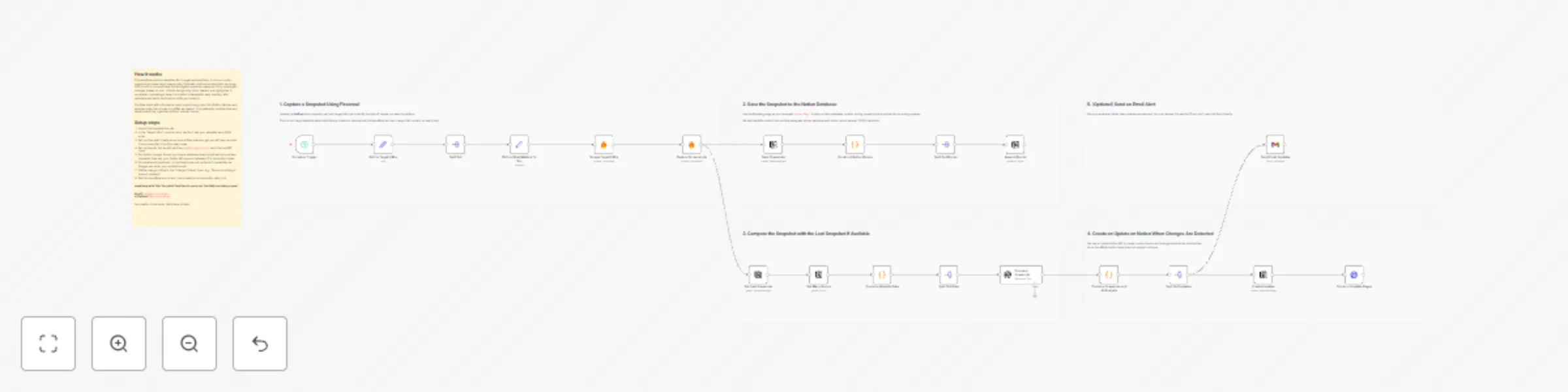
Workflow preview: Track website changes with Firecrawl, GPT-5-Mini, Notion, and Gmail
Free advanced

Track website changes with Firecrawl, GPT-5-Mini, Notion, and Gmail

## Stay Updated on Website Changes Automatically Manually checking websites for updates or competitor changes can be tedious. This workflow automates the process by scraping target pages, capturing screenshots, and analyzing content changes using **Firecrawl** and **GPT-5-mini**. All updates are saved in **Notion**, and you can optionally receive email alerts — keeping you informed without lifting a finger. --- ## **Key Features** * **Automated Website Monitoring** Tracks changes on multiple target URLs on a daily schedule. * **Visual & Text-Based Updates** Captures screenshots and generates concise text summaries for each change. * **Notion Integration** Stores snapshots, comparisons, and summaries directly in Notion for easy reference. * **GPT-Powered Comparison** Highlights meaningful changes between snapshots using GPT-5-mini. * **Change Criteria Input** Define what type of updates matter to you — focus on specific content changes or ignore minor differences. * **Email Alerts via Gmail** Sends notifications when updates occur, so you never miss important changes. * **Reusable Notion Page Template** Includes a structured template for consistent tracking and reporting: [View Template](https://scoutnow.notion.site/Track-Website-Changes-2b0c56764824800a993eca79f4b10bbf) --- **Email Updates:** ![Email Update](https://res.cloudinary.com/datbbikfe/image/upload/v1763719178/n8n/Screenshot_2025-11-21_at_2.38.51_PM_qc2d3v.png) **Notion Page Template:** ![Notion Page](https://res.cloudinary.com/datbbikfe/image/upload/v1763719178/n8n/Screenshot_2025-11-21_at_2.42.27_PM_wftpcy.png) **Notion Update Example:** ![Notion Update](https://res.cloudinary.com/datbbikfe/image/upload/v1763719178/n8n/Screenshot_2025-11-21_at_2.41.42_PM_mag7gf.png) --- ## **Setup Instructions** ### 1. Add Target URLs Paste one or more websites you want to monitor. The workflow accepts multiple URLs in JSON format for scalable tracking. --- ### 2. Setup Firecrawl Credential Use **Firecrawl** to scrape website data without dealing with complex API setups. **Steps:** 1. Go to [firecrawl.dev/app](https://firecrawl.dev/app) and sign up. 2. Copy your **API Key** from the dashboard. 3. In n8n, open the **Firecrawl** node, add a new credential, and paste the key. 4. Test the node to ensure the connection works. --- ### 3. Setup OpenAI API Key The workflow uses **GPT-5-mini** to analyze and summarize website changes. **Steps:** 1. Sign up at [OpenAI](https://platform.openai.com/) if you haven’t already. 2. Generate a new **API Key** in your OpenAI dashboard. 3. In n8n, open the **GPT** node, add a new credential, and paste the API key. 4. Test the node to ensure it can successfully call the API. --- ### 4. Setup Gmail for Email Alerts 1. In n8n, open the **Gmail** node. 2. Click **Add New Credentials** and select **OAuth2**. 3. Follow the Google OAuth setup to allow n8n to send emails on your behalf. 4. Choose the recipient and customize the alert formatting to include snapshots and summaries. --- ### 5. Configure the Workflow 1. Import the workflow into n8n. 2. Add your target URLs in JSON format. 3. Paste your Firecrawl API Key into the Firecrawl node. 4. Add your OpenAI API key to the GPT node. 5. Authenticate Gmail if email notifications are desired. 6. Set your preferred **change criteria** to filter meaningful updates. 7. Adjust the schedule for daily execution or your preferred frequency. --- ## **How It Works** 1. **Schedule Trigger:** Runs daily or on-demand. 2. **Fetch Pages:** Scrapes target websites using Firecrawl. 3. **Capture & Compare:** Screenshots and text are stored and compared using GPT-5-mini. 4. **Apply Change Criteria:** Only updates that meet your defined criteria are logged. 5. **Save Updates:** Changes are stored in Notion with visual and text summaries. 6. **Optional Alerts:** Sends Gmail notifications with updates. --- ## **Example Use Cases** * Monitor competitor websites for product, pricing, or design changes. * Track updates on blogs, documentation, or landing pages. * Automatically log changes for research, reporting, or team awareness. * Get notified instantly when key pages are updated. --- ## **Requirements** | Tool | Purpose | |------|----------| | Firecrawl API Key | Scrape website content | | OpenAI API Key | Generate summaries and compare changes with GPT-5-mini | | n8n | Run and schedule the automation | | Notion | Store snapshots, summaries, and comparisons | | Gmail (OAuth2) | Send alert emails | --- Have questions about this template? Feel free to reach out. Our DMs are always open! **Email:** [[email protected]](mailto:[email protected]) **X (Twitter):** [@ScoutNowApp](https://x.com/ScoutNowApp)

S
ScoutNow
Market Research
21 Nov 2025
97
0

Workflow preview: Automate Reddit Monitoring with GPT-5-Mini, Notion, and Gmail
Free advanced

Automate Reddit Monitoring with GPT-5-Mini, Notion, and Gmail

## Instantly Track Reddit Discussions and Generate Insights Manually monitoring Reddit for relevant discussions can be overwhelming. This automation does all the heavy lifting by automatically searching for **keywords across selected subreddits or the entire Reddit**, analyzing each post with **GPT-5-Mini**, and saving structured insights in your **Notion database**. Optionally, receive daily email notifications summarizing new discussions without lifting a finger. --- ## **Key Features** * **Daily Automated Reddit Monitoring** Checks Reddit once a day for new posts matching your keywords in selected subreddits or across all of Reddit. * **AI-Powered Analysis with Custom Prompts** Uses GPT-5-Mini to: - Assign a **relevance score** to each post based on your defined priorities. - Generate a **suggested comment** tailored to your audience or engagement strategy. - Allow custom prompts so you can tweak AI behavior for lead generation, competitor monitoring, or brand mentions. * **Notion Integration** Saves all posts, relevance scores, and AI-generated comments directly into your Notion database for easy tracking and collaboration. ![Notion ScreenShot](https://res.cloudinary.com/datbbikfe/image/upload/v1763283388/n8n/Screenshot_2025-11-16_at_1.23.50_PM_brfh94.png) * **Optional Email Alerts** Sends a clean, HTML-formatted email summarizing new discussions and insights. ![Email Screenshot](https://res.cloudinary.com/datbbikfe/image/upload/v1763283525/n8n/Screenshot_2025-11-16_at_1.21.31_PM_bdnc5g.png) * **No API Keys Required for Reddit** Works with the official Reddit API without requiring users to create credentials. * **Customizable Inputs** Users define keywords, subreddits, relevance criteria, custom prompts, and notification preferences with minimal setup. --- ## **Setup Instructions** ### 1. Configure Keywords and Subreddits 1. Open the **Define Keywords and Subreddits** node. 2. Enter your target keywords and choose specific subreddits, or enable search across all Reddit. 3. Map the inputs to the workflow’s search nodes. --- ### 2. Connect OpenAI (GPT-5-Mini) 1. Create an OpenAI account and obtain your **API key**. 2. Open the **AI Analysis Node** in the workflow. 3. Paste your OpenAI API key into the credentials field. 4. Customize your prompts to define how GPT-5-Mini: - Scores relevance based on your specific criteria. - Generates suggested comments tailored to your objectives (e.g., lead generation, brand engagement, competitor analysis). 5. Test the node to ensure relevance scoring and suggested comments are generated correctly. --- ### 3. Connect Notion 1. Duplicate the provided Notion template into your workspace. 2. Obtain your **Notion integration secret** from Notion settings. 3. Paste the secret into the **Add Each Post to Notion Database** node. 4. Test the connection to ensure posts are saved correctly. --- ### 4. Optional Email Notifications 1. Setup **Google API credentials** in the Google Cloud Console. 2. Authenticate Gmail in the workflow. 3. Map the recipient email and customize the notification format. 4. Test sending an email to confirm delivery. --- ### 5. Configure Workflow Trigger 1. Import the workflow into n8n. 2. Ensure the daily trigger is enabled. 3. Optionally adjust schedule or notification settings. --- ## **How It Works** 1. **Daily Trigger:** Starts the workflow once per day. 2. **Reddit Search:** Queries new posts based on user-defined keywords. 3. **AI Analysis:** GPT-5-Mini evaluates **relevance score** and generates **suggested comments** based on your custom prompts. 4. **Save & Notify:** Posts are saved to Notion and optionally summarized via email. --- ## **Example Use Cases** * Generate **leads** by identifying potential prospects discussing your industry or product. * Monitor **brand mentions** to stay on top of conversations around your company. * Track **competitor activity** across relevant subreddits. * Keep a daily digest of trending posts for **market research or content ideas**. * Automate engagement by posting AI-generated **suggested comments**. --- ## **Requirements** | Tool | Purpose | | -------------- | ------------------------------------------------- | | Notion Account | Store posts, relevance scores, and comments | | Gmail Account | Optional daily email notifications | | n8n | Run, schedule, and manage the workflow | | OpenAI API Key | Access GPT-5-Mini for relevance scoring and AI-generated comments | ---

S
ScoutNow
Market Research
16 Nov 2025
168
0

Workflow preview: Track social media growth and weekly reports with X API, YouTube API, and Gmail
Free advanced

Track social media growth and weekly reports with X API, YouTube API, and Gmail

## Monitor and record your personal or competitors’ social media growth with this scalable n8n automation template. Using official APIs from **X (formerly Twitter)** and **YouTube**, the workflow fetches daily **follower and subscriber counts**, stores them in a structured **n8n Data Table**, and now sends **automated weekly summary emails via Gmail**. Built with **extensibility** in mind, this workflow is ready for future updates to support additional platforms like Instagram, TikTok, LinkedIn, and more. --- ## **Features** * 📈 **Daily Social Media Tracking** Automatically collects X follower counts and YouTube subscriber numbers based on **usernames**, not channel IDs. * 📦 **Data Table Logging** Cleanly stores daily metrics in a dedicated n8n Data Table with timestamps. * 📧 **Weekly Email Reports (New)** Sends a concise weekly summary of growth trends using the **Gmail node**. * 🔁 **Easy Customization** Swap out usernames in a couple of fields — no deep edits required. * 🛠️ **Extensible Design** Structure is ready to support more platforms (e.g., TikTok, Instagram, LinkedIn). * 🧩 **API-Based Accuracy** Uses official APIs from X and YouTube for real-time, reliable data. --- ## **Setup Instructions** ### 1. Get API Credentials * **X API (Bearer Token)** → [developer.x.com](https://developer.x.com) * **YouTube API Key** → [Google Cloud Console](https://console.cloud.google.com) * **Gmail Credentials** → Enable the **Gmail API** in your Google Cloud project and configure OAuth2 credentials for use in n8n. --- ### 2. Configure in n8n * Import the template * In the **HTTP Request nodes**: * Add **Bearer Auth** (for X API) * Add **Query Auth** with your YouTube API Key (`?key=<your_api_key>`) * In the **Gmail node**: * Connect your Gmail account via OAuth2 credentials * Customize recipient email(s) and message format * Edit these fields to track your accounts: * `xUsername` → your **X / Twitter handle** * `ytChannelUsername` → your **YouTube channel’s username** --- ### 3. Create the Data Table Inside the n8n dashboard, create a table with the following fields: | Field Name | Type | | ------------------- | -------- | | `date` | DateTime | | `xFollowersCount` | Number | | `ytSubscriberCount` | Number | --- ## **How It Works** 1. **Trigger**: Daily cron node starts the workflow. 2. **Fetch X Followers**: Grabs follower count using the X API. 3. **Fetch YouTube Subscribers**: Retrieves sub count using the YouTube API. 4. **Store Data**: Logs all values into your Data Table with a timestamp. 5. **Weekly Email Summary**: Once a week, the Gmail node compiles recent data and emails a growth report. 6. **Future Expansion**: The structure is ready to include more platforms. --- ## **Use Cases** * Track your brand or competitor’s social growth daily * Receive weekly email reports on follower/subscriber changes * Build custom dashboards or growth charts * Compare performance across platforms * Generate automated growth reports --- ## **Requirements** * X API Bearer Token * YouTube API Key * Gmail API Credentials * Access to n8n (cloud or self-hosted) --- ## **Delivery Options** You can extend this template to: * Post daily growth summaries to Slack or Telegram * Auto-update a Google Sheet or Notion database * Send more detailed weekly reports * Add new platforms (Instagram, TikTok, LinkedIn, etc.) --- ## **Details** | Node | Function | | ------------ | ----------------------------------- | | HTTP Request | Pull data from APIs | | Cron | Trigger workflow daily | | Data Table | Store historical growth data | | Gmail | Send weekly email reports | | Set | Define usernames and settings | ---

S
ScoutNow
Market Research
15 Oct 2025
172
0
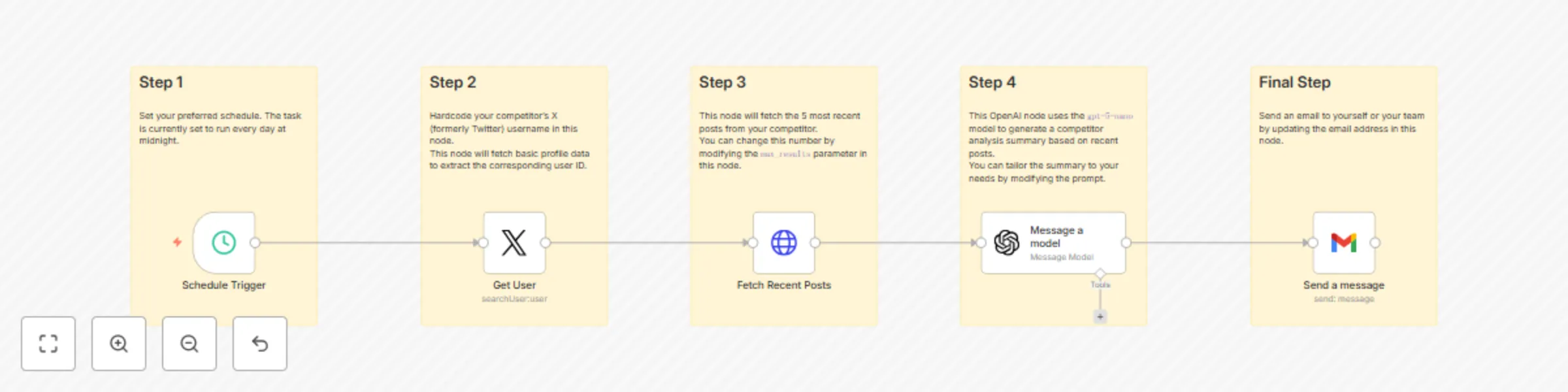
Workflow preview: Daily Competitor Tweet Summarizer with X API, GPT-5-Nano, and Gmail Delivery
Free intermediate

Daily Competitor Tweet Summarizer with X API, GPT-5-Nano, and Gmail Delivery

## Automated Daily Competitor Tweet Summarizer with X API, GPT-5-Nano, and Gmail Stay on top of your competition with this powerful n8n workflow that automatically fetches and summarizes your competitors’ latest tweets every day. Using the official X (formerly Twitter) API and OpenAI's GPT-5-Nano model, this template extracts insights from public tweets and sends concise summaries directly to your Gmail inbox. Ideal for marketing teams, product managers, PR professionals, and competitive intelligence analysts, this solution turns noisy social feeds into clear, actionable summaries—automated and customized to your needs. --- ## Features - Daily automation: Fetches competitor tweets every 24 hours using X API - AI summarization: Uses GPT-5-Nano to highlight key insights and themes - Smart filtering: Cleans and filters tweets for relevance before summarizing - Email delivery: Sends summaries to Gmail (or your team’s inbox) - Fully customizable: Modify schedules, accounts, and integrations as needed --- ## Setup Instructions 1. **Get API Keys:** - X API (Bearer Token) – from [developer.x.com](https://developer.x.com) - OpenAI API Key – from [platform.openai.com](https://platform.openai.com) - Gmail OAuth2 credentials (via Google Cloud Console) 2. **Configure in n8n:** - Import the workflow - Add credentials under the "Credentials" tab - Set target X usernames and schedule 3. **Customize Delivery (Optional):** - Set email subject, recipients - Add additional integrations (e.g., Slack, Notion, Sheets) --- ## How It Works 1. **Trigger:** A daily cron node initiates the workflow. 2. **Fetch User ID:** The workflow uses the X API to retrieve the user ID based on the provided username. This step is necessary because the tweet retrieval endpoint requires a user ID, not a username. 3. **Fetch Tweets:** Using the extracted user ID, the workflow queries the X API for recent tweets from the selected account. 4. **Clean Data:** Filters out replies, retweets, and any irrelevant content to ensure only meaningful tweets are summarized. 5. **Summarize:** GPT-4 processes the cleaned tweet content and generates a concise, insightful summary. 6. **Send Email:** The Gmail node sends the final summary to your inbox or chosen recipient. --- ## Use Cases - Track competitor announcements and marketing messages - Automate daily social media briefs for leadership - Monitor trends in your industry effortlessly - Keep your team aligned with market developments --- ## Requirements - Valid X API credentials (Bearer token) - OpenAI API key - Gmail OAuth2 credentials - Access to n8n (cloud or self-hosted) --- ## Delivery Options While Gmail is the default, you can easily extend the workflow to integrate with: - Slack - Notion - Google Sheets - Webhooks - Any supported n8n integration --- Automate your competitive intelligence process and stay informed—without lifting a finger.

S
ScoutNow
Market Research
7 Oct 2025
360
0