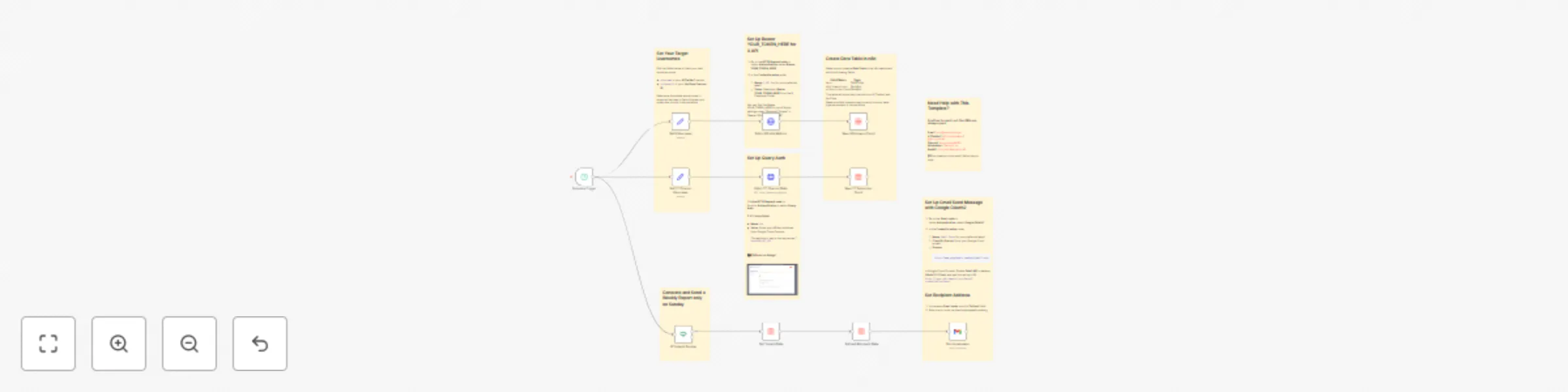
Track social media growth and weekly reports with X API, YouTube API, and Gmail

Workflow preview

Workflow preview
100%
Track social media growth and weekly reports with X API, YouTube API, and Gmail preview
Open on n8n.io

Important notice

This workflow is provided as-is. Please review and test before using in production.

1. Workflow Overview

Monitor and record your personal or competitors’ social media growth with this scalable n8n automation template. Using official APIs from X (formerly Twitter) and YouTube , the workflow fetches dai...

Best for

  • Market Research automation workflows
  • advanced n8n builders looking for reusable templates

Tools used

n8n-nodes-base.httprequest, n8n-nodes-base.datatable, n8n-nodes-base.set, n8n-nodes-base.stickynote, n8n-nodes-base.scheduletrigger, n8n-nodes-base.if, n8n-nodes-base.gmail

Source and attribution

This workflow is cataloged by N8N Workflows and links back to its original n8n.io source page by ScoutNow.

Original n8n.io source

1.1 Workflow description

Title
Track social media growth and weekly reports with X API, YouTube API, and Gmail
Workflow name
Track social media growth and weekly reports with X API, YouTube API, and Gmail

Monitor and record your personal or competitors’ social media growth with this scalable n8n automation template.

Using official APIs from X (formerly Twitter) and YouTube, the workflow fetches daily follower and subscriber counts, stores them in a structured n8n Data Table, and now sends automated weekly summary emails via Gmail.

Built with extensibility in mind, this workflow is ready for future updates to support additional platforms like Instagram, TikTok, LinkedIn, and more.


Features

  • 📈 Daily Social Media Tracking
    Automatically collects X follower counts and YouTube subscriber numbers based on usernames, not channel IDs.

  • 📦 Data Table Logging
    Cleanly stores daily metrics in a dedicated n8n Data Table with timestamps.

  • 📧 Weekly Email Reports (New)
    Sends a concise weekly summary of growth trends using the Gmail node.

  • 🔁 Easy Customization
    Swap out usernames in a couple of fields — no deep edits required.

  • 🛠️ Extensible Design
    Structure is ready to support more platforms (e.g., TikTok, Instagram, LinkedIn).

  • 🧩 API-Based Accuracy
    Uses official APIs from X and YouTube for real-time, reliable data.


Setup Instructions

1. Get API Credentials

  • X API (Bearer Token)developer.x.com
  • YouTube API KeyGoogle Cloud Console
  • Gmail Credentials → Enable the Gmail API in your Google Cloud project and configure OAuth2 credentials for use in n8n.

2. Configure in n8n

  • Import the template
  • In the HTTP Request nodes:
    • Add Bearer Auth (for X API)
    • Add Query Auth with your YouTube API Key (?key=<your_api_key>)
  • In the Gmail node:
    • Connect your Gmail account via OAuth2 credentials
    • Customize recipient email(s) and message format
  • Edit these fields to track your accounts:
    • xUsername → your X / Twitter handle
    • ytChannelUsername → your YouTube channel’s username

3. Create the Data Table

Inside the n8n dashboard, create a table with the following fields:

Field Name Type
date DateTime
xFollowersCount Number
ytSubscriberCount Number

How It Works

  1. Trigger: Daily cron node starts the workflow.
  2. Fetch X Followers: Grabs follower count using the X API.
  3. Fetch YouTube Subscribers: Retrieves sub count using the YouTube API.
  4. Store Data: Logs all values into your Data Table with a timestamp.
  5. Weekly Email Summary: Once a week, the Gmail node compiles recent data and emails a growth report.
  6. Future Expansion: The structure is ready to include more platforms.

Use Cases

  • Track your brand or competitor’s social growth daily
  • Receive weekly email reports on follower/subscriber changes
  • Build custom dashboards or growth charts
  • Compare performance across platforms
  • Generate automated growth reports

Requirements

  • X API Bearer Token
  • YouTube API Key
  • Gmail API Credentials
  • Access to n8n (cloud or self-hosted)

Delivery Options

You can extend this template to:

  • Post daily growth summaries to Slack or Telegram
  • Auto-update a Google Sheet or Notion database
  • Send more detailed weekly reports
  • Add new platforms (Instagram, TikTok, LinkedIn, etc.)

Details

Node Function
HTTP Request Pull data from APIs
Cron Trigger workflow daily
Data Table Store historical growth data
Gmail Send weekly email reports
Set Define usernames and settings

1.2 Logical Blocks

This catalog entry is organized from the workflow JSON. The node-level section below shows the executable blocks available for review before importing the template.

2. Block-by-Block Analysis

Block 1 - Fetch X Profile Metrics

Type / Role
n8n-nodes-base.httpRequest - httpRequest
Config choices
Version 4.2

Block 2 - Save X Followers Count

Type / Role
n8n-nodes-base.dataTable - dataTable
Config choices
Version 1

Block 3 - Save YT Subscriber Count

Type / Role
n8n-nodes-base.dataTable - dataTable
Config choices
Version 1

Block 4 - Set YT Channel Username

Type / Role
n8n-nodes-base.set - set
Config choices
Version 3.4

Block 5 - Fetch YT Channel Stats

Type / Role
n8n-nodes-base.httpRequest - httpRequest
Config choices
Version 4.2

Block 6 - Sticky Note

Type / Role
n8n-nodes-base.stickyNote - stickyNote
Config choices
Version 1

Block 7 - Sticky Note1

Type / Role
n8n-nodes-base.stickyNote - stickyNote
Config choices
Version 1

Block 8 - Sticky Note2

Type / Role
n8n-nodes-base.stickyNote - stickyNote
Config choices
Version 1

Block 9 - Set X Username

Type / Role
n8n-nodes-base.set - set
Config choices
Version 3.4

Block 10 - Sticky Note3

Type / Role
n8n-nodes-base.stickyNote - stickyNote
Config choices
Version 1

Block 11 - Sticky Note4

Type / Role
n8n-nodes-base.stickyNote - stickyNote
Config choices
Version 1

Block 12 - Schedule Trigger

Type / Role
n8n-nodes-base.scheduleTrigger - scheduleTrigger
Config choices
Version 1.2

Block 13 - If Today Is Sunday

Type / Role
n8n-nodes-base.if - if
Config choices
Version 2.2

Block 14 - Get Today's Data

Type / Role
n8n-nodes-base.dataTable - dataTable
Config choices
Version 1

Block 15 - Get Last Monday's Data

Type / Role
n8n-nodes-base.dataTable - dataTable
Config choices
Version 1

Block 16 - Send a message

Type / Role
n8n-nodes-base.gmail - gmail
Config choices
Version 2.1

Block 17 - Sticky Note5

Type / Role
n8n-nodes-base.stickyNote - stickyNote
Config choices
Version 1

Block 18 - Sticky Note6

Type / Role
n8n-nodes-base.stickyNote - stickyNote
Config choices
Version 1

3. Summary Table

Workflow Track social media growth and weekly reports with X API, YouTube API, and Gmail
Complexity advanced
Nodes 18
Categories Market Research
Author ScoutNow
Published 15 Oct 2025

4. Reproducing the Workflow from Scratch

  1. 1. Download the workflow JSON

    Use the JSON export at /data/workflows/9718/9718.json as the source template for this automation.

  2. 2. Import the template into n8n

    Open n8n, import the downloaded JSON, and review each node before activating the workflow.

  3. 3. Configure credentials and variables

    Replace placeholder credentials, API keys, webhook URLs, account IDs, and environment-specific values with your own settings.

  4. 4. Test with sample data

    Run the workflow manually or in a staging workspace, inspect node output, and confirm downstream systems receive the expected data.

  5. 5. Activate and monitor

    Enable the workflow only after testing, then monitor executions, errors, and rate limits during the first production runs.

5. General Notes & Resources

Review imported nodes carefully before activation. This catalog entry is intended to help you inspect the workflow structure, understand required services, and find related templates faster.

Node names, credentials, schedules, webhook paths, and external service limits may need adjustment for your workspace.

Frequently asked questions

What does Track social media growth and weekly reports with X API, YouTube API, and Gmail do?

Monitor and record your personal or competitors’ social media growth with this scalable n8n automation template. Using official APIs from X (formerly Twitter) and YouTube , the workflow fetches dai...

What do I need before importing this workflow?

Review the workflow JSON, configure any required credentials in n8n, and test the automation in a safe workspace before using it in production.

Can I customize this workflow?

Yes. Use the block-by-block analysis and the downloadable JSON to inspect each node, then adjust credentials, prompts, schedules, filters, or destinations for your Market Research use case.