Daily Competitor Tweet Summarizer with X API, GPT-5-Nano, and Gmail Delivery

Workflow preview

Workflow preview
100%
Daily Competitor Tweet Summarizer with X API, GPT-5-Nano, and Gmail Delivery preview
Open on n8n.io

Important notice

This workflow is provided as-is. Please review and test before using in production.

1. Workflow Overview

Automated Daily Competitor Tweet Summarizer with X API, GPT 5 Nano, and Gmail Stay on top of your competition with this powerful n8n workflow that automatically fetches and summarizes your competit...

Best for

  • Market Research automation workflows
  • AI Summarization automation workflows
  • intermediate n8n builders looking for reusable templates

Tools used

n8n-nodes-base.twitter, @n8n/n8n-nodes-langchain.openai, n8n-nodes-base.gmail, n8n-nodes-base.scheduletrigger, n8n-nodes-base.stickynote, n8n-nodes-base.httprequest

Source and attribution

This workflow is cataloged by N8N Workflows and links back to its original n8n.io source page by ScoutNow.

Original n8n.io source

1.1 Workflow description

Title
Daily Competitor Tweet Summarizer with X API, GPT-5-Nano, and Gmail Delivery
Workflow name
Daily Competitor Tweet Summarizer with X API, GPT-5-Nano, and Gmail Delivery

Automated Daily Competitor Tweet Summarizer with X API, GPT-5-Nano, and Gmail

Stay on top of your competition with this powerful n8n workflow that automatically fetches and summarizes your competitors’ latest tweets every day. Using the official X (formerly Twitter) API and OpenAI's GPT-5-Nano model, this template extracts insights from public tweets and sends concise summaries directly to your Gmail inbox.

Ideal for marketing teams, product managers, PR professionals, and competitive intelligence analysts, this solution turns noisy social feeds into clear, actionable summaries—automated and customized to your needs.


Features

  • Daily automation: Fetches competitor tweets every 24 hours using X API
  • AI summarization: Uses GPT-5-Nano to highlight key insights and themes
  • Smart filtering: Cleans and filters tweets for relevance before summarizing
  • Email delivery: Sends summaries to Gmail (or your team’s inbox)
  • Fully customizable: Modify schedules, accounts, and integrations as needed

Setup Instructions

  1. Get API Keys:

  2. Configure in n8n:

    • Import the workflow
    • Add credentials under the "Credentials" tab
    • Set target X usernames and schedule
  3. Customize Delivery (Optional):

    • Set email subject, recipients
    • Add additional integrations (e.g., Slack, Notion, Sheets)

How It Works

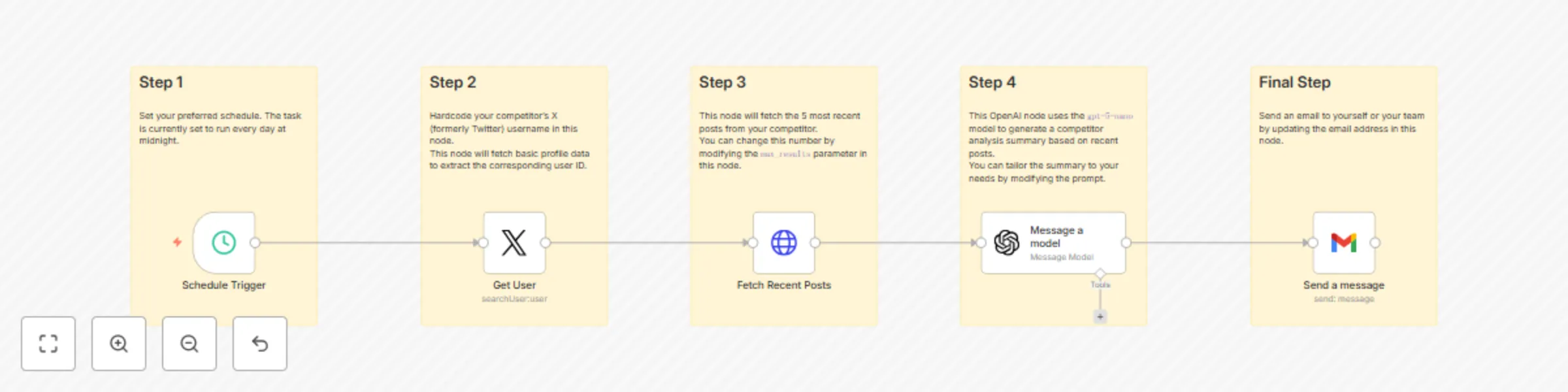
  1. Trigger: A daily cron node initiates the workflow.
  2. Fetch User ID: The workflow uses the X API to retrieve the user ID based on the provided username. This step is necessary because the tweet retrieval endpoint requires a user ID, not a username.
  3. Fetch Tweets: Using the extracted user ID, the workflow queries the X API for recent tweets from the selected account.
  4. Clean Data: Filters out replies, retweets, and any irrelevant content to ensure only meaningful tweets are summarized.
  5. Summarize: GPT-4 processes the cleaned tweet content and generates a concise, insightful summary.
  6. Send Email: The Gmail node sends the final summary to your inbox or chosen recipient.

Use Cases

  • Track competitor announcements and marketing messages
  • Automate daily social media briefs for leadership
  • Monitor trends in your industry effortlessly
  • Keep your team aligned with market developments

Requirements

  • Valid X API credentials (Bearer token)
  • OpenAI API key
  • Gmail OAuth2 credentials
  • Access to n8n (cloud or self-hosted)

Delivery Options

While Gmail is the default, you can easily extend the workflow to integrate with:

  • Slack
  • Notion
  • Google Sheets
  • Webhooks
  • Any supported n8n integration

Automate your competitive intelligence process and stay informed—without lifting a finger.

1.2 Logical Blocks

This catalog entry is organized from the workflow JSON. The node-level section below shows the executable blocks available for review before importing the template.

2. Block-by-Block Analysis

Block 1 - Get User

Type / Role
n8n-nodes-base.twitter - twitter
Config choices
Version 2

Block 2 - Message a model

Type / Role
@n8n/n8n-nodes-langchain.openAi - openAi
Config choices
Version 1.8

Block 3 - Send a message

Type / Role
n8n-nodes-base.gmail - gmail
Config choices
Version 2.1

Block 4 - Schedule Trigger

Type / Role
n8n-nodes-base.scheduleTrigger - scheduleTrigger
Config choices
Version 1.2

Block 5 - Sticky Note

Type / Role
n8n-nodes-base.stickyNote - stickyNote
Config choices
Version 1

Block 6 - Sticky Note1

Type / Role
n8n-nodes-base.stickyNote - stickyNote
Config choices
Version 1

Block 7 - Sticky Note2

Type / Role
n8n-nodes-base.stickyNote - stickyNote
Config choices
Version 1

Block 8 - Sticky Note3

Type / Role
n8n-nodes-base.stickyNote - stickyNote
Config choices
Version 1

Block 9 - Sticky Note4

Type / Role
n8n-nodes-base.stickyNote - stickyNote
Config choices
Version 1

Block 10 - Fetch Recent Posts

Type / Role
n8n-nodes-base.httpRequest - httpRequest
Config choices
Version 4.2

3. Summary Table

Workflow Daily Competitor Tweet Summarizer with X API, GPT-5-Nano, and Gmail Delivery
Complexity intermediate
Nodes 10
Categories Market Research, AI Summarization
Author ScoutNow
Published 07 Oct 2025

4. Reproducing the Workflow from Scratch

  1. 1. Download the workflow JSON

    Use the JSON export at /data/workflows/9355/9355.json as the source template for this automation.

  2. 2. Import the template into n8n

    Open n8n, import the downloaded JSON, and review each node before activating the workflow.

  3. 3. Configure credentials and variables

    Replace placeholder credentials, API keys, webhook URLs, account IDs, and environment-specific values with your own settings.

  4. 4. Test with sample data

    Run the workflow manually or in a staging workspace, inspect node output, and confirm downstream systems receive the expected data.

  5. 5. Activate and monitor

    Enable the workflow only after testing, then monitor executions, errors, and rate limits during the first production runs.

5. General Notes & Resources

Review imported nodes carefully before activation. This catalog entry is intended to help you inspect the workflow structure, understand required services, and find related templates faster.

Node names, credentials, schedules, webhook paths, and external service limits may need adjustment for your workspace.

Frequently asked questions

What does Daily Competitor Tweet Summarizer with X API, GPT-5-Nano, and Gmail Delivery do?

Automated Daily Competitor Tweet Summarizer with X API, GPT 5 Nano, and Gmail Stay on top of your competition with this powerful n8n workflow that automatically fetches and summarizes your competit...

What do I need before importing this workflow?

Review the workflow JSON, configure any required credentials in n8n, and test the automation in a safe workspace before using it in production.

Can I customize this workflow?

Yes. Use the block-by-block analysis and the downloadable JSON to inspect each node, then adjust credentials, prompts, schedules, filters, or destinations for your Market Research, AI Summarization use case.