Track Udemy course discounts with Airtop, Google Sheets and Telegram alerts

Workflow preview

Workflow preview
100%
Track Udemy course discounts with Airtop, Google Sheets and Telegram alerts preview
Open on n8n.io

Important notice

This workflow is provided as-is. Please review and test before using in production.

1. Workflow Overview

What problem does this workflow solve? Online course prices—especially on platforms like Udemy—change frequently and often include time limited discounts . Manually checking prices, coupon availa...

Best for

  • Market Research automation workflows
  • advanced n8n builders looking for reusable templates

Tools used

n8n-nodes-base.scheduletrigger, n8n-nodes-base.airtop, n8n-nodes-base.splitinbatches, n8n-nodes-base.splitout, n8n-nodes-base.if, n8n-nodes-base.code, n8n-nodes-base.googlesheets, n8n-nodes-base.telegram

Source and attribution

This workflow is cataloged by N8N Workflows and links back to its original n8n.io source page by InfyOm Technologies.

Original n8n.io source

1.1 Workflow description

Title
Track Udemy course discounts with Airtop, Google Sheets and Telegram alerts
Workflow name
Track Udemy course discounts with Airtop, Google Sheets and Telegram alerts

✅ What problem does this workflow solve?

Online course prices—especially on platforms like Udemy—change frequently and often include time-limited discounts. Manually checking prices, coupon availability, and offer expiration is tedious and unreliable.

This workflow automates browser-based price tracking using Airtop, detects high-discount deals, logs them in Google Sheets, and instantly notifies you on Telegram—all without scraping hacks or brittle scripts.


⚙️ What does this workflow do?

  • Automates real browser interactions using Airtop
  • Searches Udemy for specific course topics
  • Extracts live course pricing and offer data
  • Detects discounts of 50% or more
  • Logs deal details in Google Sheets
  • Sends real-time Telegram alerts before offers expire

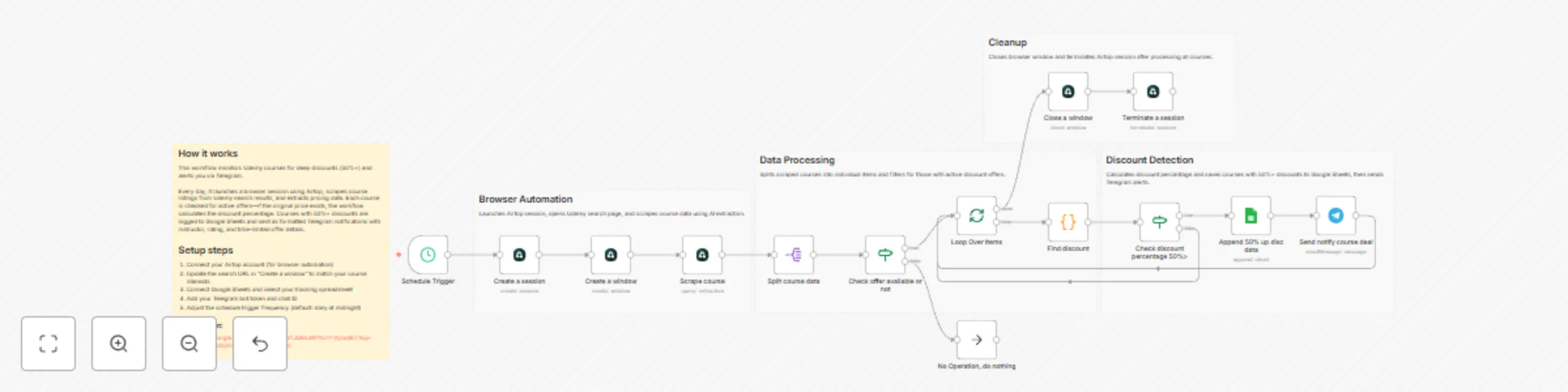
🧠 How It Works – Step by Step

1. ⏱ Schedule Trigger

The workflow runs automatically at a fixed interval (hourly or daily).


2. 🌐 Create Browser Session (Airtop)

  • Starts a new Airtop browser session
  • Opens Udemy search results for a specific keyword (e.g., n8n)

3. 🔍 Scrape Course Data

Using Airtop’s extraction capabilities, the workflow collects:

  • Course title
  • Instructor name
  • Current price
  • Original price (if available)
  • Rating
  • Offer expiration time
  • Course URL

4. 🔁 Loop Through Courses

Each course is processed individually to:

  • Check if an offer exists
  • Skip non-discounted courses

5. 🧮 Calculate Discount Percentage

  • Extracts numeric price values
  • Computes discount percentage
  • Filters courses with ≥ 50% discount

6. 📊 Log Deals in Google Sheets

For qualifying deals, the workflow appends:

  • Course title
  • Instructor
  • Original & discounted price
  • Discount percentage
  • Rating
  • Offer time left
  • Course URL

This creates a persistent deal history for tracking and analysis.


7. 📣 Telegram Notification

When a high-discount deal is found, a formatted Telegram alert is sent including:

  • Course name
  • Instructor
  • Discount amount
  • Price comparison
  • Rating
  • Direct course link
  • Offer expiration info

8. 🧹 Cleanup

  • Closes the Airtop browser window
  • Terminates the session to conserve resources

🧩 Integrations Used

  • Airtop – No-code browser automation
  • n8n – Workflow orchestration
  • Google Sheets – Deal tracking & logging
  • Telegram Bot API – Instant deal alerts

👤 Who is this for?

This workflow is perfect for:

  • 🎓 Learners hunting course deals
  • 🧠 Knowledge seekers tracking Udemy discounts
  • 🤖 Automation enthusiasts exploring browser automation
  • 📉 Price monitoring use cases beyond e-learning

1.2 Logical Blocks

This catalog entry is organized from the workflow JSON. The node-level section below shows the executable blocks available for review before importing the template.

2. Block-by-Block Analysis

Block 1 - Schedule Trigger

Type / Role
n8n-nodes-base.scheduleTrigger - scheduleTrigger
Config choices
Version 1.2

Block 2 - Create a session

Type / Role
n8n-nodes-base.airtop - airtop
Config choices
Version 1

Block 3 - Create a window

Type / Role
n8n-nodes-base.airtop - airtop
Config choices
Version 1

Block 4 - Loop Over Items

Type / Role
n8n-nodes-base.splitInBatches - splitInBatches
Config choices
Version 3

Block 5 - Close a window

Type / Role
n8n-nodes-base.airtop - airtop
Config choices
Version 1

Block 6 - Terminate a session

Type / Role
n8n-nodes-base.airtop - airtop
Config choices
Version 1

Block 7 - Split course data

Type / Role
n8n-nodes-base.splitOut - splitOut
Config choices
Version 1

Block 8 - Scrape course

Type / Role
n8n-nodes-base.airtop - airtop
Config choices
Version 1

Block 9 - Check offer available or not

Type / Role
n8n-nodes-base.if - if
Config choices
Version 2.2

Block 10 - Find discount

Type / Role
n8n-nodes-base.code - code
Config choices
Version 2

Block 11 - Append 50% up disc data

Type / Role
n8n-nodes-base.googleSheets - googleSheets
Config choices
Version 4.6

Block 12 - Send notify course deal

Type / Role
n8n-nodes-base.telegram - telegram
Config choices
Version 1.2

Block 13 - Check discount percentage 50%>

Type / Role
n8n-nodes-base.if - if
Config choices
Version 2.2

Block 14 - No Operation, do nothing

Type / Role
n8n-nodes-base.noOp - noOp
Config choices
Version 1

Block 15 - Overview

Type / Role
n8n-nodes-base.stickyNote - stickyNote
Config choices
Version 1

Block 16 - Browser Automation

Type / Role
n8n-nodes-base.stickyNote - stickyNote
Config choices
Version 1

Block 17 - Data Processing

Type / Role
n8n-nodes-base.stickyNote - stickyNote
Config choices
Version 1

Block 18 - Discount Detection

Type / Role
n8n-nodes-base.stickyNote - stickyNote
Config choices
Version 1

Block 19 - Cleanup

Type / Role
n8n-nodes-base.stickyNote - stickyNote
Config choices
Version 1

3. Summary Table

Workflow Track Udemy course discounts with Airtop, Google Sheets and Telegram alerts
Complexity advanced
Nodes 19
Categories Market Research
Author InfyOm Technologies
Published 29 Dec 2025

4. Reproducing the Workflow from Scratch

  1. 1. Download the workflow JSON

    Use the JSON export at /data/workflows/12248/12248.json as the source template for this automation.

  2. 2. Import the template into n8n

    Open n8n, import the downloaded JSON, and review each node before activating the workflow.

  3. 3. Configure credentials and variables

    Replace placeholder credentials, API keys, webhook URLs, account IDs, and environment-specific values with your own settings.

  4. 4. Test with sample data

    Run the workflow manually or in a staging workspace, inspect node output, and confirm downstream systems receive the expected data.

  5. 5. Activate and monitor

    Enable the workflow only after testing, then monitor executions, errors, and rate limits during the first production runs.

5. General Notes & Resources

Review imported nodes carefully before activation. This catalog entry is intended to help you inspect the workflow structure, understand required services, and find related templates faster.

Node names, credentials, schedules, webhook paths, and external service limits may need adjustment for your workspace.

Frequently asked questions

What does Track Udemy course discounts with Airtop, Google Sheets and Telegram alerts do?

What problem does this workflow solve? Online course prices—especially on platforms like Udemy—change frequently and often include time limited discounts . Manually checking prices, coupon availa...

What do I need before importing this workflow?

Review the workflow JSON, configure any required credentials in n8n, and test the automation in a safe workspace before using it in production.

Can I customize this workflow?

Yes. Use the block-by-block analysis and the downloadable JSON to inspect each node, then adjust credentials, prompts, schedules, filters, or destinations for your Market Research use case.