Block 1 - Set Parameters
- Type / Role
- n8n-nodes-base.set - set
- Config choices
- Version 3.4


 Early Deal
This workflow is provided as-is. Please review and test before using in production.
This workflow continuously monitors the TikTok Ads Library for new creatives from specific advertisers or keyword searches, scrapes them via Apify, logs them into Google Sheets, and sends concise n...
n8n-nodes-base.set, n8n-nodes-base.code, n8n-nodes-base.googlesheets, n8n-nodes-base.merge, n8n-nodes-base.if, n8n-nodes-base.slack, n8n-nodes-base.telegram, @apify/n8n-nodes-apify.apify
This workflow is cataloged by N8N Workflows and links back to its original n8n.io source page by Kirill Khatkevich.
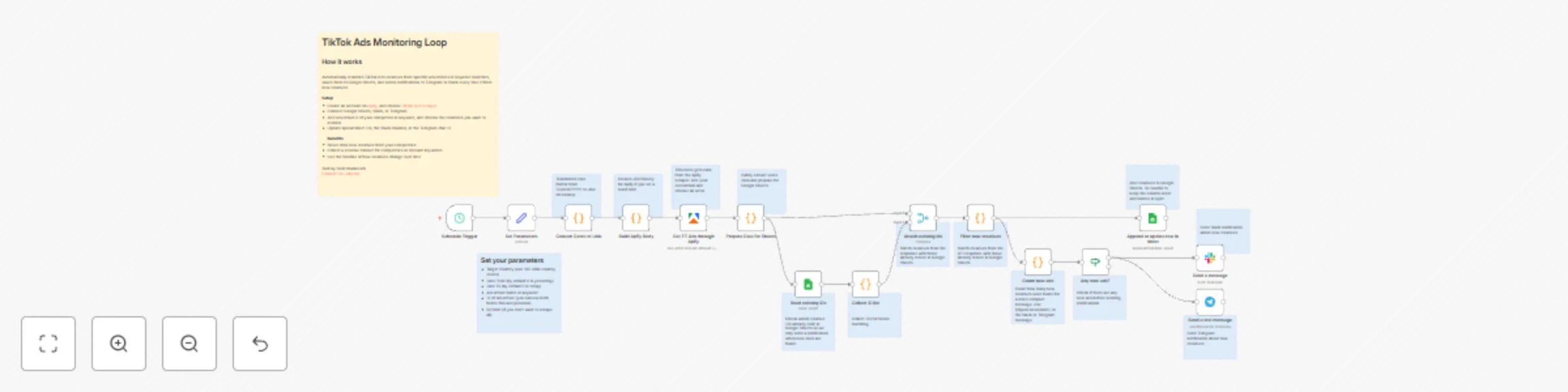
Original n8n.io sourceThis workflow continuously monitors the TikTok Ads Library for new creatives from specific advertisers or keyword searches, scrapes them via Apify, logs them into Google Sheets, and sends concise notifications to Telegram or Slack with the number of newly discovered ads. It is built as a safe, idempotent loop that can run on a schedule without creating duplicates in your sheet.
Manually checking the TikTok Ads Library for competitor creatives is time-consuming, and it's easy to lose track of which ads you've already seen. This workflow is ideal if you want to:
adId field.The workflow is organized into four logical blocks:
1. Configuration & Date Conversion
Set Parameters Set node stores all key request variables:Ad target country (e.g., all or specific ISO country codes),Ad published date From (automatically set to yesterday by default),Ad published To (automatically set to today by default),Advertiser name or keyword (for keyword-based searches),adv_biz_ids (advertiser business IDs for specific advertiser tracking),Ad limit (optional limit on the number of results to scrape).Convert Dates to Unix transforms the human-readable date format (DD/MM/YYYY) into Unix timestamps in milliseconds, which are required by the TikTok Ads Library API.2. Request Building & Data Fetching
Build Apify Body creates the JSON request body for the Apify actor:resultsLimit to the request body only if the Ad limit field is not empty, allowing you to scrape all results or limit them as needed.Get TT Ads through Apify executes the Apify actor (Tiktok Ads Scraper) and retrieves all matching ads from the TikTok Ads Library.3. Data Preparation & De-duplication
Prepare Data for Sheets safely extracts nested data from the API response:videos array (if available).tiktokUser object (if available).Read existing IDs pulls the existing adId column from your Google Sheet (configured to read a specific column/range, e.g., column K).Collect ID list converts these into a unique, normalized string array existingIds, which represents all ads you have already logged.Attach existing ids (Merge node) combines, for each execution, the freshly fetched TikTok response with the historical existingIds array from Sheets.Filter new creatives Code node compares each ad's adId (string) against the existingIds set and builds a new array containing only ads that are not yet present in the sheet. Set.4. Data Logging & Notification
Append or update row in sheet performs an appendOrUpdate into Google Sheets, mapping core fields such as adId, adName, advertiserName, advertiserId, paidBy, impressions, regionStats, targeting, tiktokUser, startUrl, videos, and coverImageURL (using the =IMAGE() formula to display images directly in the sheet). adId as the matching column so that existing rows can be updated if needed.Filter new creatives also feeds into Count new ads. newCount = items.length, i.e., the total number of new creatives processed in this run.Any new ads? checks whether newCount is greater than 0. If not, the workflow ends silently and no message is sent, avoiding noise.Send a text message (Telegram) and Send a message (Slack) send notifications to the configured channels. {{$json.newCount}} and a fixed link to the Google Sheet, giving you a quick heads-up without listing individual ads.To use this template, configure the following components.
1. Credentials
Apify account credentials used by Get TT Ads through Apify.Read existing IDs,Append or update row in sheet.Telegram account credentials in Send a text message.Send a message.2. The Set Parameters Node
Open the Set Parameters Set node and customize:
Ad target country: Which countries to monitor (all for all countries, or specific ISO 3166 country codes like US, GB, etc.).Ad published date From: Start date for the search range (defaults to yesterday using {{ $now.minus({ days: 1 }).toFormat('dd/MM/yyyy') }}).Ad published To: End date for the search range (defaults to today using {{ $now.toFormat('dd/MM/yyyy') }}).Advertiser name or keyword: Search by advertiser name or keywords (URL-encoded format, e.g., %22Applicave%20LLC%22).adv_biz_ids: Specific advertiser business IDs to track (comma-separated if multiple).Ad limit: Optional limit on the number of results (leave empty to scrape all available results).3. Google Sheets Configuration
Read existing IDs documentId and sheetName to your tracking spreadsheet and sheet (e.g., Sheet1). adId values (e.g., column K: K:K).Append or update row in sheet documentId and sheetName to the same spreadsheet/sheet. adId, coverImageURL, adName, Impressions, regionStats, targeting, tiktokUser, advertiserID, paidBy, advertiserName, startURL, videos). adId is included in matchingColumns so de-duplication works correctly.4. Notification Configuration
Send a text message, set:chatId: Your target Telegram chat or channel ID.text: Customize the message template as needed, but keep {{$json.newCount}} to show the number of new creatives.Send a message, set:channelId: Your target Slack channel ID.text: Customize the message template as needed, but keep {{$json.newCount}} to show the number of new creatives.5. Schedule
Schedule Trigger and configure when you want the workflow to run (e.g., every morning). This workflow is a solid foundation for systematic TikTok competitor monitoring. You can extend it to:
adv_biz_ids into a list and iterating over it with a loop or separate executions.adId from TikTok's API (if available), and merges the metrics back.This catalog entry is organized from the workflow JSON. The node-level section below shows the executable blocks available for review before importing the template.
Showing the first 24 of 30 workflow blocks. Download the JSON for the full node graph.
| Workflow | Track TikTok Ads Library with Apify, Google Sheets & Slack/Telegram Notifications |
|---|---|
| Complexity | advanced |
| Nodes | 30 |
| Categories | Market Research |
| Author | Kirill Khatkevich |
| Published | 08 Dec 2025 |
Use the JSON export at /data/workflows/11615/11615.json as the source template for this automation.
Open n8n, import the downloaded JSON, and review each node before activating the workflow.
Replace placeholder credentials, API keys, webhook URLs, account IDs, and environment-specific values with your own settings.
Run the workflow manually or in a staging workspace, inspect node output, and confirm downstream systems receive the expected data.
Enable the workflow only after testing, then monitor executions, errors, and rate limits during the first production runs.
Review imported nodes carefully before activation. This catalog entry is intended to help you inspect the workflow structure, understand required services, and find related templates faster.
Node names, credentials, schedules, webhook paths, and external service limits may need adjustment for your workspace.
This workflow continuously monitors the TikTok Ads Library for new creatives from specific advertisers or keyword searches, scrapes them via Apify, logs them into Google Sheets, and sends concise n...
Review the workflow JSON, configure any required credentials in n8n, and test the automation in a safe workspace before using it in production.
Yes. Use the block-by-block analysis and the downloadable JSON to inspect each node, then adjust credentials, prompts, schedules, filters, or destinations for your Market Research use case.