Track software vulnerability patents with ScrapeGraphAI, Matrix, and Intercom

Workflow preview

Workflow preview
100%
Track software vulnerability patents with ScrapeGraphAI, Matrix, and Intercom preview
Open on n8n.io

Important notice

This workflow is provided as-is. Please review and test before using in production.

1. Workflow Overview

Software Vulnerability Patent Tracker ️ COMMUNITY TEMPLATE ...

Best for

  • Market Research automation workflows
  • AI Summarization automation workflows
  • intermediate n8n builders looking for reusable templates

Tools used

n8n-nodes-base.stickynote, n8n-nodes-base.scheduletrigger, n8n-nodes-base.code, n8n-nodes-scrapegraphai.scrapegraphai, n8n-nodes-base.if, n8n-nodes-base.matrix, n8n-nodes-base.set, n8n-nodes-base.intercom

Source and attribution

This workflow is cataloged by N8N Workflows and links back to its original n8n.io source page by vinci-king-01.

Original n8n.io source

1.1 Workflow description

Title
Track software vulnerability patents with ScrapeGraphAI, Matrix, and Intercom
Workflow name
Track software vulnerability patents with ScrapeGraphAI, Matrix, and Intercom

Software Vulnerability Patent Tracker

⚠️ COMMUNITY TEMPLATE DISCLAIMER: This is a community-contributed template that uses ScrapeGraphAI (a community node). Please ensure you have the ScrapeGraphAI community node installed in your n8n instance before using this template.

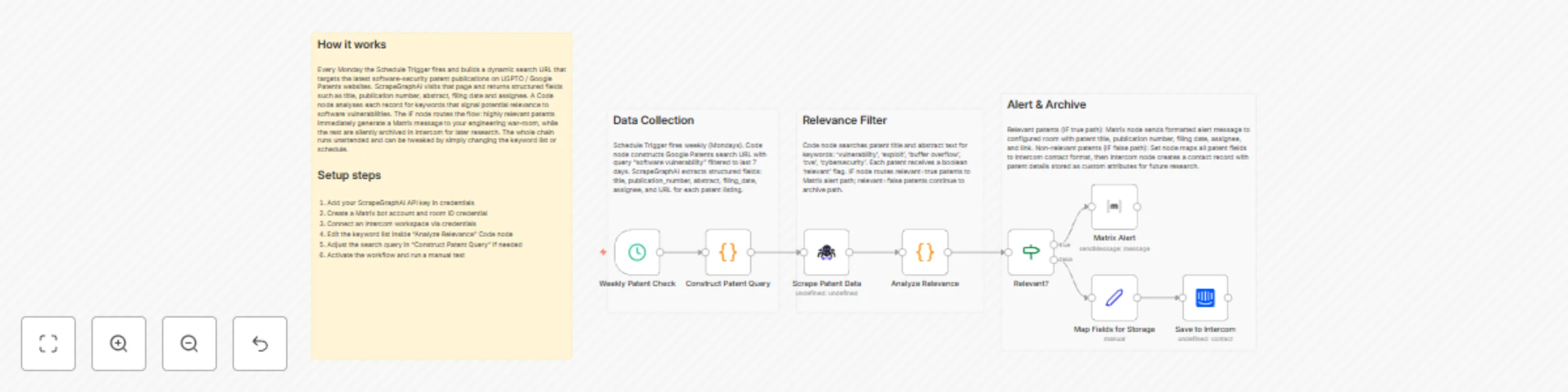
This workflow automatically tracks newly-published patent filings that mention software-security vulnerabilities, buffer-overflow mitigation techniques, and related technology keywords. Every week it aggregates fresh patent data from USPTO and international patent databases, filters it by relevance, and delivers a concise JSON digest (and optional Intercom notification) to R&D teams and patent attorneys.

Pre-conditions/Requirements

Prerequisites

  • n8n instance (self-hosted or n8n cloud, v1.7.0+)
  • ScrapeGraphAI community node installed
  • Basic understanding of patent search syntax (for customizing keyword sets)
  • Optional: Intercom account for in-app alerts

Required Credentials

Credential Purpose
ScrapeGraphAI API Key Enables ScrapeGraphAI nodes to fetch and parse patent-office webpages
Intercom Access Token (optional) Sends weekly digests directly to an Intercom workspace

Additional Setup Requirements

Setting Recommended Value Notes
Cron schedule 0 9 * * 1 Triggers every Monday at 09:00 server time
Patent keyword matrix See example CSV below List of comma-separated keywords per tech focus

Example keyword matrix (upload as keywords.csv or paste into the “Matrix” node):

topic,keywords
Buffer Overflow,"buffer overflow, stack smashing, stack buffer"
Memory Safety,"memory safety, safe memory allocation, pointer sanitization"
Code Injection,"SQL injection, command injection, injection prevention"

How it works

This workflow automatically tracks newly-published patent filings that mention software-security vulnerabilities, buffer-overflow mitigation techniques, and related technology keywords. Every week it aggregates fresh patent data from USPTO and international patent databases, filters it by relevance, and delivers a concise JSON digest (and optional Intercom notification) to R&D teams and patent attorneys.

Key Steps:

  • Schedule Trigger: Fires weekly based on the configured cron expression.
  • Matrix (Keyword Loader): Loads the CSV-based technology keyword matrix into memory.
  • Code (Build Search Queries): Dynamically assembles patent-search URLs for each keyword group.
  • ScrapeGraphAI (Fetch Results): Scrapes USPTO, EPO, and WIPO result pages and parses titles, abstracts, publication numbers, and dates.
  • If (Relevance Filter): Removes patents older than 1 year or without vulnerability-related terms in the abstract.
  • Set (Normalize JSON): Formats the remaining records into a uniform JSON schema.
  • Intercom (Notify Team): Sends a summarized digest to your chosen Intercom workspace.
    (Skip or disable this node if you prefer to consume the raw JSON output instead.)
  • Sticky Notes: Contain inline documentation and customization tips for future editors.

Set up steps

Setup Time: 10-15 minutes

  1. Install Community Node
    Navigate to “Settings → Community Nodes”, search for ScrapeGraphAI, and click “Install”.
  2. Create Credentials
    • Go to “Credentials” → “New Credential” → select ScrapeGraphAI API → paste your API key.
    • (Optional) Add an Intercom credential with a valid access token.
  3. Import the Workflow
    • Click “Import” → “Workflow JSON” and paste the template JSON, or drag-and-drop the .json file.
  4. Configure Schedule
    Open the Schedule Trigger node and adjust the cron expression if a different frequency is required.
  5. Upload / Edit Keyword Matrix
    Open the Matrix node, paste your custom CSV, or modify existing topics & keywords.
  6. Review Search Logic
    In the Code (Build Search Queries) node, review the base URLs and adjust patent databases as needed.
  7. Define Notification Channel
    If using Intercom, select your Intercom credential in the Intercom node and choose the target channel.
  8. Execute & Activate
    Click “Execute Workflow” for a trial run. Verify the output. If satisfied, switch the workflow to “Active”.

Node Descriptions

Core Workflow Nodes:

  • Schedule Trigger – Initiates the workflow on a weekly cron schedule.
  • Matrix – Holds the CSV keyword table and makes each row available as an item.
  • Code (Build Search Queries) – Generates search URLs and attaches meta-data for later nodes.
  • ScrapeGraphAI – Scrapes patent listings and extracts structured fields (title, abstract, pub. date, link).
  • If (Relevance Filter) – Applies date and keyword relevance filters.
  • Set (Normalize JSON) – Maps scraped fields into a clean JSON schema for downstream use.
  • Intercom – Sends formatted patent summaries to an Intercom inbox or channel.
  • Sticky Notes – Provide inline documentation and edit history markers.

Data Flow:

  1. Schedule TriggerMatrixCodeScrapeGraphAIIfSetIntercom

Customization Examples

Change Data Source to Google Patents

// In the Code node
const base = 'https://patents.google.com/?q=';
items.forEach(item => {
  item.json.searchUrl = `${base}${encodeURIComponent(item.json.keywords)}&oq=${encodeURIComponent(item.json.keywords)}`;
});
return items;

Send Digest via Slack Instead of Intercom

// Replace Intercom node with Slack node
{
  "text": `🚀 New Vulnerability-related Patents (${items.length})\n` +
          items.map(i => `• <${i.json.link}|${i.json.title}>`).join('\n')
}

Data Output Format

The workflow outputs structured JSON data:

{
  "topic": "Memory Safety",
  "keywords": "memory safety, safe memory allocation, pointer sanitization",
  "title": "Memory protection for compiled binary code",
  "publicationNumber": "US20240123456A1",
  "publicationDate": "2024-03-21",
  "abstract": "Techniques for enforcing memory safety in compiled software...",
  "link": "https://patents.google.com/patent/US20240123456A1/en",
  "source": "USPTO"
}

Troubleshooting

Common Issues

  1. Empty Result Set – Ensure that the keywords are specific but not overly narrow; test queries manually on USPTO.
  2. ScrapeGraphAI Timeouts – Increase the timeout parameter in the ScrapeGraphAI node or reduce concurrent requests.

Performance Tips

  • Limit the keyword matrix to <50 rows to keep weekly runs under 2 minutes.
  • Schedule the workflow during off-peak hours to reduce load on patent-office servers.

Pro Tips:

  • Combine this workflow with a vector database (e.g., Pinecone) to create a semantic patent knowledge base.
  • Add a “Merge” node to correlate new patents with existing vulnerability CVE entries.
  • Use a second ScrapeGraphAI node to crawl citation trees and identify emerging technology clusters.

1.2 Logical Blocks

This catalog entry is organized from the workflow JSON. The node-level section below shows the executable blocks available for review before importing the template.

2. Block-by-Block Analysis

Block 1 - Workflow Overview

Type / Role
n8n-nodes-base.stickyNote - stickyNote
Config choices
Version 1

Block 2 - Section – Collection

Type / Role
n8n-nodes-base.stickyNote - stickyNote
Config choices
Version 1

Block 3 - Section – Filter

Type / Role
n8n-nodes-base.stickyNote - stickyNote
Config choices
Version 1

Block 4 - Section – Output

Type / Role
n8n-nodes-base.stickyNote - stickyNote
Config choices
Version 1

Block 5 - Weekly Patent Check

Type / Role
n8n-nodes-base.scheduleTrigger - scheduleTrigger
Config choices
Version 1

Block 6 - Construct Patent Query

Type / Role
n8n-nodes-base.code - code
Config choices
Version 2

Block 7 - Scrape Patent Data

Type / Role
n8n-nodes-scrapegraphai.scrapegraphAi - scrapegraphAi
Config choices
Version 1

Block 8 - Analyze Relevance

Type / Role
n8n-nodes-base.code - code
Config choices
Version 2

Block 9 - Relevant?

Type / Role
n8n-nodes-base.if - if
Config choices
Version 2

Block 10 - Matrix Alert

Type / Role
n8n-nodes-base.matrix - matrix
Config choices
Version 1

Block 11 - Map Fields for Storage

Type / Role
n8n-nodes-base.set - set
Config choices
Version 3

Block 12 - Save to Intercom

Type / Role
n8n-nodes-base.intercom - intercom
Config choices
Version 1

3. Summary Table

Workflow Track software vulnerability patents with ScrapeGraphAI, Matrix, and Intercom
Complexity intermediate
Nodes 12
Categories Market Research, AI Summarization
Author vinci-king-01
Published 01 Dec 2025

4. Reproducing the Workflow from Scratch

  1. 1. Download the workflow JSON

    Use the JSON export at /data/workflows/11404/11404.json as the source template for this automation.

  2. 2. Import the template into n8n

    Open n8n, import the downloaded JSON, and review each node before activating the workflow.

  3. 3. Configure credentials and variables

    Replace placeholder credentials, API keys, webhook URLs, account IDs, and environment-specific values with your own settings.

  4. 4. Test with sample data

    Run the workflow manually or in a staging workspace, inspect node output, and confirm downstream systems receive the expected data.

  5. 5. Activate and monitor

    Enable the workflow only after testing, then monitor executions, errors, and rate limits during the first production runs.

5. General Notes & Resources

Review imported nodes carefully before activation. This catalog entry is intended to help you inspect the workflow structure, understand required services, and find related templates faster.

Node names, credentials, schedules, webhook paths, and external service limits may need adjustment for your workspace.

Frequently asked questions

What does Track software vulnerability patents with ScrapeGraphAI, Matrix, and Intercom do?

Software Vulnerability Patent Tracker ️ COMMUNITY TEMPLATE ...

What do I need before importing this workflow?

Review the workflow JSON, configure any required credentials in n8n, and test the automation in a safe workspace before using it in production.

Can I customize this workflow?

Yes. Use the block-by-block analysis and the downloadable JSON to inspect each node, then adjust credentials, prompts, schedules, filters, or destinations for your Market Research, AI Summarization use case.