Block 1 - Workflow Overview
- Type / Role
- n8n-nodes-base.stickyNote - stickyNote
- Config choices
- Version 1


 Early Deal
This workflow is provided as-is. Please review and test before using in production.
Software Vulnerability Tracker with Pushover and Notion . Please ensure you have the ScrapeGraphAI community node installed in your n8n instance before using this template.
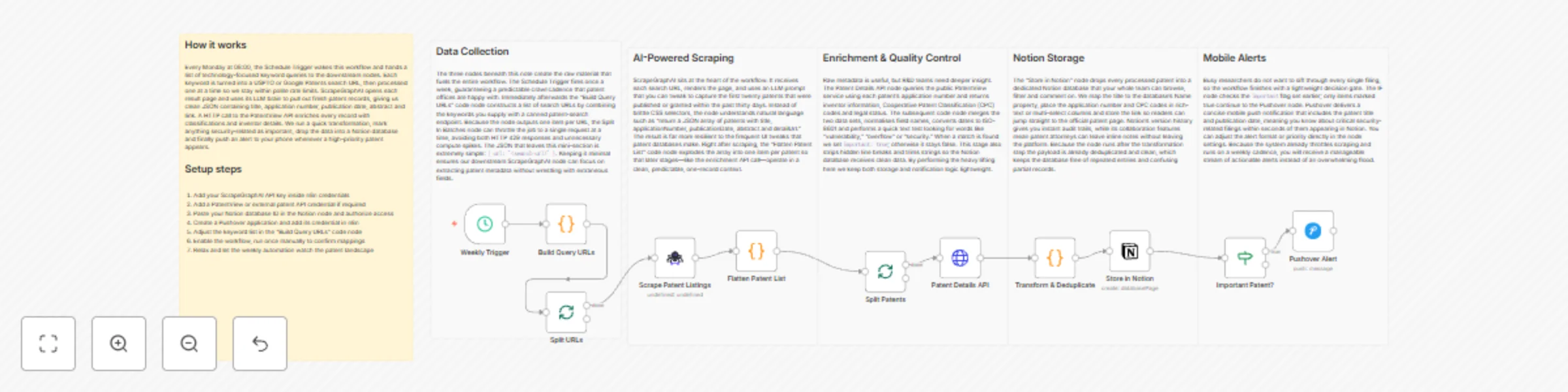
This workflow automatically scans multiple patent databases on a weekly schedule, filters new filings relevant to selected technology domains, saves the findings to Notion, and pushes instant alerts to your mobile device via Pushover. It is ideal for R&D teams and patent attorneys who need up-to-date insights on emerging technology trends and competitor activity.
| Service | Needed Item | Where to obtain |
|---|---|---|
| USPTO, EPO, WIPO, etc. | Public URLs for search endpoints | Free/public |
| Notion | Database with properties: Title, Abstract, URL, Date |
Create in Notion |
| Keyword List | Text file or environment variable PATENT_KEYWORDS |
Define yourself |
This workflow automatically scans multiple patent databases on a weekly schedule, filters new filings relevant to selected technology domains, saves the findings to Notion, and pushes instant alerts to your mobile device via Pushover. It is ideal for R&D teams and patent attorneys who need up-to-date insights on emerging technology trends and competitor activity.
Setup Time: 10-15 minutes
@n8n-nodes/scrapegraphai.keywords array (e.g., ["quantum computing", "Li-ion battery", "5G antenna"]).sources array if you want to add/remove patent portals.Name, Abstract, Link, Date) to incoming JSON fields.// Inside the Pushover node "Message" field
return {
message: `📜 ${items[0].json.count} new patent(s) detected in ${new Date().toDateString()}`,
title: '🆕 Patent Alert',
url: items[0].json.firstPatentUrl,
url_title: 'Open first patent'
};
// Replace the Pushover node with a Slack node
{
  text: `*${$json.count}* new patents published:\n${$json.list.join('\n')}`,
  channel: '#patent-updates'
}
The workflow outputs structured JSON data:
{
  "title": "Quantum Computing Device",
  "abstract": "A novel qubit architecture that ...",
  "url": "https://patents.example.com/US20240012345A1",
  "publicationDate": "2024-06-01",
  "source": "USPTO",
  "keywordsMatched": ["quantum computing"]
}
Pro Tips:
{{ $env.PATENT_KEYWORDS }}) to manage keyword lists without editing nodes.publicationDate is within past 30 days for quick scanning.This catalog entry is organized from the workflow JSON. The node-level section below shows the executable blocks available for review before importing the template.
| Workflow | Track software security patents with ScrapeGraphAI, Notion, and Pushover alerts |
|---|---|
| Complexity | advanced |
| Nodes | 17 |
| Categories | SecOps, AI Summarization |
| Author | vinci-king-01 |
| Published | 09 Dec 2025 |
Use the JSON export at /data/workflows/11635/11635.json as the source template for this automation.
Open n8n, import the downloaded JSON, and review each node before activating the workflow.
Replace placeholder credentials, API keys, webhook URLs, account IDs, and environment-specific values with your own settings.
Run the workflow manually or in a staging workspace, inspect node output, and confirm downstream systems receive the expected data.
Enable the workflow only after testing, then monitor executions, errors, and rate limits during the first production runs.
Review imported nodes carefully before activation. This catalog entry is intended to help you inspect the workflow structure, understand required services, and find related templates faster.
Node names, credentials, schedules, webhook paths, and external service limits may need adjustment for your workspace.
Software Vulnerability Tracker with Pushover and Notion ![Workflow Preview Image](https://via.placeholder.com/800x400/007ACC/FFFFFF?text=Software+Vulnerability+Tracker+with+Pushover+and+Notion+Work...
Review the workflow JSON, configure any required credentials in n8n, and test the automation in a safe workspace before using it in production.
Yes. Use the block-by-block analysis and the downloadable JSON to inspect each node, then adjust credentials, prompts, schedules, filters, or destinations for your SecOps, AI Summarization use case.