Track SERP rankings & discover keywords using DataForSEO & Airtable

Workflow preview

Workflow preview
100%
Track SERP rankings & discover keywords using DataForSEO & Airtable preview
Open on n8n.io

Important notice

This workflow is provided as-is. Please review and test before using in production.

1. Workflow Overview

Automated SEO Data Engine using DataForSEO & Airtable This workflow automatically pulls SERP rankings, competitor keywords, and related keyword ideas from DataForSEO and stores structured results i...

Best for

  • Market Research automation workflows
  • advanced n8n builders looking for reusable templates

Tools used

n8n-nodes-base.manualtrigger, n8n-nodes-base.wait, n8n-nodes-base.splitout, n8n-nodes-base.aggregate, n8n-nodes-base.airtable, n8n-nodes-base.httprequest, n8n-nodes-base.stickynote

Source and attribution

This workflow is cataloged by N8N Workflows and links back to its original n8n.io source page by Sparsh From Automation Jinn.

Original n8n.io source

1.1 Workflow description

Title
Track SERP rankings & discover keywords using DataForSEO & Airtable
Workflow name
Track SERP rankings & discover keywords using DataForSEO & Airtable

Automated SEO Data Engine using DataForSEO & Airtable

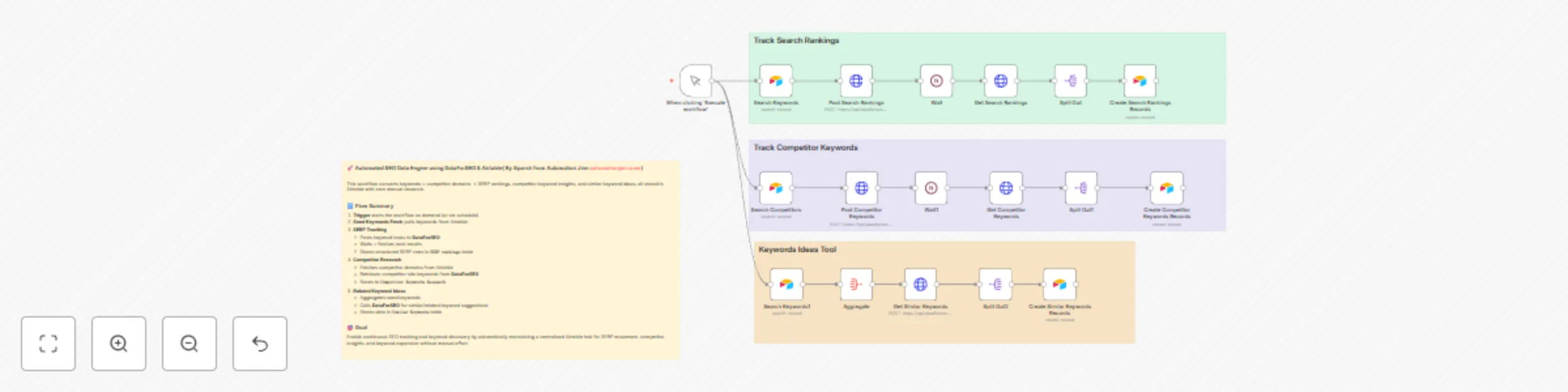
This workflow automatically pulls SERP rankings, competitor keywords, and related keyword ideas from DataForSEO and stores structured results in Airtable β€” making SEO tracking and keyword research streamlined and automated.


πŸ—οΈ What this automation does

Step Component Purpose
1 Trigger (Manual: β€œExecute workflow”) Starts the workflow on demand β€” optionally replaceable with a schedule or webhook.
2 Read seed keywords from Airtable (SERP Keywords table) Fetches the list of keywords for which to track SERP.
3 Post SERP task to DataForSEO API Requests Google organic SERP results (depth up to 10) for each keyword.
4 Wait + Poll for results (after ~1 min) Gives DataForSEO time to process, then retrieves the completed task results.
5 Parse & store SERP results into Airtable (SERP rankings table) Records rank, URL, domain, title, description, breadcrumb, etc. for each result.
6 Read competitor list from Airtable (Competitor Research table) Fetches competitors (domains/sites) marked for keyword research.
7 Post competitor-site keywords task to DataForSEO Fetches keywords used by competitor sites.
8 Wait + Poll + Store competitor keywords into Airtable (Competitor Keywords Research) Captures keyword, competition level, search volume, CPC, monthly volume trends.
9 Aggregate seed keywords β†’ request related keywords via DataForSEO Retrieves related / similar keyword ideas for seed list (keyword expansion).
10 Store related keywords into Airtable (Similar Keywords table) Saves keyword data for long-tail / expansion analysis.

πŸ“Œ Key Integrations & Tools

  • n8n β€” Workflow automation and orchestration
  • Airtable β€” Storage for seed keywords, competitor list, and all result tables (SERP Rankings, Competitor Keywords, Similar Keywords)
  • DataForSEO API β€” For SERP data, competitor-site keywords, and related keyword suggestions
  • Core n8n nodes: Trigger, HTTP Request, Wait, Split Out, Aggregate, Airtable (search & create)

πŸ“„ Data Output / Stored Fields

SERP Rankings

  • type, rank_group, rank_absolute, page, domain, title, description, url, breadcrumb
  • Linked to original seed keyword via SERP Keywords reference

Competitor Keywords & Similar Keywords

  • Keyword
  • Competition, Competition_Index
  • Search_Volume, CPC, Low_Top_Of_Page_Bid, High_Top_Of_Page_Bid (if available)
  • Monthly search-volume fields: Jan_2025, Feb_2025, …, Dec_2025 (mapped from API's monthly_searches)
  • For competitor keywords: linked to competitor (company/domain)
  • For similar keywords: linked to seed keyword

πŸ”” Important Notes

  • Month-volume mapping: Ensure the index mapping from API’s monthly_searches to months is correct β€” wrong indices will mislabel month data.
  • Fixed wait time: Current 1-minute wait may not always suffice β€” for large workloads or slow API responses, increase wait or implement polling/backoff logic.
  • No deduplication: Running repeatedly may produce duplicate Airtable records. Consider adding search-or-update logic to avoid duplicates.
  • Rate limits / quotas: Airtable and DataForSEO have limits β€” batch carefully, throttle requests or add spacing to avoid hitting limits.
  • Credentials security: Store Airtable and DataForSEO API credentials securely in n8n’s credentials manager β€” avoid embedding tokens directly in workflow JSON.

πŸš€ Why this Workflow is Useful

  • Fully automates SERP tracking and competitor keyword research β€” no manual work needed after setup
  • Maintains structured, historical data in Airtable β€” ideal for tracking rank changes, discovering competitor moves, and keyword expansion over time
  • Great for SEO teams, agencies, content owners, or anyone needing systematic keyword intelligence and monitoring

🌟 Recommended Next Steps

  • Replace manual trigger with a Schedule Trigger (daily/weekly) for automated runs
  • Add deduplication (upsert) logic to prevent duplicate records and keep Airtable clean
  • Improve robustness: add retry logic for API failures, rate-limit handling, and error notifications (Slack / email)
  • Add logging of API response data (task IDs, raw responses) for debugging and audit trails
  • (Optional) Build a reporting dashboard (Airtable Interface / BI tool) to visualise rank trends, keyword growth, and competitor comparisons

πŸ“ Usage / Setup Checklist

  1. Configure Airtable base / tables: SERP Keywords, Competitor Research, SERP rankings, Competitor Keywords Research, Similar Keywords.
  2. Add credentials in n8n: Airtable API token; DataForSEO API credentials (HTTP Basic / Header auth).
  3. Import this workflow JSON into your n8n instance.
  4. Update any base/table/field IDs if different.
  5. (Optional) Replace Manual Trigger with Schedule Trigger, enable workflow.
  6. Run once with a small seed list β€” verify outputs, schema, and month-volume mapping.
  7. Enable periodic runs and monitor for rate limits or API errors.

1.2 Logical Blocks

This catalog entry is organized from the workflow JSON. The node-level section below shows the executable blocks available for review before importing the template.

2. Block-by-Block Analysis

Block 1 - When clicking β€˜Execute workflow’

Type / Role
n8n-nodes-base.manualTrigger - manualTrigger
Config choices
Version 1

Block 2 - Wait

Type / Role
n8n-nodes-base.wait - wait
Config choices
Version 1.1

Block 3 - Split Out

Type / Role
n8n-nodes-base.splitOut - splitOut
Config choices
Version 1

Block 4 - Split Out1

Type / Role
n8n-nodes-base.splitOut - splitOut
Config choices
Version 1

Block 5 - Wait1

Type / Role
n8n-nodes-base.wait - wait
Config choices
Version 1.1

Block 6 - Aggregate

Type / Role
n8n-nodes-base.aggregate - aggregate
Config choices
Version 1

Block 7 - Split Out2

Type / Role
n8n-nodes-base.splitOut - splitOut
Config choices
Version 1

Block 8 - Search Keywords

Type / Role
n8n-nodes-base.airtable - airtable
Config choices
Version 2.1

Block 9 - Search Competitors

Type / Role
n8n-nodes-base.airtable - airtable
Config choices
Version 2.1

Block 10 - Search Keywords1

Type / Role
n8n-nodes-base.airtable - airtable
Config choices
Version 2.1

Block 11 - Post Search Rankings

Type / Role
n8n-nodes-base.httpRequest - httpRequest
Config choices
Version 4.3

Block 12 - Get Search Rankings

Type / Role
n8n-nodes-base.httpRequest - httpRequest
Config choices
Version 4.3

Block 13 - Post Competitor Keywords

Type / Role
n8n-nodes-base.httpRequest - httpRequest
Config choices
Version 4.3

Block 14 - Get Competitor Keywords

Type / Role
n8n-nodes-base.httpRequest - httpRequest
Config choices
Version 4.3

Block 15 - Get Similar Keywords

Type / Role
n8n-nodes-base.httpRequest - httpRequest
Config choices
Version 4.3

Block 16 - Create Competitor Keywords Records

Type / Role
n8n-nodes-base.airtable - airtable
Config choices
Version 2.1

Block 17 - Create Search Rankings Records

Type / Role
n8n-nodes-base.airtable - airtable
Config choices
Version 2.1

Block 18 - Create Similar Keywords Records

Type / Role
n8n-nodes-base.airtable - airtable
Config choices
Version 2.1

Block 19 - Sticky Note

Type / Role
n8n-nodes-base.stickyNote - stickyNote
Config choices
Version 1

Block 20 - Sticky Note2

Type / Role
n8n-nodes-base.stickyNote - stickyNote
Config choices
Version 1

Block 21 - Sticky Note3

Type / Role
n8n-nodes-base.stickyNote - stickyNote
Config choices
Version 1

Block 22 - Sticky Note1

Type / Role
n8n-nodes-base.stickyNote - stickyNote
Config choices
Version 1

3. Summary Table

Workflow Track SERP rankings & discover keywords using DataForSEO & Airtable
Complexity advanced
Nodes 22
Categories Market Research
Author Sparsh From Automation Jinn
Published 09 Dec 2025

4. Reproducing the Workflow from Scratch

  1. 1. Download the workflow JSON

    Use the JSON export at /data/workflows/11630/11630.json as the source template for this automation.

  2. 2. Import the template into n8n

    Open n8n, import the downloaded JSON, and review each node before activating the workflow.

  3. 3. Configure credentials and variables

    Replace placeholder credentials, API keys, webhook URLs, account IDs, and environment-specific values with your own settings.

  4. 4. Test with sample data

    Run the workflow manually or in a staging workspace, inspect node output, and confirm downstream systems receive the expected data.

  5. 5. Activate and monitor

    Enable the workflow only after testing, then monitor executions, errors, and rate limits during the first production runs.

5. General Notes & Resources

Review imported nodes carefully before activation. This catalog entry is intended to help you inspect the workflow structure, understand required services, and find related templates faster.

Node names, credentials, schedules, webhook paths, and external service limits may need adjustment for your workspace.

Frequently asked questions

What does Track SERP rankings & discover keywords using DataForSEO & Airtable do?

Automated SEO Data Engine using DataForSEO & Airtable This workflow automatically pulls SERP rankings, competitor keywords, and related keyword ideas from DataForSEO and stores structured results i...

What do I need before importing this workflow?

Review the workflow JSON, configure any required credentials in n8n, and test the automation in a safe workspace before using it in production.

Can I customize this workflow?

Yes. Use the block-by-block analysis and the downloadable JSON to inspect each node, then adjust credentials, prompts, schedules, filters, or destinations for your Market Research use case.