S

Sparsh From Automation Jinn

3
Workflows

Workflows by Sparsh From Automation Jinn
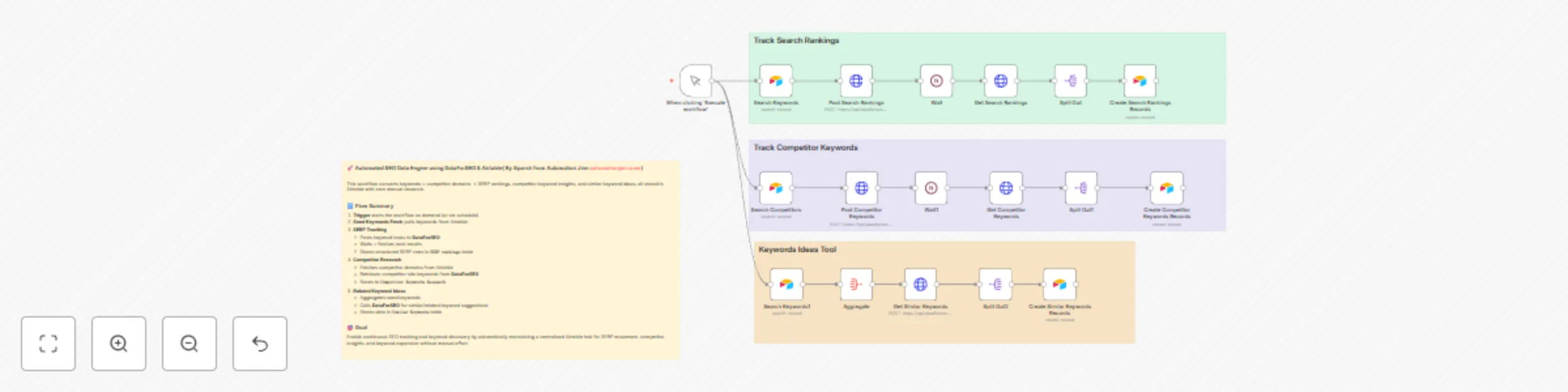
Workflow preview: Track SERP rankings & discover keywords using DataForSEO & Airtable
Free advanced

Track SERP rankings & discover keywords using DataForSEO & Airtable

# Automated SEO Data Engine using DataForSEO & Airtable This workflow automatically pulls SERP rankings, competitor keywords, and related keyword ideas from DataForSEO and stores structured results in Airtable — making SEO tracking and keyword research streamlined and automated. --- ## 🏗️ What this automation does | Step | Component | Purpose | |------|-----------|---------| | 1 | **Trigger** (Manual: “Execute workflow”) | Starts the workflow on demand — optionally replaceable with a schedule or webhook. | | 2 | **Read seed keywords** from Airtable (`SERP Keywords` table) | Fetches the list of keywords for which to track SERP. | | 3 | **Post SERP task** to DataForSEO API | Requests Google organic SERP results (depth up to 10) for each keyword. | | 4 | **Wait + Poll** for results (after ~1 min) | Gives DataForSEO time to process, then retrieves the completed task results. | | 5 | **Parse & store** SERP results into Airtable (`SERP rankings` table) | Records rank, URL, domain, title, description, breadcrumb, etc. for each result. | | 6 | **Read competitor list** from Airtable (`Competitor Research` table) | Fetches competitors (domains/sites) marked for keyword research. | | 7 | **Post competitor-site keywords task** to DataForSEO | Fetches keywords used by competitor sites. | | 8 | **Wait + Poll + Store** competitor keywords into Airtable (`Competitor Keywords Research`) | Captures keyword, competition level, search volume, CPC, monthly volume trends. | | 9 | **Aggregate seed keywords → request related keywords** via DataForSEO | Retrieves related / similar keyword ideas for seed list (keyword expansion). | | 10 | **Store related keywords** into Airtable (`Similar Keywords` table) | Saves keyword data for long-tail / expansion analysis. | --- ## 📌 Key Integrations & Tools - **n8n** — Workflow automation and orchestration - **Airtable** — Storage for seed keywords, competitor list, and all result tables (SERP Rankings, Competitor Keywords, Similar Keywords) - **DataForSEO API** — For SERP data, competitor-site keywords, and related keyword suggestions - Core n8n nodes: Trigger, HTTP Request, Wait, Split Out, Aggregate, Airtable (search & create) --- ## 📄 Data Output / Stored Fields ### SERP Rankings - `type`, `rank_group`, `rank_absolute`, `page`, `domain`, `title`, `description`, `url`, `breadcrumb` - Linked to original seed keyword via `SERP Keywords` reference ### Competitor Keywords & Similar Keywords - `Keyword` - `Competition`, `Competition_Index` - `Search_Volume`, `CPC`, `Low_Top_Of_Page_Bid`, `High_Top_Of_Page_Bid` (if available) - Monthly search-volume fields: `Jan_2025`, `Feb_2025`, …, `Dec_2025` (mapped from API's `monthly_searches`) - For competitor keywords: linked to competitor (company/domain) - For similar keywords: linked to seed keyword --- ## 🔔 Important Notes - **Month-volume mapping:** Ensure the index mapping from API’s `monthly_searches` to months is correct — wrong indices will mislabel month data. - **Fixed wait time:** Current 1-minute wait may not always suffice — for large workloads or slow API responses, increase wait or implement polling/backoff logic. - **No deduplication:** Running repeatedly may produce duplicate Airtable records. Consider adding search-or-update logic to avoid duplicates. - **Rate limits / quotas:** Airtable and DataForSEO have limits — batch carefully, throttle requests or add spacing to avoid hitting limits. - **Credentials security:** Store Airtable and DataForSEO API credentials securely in n8n’s credentials manager — avoid embedding tokens directly in workflow JSON. --- ## 🚀 Why this Workflow is Useful - Fully automates SERP tracking and competitor keyword research — no manual work needed after setup - Maintains structured, historical data in Airtable — ideal for tracking rank changes, discovering competitor moves, and keyword expansion over time - Great for SEO teams, agencies, content owners, or anyone needing systematic keyword intelligence and monitoring --- ## 🌟 Recommended Next Steps - Replace manual trigger with a **Schedule Trigger** (daily/weekly) for automated runs - Add **deduplication (upsert) logic** to prevent duplicate records and keep Airtable clean - Improve robustness: add retry logic for API failures, rate-limit handling, and error notifications (Slack / email) - Add logging of API response data (task IDs, raw responses) for debugging and audit trails - (Optional) Build a reporting dashboard (Airtable Interface / BI tool) to visualise rank trends, keyword growth, and competitor comparisons --- ## 📝 Usage / Setup Checklist 1. Configure Airtable base / tables: `SERP Keywords`, `Competitor Research`, `SERP rankings`, `Competitor Keywords Research`, `Similar Keywords`. 2. Add credentials in n8n: Airtable API token; DataForSEO API credentials (HTTP Basic / Header auth). 3. Import this workflow JSON into your n8n instance. 4. Update any base/table/field IDs if different. 5. (Optional) Replace Manual Trigger with Schedule Trigger, enable workflow. 6. Run once with a small seed list — verify outputs, schema, and month-volume mapping. 7. Enable periodic runs and monitor for rate limits or API errors. ---

S
Sparsh From Automation Jinn
Market Research
9 Dec 2025
75
0
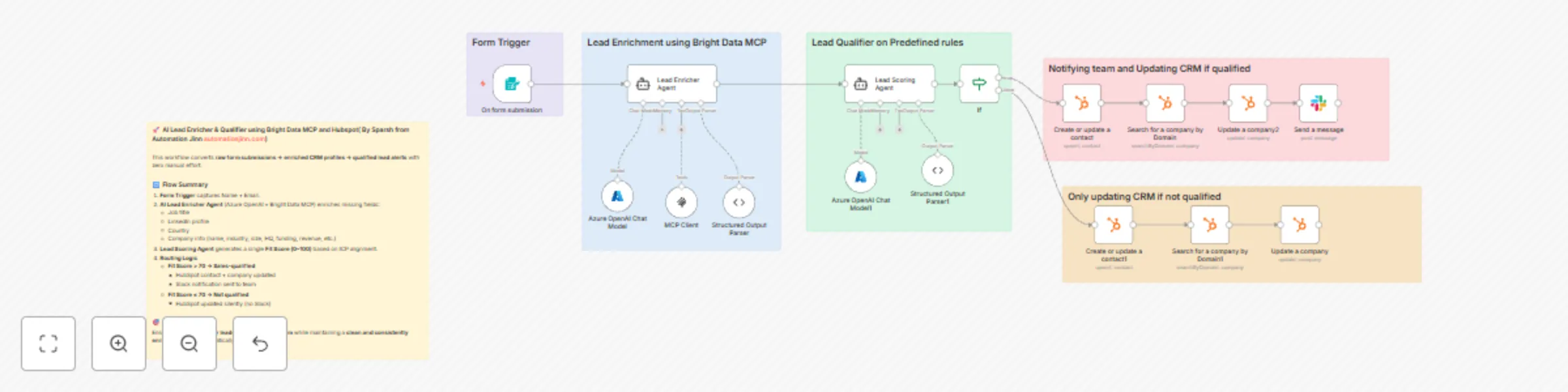
Workflow preview: Enrich & qualify leads with Azure OpenAI, Bright Data MCP & HubSpot CRM
Free advanced

Enrich & qualify leads with Azure OpenAI, Bright Data MCP & HubSpot CRM

## 🧠 AI Lead Enricher & Qualifier using Bright Data MCP and Hubspot This workflow automatically enriches inbound leads, evaluates their business fit, updates HubSpot, and alerts the team only when a lead meets qualification criteria. It eliminates manual research and scoring while keeping CRM data clean and complete. --- ### 🏗️ What this automation does | Step | Component | Purpose | |------|----------|---------| | 1 | **Form Trigger** | Captures a new lead’s Name + Email | | 2 | **AI Lead Enricher Agent** | Uses Azure OpenAI + Bright Data MCP to search the public web and fill missing contact + company details | | 3 | **Structured Output Parser** | Ensures AI returns clean JSON in a strict schema | | 4 | **Lead Scoring Agent** | Calculates a numeric **Fit Score (0–100)** based on ICP match | | 5 | **IF Logic** | Routes the lead based on Fit Score threshold (> 70 = qualified) | | 6 | **HubSpot Actions** | Updates/creates Contact & Company with enriched properties | | 7 | **Slack Notification** | Sends high-quality leads to the team instantly | --- ### 🧩 Data Enriched by AI The enrichment agent populates the following fields **only if validated with high confidence**: #### Contact - Job title - LinkedIn profile - Country #### Company - Company name - LinkedIn company page - Industry - Number of employees - Annual revenue - Description - Headquarters (country & city) - Funding raised If reliable data is not found → field stays `""` (no hallucination, no guessing). --- ### 🎯 Lead Qualification Strategy The Fit Score (0–100) evaluates how aligned the lead is with a: > **B2B automation / AI / RevOps agency targeting SaaS and tech companies** Score increases for: - SaaS / tech / B2B service industries - Mid-size or high-growth teams - High-responsibility job titles (Founder, COO, Head of Ops, RevOps, CTO) - Funding raised or traction signals --- ### 🔔 Resulting CRM + Team Workflow | Fit Score | CRM Update | Slack Notification | |----------|------------|--------------------| | `>` (qualified) | Contact + Company updated | **YES — sales alert sent** | | `≤ 70` (not qualified) | Contact + Company updated | No notification | This ensures: - CRM always stays enriched and structured - Sales only sees high-potential leads - No lead is ever dropped or ignored --- ### 🌟 Why this automation is powerful ✔ 0 manual research ✔ 0 manual lead scoring ✔ Real-time alerts for high-value leads ✔ Eliminates poor data quality in HubSpot ✔ Works instantly on every form submission --- ### 🔧 Ideal use cases - Agencies generating inbound leads - SaaS companies with SDR teams - RevOps teams improving CRM hygiene - Lead qualification before booking calls --- ### 📌 Key Integrations - **Azure OpenAI** - **Bright Data MCP** - **HubSpot (Contacts & Companies)** - **Slack** - **n8n Form Trigger** --- This workflow can run **fully autonomously** or be extended with: - Calendly auto-booking for qualified leads - Sales sequence automation - CRM lifecycle stage updates - Forecasting dashboards

S
Sparsh From Automation Jinn
Lead Generation
27 Nov 2025
118
0
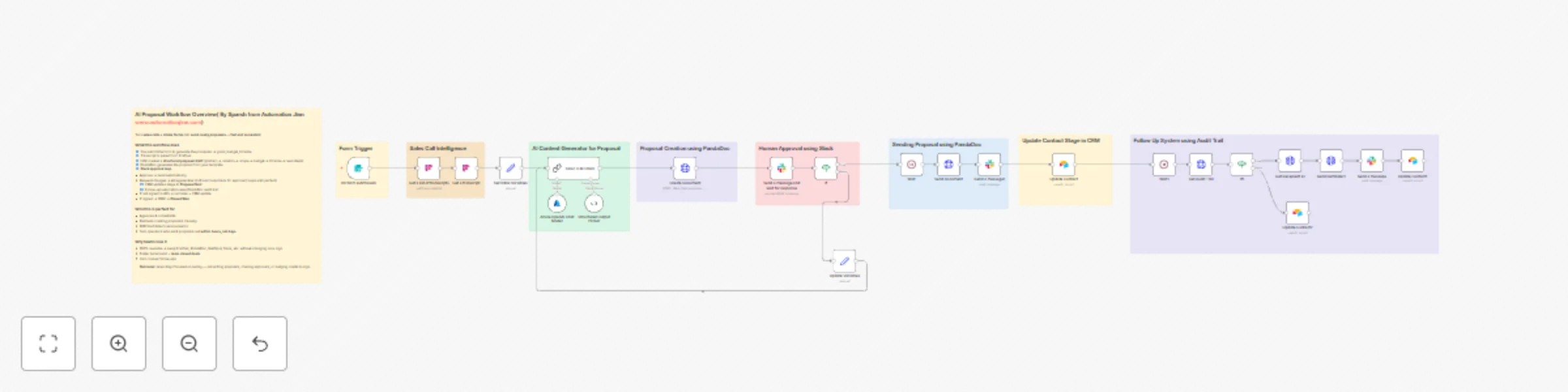
Workflow preview: Generate AI sales proposals from transcripts using Azure OpenAI, PandaDoc & Slack approval
Free advanced

Generate AI sales proposals from transcripts using Azure OpenAI, PandaDoc & Slack approval

## AI Proposal Workflow Overview This workflow turns your **sales calls + intake form** into a polished, send-ready proposal. It pulls the latest call transcript from **Fireflies**, generates structured proposal content with **Azure OpenAI**, builds a proposal in **PandaDoc**, routes it for **Slack approval**, and then handles sending, CRM stage updates (Airtable/HubSpot), and automated follow-ups using the PandaDoc audit trail. This workflow is modular. You can replace each major tool: - **Fireflies** → Gong, Fathom, Wingman, Avoma (any transcript provider) - **PandaDoc** → DocuSign, Qwilr, Proposify, Google Docs API - **Slack Approval** → Gmail Approval, MS Teams Approval, Notion DB Approvals - **Airtable CRM** → HubSpot, Pipedrive, Salesforce, Zoho, Monday Sales CRM - **Intake Form** → Typeform, Tally, Jotform, HubSpot forms - **Azure OpenAI** → OpenAI, Anthropic Claude, Mistral, or any LLM connected through an API The core logic stays the same — you only swap the nodes. --- ## Who It’s For - Agencies & consultants who send similar proposals after every call - B2B SaaS / tech teams that want proposals going out within hours - Solo operators who want AI to handle most of the draft but keep final control - Teams already working out of **Slack**, wanting approval flows there --- ## How It Works ### 1. Form Trigger (Client Proposal Intake) Client fills a form with: - Name, email, website - Industry / business context - Problem, solution idea, scope - Budget, timeline, deliverables ### 2. Sales Call Intelligence (Fireflies or Gong) - Workflow searches transcripts using the client email - Fetches the relevant transcript + summary ### 3. AI Proposal Generator (Azure OpenAI or any LLM) - Sets initial variables (`draftText`, `lastFeedback`) - Sends transcript + form data into LLM - Returns structured JSON: - introduction - client_problem - proposed_solution - scope_of_work - deliverables - timeline_breakdown - investment - next_steps ### 4. Proposal Creation (PandaDoc, DocuSign, etc.) - Creates the proposal document from a template - Fills tokens with AI-generated content - Inserts pricing table using Budget ### 5. Slack Approval Loop - Slack message is sent to reviewer with: - **Approve** button - **Request Changes** button - Optional comment thread for feedback - If **Approved**: - Proposal is sent automatically via PandaDoc/DocuSign - Slack message to notify proposal has been sent - If **Changes Requested**: - Feedback + draft are stored - Passed back into the LLM to regenerate - New document is created and the Slack approval request is sent again - This loop continues until approval happens ### 6. CRM Update (Airtable / HubSpot) - After proposal is sent, Stage → **Proposal Sent** ### 7. Follow-Up System (PandaDoc Audit Trail) After a 48-hour wait: - Audit trail is fetched - If document is **not yet signed**: - Reminder is sent - Stage → **Reminder Sent** - Slack message to notify a reminder has been sent - If **signed**: - Stage → **Document Signed** --- ### Ideal use cases - Sales teams creating tailored proposals at scale - Agencies responding quickly to inbound RFPs - Freelancers producing polished proposals in minutes - RevOps teams standardizing proposal formats - SaaS companies automating repetitive proposal creation --- ## Requirements - n8n (self-hosted or cloud) - Transcript provider (Fireflies, Gong, Fathom, etc.) - LLM API (Azure OpenAI, OpenAI, Claude, etc.) - Proposal tool (PandaDoc, DocuSign, Qwilr) - Slack API app for approval flow - CRM (Airtable, HubSpot, Pipedrive) - Intake form --- You can now integrate this into your lead workflow and let AI + automation handle proposal drafting, Slack approvals, sending, CRM updates, and follow-ups.

S
Sparsh From Automation Jinn
CRM
22 Nov 2025
69
0