Track SEO keyword rankings in Google Search with ScrapingBee API

Workflow preview

Workflow preview
100%
Track SEO keyword rankings in Google Search with ScrapingBee API preview
Open on n8n.io

Important notice

This workflow is provided as-is. Please review and test before using in production.

1. Workflow Overview

Who is this template for? This SEO Reporting workflow template is ideal for digital marketers, SEO consultants, content strategists, and founders who need to quickly gather, format, and store Googl...

Best for

  • Market Research automation workflows
  • intermediate n8n builders looking for reusable templates

Tools used

n8n-nodes-base.stickynote, n8n-nodes-base.code, n8n-nodes-base.httprequest, n8n-nodes-base.formtrigger, n8n-nodes-base.converttofile, n8n-nodes-base.mailjet

Source and attribution

This workflow is cataloged by N8N Workflows and links back to its original n8n.io source page by Gegenfeld.

Original n8n.io source

1.1 Workflow description

Title
Track SEO keyword rankings in Google Search with ScrapingBee API
Workflow name
Track SEO keyword rankings in Google Search with ScrapingBee API

Who is this template for?

This SEO Reporting workflow template is ideal for digital marketers, SEO consultants, content strategists, and founders who need to quickly gather, format, and store Google search result data. If you regularly audit SERPs, track keyword performance, or monitor competitors, this automation lets you generate polished SEO reports in seconds—ready to share or analyze further.

What problem does this workflow solve?

Scraping and formatting Google search results for SEO insights is often manual, repetitive, and error-prone or requires expensive software. Professionals frequently face challenges like:

  • Collecting live, structured data from Google for multiple keywords
  • Converting raw search results into readable reports for clients or stakeholders
  • Logging changes in rankings or URLs across time for historical tracking
  • Exporting SEO data into spreadsheets for deeper analysis
  • High monthly software fees

What this workflow does

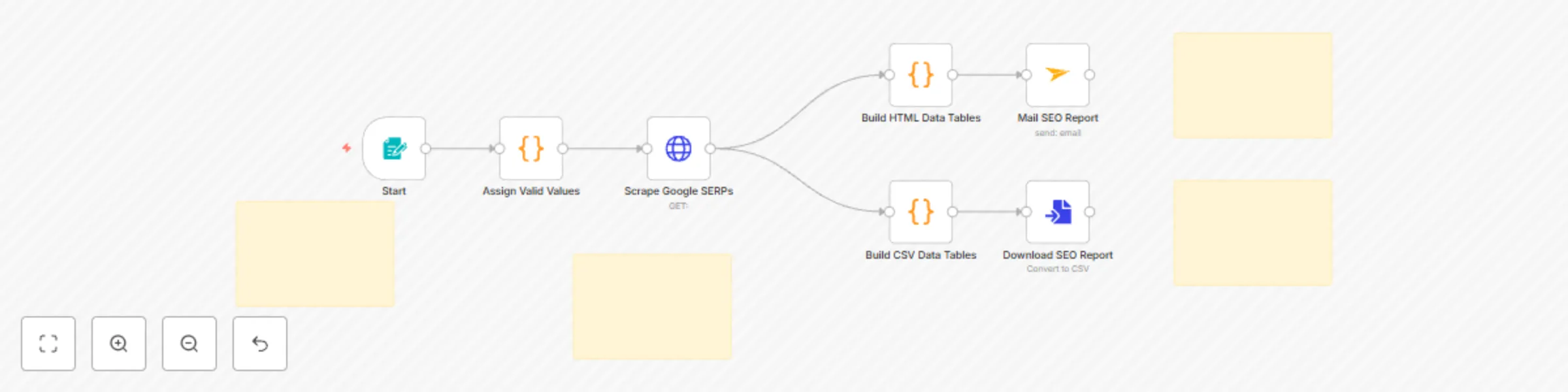
This n8n workflow scrapes the top organic Google search results for a given keyword and automatically creates a downloadable report while also logging the results in a table format for long-term storage or further processing.

Here’s what it includes:

  • A trigger form that accepts a search keyword from the user
  • An automated API call to fetch Google’s SERP data
  • Two output formats: a formatted HTML table for emails and a Markdown table for download (e.g., for Excel, Airtable or Google Sheets)
  • Automatic CSV file generation for download
  • Optional email delivery of the report

Setup

Getting started is simple:

  1. Enter your API key

    • Add your API key to the “Scrape Google SERPs” HTTP Request node (Step-by-step guide inside the template)
    • Replace the default query with your own custom Google search parameters if needed
  2. Set up delivery options

    • Update your email in the “Mail SEO Report” node for report delivery
    • Use the downloadable file output from the “Convert to File” node
    • Optional: Add a Google Sheets (or similar) node which imports the file
  3. Test the workflow

    • Use the built-in form to input a keyword
    • Confirm that results appear in both your email and downloadable file
  4. Activate the workflow

    • Turn on the trigger so your team or clients can submit keywords at any time

How to customize this workflow

This template is easy to extend for a variety of SEO automation needs:

  • Add a loop to handle multiple keywords at once
  • Connect to Airtable, Notion or Google Sheets
  • Integrate with Slack or Discord for notifications
  • Apply additional filtering to track only new or changed search results
  • Schedule it to run daily or weekly with a cron trigger

By combining live SERP scraping, report formatting, and spreadsheet integration, this workflow gives you a fast and flexible SEO reporting system you can use right away or scale up as needed.

1.2 Logical Blocks

This catalog entry is organized from the workflow JSON. The node-level section below shows the executable blocks available for review before importing the template.

2. Block-by-Block Analysis

Block 1 - Sticky Note1

Type / Role
n8n-nodes-base.stickyNote - stickyNote
Config choices
Version 1

Block 2 - Sticky Note

Type / Role
n8n-nodes-base.stickyNote - stickyNote
Config choices
Version 1

Block 3 - Build HTML Data Tables

Type / Role
n8n-nodes-base.code - code
Config choices
Version 2

Block 4 - Assign Valid Values

Type / Role
n8n-nodes-base.code - code
Config choices
Version 2

Block 5 - Scrape Google SERPs

Type / Role
n8n-nodes-base.httpRequest - httpRequest
Config choices
Version 4.2

Block 6 - Start

Type / Role
n8n-nodes-base.formTrigger - formTrigger
Config choices
Version 2.2

Block 7 - Build CSV Data Tables

Type / Role
n8n-nodes-base.code - code
Config choices
Version 2

Block 8 - Sticky Note3

Type / Role
n8n-nodes-base.stickyNote - stickyNote
Config choices
Version 1

Block 9 - Download SEO Report

Type / Role
n8n-nodes-base.convertToFile - convertToFile
Config choices
Version 1.1

Block 10 - Mail SEO Report

Type / Role
n8n-nodes-base.mailjet - mailjet
Config choices
Version 1

Block 11 - Sticky Note2

Type / Role
n8n-nodes-base.stickyNote - stickyNote
Config choices
Version 1

3. Summary Table

Workflow Track SEO keyword rankings in Google Search with ScrapingBee API
Complexity intermediate
Nodes 11
Categories Market Research
Author Gegenfeld
Published 15 May 2025

4. Reproducing the Workflow from Scratch

  1. 1. Download the workflow JSON

    Use the JSON export at /data/workflows/4089/4089.json as the source template for this automation.

  2. 2. Import the template into n8n

    Open n8n, import the downloaded JSON, and review each node before activating the workflow.

  3. 3. Configure credentials and variables

    Replace placeholder credentials, API keys, webhook URLs, account IDs, and environment-specific values with your own settings.

  4. 4. Test with sample data

    Run the workflow manually or in a staging workspace, inspect node output, and confirm downstream systems receive the expected data.

  5. 5. Activate and monitor

    Enable the workflow only after testing, then monitor executions, errors, and rate limits during the first production runs.

5. General Notes & Resources

Review imported nodes carefully before activation. This catalog entry is intended to help you inspect the workflow structure, understand required services, and find related templates faster.

Node names, credentials, schedules, webhook paths, and external service limits may need adjustment for your workspace.

Frequently asked questions

What does Track SEO keyword rankings in Google Search with ScrapingBee API do?

Who is this template for? This SEO Reporting workflow template is ideal for digital marketers, SEO consultants, content strategists, and founders who need to quickly gather, format, and store Googl...

What do I need before importing this workflow?

Review the workflow JSON, configure any required credentials in n8n, and test the automation in a safe workspace before using it in production.

Can I customize this workflow?

Yes. Use the block-by-block analysis and the downloadable JSON to inspect each node, then adjust credentials, prompts, schedules, filters, or destinations for your Market Research use case.