Block 1 - Fetch Policy Data
- Type / Role
- n8n-nodes-base.googleSheets - googleSheets
- Config choices
- Version 4.6
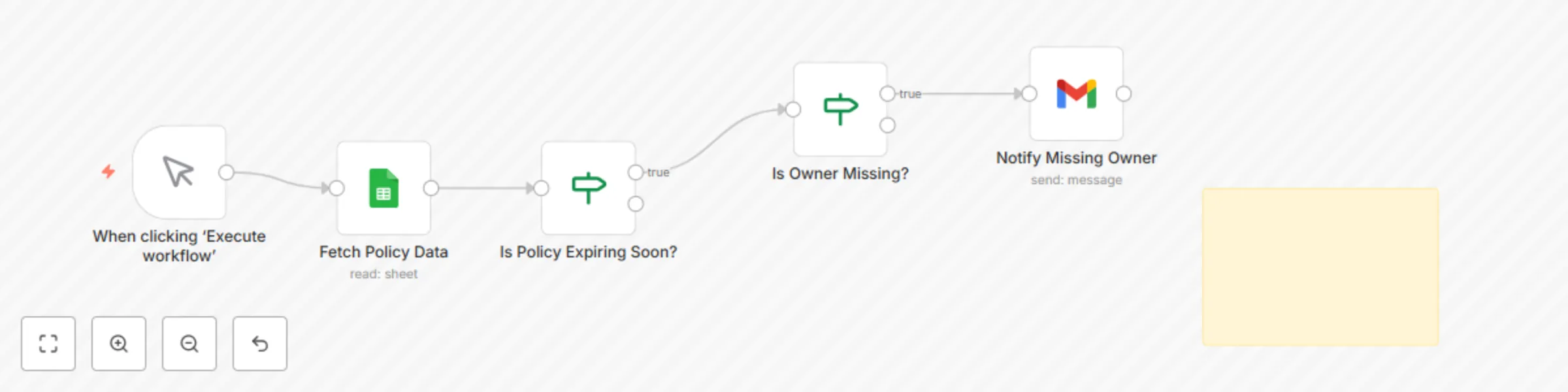


 Early Deal
This workflow is provided as-is. Please review and test before using in production.
Purpose Automates the monitoring of policy documents for expiry and ownership gaps. Ensures accountability by sending proactive notifications when policies are nearing renewal deadlines or when no ...
n8n-nodes-base.googlesheets, n8n-nodes-base.if, n8n-nodes-base.manualtrigger, n8n-nodes-base.gmail, n8n-nodes-base.stickynote
This workflow is cataloged by N8N Workflows and links back to its original n8n.io source page by Adnan Tariq.
Original n8n.io sourcePurpose Automates the monitoring of policy documents for expiry and ownership gaps. Ensures accountability by sending proactive notifications when policies are nearing renewal deadlines or when no owner is assigned.
Key Benefits
Avoids missed policy reviews or lapses.
Enforces accountability by flagging missing owners.
Sends automated, clear email notifications.
Reduces manual tracking workload across teams.
Maintains an audit-ready record of policy metadata.
How It Works
Fetches policy metadata from Google Sheets.
Checks if policy expiry date is within 30 days.
Flags entries with blank owner fields.
Sends automated notifications to responsible teams.
Maintains an updated log of policy status for audits.
Requirements
Google Sheets (OAuth2) to store and manage policy metadata.
Gmail/SMTP node for notifications (optional).
Sheet must include:
policy_name
owner_email
last_reviewed
expiry_date
review_frequency_months
status
Customization Tips
Adjust expiry window to 60 or 90 days.
Replace Gmail with Slack/Teams notifications.
Integrate with Jira/ServiceNow for policy tasks.
Modify email templates to include escalation paths.
Compliance Alignment
ISO 27001: A.5.1.1 (Policies for Information Security)
NIST 800-53: PL-2 (System and Communications Protection Policy)
SOC 2: CC5.3 (Policies and Communication)
Supports lifecycle validation for external audits.
Supports
ISO 27001 Information Security
SOC 2 Compliance
NIST 800-53
ACSC Essential Eight
This catalog entry is organized from the workflow JSON. The node-level section below shows the executable blocks available for review before importing the template.
| Workflow | Track policy expiry dates and ownership with Google Sheets and Gmail notifications |
|---|---|
| Complexity | intermediate |
| Nodes | 6 |
| Categories | SecOps, Multimodal AI |
| Author | Adnan Tariq |
| Published | 26 Aug 2025 |
Use the JSON export at /data/workflows/7864/7864.json as the source template for this automation.
Open n8n, import the downloaded JSON, and review each node before activating the workflow.
Replace placeholder credentials, API keys, webhook URLs, account IDs, and environment-specific values with your own settings.
Run the workflow manually or in a staging workspace, inspect node output, and confirm downstream systems receive the expected data.
Enable the workflow only after testing, then monitor executions, errors, and rate limits during the first production runs.
Review imported nodes carefully before activation. This catalog entry is intended to help you inspect the workflow structure, understand required services, and find related templates faster.
Node names, credentials, schedules, webhook paths, and external service limits may need adjustment for your workspace.
Purpose Automates the monitoring of policy documents for expiry and ownership gaps. Ensures accountability by sending proactive notifications when policies are nearing renewal deadlines or when no ...
Review the workflow JSON, configure any required credentials in n8n, and test the automation in a safe workspace before using it in production.
Yes. Use the block-by-block analysis and the downloadable JSON to inspect each node, then adjust credentials, prompts, schedules, filters, or destinations for your SecOps, Multimodal AI use case.