A

Adnan Tariq

22
Workflows

Workflows by Adnan Tariq

Workflow preview: Automated compliance control scoring with CyberPulse, GPT-4o & Google Sheets
Free advanced

Automated compliance control scoring with CyberPulse, GPT-4o & Google Sheets

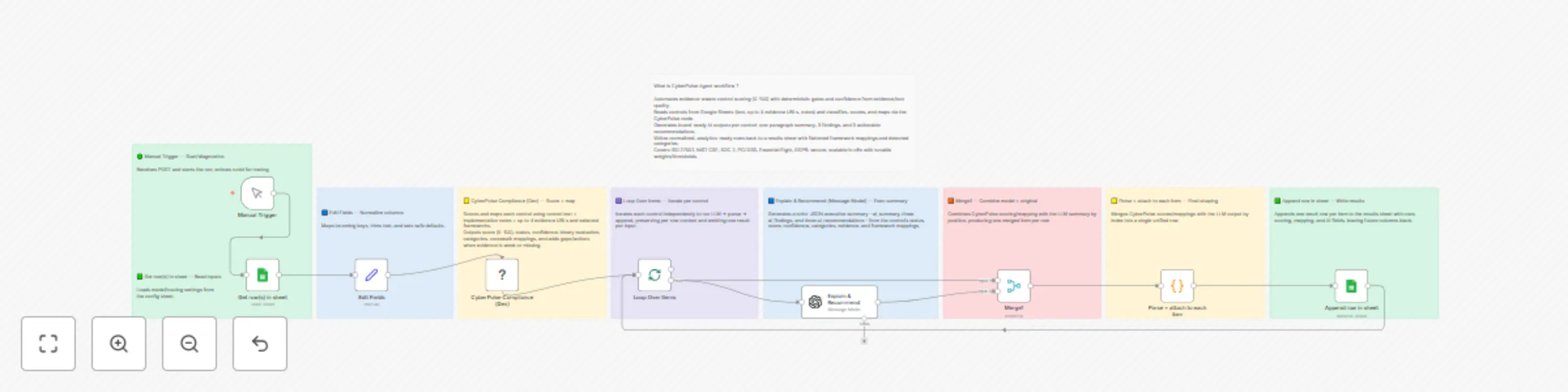
**What this template does** Batch-evaluates compliance controls from Google Sheets using the CyberPulse Compliance API. Each control is scored, mapped to selected frameworks, enriched with crosswalk mappings, and summarized with AI-generated findings and recommendations. **How it works** Read from Sheets → Build control text (response_text + implementation_notes) → CyberPulse Compliance (scoring, mapping, AI summary) → Normalize → Append results to Sheets. **Setup (5–10 min)** Add Google Sheets + CyberPulse HTTP Header Auth credentials. Replace YOUR_SHEET_ID and sheet names. Provide your Crosswalk JSON URL (raw GitHub or API endpoint) or use this url: https://www.cyberpulsesolutions.com/xw.json Select frameworks to evaluate against. Run a small test, then full batch. **CyberPulse API (required for production)** Use hosted scoring/mapping (no local ML code). Create a CyberPulse HTTP Header Auth credential with API Key. In the node: paste Crosswalk URL, select frameworks, set credential. For large sheets, add a short Wait or reduce batch size. **Input columns** control_id control_description response_text implementation_notes evidence_url_1 … evidence_url_4 **Output columns** status evaluation score confidence rationale categories evidence_count mapped_count mapping_flat frameworks_selected engine_version ai_summary ai_findings (3 per control) ai_recommendations (3 per control) **Troubleshooting** No rows → check sheet ID and range. Empty mappings → verify Crosswalk URL. Write errors → confirm results sheet + permissions. **Learn more about CyberPulse Compliance Agent:** https://www.cyberpulsesolutions.com/solutions/compliance-agent **Start free:** https://www.cyberpulsesolutions.com/pricing Email: [email protected]

A
Adnan Tariq
Engineering
9 Oct 2025
53
0
Workflow preview: Track policy expiry dates and ownership with Google Sheets and Gmail notifications
Free intermediate

Track policy expiry dates and ownership with Google Sheets and Gmail notifications

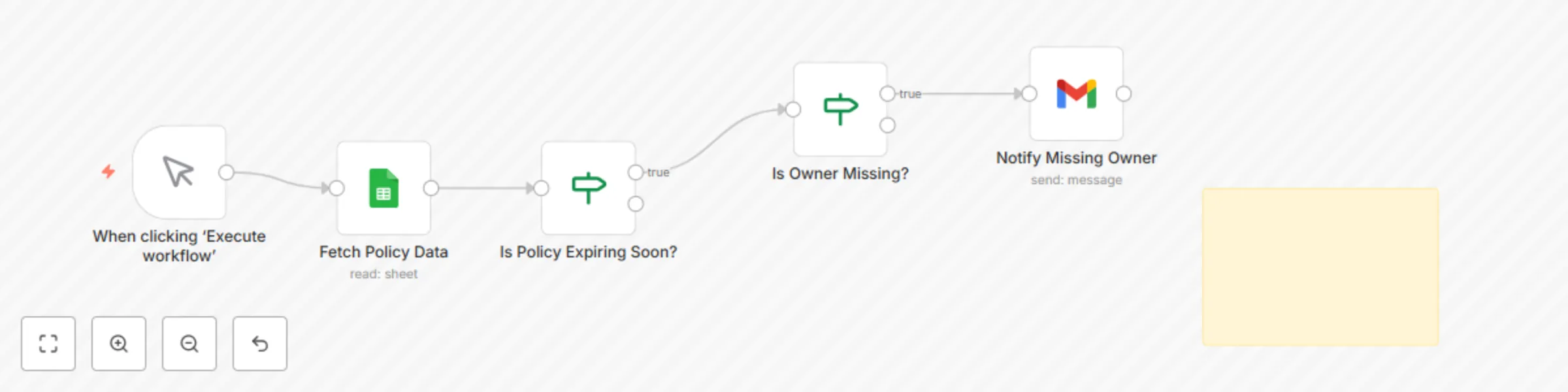
Purpose Automates the monitoring of policy documents for expiry and ownership gaps. Ensures accountability by sending proactive notifications when policies are nearing renewal deadlines or when no owner is assigned. Key Benefits Avoids missed policy reviews or lapses. Enforces accountability by flagging missing owners. Sends automated, clear email notifications. Reduces manual tracking workload across teams. Maintains an audit-ready record of policy metadata. How It Works Fetches policy metadata from Google Sheets. Checks if policy expiry date is within 30 days. Flags entries with blank owner fields. Sends automated notifications to responsible teams. Maintains an updated log of policy status for audits. Requirements Google Sheets (OAuth2) to store and manage policy metadata. Gmail/SMTP node for notifications (optional). Sheet must include: policy_name owner_email last_reviewed expiry_date review_frequency_months status Customization Tips Adjust expiry window to 60 or 90 days. Replace Gmail with Slack/Teams notifications. Integrate with Jira/ServiceNow for policy tasks. Modify email templates to include escalation paths. Compliance Alignment ISO 27001: A.5.1.1 (Policies for Information Security) NIST 800-53: PL-2 (System and Communications Protection Policy) SOC 2: CC5.3 (Policies and Communication) Supports lifecycle validation for external audits. Supports ISO 27001 Information Security SOC 2 Compliance NIST 800-53 ACSC Essential Eight 🔗 https://cyberpulsesolutions.com

A
Adnan Tariq
SecOps
26 Aug 2025
36
0
Workflow preview: CYBERPULSE AI GRC: Vendor risk evaluator
Free intermediate

CYBERPULSE AI GRC: Vendor risk evaluator

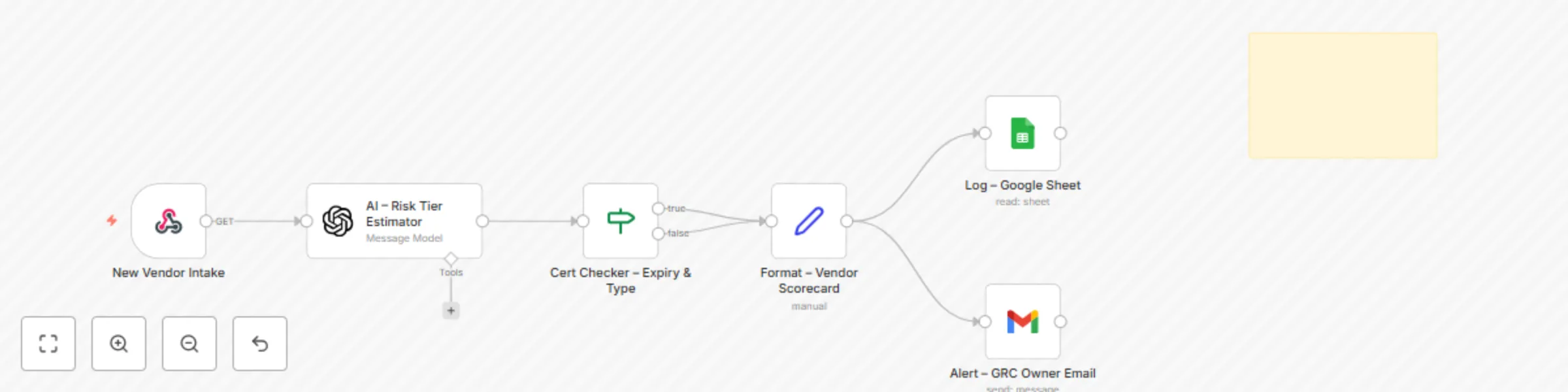
Description Automates the intake, classification, and documentation of third-party vendors. Evaluates vendor function, data access level, certification status, and applies AI-driven risk tiering (Low, Standard, Critical). Ensures standardized onboarding and scalable due diligence. Who It’s For Compliance and procurement teams onboarding vendors GRC consultants managing supply chain risk Security leads needing traceable vendor evidence Audit teams validating third-party controls How It Works Trigger via intake form or webhook AI engine assigns vendor risk tier based on context (certification, access type, data sensitivity) If certifications (ISO 27001, SOC 2, IRAP, PCI DSS) are missing, status is flagged Scorecard is formatted automatically with vendor details, risk tier, and timestamp Logs results to Google Sheets for audit-ready evidence Sends instant alerts for high-risk or uncertified vendors Requirements Google Sheets (OAuth2) connected for logging Gmail/SMTP node for automated alerts (optional) Intake form/webhook for vendor submissions Mandatory fields in vendor intake: Vendor Name Function Data Access Access Type (Read/Write/API) Certification (if any) Owner (GRC) File Templates Vendor_Risk_Log.xlsx (auto-created sheet with audit-ready logs) Intake form (customizable, connects via webhook) Customization Tips Modify AI prompt logic to reflect internal risk appetite Add more certification checks (e.g., ISO 27701, FedRAMP) Adjust alert thresholds (e.g., auto-notify only for Critical tier) Extend integration to Slack/Teams or SIEM for escalation Link logs to a dashboard for executive reporting Compliance ISO/IEC 27001: Controls A.15.1.1, A.15.1.2 (supplier relationships and information security) SOC 2: Vendor management and risk classification NIST 800-53: SR-3, SR-5 (supply chain risk and contractual requirements) Essential Eight: Supports control validation via vendor documentation logging Provides timestamped, structured logs suitable for external audits Setup Instructions Deploy the provided intake form or connect your own vendor submission process to the webhook. Connect Google Sheets to store vendor logs (Vendor_Risk_Log.xlsx). Connect Gmail/SMTP node for notifications (optional). Customize AI prompt and certification logic if needed. Run intake tests to validate risk tier assignment. Confirm vendor logs and alerts are recorded correctly. Supports ISO 27001 Information Security SOC 2 Compliance PCI DSS v4.0 NIST CSF / 800-53 ACSC Essential Eight https://cyberpulsesolutions.com

A
Adnan Tariq
AI Summarization
26 Aug 2025
83
0
Workflow preview: Automate risk treatment tasks with Google Sheets for GRC compliance
Free intermediate

Automate risk treatment tasks with Google Sheets for GRC compliance

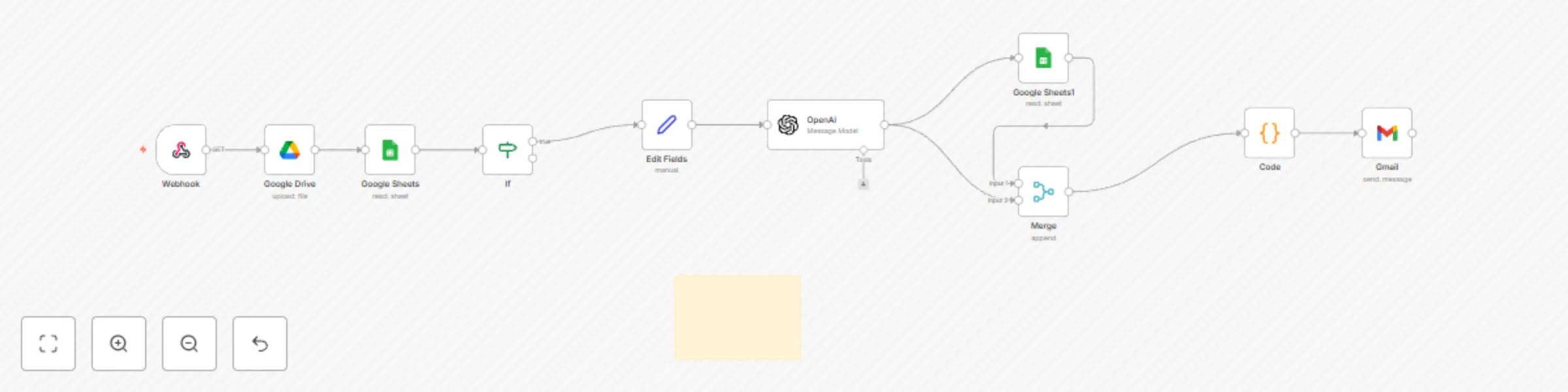
Description Automatically assigns and escalates risk treatment tasks based on severity, organizational unit, and asset class. Removes manual owner-assignment steps, ensures consistent routing, speeds up escalations, and provides a complete audit trail of tasks and status changes. Who It’s For Compliance teams preparing audit documentation GRC consultants managing multiple clients Internal auditors requiring traceable evidence How It Works Trigger manually or on schedule (e.g., daily) Reads risk register logs from Google Sheets Applies severity logic to assign owners and due dates Logs assigned treatment tasks to an “Assigned_Tasks” sheet Escalates overdue or critical risks within SLA thresholds Requirements Gmail or SMTP node for notifications (optional) Google Sheets connected (OAuth2) Google Drive connected (OAuth2) Google Sheet Requirements: Columns: Risk ID, Severity, Status, Created At One row per control ID or risk entry Headers must be in the first row Sheet must be shared with your n8n service account File Templates Risk_Treatment_Register.xlsx Assigned_Tasks (Google Sheet auto-created via workflow) Customization Tips Adjust SLA timelines (High = 3 days, Medium = 7 days, Low = 14 days) Modify owner mapping per department (CISO, IT Security, Department Head) Change escalation recipients in the Gmail/SMTP node Extend workflow to SIEM, Slack, or Teams notifications Compliance Ensures audit trail and traceability of risk treatment Prevents risks being missed or misrouted Aligns with ISO 27001 A.5.1.1 and NIST CSF ID.RA Supports audit evidence for PCI DSS, SOCI Act, and ACSC Essential Eight Setup Instructions Copy the provided Google Sheet template (Risk_Treatment_Register.xlsx). Enter your risks with Risk ID, Severity, Status, and Created At. Connect Google Sheets node using OAuth2. Connect Gmail/SMTP for escalation emails (optional). Run manually or schedule daily with a Cron trigger. Review task allocations in the “Assigned_Tasks” sheet. Supports ISO 27001 Information Security PCI DSS v4.0 NIST CSF / SOCI Act ACSC Essential Eight

A
Adnan Tariq
SecOps
26 Aug 2025
53
0
Workflow preview: Cyberpulse AI GRC: Automate security questionnaire responses
Free intermediate

Cyberpulse AI GRC: Automate security questionnaire responses

Description Automates vendor/customer security questionnaire responses. It ingests a questionnaire (Sheet/CSV/XLSX), matches each question to your approved answers and evidence, and writes a clean “Auto-Fill” sheet ready to review and send back. Optional alerts nudge reviewers and track progress to completion. Who’s It For GRC / Compliance teams responding to customer security reviews Security engineers and sales engineers supporting questionnaires Startups that need fast, consistent, audit-ready answers How It Works Trigger Run manually, on a schedule, or when a questionnaire file/row is added. Ingest & Normalize Reads questions from Google Sheets/CSV/XLSX. Normalizes columns (e.g., question, category, customer_notes) and de-duplicates. Classify Detects question type (Yes/No, multi-select, free text). Tags topics (encryption, access control, incident response, privacy, HR, etc.). Answer Retrieval Looks up approved answers from your Answer Library sheet (mapped by keywords/category/control). Falls back to templates (short form/long form) when no exact match exists. Evidence Linking Inserts Drive links for policies, diagrams, SOC2/ISO docs (from your evidence folder). Adds version/date so reviewers can verify what was sent. Auto-Fill Output Writes a new sheet with columns like: question, proposed_answer, rationale/notes, evidence_link, control_ref, owner, status, confidence, last_updated. Review & Notifications Emails the reviewer/owner with a link to the output sheet for quick approval edits. Status can move from draft → reviewed → ready to send. Export Optional export to CSV/XLSX to match customer’s template. Optional PDF of responses for audit trail. Requirements Google Sheets & Drive credentials Destination Sheet & Evidence folder (env vars used in the template): GSHEET_ID, GSHEET_SHEET DRIVE_FOLDER_ID (or keep SANITIZED and set after import) Alert email: GRC_ALERT_EMAIL File Templates GRC_SQ_AutoFill_Template.xlsx – target sheet with the output columns above Answer_Library.xlsx / Sheet tab – key-value pairs: keywords/category → approved answers Control_Mapping.xlsx / Sheet tab – optional mapping to ISO 27001, SOC2, NIST CSF Output A populated Auto-Fill sheet ready to review/share Evidence links with versioning Email notification to the reviewer with next steps Customization Tips Add your framework tags (ISO/SOC2/NIST) to enable quick mapping in the output. Set owners per topic (e.g., “Encryption → Security Eng”, “Privacy → Legal”). Add a confidence score threshold to flag answers needing human review. Enable “strict mode” to prevent sending answers without evidence links. Schedule a weekly run to pre-fill common questionnaires and keep answers fresh.

A
Adnan Tariq
SecOps
14 Aug 2025
139
0
Workflow preview: CYBERPULSE AI GRC: automate compliance audit documentation
Free intermediate

CYBERPULSE AI GRC: automate compliance audit documentation

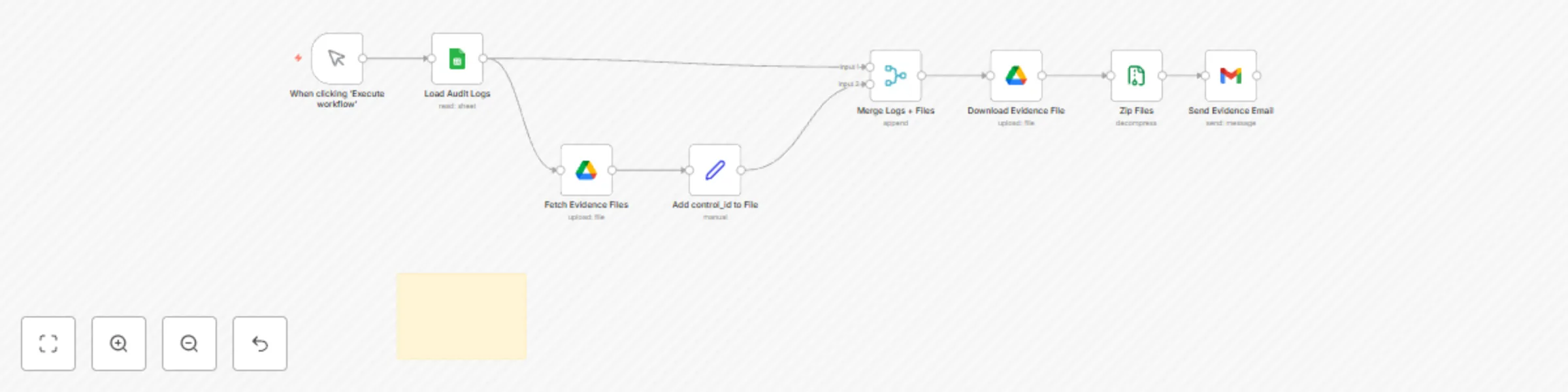
Description Automatically packages audit-ready evidence files matched to control IDs from ISO 42001 or other frameworks. Fetches logs from Google Sheets, finds corresponding files in Google Drive, compresses them into a ZIP archive, and sends via email — no manual formatting required. Who’s It For: Compliance teams preparing audit documentation GRC consultants managing multiple clients Internal auditors requiring traceable evidence How It Works: Trigger manually or on schedule (e.g., daily) Reads audit logs from Google Sheets Searches Google Drive for files matching control_id Downloads matched files Zips them into an archive Sends the archive via email (Gmail or SMTP) Requirements: Gmail or SMTP node for email delivery Google Sheets connected (OAuth2) Google Drive connected (OAuth2) Google Sheet Requirements: Columns: control_id, description, evidence_status, last_updated One row per control ID or log entry Headers must be in the first row Log sheet must be shared with your service account or n8n-connected user File Templates: Audit_AutoPack_Sheet_Template.xlsx Evidence files in Google Drive named using control ID (e.g., ISO42001-5.1.pdf) Customization Tips: Adjust ZIP archive name in the “Zip Files” node Customize email subject, body, and recipient Use a different Drive folder per client or audit phase Ethics & Compliance: Ensures audit trail and evidence traceability Prevents unauthorized edits or file mismatches Setup Instructions Copy the provided Google Sheet template (linked in File Templates). Fill in your audit logs (columns: control_id, description, status, last_updated). Connect Google Sheets node using OAuth credentials. In the Gmail node: Set recipient email (e.g., [email protected]) Choose “Send binary data” and attach ZIP Trigger via Cron node (e.g., daily) or manually (Optional) Connect Drive or S3 node to store a backup copy Supports: ISO 42001 AI Governance PCI DSS v4.0 NIST CSF / SOCI Act ACSC Essential Eight https://cyberpulsesolutions.com

A
Adnan Tariq
Document Extraction
7 Aug 2025
97
0
Workflow preview: CYBERPULSE AI GRC: automated ISO 42001 compliance evaluation
Free intermediate

CYBERPULSE AI GRC: automated ISO 42001 compliance evaluation

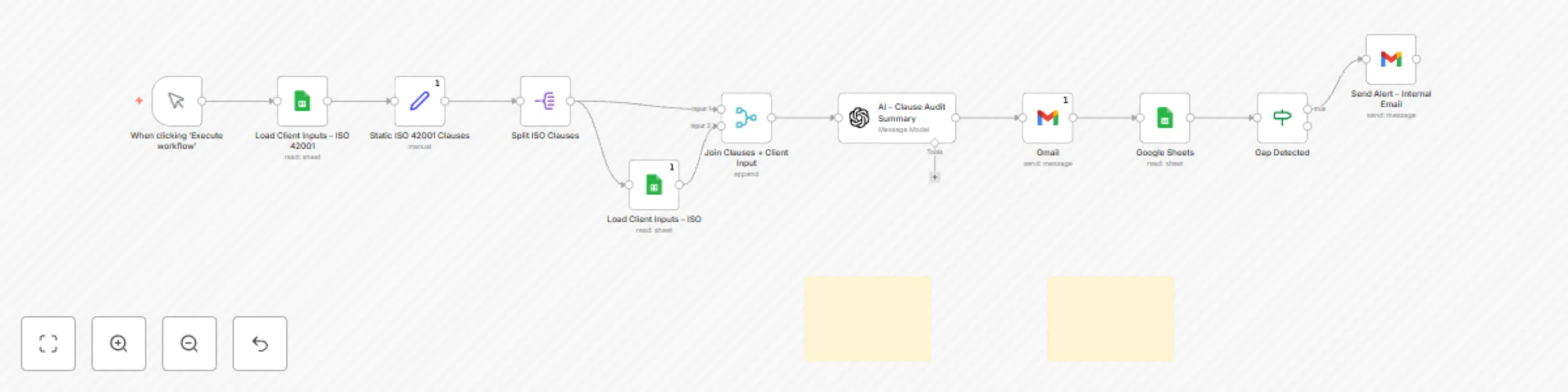
Description Automatically evaluates and maps AI governance responses to ISO 42001:2023 clause requirements using AI-powered logic. Designed for GRC consultants, audit teams, and AI-focused security programs to reduce time spent on manual clause interpretation and alignment. Who’s It For: GRC Consultants handling AI governance controls Internal Auditors preparing for ISO 42001 audits Security teams implementing AI assurance frameworks Organizations adopting Responsible AI principles How It Works: Triggers manually or on schedule (e.g., clause review cycles) Reads AI control responses from a connected Google Sheet Uses AI to evaluate each response against ISO 42001 clauses Flags compliance status (match / partial / gap) with clause mapping Outputs a clean control map with automated summary Requirements: Gmail or SMTP node for email Google Sheets connected (OAuth) OpenAI or AI node (optional but recommended for advanced clause interpretation) Google Sheet Requirements: Columns: ClauseID, Clause_Description, Control_Response, Evaluation_Result Each row must correspond to one ISO 42001 clause Headers in the first row Optional: add column for Suggested_Remediation File Templates: ISO42001_Mapping_Template.xlsx Includes: clause ID, clause text, response, result, suggested fix Customization Tips: Modify clause response logic in the evaluation node (e.g., strict vs lenient mapping) Enable multi-framework mapping (e.g., align to NIST AI RMF as well) Auto-send mapping result to Drive or S3 as audit evidence Ethics & Compliance: This module assists with clause interpretation and reporting only. It does not simulate AI models or assess ethical risk directly. For internal reporting, policy alignment, and audit preparation use only. Setup Instructions: Copy the provided Google Sheet template (ISO42001_Mapping_Template.xlsx) Fill in your control responses (row = clause) Connect Google Sheets node using OAuth credentials In the AI node: Evaluate clause response using GPT or internal prompt Flag match/partial/gap Optional: auto-send report via email or upload to storage Review results and update your compliance register accordingly Supports: ISO 42001:2023 AI Governance Principles (OECD, NIST AI RMF) SOCI Act compliance efforts (AI assurance layer) ACSC AI oversight recommendations 📬 [email protected] 🌐 https://www.cyberpulsesolutions.com/

A
Adnan Tariq
Document Extraction
7 Aug 2025
71
0
Workflow preview: CYBERPULSE AI GRC: automate PCI DSS control evaluation and compliance tracking
Free advanced

CYBERPULSE AI GRC: automate PCI DSS control evaluation and compliance tracking

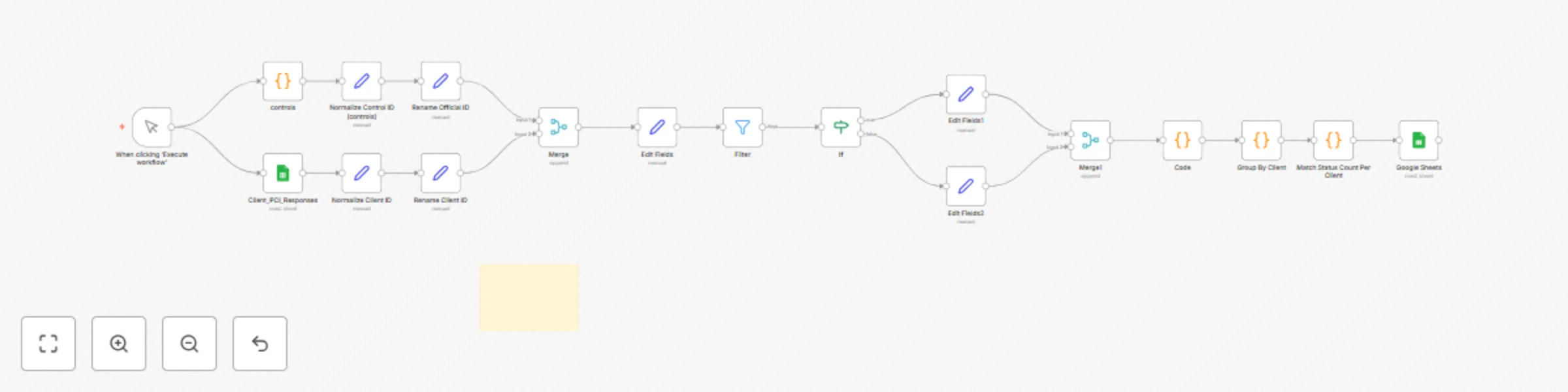
Description Automatically evaluates PCI DSS control responses using logic or AI. Designed to speed up compliance workflows, reduce audit fatigue, and flag non-compliance early. Who’s It For: - Internal compliance teams - PCI DSS auditors - Security officers preparing for certification How It Works: 1. Reads PCI controls and responses from Google Sheet 2. Applies logic to classify each control as Compliant, Partial, or Non-Compliant 3. Tags evaluation results 4. Sends output to Sheet, Email, or Drive Requirements: - Google Sheet with PCI controls - n8n (open-source automation tool) - Optional: Gmail or Drive node for delivery Google Sheet Requirements: - Columns: Control_ID, Control_Description, Response, Evaluation_Result, Notes - Headers must be in row 1 File Templates: PCI_Control_Evaluation_Template.xlsx Customization Tips: Adjust logic for more strict evaluation Highlight non-compliant results for rapid review Compliance Alignment: • PCI DSS v4.0 • ISO 27001 – Annex A crosswalk • Internal audit programs Setup Instructions: 1. Fill in the Google Sheet template 2. Connect to n8n with Google Sheet node 3. Run the workflow or schedule via Cron node 4. Review and export results 🌐 https://cyberpulsesolutions.com 📧 [email protected]

A
Adnan Tariq
SecOps
7 Aug 2025
100
0
Workflow preview: CYBERPULSE AI RedOps: generate daily RedOps security simulation reports
Free intermediate

CYBERPULSE AI RedOps: generate daily RedOps security simulation reports

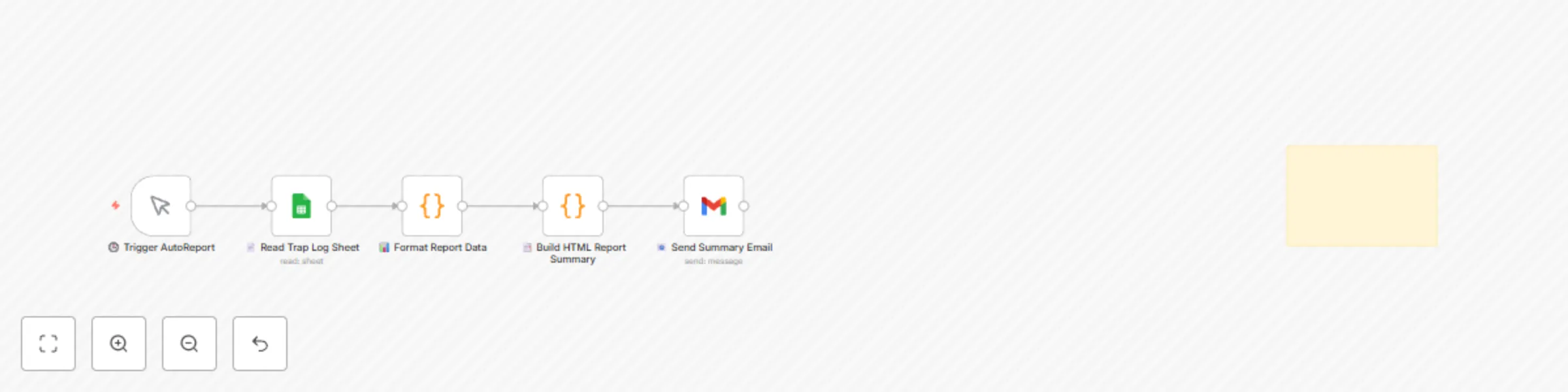
## Description Automatically compiles a daily HTML report of all RedOps simulations (Modules 1–5), summarizing offensive activity, response logs, and module effectiveness. Designed for GRC teams, Red/Purple teams, and internal auditors — no manual formatting required. ## Who’s It For: Red Teams running daily simulations Purple Teams reviewing impact and response CISOs, SOCs, or compliance teams requiring summaries ## How It Works: Trigger manually or on schedule (e.g., daily cron) Reads simulation logs from a shared Google Sheet Filters data by time or module Formats data into an HTML summary table Sends email with report or uploads to Drive/S3 ## Requirements: Gmail or SMTP node for email Google Sheets connected (OAuth) ### Google Sheet Requirements: - Columns: `Date`, `Module`, `Action`, `Result`, `Status` - One row per offensive simulation log - Make sure headers are in the first row Unified log format for RedOps Modules 1–5 ## File Templates: RedOps_AutoReport_Log_Template.xlsx email module payload status response timestamp ## Customization Tips: Set filtering timeframe (24h, 7d) in JavaScript node Modify the table style in the HTML generator Connect to PDF node or S3 for exporting to other tools ## Ethics & Compliance: This workflow is designed for internal reporting only. It does not simulate attacks or initiate actions. Use for audit logs, red team reviews, and awareness tracking only. ## Setup Instructions 1. Copy the provided Google Sheet template (linked in File Templates). 2. Fill in your RedOps logs (columns: date, module, action, result, status). 3. Connect Google Sheets node using OAuth credentials. 4. In the Gmail node: - Set recipient email (use `[email protected]` as a placeholder). - Choose HTML output from the summary table. 5. Trigger via Cron node (daily) or manually. 6. Optional: Connect Drive or S3 node to store a backup. Supports: NIST 800-53 AU-6, AU-12 ISO 27001 A.16.1.6 ACSC Essential Eight reporting practices 🔗 Part of the CYBERPULSE RedOps Suite 🌐 https://cyberpulsesolutions.com 📧 [email protected]

A
Adnan Tariq
SecOps
27 Jul 2025
54
0
Workflow preview: CYBERPULSE AI redOps: credential trap sim: fake login page simulation
Free intermediate

CYBERPULSE AI redOps: credential trap sim: fake login page simulation

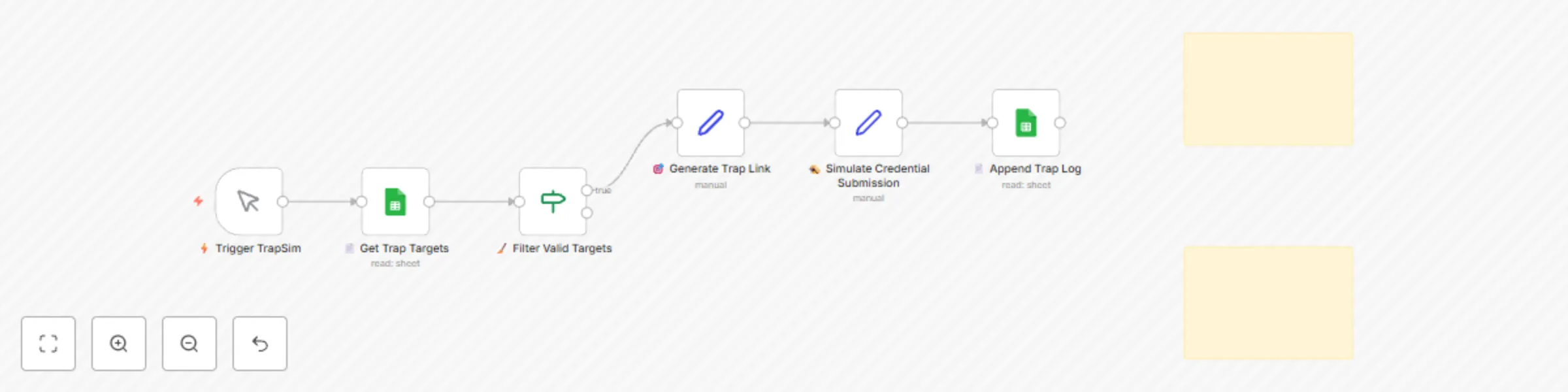
## 📝 Description: Simulate a phishing login page to test user behavior and SOC response. This controlled workflow sends trap links to predefined targets and logs simulated interaction results—without capturing real credentials. ## ✅ Who’s It For: Red Teams conducting phishing awareness campaigns SOCs validating alert triggers for credential-based phishing GRC/Compliance teams performing control testing ## ⚙️ How It Works: Loads test targets from Google Sheets Generates trap page URLs (non-malicious) Fakes login interaction upon click Logs timestamped event and status to Google Sheet ## 📦 Requirements: Google Sheets credentials Optional: Use Vercel/Cloudflare to deploy a real HTML page for advanced simulation No sensitive data is collected ## 📁 File Templates: RedOps_CredentialTrapSim_Log_Template.xlsx email name team payload response status module timestamp [email protected] Jane Doe HR fake-login.com User clicked Simulated Credential_Trap_Sim 2025-07-27T11:00:00Z ## 🧠 Customization Tips: Change trap content using a public static site Connect to real EDR/alert system for end-to-end SOC validation Adjust payload wording for different awareness campaigns ## ⚠️ Ethics & Warning: This module is 100% simulated and does not capture real credentials. Use only in authorized environments with informed consent. It is designed for training, awareness, and control testing under ethical guidelines. 🔗 Part of the CYBERPULSE AI RedOps Suite 🌐 https://cyberpulsesolutions.com 📧 [email protected]

A
Adnan Tariq
SecOps
27 Jul 2025
69
0
Workflow preview: CYBERPULSE AI redOps: phishing simulation with redirect tracking
Free intermediate

CYBERPULSE AI redOps: phishing simulation with redirect tracking

## Description: Simulate cloaked phishing links that redirect through a controlled proxy. This module tracks if secure email gateways (SEGs) or sandboxes trigger the redirect before users do. Logs access, response, and timestamps in Google Sheets. ## Who’s It For: Red Teams simulating real-world phishing redirects Security teams testing gateway/sandbox behavior Awareness teams tracking click-throughs ## How It Works: Loads target list from Google Sheets Generates dynamic redirect links per target Emails the links using Gmail or SMTP Simulates access via webhook or internal call Logs metadata and redirect access to Sheets ## Requirements: ## Google Sheet Requirements - Sheet Name: `Redirect_Logs` - Required Columns: name, team, email, module, status, payload, response, timestamp Google Sheets credentials Email service (Gmail, SMTP, or custom node) Optional: Real endpoint for link redirection (e.g., Vercel Function, Cloudflare Worker) ## Setup Instructions 1. Clone or copy the provided Google Sheet template (linked below). 2. Set up the webhook trigger in the Redirect Proxy node. 3. Use URL shortener node (optional) to obfuscate redirect links. 4. Connect Google Sheets node and map fields: timestamp, IP, user-agent, original URL. 5. Configure redirection logic using IF and Set nodes. 6. Run a test redirect to validate Google Sheet logging. ## File Templates: RedOps_RedirectCloak_Log_Template.xlsx email name team payload response status module timestamp [email protected] John Doe IT redirect.link/... Redirect triggered Simulated RedirectCloak 2025-07-27T12:00:00Z ## Customization - **Redirect Logic**: Modify the `HTTP Response` or `Set` node to redirect to real servers or simulation targets. - **Tracking Format**: Adjust the structure of the logged data — include fields like user-agent, referrer, campaign ID, etc. - **Redirection Endpoint**: Host the redirection logic on a public API gateway (e.g., AWS API Gateway, Vercel Edge Function) if deploying outside of n8n. - **Obfuscation**: Integrate a URL shortener (like Bitly) or a custom domain to hide the true destination during simulations. ## Ethics Note: This module is intended for internal simulations only and does not contain malicious payloads. Always use with authorization and red team awareness protocols. 🔗 Part of the CYBERPULSE AI RedOps Suite 🌐 https://cyberpulsesolutions.com 📧 [email protected]

A
Adnan Tariq
SecOps
27 Jul 2025
73
0
Workflow preview: CYBERPULSE AI RedOps: Role-based LinkedIn profile discovery with Google OSINT
Free intermediate

CYBERPULSE AI RedOps: Role-based LinkedIn profile discovery with Google OSINT

## Description: Automates public profile discovery for CISO, CEO, and other key roles using Google Programmable Search. Extracts LinkedIn profile links, names, and timestamps to a structured Google Sheet for OSINT, exposure analysis, or Red Team prep. ## Who’s It For: Red Teams planning phishing simulations OSINT investigators and social engineers Cybersecurity trainers mapping exposure risk ## How It Works This workflow simulates role-based OSINT (Open Source Intelligence) by performing automated LinkedIn discovery using Google Search. Here's a breakdown: 1. **Trigger**: - Can run manually or via Cron for daily/weekly scraping tasks. 2. **Load Roles to Target**: - Reads role-based search queries (e.g., `"CISO site:linkedin.com/in/"`) from a pre-filled input list or Google Sheet. 3. **Query Google Custom Search API**: - Sends requests to the Programmable Search Engine using secure API credentials (CSE ID + API Key). - Each query returns up to 10 LinkedIn profile results. 4. **Parse and Extract**: - Captures full name, title snippet, LinkedIn URL, and description using JSON response parsing. 5. **Output**: - Logs results to a structured Google Sheet for review or later enrichment. - Sheet columns include: `role`, `name`, `snippet`, `url`, `timestamp` Optional enhancements can include: - Entity tagging by organization - Filtering by location or keyword - Lead scoring based on search terms - Search query editing - ## Requirements: Google Programmable Search Engine (API key + CX ID) Google Sheets credentials ## File Templates: RedOps_SocialGraph_Log_Template.xlsx name linkedin team status module timestamp John Doe https://linkedin.com/in/johndoe GRC active Social_Graph_Builder 2025-07-27T12:00:00Z ## Customization Tips: Update queries (CISO, CEO, VP IT, etc.) Filter results by region or org using site filters Extend to track Twitter or GitHub links ## Setup Instructions 1. Set up a Google Programmable Search Engine (CSE) at https://programmablesearchengine.google.com/ 2. Restrict it to search only `linkedin.com/in/` 3. Copy your **CSE ID** and generate a **Google API Key** from https://console.cloud.google.com/apis/credentials 4. In n8n, use the HTTP Request node: - Select `Use Authentication: Yes` - Store your API Key and CSE ID in n8n credentials (not in query parameters) 5. Configure pagination to extract multiple results 6. Optional: Append results to Google Sheets or another storage system ## Ethics Note: This tool uses public Google Search results. It is meant for educational or internal red teaming only. Do not use for scraping or unauthorized targeting. 🔗 Part of the CYBERPULSE AI RedOps Suite 🌐 https://cyberpulsesolutions.com 📧 [email protected]

A
Adnan Tariq
Lead Generation
27 Jul 2025
138
0
Workflow preview: CYBERPULSE AI RedOps: validate email security gateways generated payloads
Free intermediate

CYBERPULSE AI RedOps: validate email security gateways generated payloads

Description: Automatically send structured benign payloads (PDF/HTML/JS markers) to test email gateways and sandbox response. AI-generated phishing-style content helps simulate real-world threats without malicious intent. Results logged in Google Sheets. ## Who’s It For: Security teams validating email filters and sandboxes Red Teams doing payload simulation GRC/compliance teams testing Secure Email Gateway (SEG) controls ## How It Works: Loads target list from Google Sheets Crafts payload using OpenAI prompt logic Sends emails with embedded controlled markers Logs responses back to the same sheet ## Requirements: ## Google Sheet Requirements - Sheet Name: `Payload_Validation_Log` - Required Columns: - `payload` - `status` - `response` - `timestamp` Gmail/SMTP or email-sending node Google Sheets credential OpenAI API Key ## File Templates: RedOps_PayloadValidator_Log_Template.xlsx – track targets, payload, status ## How to Customize: Modify the OpenAI prompt for alternate payload types Adjust fields or webhook triggers Add logging to SIEM or ticketing platforms ## This module is part of the CYBERPULSE AI RedOps Suite 🌐 https://cyberpulsesolutions.com ## Detailed README: ## Purpose Simulate benign payloads (e.g., links, encoded HTML) to test how your email security gateway and sandbox environment responds. ## How It Works 1. **Trigger Test Batch** Starts manually or on schedule. 2. **Get Targets** Loads email recipients from Google Sheets. 3. **Generate Payload** Prepares static payload like a fake link. 4. **OpenAI Node** Generates a realistic simulation email using the payload. 5. **Merge + Format** Combines recipient info with OpenAI output, formats the message, and tags it as simulated. 6. **Validated Node** Appends results to Google Sheets with fields like: - `email`, `payload`, `response`, `status`, `module`, `time` ## Google Sheets Requirements - Sheet Name: `RedOps_Targets` - Columns: `email`, `name`, `team`, `payload`, `status`, `response`, `module`, `time` ## Security Note This workflow uses simulated payloads and never sends real malicious content. No real user data is stored or transmitted. Meant for internal Red Team and security validation use only.

A
Adnan Tariq
SecOps
27 Jul 2025
49
0
Workflow preview: CYBERPULSE AI RedOps: internal phishing simulation for security training
Free intermediate

CYBERPULSE AI RedOps: internal phishing simulation for security training

## Description: Simulate phishing awareness campaigns using OpenAI-generated emails. Send to target lists, log clicks with a webhook, and store results in Google Sheets. Built for internal testing and cyber awareness training. ## Who’s it for: - Security teams conducting internal simulations - GRC teams doing phishing awareness - Red Teams wanting modular test setups ## How it works / What it does: - Loads targets from Google Sheets - Uses OpenAI to write realistic phishing emails - Sends them via Gmail - Tracks who clicked via webhook - Logs actions in Sheets ## Requirements: - Gmail or SMTP credentials - Google Sheets OAuth2 - OpenAI API Key - Self-hosted webhook or tunnel for /phishlink tracking ## How to customize: - Replace email template with your own LLM prompt - Swap Gmail for SendGrid, SES, etc. - Edit domain in tracking link - Use Cron or manual start

A
Adnan Tariq
SecOps
27 Jul 2025
107
0
Workflow preview: Real-time security threat dashboard with Google Sheets, AI risk analysis & email alerts
Free advanced

Real-time security threat dashboard with Google Sheets, AI risk analysis & email alerts

👤 Who it’s for Blue Team leads, CISOs, and SOC managers who want automated visibility into threat metrics, endpoint alerts, and response actions — without needing a full SIEM or BI platform. Great for teams using Modules 1–5 and now ready to report, review, or share BlueOps data across stakeholders. ⚙️ How it works / What it does Fetches threat + response data from up to 5 Google Sheets Aggregates data into four key slices: summary_metrics: Total threats, actions, endpoints daily_trends: Time-based charting top_assets: High-risk endpoints or systems actions_taken: Logged IR activity Generates a clean HTML report and sends via email Logs report summary to a central reporting tracker sheet Optionally converts and stores PDF versions or links 🛠️ How to set up Google Sheets: Connect your live sheets from previous BlueOps modules (M1–M5) Email Setup: Insert sender credentials and recipient(s) Customize Your Charts: Edit the “📈 Format Charts” and “📋 Structure Report Body” nodes Trigger Options: Run weekly, monthly, or on-demand via Webhook/Cron Add PDF Generator (Optional): Use Puppeteer, HTML → PDF services, or internal scripts 📋 Requirements Google account with access to all BlueOps logs SMTP or Gmail access for report delivery Optional: PDF storage service or HTML → PDF logic Previous modules (M1–M5) to populate threat/response data 🧩 How to customize the workflow Swap out Google Sheets for Supabase or Notion Modify visual output (color, layout, sections) using HTML nodes Export to Airtable, Slack, or external BI tools Add chart images using ChartJS, QuickChart API, or CloudConvert 📦 This module is modular, professional, and presentation-ready. All sections are labeled, editable, and safe for team-wide sharing. 📈 This module is the final piece of the CYBERPULSEBlueOps automation suite. Get the full reporting engine and link with live BlueOps modules at 👉 cyberpulsesolutions.com/blueops

A
Adnan Tariq
SecOps
25 Jul 2025
127
0
Workflow preview: Automate security incident response with Google Sheets, email alerts and EDR isolation
Free intermediate

Automate security incident response with Google Sheets, email alerts and EDR isolation

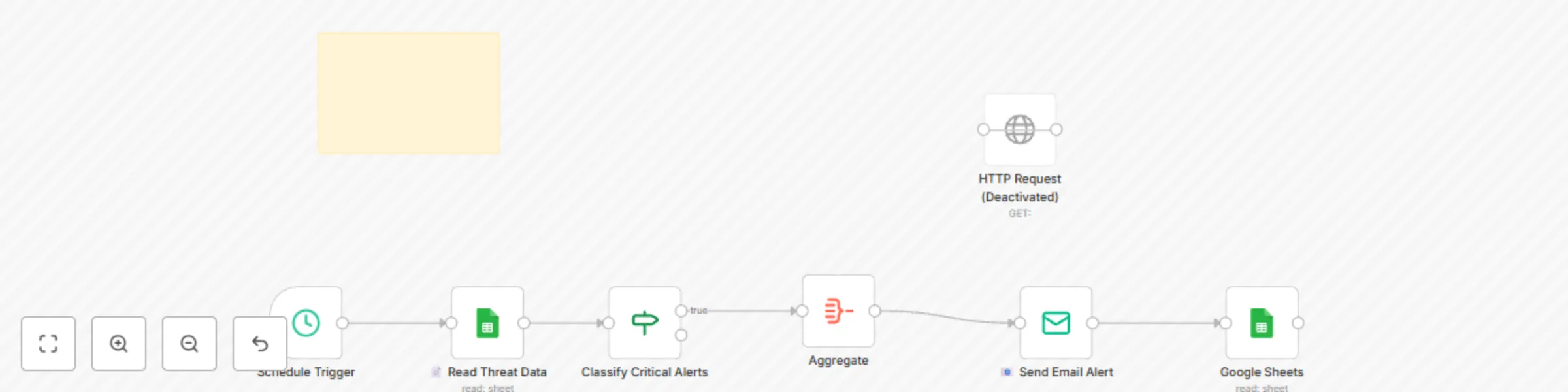
👤 Who it’s for SOC teams, incident responders, or solo defenders who need to automatically act on critical threats without manual triage. Ideal for BlueOps users who’ve already classified alerts via GPT (Module 4) and want to auto-execute response steps like email alerts, logging, or EDR isolation. ⚙️ How it works / What it does Reads critical alerts from a classified incident log (e.g., Module 4 output) Filters alerts by severity = Critical Sends alert summary via email (custom HTML formatting) Logs all details to a central incident response sheet Optionally sends a request to your EDR/Isolation API (e.g. CrowdStrike or simulated API) 🛠️ How to set up Replace Placeholder API Key Swap in your secure ISOLATION_API_KEY from your EDR or proxy tool Update Email Settings Insert your FROM_EMAIL and TO_EMAIL credentials in the Email node Connect Sheets Authorize access to both your Classified Alerts sheet and Incident Log sheet Schedule the Run Default trigger is weekly — change it to run hourly, on webhook, or via logic hook 📋 Requirements EDR or endpoint proxy API accepting POST requests Open or pre-classified incident sheet (Module 4 required) SMTP email provider or Gmail API access Google Sheets or internal DB to log actions 🧩 How to customize the workflow Replace Google Sheets with Supabase or your internal SQL Swap email alerts with ticketing system (e.g., Jira or Slack alerts) Trigger downstream actions (e.g. auto-pause cloud assets) Modify aggregation or isolation logic to your threat model 📦 This is a live-fire auto-responder workflow. Make sure to test with dummy data before enabling full EDR triggers. All sensitive variables are clearly marked with placeholders. 🚨 This module is part of the CYBERPULSEBlueOps Pro Incident Response Suite. View the full lineup at 👉 cyberpulsesolutions.com/blueops

A
Adnan Tariq
SecOps
25 Jul 2025
83
0
Workflow preview: Auto-classify security incidents with GPT-4 and Google Sheets for SOC teams
Free intermediate

Auto-classify security incidents with GPT-4 and Google Sheets for SOC teams

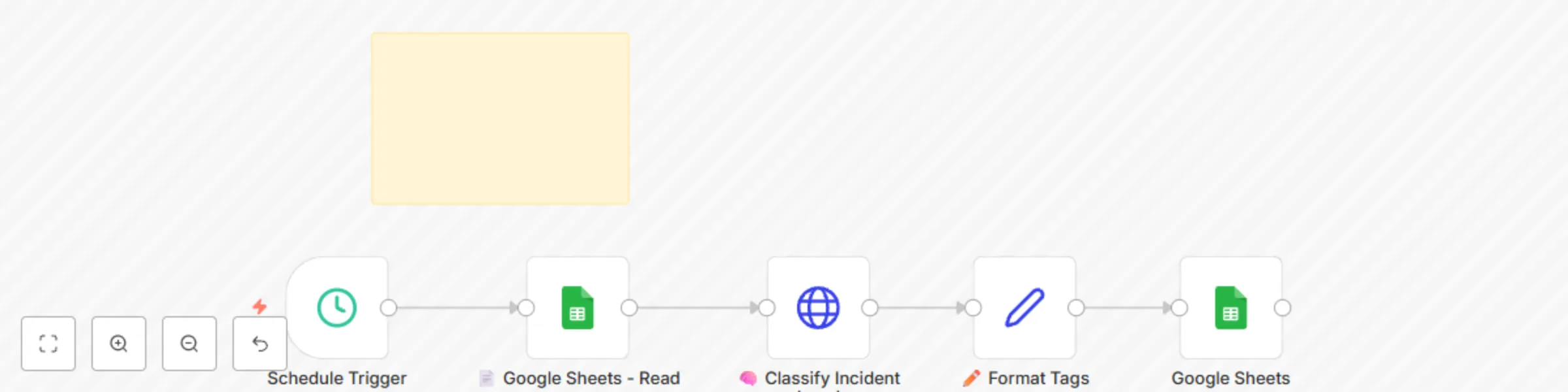
## 👤 Who it’s for Blue Team leads, SOC analysts, and IT responders looking to automatically classify security alerts using AI-driven logic and asset-based risk signals. Ideal for teams already scoring threats via CyberScan or BlueOps Module 3, and needing to prioritize next steps across Monitor / Investigate / Isolate / Escalate playbooks. ## ⚙️ How it works / What it does Reads recent endpoint alerts from Google Sheets Sends alert data (hostname, IP, risk score) to OpenAI GPT model GPT returns structured JSON with: severity tag (Low / Medium / High / Critical) action recommendation (Monitor / Investigate / Isolate / Escalate) Logs the full result to a centralized incident sheet Can be expanded to trigger automated EDR actions or email alerts ## 🛠️ How to set up Insert OpenAI API Key Replace placeholder with your actual OpenAI secret in the HTTP Request node Connect Sheets Use your OAuth2 credentials to access the alerts input + classified log sheet Tune GPT Prompt Adjust language or risk thresholds inside the 🧠 Classify Incident (GPT) node Automation Add a Cron node or Webhook to run every X minutes/hours ## 📋 Requirements OpenAI API key (GPT-4 or GPT-3.5 supported) Google Sheets (or similar DB with alerts) n8n credentials for Sheets access Optional: Connected playbook actions or EDR endpoint logic ## 🧩 How to customize the workflow Swap GPT with Claude, Gemini, or local LLM via API Replace Google Sheets with Supabase or Airtable Add a playbook router for Notify / Isolate logic Integrate email or ticketing notification step ## 📦 This is a production-grade, AI-powered classification engine. All inputs and tags are configurable. Safe placeholders are marked clearly. ## 📘 This module is part of the CYBERPULSEBlueOps Pro automation suite. Explore the full set at 👉 cyberpulsesolutions.com/blueops

A
Adnan Tariq
SecOps
25 Jul 2025
104
0
Workflow preview: Aggregate endpoint security risk scores with EDR, vulnerability data & Google Sheets
Free intermediate

Aggregate endpoint security risk scores with EDR, vulnerability data & Google Sheets

👤 Who it’s for Security teams, SOC analysts, and small-to-mid IT teams looking to automatically assess endpoint risk by combining known vulnerabilities with internal asset value and dynamic threat indicators. Perfect for teams using Google Sheets or CSV asset inventories who want to prioritize incidents based on true business risk — not just raw CVE scores. ⚙️ How it works / What it does Fetches endpoint-specific CVE data from prior modules or external feeds Loads enriched internal asset inventory (IP, department, criticality, etc.) Calculates risk score using a weighted formula: (CVE severity × Asset risk rating × Exposure coefficient) Applies custom playbook rules to determine action level (Notify / Investigate / Isolate) Outputs filtered, triaged list of high-risk endpoints Logs results to active and historical threat sheets Sends summary email alerts based on final triaged list 🛠️ How to set up Google Sheets: Connect your enriched asset inventory and endpoint vulnerability input sheets using your OAuth2 credentials Edit Thresholds: Adjust scoring logic or thresholds in the “🔎 Risk Score Calculator” node Email Alerts: Add your sender credentials and customize recipient address list Automation Trigger: Optional: Add a Cron node or Webhook to run this aggregator hourly/daily Review sticky notes: All logic is labeled clearly with setup instructions 📋 Requirements Google account + access to n8n Google Sheets integration Vulnerability scan output (from CyberScan or external CVE feed) Enriched asset inventory with basic scoring fields (asset value, criticality) SMTP or email alert service (optional) 🧩 How to customize the workflow Replace Google Sheets with Supabase, Airtable, or internal DB Add columns for department ownership, system type, or live agent signals Integrate with EDR/XDR system or incident tracking tool Expand the playbook to include automatic isolation triggers 📦 This is a clean, production-ready version with no sensitive data. Placeholders are clearly marked. 🔐 This module is part of the CYBERPULSEBlueOps Pro Pack. Get access to advanced automation, isolation triggers, full asset triage logic, and instant download at 👉 cyberpulsesolutions.com/blueops

A
Adnan Tariq
SecOps
25 Jul 2025
63
0
Workflow preview: CYBERPULSE AI BlueOps: asset enrichment engine
Free intermediate

CYBERPULSE AI BlueOps: asset enrichment engine

👤 Who it’s for Blue teamers, SOC operators, cyber analysts, and SME defenders who want to automatically enrich daily CVE/IOC threats by matching them to their internal asset database. Ideal for compliance-driven teams (NIST CSF, Essential Eight) seeking automated enrichment and alert routing. ⚙️ How it works / What it does Loads current threat data from Sheet or Module 1 output Loads internal asset database from Google Sheets Merges based on matching IP fields Calculates impact score (threat score × asset value) Applies basic playbook logic to classify action Sends summary emails for matched threats Logs to archived and live threat monitoring sheets Built with modular, no-code logic and alerting support 🛠️ How to set up Google Sheets: Authenticate your Google account (OAuth2) and set your Asset DB and Threats log sheet IDs. Email: Add sender/recipient addresses and SMTP credentials. Customize Matching Logic: Adjust enrichment rule in the “🧠 Match Threats to Assets” node. Triggers: Add a Cron node or Webhook to schedule the enrichment job. Review sticky notes: All steps are explained clearly within the workflow nodes. 📋 Requirements Google Sheets with asset inventory + threat log Google account with Sheets API access SMTP service (Gmail, Mailgun, SendGrid, etc.) Optional: OpenAI for dynamic playbook scoring (if extending logic) 🧩 How to customize the workflow Replace Google Sheets with Supabase, Airtable, or Postgres Extend enrichment rule to include hostname or UUID matching Fine-tune scoring logic by severity, CVSS, or business unit Route alerts via Slack, Discord, or n8n Webhook endpoints Add conditional routing for alert suppression or review queues 📦 No sensitive data included. All credentials and sheet IDs are placeholders. 🔐 This module is part of the CYBERPULSEBlueOps Pro Pack. For full access to advanced Blue Team automations, visit cyberpulsesolutions.com/blueops

A
Adnan Tariq
SecOps
25 Jul 2025
67
0
Workflow preview: Auto CVE & IOC feed ingestor with OpenAI risk triage & email alerts
Free advanced

Auto CVE & IOC feed ingestor with OpenAI risk triage & email alerts

## How it works This Blue Team workflow ingests threat intelligence from public CVE and IOC feeds, merges the data, performs automated triage using OpenAI, and routes actionable alerts via email. - 📥 CVE and IOC feeds pulled from trusted sources - 🤖 AI node evaluates risk severity and recommends response - 🧠 Playbook logic determines whether to notify, monitor, or isolate - 📧 Alerts sent to email and also logged to Google Sheets - 🧱 Built with modular, no-code logic for maximum clarity ## Set up steps 1. Add your OpenAI API key in the AI nodes 2. Configure your email in the Gmail node 3. Update Google Sheets credentials and sheet ID 4. (Optional) Add a Cron or Webhook trigger to automate intake ## Requirements • OpenAI API key • Gmail credentials • Google Sheets access • Internet connection ## Who’s it for • Blue teamers • SOC analysts • Cybersecurity students • SME defenders using no-code tooling --- This template is part of the CYBERPULSE AI BlueOps Lite & Pro plans. Visit [cyberpulsesolutions.com/blueops](https://www.cyberpulsesolutions.com/blueops) for the full bundle.

A
Adnan Tariq
SecOps
24 Jul 2025
193
0
Workflow preview: Automated DNS records lookup for subdomains with HackerTarget API reports
Free intermediate

Automated DNS records lookup for subdomains with HackerTarget API reports

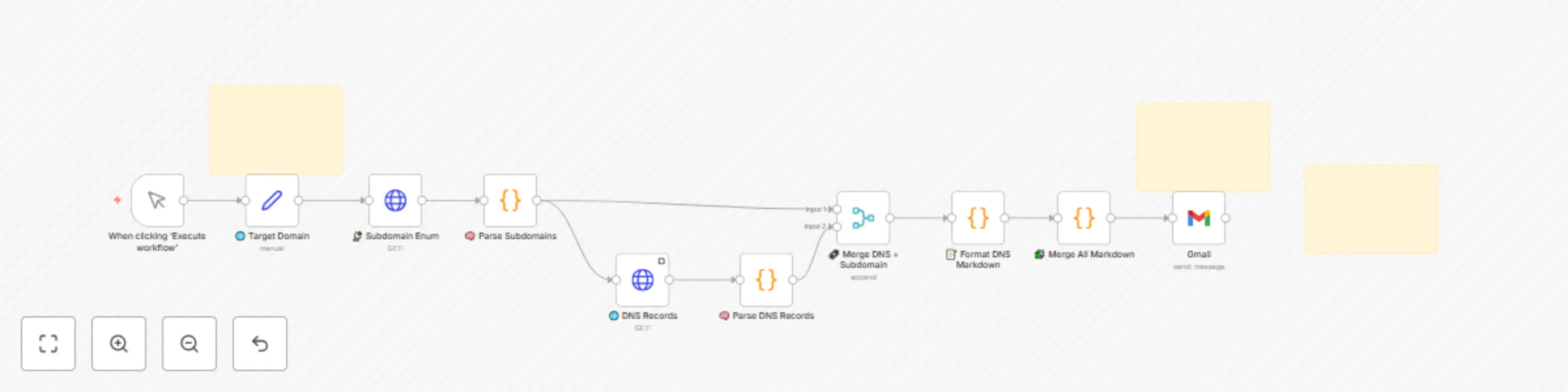
🧠 EnumX: Auto DNS Lookup for Subdomains with Markdown Export Who’s it for Security engineers, red teamers, or automation-curious teams looking to enhance passive reconnaissance with minimal effort. Ideal for early-stage security setups, bug bounty hunters, and SME SOC analysts. What it does This workflow performs passive subdomain enumeration and DNS record lookup for a given domain. It parses the data, generates a clean markdown report, and sends it via email. 🌐 Uses HackerTarget APIs for subdomain and DNS data 🧠 Parses records (A, AAAA, CNAME, TXT, MX, NS, SOA) 📨 Sends a structured markdown report to a designated inbox 🛡️ Useful for recon, misconfiguration detection, and compliance evidence How to set up Replace the email address in the Gmail node with your recipient. (Optional) Replace HackerTarget API with your own recon APIs. Click Execute Workflow or trigger via cron on schedule. View the full markdown output in your inbox. Requirements Free Gmail account (with n8n Gmail OAuth2 configured) (Optional) Replace example.com with your target domain Internet access (API calls use HTTPS) How to customize the workflow Modify the target domain via the "🌐 Target Domain" Set node Adjust markdown format in “📝 Format DNS Markdown” Replace Gmail node with Slack/Telegram/Notion if preferred Add additional enrichment nodes (e.g., Shodan, VirusTotal) for deeper analysis *💼 This template is part of the CYBERPULSE AI BlueOps/RedOps suite.

A
Adnan Tariq
SecOps
24 Jul 2025
298
0
Workflow preview: AI-powered vulnerability scanner with Nessus, risk triage & Google Sheets reporting
Free advanced

AI-powered vulnerability scanner with Nessus, risk triage & Google Sheets reporting

## 🛡 CyberScan – AI-Powered Vulnerability Scanner with Nessus, OpenAI, and Google Sheets ### 👤 Who’s it for Security teams, DevOps engineers, vulnerability analysts, and automation builders who want to eliminate repetitive Nessus scan parsing, AI-based risk triage, and manual reporting. Designed for orgs following NIST CSF or CISA KEV compliance guidelines. --- ### ⚙️ How it works / What it does - Runs scheduled or manual scans via the Nessus API. - Processes scan results and extracts asset + vulnerability data. - Uses a custom AI-based risk metric (LEV) to triage findings into: - 🚨 Expert review - ✅ Self-healing - 🕵️ Monitoring - Automatically sends email alerts for critical CVEs. - Exports daily summaries to Google Sheets (or your own BI system). - Maps to NIST CSF (Identify, Protect, Detect, Respond, Recover). --- ### 🧰 How to set up 1. **Nessus**: Add your Nessus API credentials and instance URL. 2. **Google Sheets**: Authenticate your Google account. 3. **OpenAI / LLM**: Use your API key if adding LLM triage or rewrite prompts. 4. **Email**: Update SMTP credentials and alert recipient address. 5. **Set your targets**: Adjust asset ranges or scan UUIDs as needed. 6. ⚠️ All setup steps are explained in sticky notes inside the workflow. --- ### 📋 Requirements - Nessus Essentials (Free) or Nessus Pro with API access. - SMTP service (e.g. Gmail, Mailgun, SendGrid). - Google Sheets OAuth2 credentials. - Optional: OpenAI or other LLM provider for LEV scoring and CVE insights. --- ### 🛠 How to customize the workflow - Swap **Google Sheets** with Airtable, Supabase, or PostgreSQL. - Change scan logic or asset list to fit your internal network scope. - Adjust AI scoring logic to match internal CVSS thresholds or KEV tags. - Expand alerting logic to include Slack, Discord, or webhook triggers. --- 🔒 **No sensitive data included. All credentials and sheet links are placeholders.**

A
Adnan Tariq
SecOps
23 Jul 2025
1635
0